
Install Arma Reforger Workshop mods on your GTX Gaming dedicated server from your computer: paste the mod links into the Reforger Workshop tool, start the server and it downloads the mods and their dependencies for you. No files to download or upload.
This guide covers the automatic mod installer, keeping mods up to date, pinning a mod to an older version and writing the mod code yourself. On your phone? Use the smartphone version of this guide.
On this page
Before you install mods
- The installer adds every dependency a mod needs, so you don't have to hunt them down.
- Mods are added without a version number, so your server always fetches the latest version.
- Add a few mods at a time and test them. If something breaks, you'll know which mod did it.
- Arma Reforger updates can break mods. The more mods you run, the bigger the risk after a game update.
- Big mods make the first start slower while they download. Give the server time to finish.
Get the mod links
All you need is the address of each mod's page on the official Arma Reforger Workshop. Find the mods you want and copy their links from your browser's address bar.

In this guide we use these three mods as an example:
Install the Workshop mods
- Press STOP on your Arma Reforger server.
- Press Reforger Workshop in the game panel.
- Paste your mod links, one per line, and press Execute.
- Press START. The server downloads the mods as it starts up.
▶ Watch the video: Installing Workshop mods with the Reforger Workshop tool
Watch the start-up in the Web Console or Log Viewer. A server with lots of big mods can take several minutes before players can join.
Keep mods up to date
Your mods update themselves every time the server restarts, as long as no version is set for them in the mod code in Server.json. Mods added with the installer never have a version set, so they always download the newest release.
A mod refusing to update? Press MORE › Delete Mods Cache and start the server: it downloads every mod again.
Schedule a daily restart so your mods stay current without you thinking about it. See How to set up automatic server restarts.
Pin a mod to a specific version
If a new mod release breaks your server, you can hold that mod on an older version:
- Press STOP.
- Open Configuration Files and edit
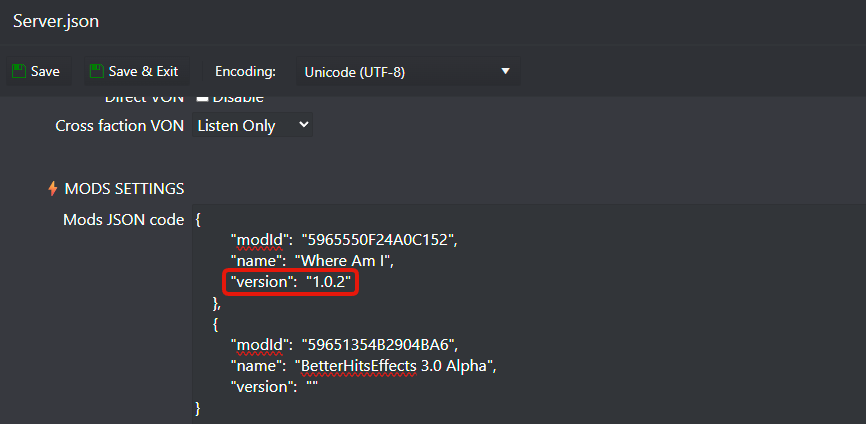
Server.jsonwith the Config Editor. - In Mods JSON code, type the version you want into the
versionfield of that mod. - Press MORE › Delete Mods Cache, then press START.
Each mod's available versions are listed on its Workshop page under the Changelog tab. In this example, Where Am I is held on version 1.0.2, while BetterHitsEffects 3.0 Alpha has an empty version and keeps updating:
{
  "modId": "5965550F24A0C152",
  "name": "Where Am I",
  "version": "1.0.2"
},
{
  "modId": "59651354B2904BA6",
  "name": "BetterHitsEffects 3.0 Alpha",
  "version": ""
}
A pinned mod no longer updates by itself. Clear the version again once the mod author has fixed the problem.
Generate the mod code yourself (advanced)
Prefer to manage Server.json by hand? The Generate Mods Code tool writes the code for you:
- Press MORE next to the start and stop buttons and choose Generate Mods Code.
- Paste your mod links, one per line.
- Choose whether the code should include version numbers.
- Copy the code into the mods section of
Server.json.
▶ Watch the video: Generating mod code with the Generate Mods Code tool
Questions and troubleshooting
Do I need to download Arma Reforger mods to my computer first?
No. Your server downloads mods straight from the official Workshop when it starts, and players get them automatically when they join. You only need each mod's Workshop link. Mods on the Arma Reforger Workshop are free.
Can Xbox and PlayStation players join my modded server?
Yes, as long as every mod on the server is available for their platform. Check each mod's platform support on the Workshop when you build a crossplay mod list.
My server won't start after adding mods. What now?
Open the Log Viewer: it usually names the mod that failed. Remove the last mods you added from Server.json, press MORE › Delete Mods Cache and start again. After a game update, wait for the mod author to release a fix or pin the mod to a version that works.
How do I add a Workshop scenario instead of a mod?
Scenarios have their own guide: How to install Workshop scenarios on your Arma Reforger server.
Related guides
Stuck with a mod? Open a support ticket. Our team is here 24/7.