
Set your DayZ server restart time with an automatic restart task: in-game and Discord warnings 30 minutes ahead, then the server locks, kicks players, makes a backup and restarts.
Regular restarts keep a DayZ server smooth, especially a modded one. The Backup and Restart with Messages task does it all for you:
- sends warnings in-game (and to Discord if you want) from 30 minutes before the restart,
- locks the server to new players shortly before the restart,
- kicks the players still online just before it, to help prevent item duplication,
- makes a backup, then restarts the server.
Important tips for your DayZ server restart time
Important Tips
- You can change the server lock time and player kick time from the Service Settings button.
- You can customise the in-game and Discord warning messages from the Service Settings button.
Every 4 hours suits most modded DayZ servers. Pick a start time outside your busiest hours, so the restarts land when the fewest players are online.
Discord notifications (optional)
Want restart warnings and status updates in your Discord server too? Set up the Discord connection first: How to set up Discord notification messages on your DayZ server. Then come back and create the task below.
Create the restart task
This example restarts the server every 4 hours, starting at 8:00 AM. Every 4 hours works well for most modded DayZ servers.
- Press Scheduled Tasks in the game panel.
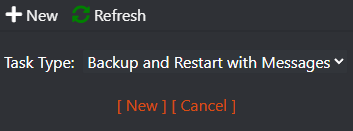
- Press New, choose Backup and Restart with Messages as the Task Type and press [ New ].
- Give the task a Name, for example Restart Every 4h, and tick Enabled.
- Set Type to Daily and choose the Start date and time of the first restart, for example 8:00 AM.
- Set Recur Every to 1 Days.
- Tick Repeat task, set Repeat Every to 4 Hours and For to 24 Hours.
- Press Save.
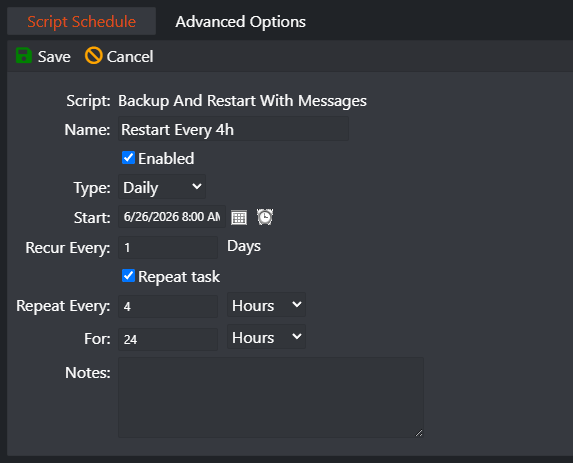
Want a different rhythm? Change Repeat Every, for example to 6 hours. For one restart a day, leave Repeat task unticked. Restart at the wrong hour? Check the task time against the server time, as explained in How to set up automatic server restarts.
Change the messages, lock and kick times
- Press Service Settings.
- Set Lock server before restart (minutes) and Kick players before restart (minutes). In the example below they are 5 and 2 minutes.
- Make sure Scheduled restart messages is ticked, then edit the warnings: 30, 20, 15, 10, 5, 2 and 1 minute, the final warning and the kick message.
- Press Execute to save.
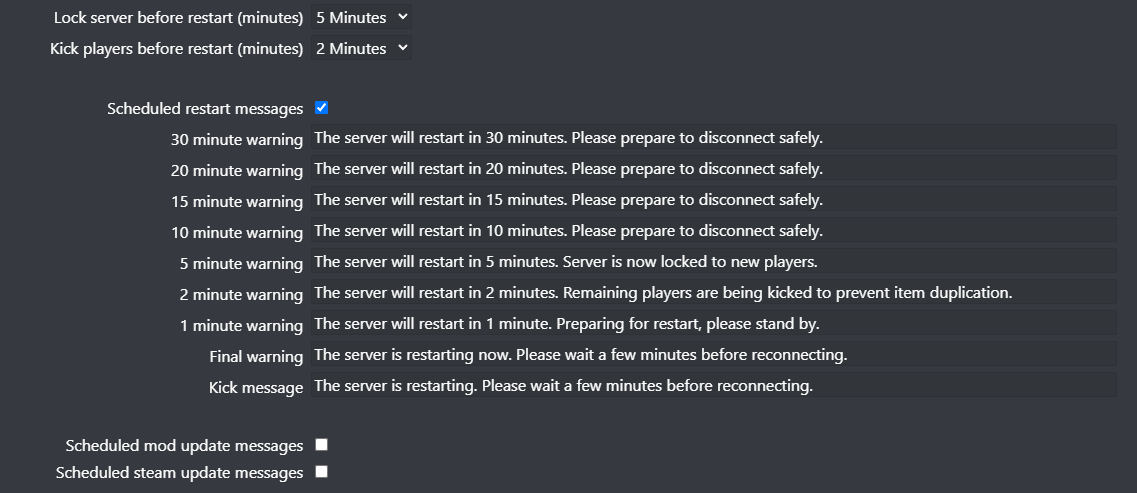
Keep the 5 and 2 minute messages in line with your lock and kick times, so players aren't told the wrong thing. The same screen also has switches for scheduled mod update and Steam update messages.
Restart questions
What is the best DayZ server restart time?
Restart every 4 hours on most modded servers, starting at a quiet time of day, for example 8:00 AM. A vanilla server with few players can go longer, for example every 6 hours. Frequent restarts keep performance steady and also apply Workshop mod updates when you combine them with automatic mod updates.
Why are players kicked before the restart?
Players who are still online while the server saves and shuts down can end up with duplicated items. Kicking them a couple of minutes early, after locking the server, helps prevent that.
How do I restart right now, with a warning?
Use a manual restart with messages: see How to manually shut down or restart your DayZ server with warning messages.
Want your own DayZ server? GTX DayZ servers deploy in minutes with automatic updates, scheduled tasks, full FTP access, mod support and powerful management tools: see DayZ server hosting plans.
Related guides
Need help with your restart schedule? Open a support ticket.