
Install multiple Conan Exiles server mods at the same time: paste all the mod IDs into Plant Workshop Mods in the GTX game panel, then reinstall them in one go from Steam Workshop.
Adding mods one by one to your Conan Exiles server takes a while when you have a long list. With Plant Workshop Mods you enter the whole list at once, in the order you want.
How to install multiple Conan Exiles server mods at once
- Stop your server.
- Go to the MORE button and press Plant Workshop Mods.
- Fill up the mods in order with the ModId's in the following format:
@ModID1;@ModID2;@ModID3;as in the example below.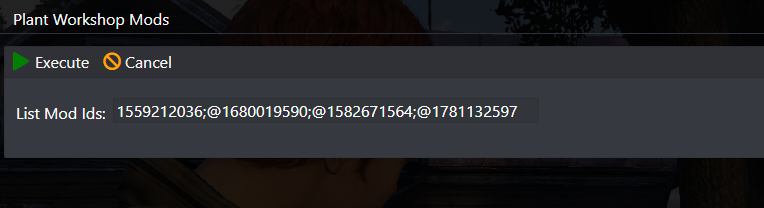
- Go to the Steam Workshop button and change the content type to installed content.
- Under batch actions click Reinstall All.
- Check if the mods have any extra configuration steps, configure them, and start your server.
Put the IDs in the order you want the mods to load. Players need the same mods as the server to join it.
How to get the ModID
You can get the ModID of each mod in the Workshop page of the mod in question. For example, in https://steamcommunity.com/sharedfiles/filedetails/?id=2644416526 the ModID is 2644416526: the number after ?id=.
Conan Exiles server mod questions
How do I add several mods to my Conan Exiles dedicated server?
Stop the server, press MORE and then Plant Workshop Mods, and enter the mod IDs in the format @ModID1;@ModID2;@ModID3;. Then open Steam Workshop, change the content type to installed content, click Reinstall All under batch actions, configure any mods that need it and start the server.
Does the mod load order matter?
Yes. Fill up the mods in the order you want them to load. For more on keeping the order, see How to install mods for your Conan Exiles server.
Is there a guide for Conan Exiles Enhanced mods?
Want your own modded Conan Exiles server? See Conan Exiles server hosting.
Related guides
If you have any questions or you need our help, don't hesitate to contact our support team, available 24/7: Open a support ticket.