
Set up 7 Days to Die Discord integration for your server: create a webhook in a Discord channel, paste it into Service Settings, and your server posts restart, update, start and stop messages.
You can send notification messages to a channel on your Discord when your server automatically restarts, automatically updates, or starts and stops, using webhooks. Check below how.
- If you want to set up automatic server restarts with messages, check out this guide: How to set up automatic restarts with warning messages on your 7 Days to Die dedicated game server
1. Generate a Discord webhook URL for 7 Days to Die Discord integration
- Go to your Discord server, click on a channel, and then select the Edit Channel option.
- Now go to the Integrations menu on the left, then click the Create Webhook button.
- Type the bot name and add an avatar to it if you want.
- Click the Copy Webhook URL button and Save Changes at the end.
- Use the webhook URL in the Service Settings button, as shown in part 2.
▶ Watch the video: Creating a Discord webhook and copying its URL
Keep your webhook URL private. Anyone who has it can post messages to that channel.
2. Enable Discord notification messages on the server
- Go to the Service Settings button in your game panel.
- Select the Edit checkbox on the Discord messages option.
- Paste the Discord Webhook URL that you got in the first part of this guide and press Execute at the end.
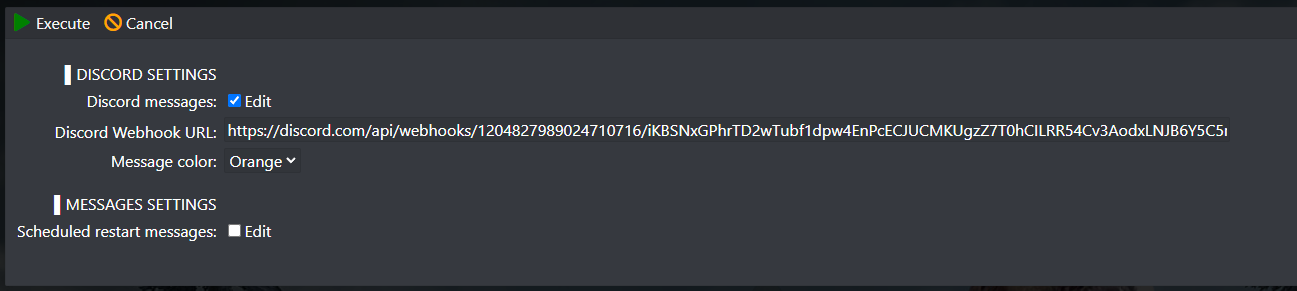
If you want to disable the Discord notification messages, just delete the webhook URL.
7 Days to Die Discord questions
How do I set up 7 Days to Die Discord integration on my server?
In Discord, edit a channel, open Integrations, create a webhook and copy its URL. In the GTX game panel, open Service Settings, tick Edit on Discord messages, paste the URL in Discord Webhook URL and press Execute. No mod or bot is needed.
How do I disable the Discord messages on my 7 Days to Die server?
Open Service Settings, tick Edit on Discord messages, delete the webhook URL and press Execute. The server then stops posting to your Discord.
Which messages does the server send to Discord?
Notifications when your server automatically restarts, automatically updates, or starts and stops. Restart warnings need the automatic restart task set up in the game panel.
Want your own 7 Days to Die server? See our 7 Days to Die server hosting plans.
Related guides
If you have any questions or need our help, open a support ticket. Our support team is available 24/7.


