

How to Install TORCH and PLUGINS on Your Crossplay Space Engineers Dedicated Server
In this guide, we’ll show you how to install the Torch API, how to enable Crossplay on Torch if you have Crossplay enabled, and how to install and configure Torch plugins using our easy plugin installer.
This tutorial will help you manage Torch safely and efficiently, explaining the key steps to install Torch itself, activate crossplay support, and set up plugins that extend your server’s functionality.
Whether you’re just starting with Space Engineers or managing multiple servers, this guide provides clear steps and tips to avoid data loss, performance issues, or world corruption.
Guide Navigation
- Important Notes Before Using Torch
- How to Install Torch
- How to Enable Crossplay on Torch
- How to Install Torch Plugins
- How to Configure Torch Plugins
- Final Thoughts
Important Notes Before Using Torch
⚠️ Before installing or using Torch, please read the following notes carefully:
- Some plugins may cause instability, lag, or even world corruption. Always make a backup before installing or updating plugins.
- Always read the plugin description and instructions before installation to ensure compatibility and correct setup.
- Ensure plugins are up-to-date and working; outdated or broken plugins can corrupt your save and force a wipe of your world.
- The current version of Torch does not allow new worlds to be generated. If you need to generate a new world, disable Torch first in your
Start.batfile.
How to Install Torch
ℹ️ Quick Tip: You can quickly enable or disable Torch directly from the Start.bat file. Use this if you need to start the server temporarily without Torch.
- Stop your Space Engineers server.
- Go to the Mod Manager button in your control panel and install Torch.
- Start your server.

How to Enable Crossplay on Torch
⚠️ Some plugins may not work properly with Crossplay enabled or may be incompatible altogether. Always read the plugin instructions carefully and perform a backup before enabling Crossplay to avoid losing progress or corrupting your world.
- Stop your server.
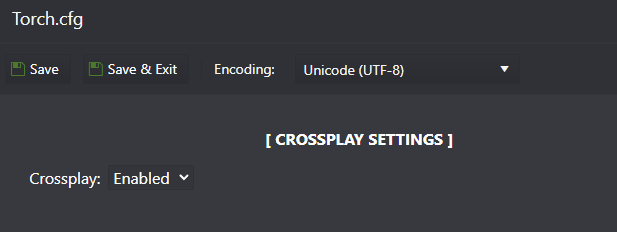
- Go to the Configuration Files section and edit the
Torch.cfgfile. - Enable the Crossplay option, then click Save & Exit.
- Start your server.
How to Install Torch Plugins
For this example, we’ll install two popular plugins:
ℹ️ Before Installing Plugins:
- Always read the plugin description and installation instructions carefully. Some plugins may require additional steps or dependencies.
- Outdated or broken plugins may cause the server to fail to start or load.
- Use the Delete Plugins Cache option to remove old plugin files safely. This does not delete configuration files.
- If you wish to remove a plugin configuration, locate and delete its config file (e.g.
Essentials.cfg) manually via the File Manager while the server is stopped.
- Stop your server.
- Go to the Torch Plugins button in your control panel.
- Paste the full plugin URL link.
- Press Execute.
- Start your server and let it run to generate the plugin configuration files automatically.
How to Configure Torch Plugins
⚠️ Important: Not all plugins create configuration files. Make sure the server is online and working — if it fails to start due to a bad plugin, mod, or configuration setting may be preventing it from creating the configuration file, but if the server is online, most likely the plugin does not have a configuration file.
ℹ️ If you need to reset a plugin configuration: Delete the plugin’s config file while the server is stopped, then start it again to generate a fresh default configuration.
- Stop your server.
- Go to the File Manager section.
- Locate the configuration file for the plugin you want to edit — it’s usually named after the plugin itself, for example
Essentials.cfg. - Right-click on it and choose Edit.
- Change the desired settings and click Save & Exit.
- Start your server.
Final Thoughts
ℹ️ Torch is a powerful server-side framework that can transform your Space Engineers experience, but it requires care when handling plugins and updates.
❓Need help? Browse our Space Engineers server guides for more configuration and troubleshooting tutorials.
Get Your Space Engineers Server Hosting Today!
✅ Ready to host your own Torch-powered Space Engineers server? Order Your Space Engineers Server Here and start building your next galactic adventure today!