
To run Stationeers commands as admin on your server, set the same secret password on the server and in your game's setting.xml, then type serverrun before each command.
The server only accepts admin commands from a game that knows its secret password. Set it in two places: on your server and on your computer.
1. Define secret password on the server for Stationeers commands
- Press STOP to stop your server.
- In the game panel, go to Configuration Files and edit the file
settings.xmlwith the Config Editor option. - Define an Admin Password and save the file.
- Press START to start your server.
2. Define secret password on your computer
- Close the Stationeers game.
- Open File Explorer on your computer and go to this folder:
%userprofile%\documents\My Games\Stationeers\(copy and paste it into the File Explorer address bar at the top, as in the image below).
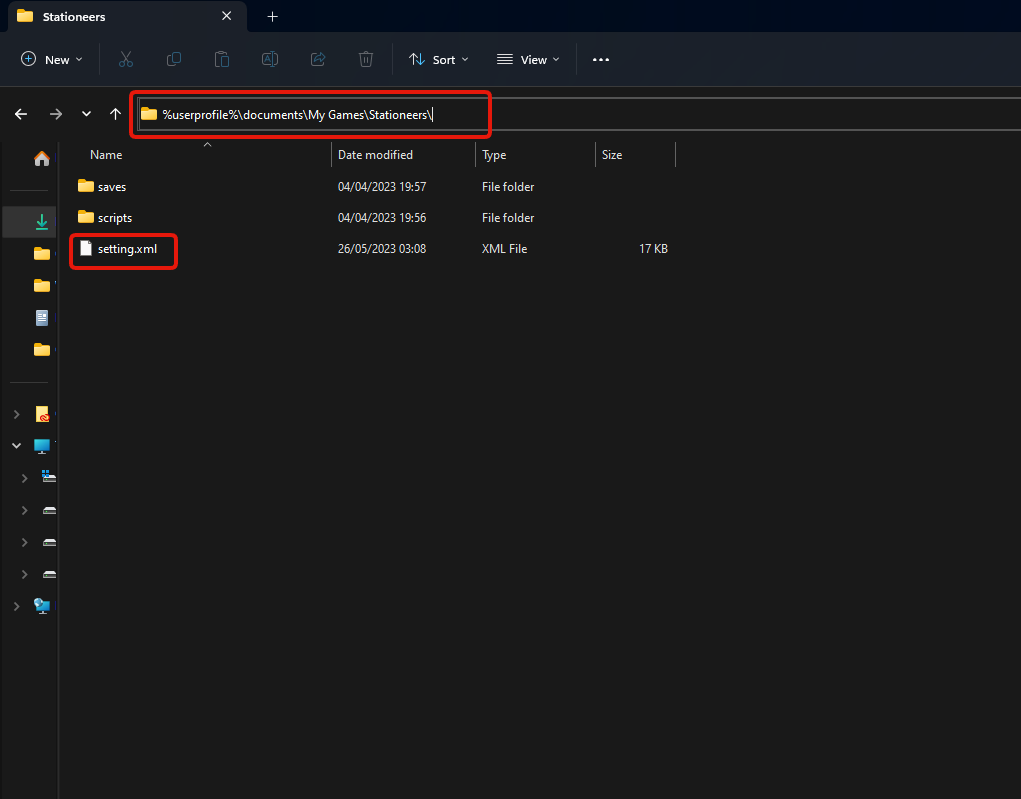
- Edit the
setting.xmlfile and find the line:<ServerAuthSecret /> - Replace
<ServerAuthSecret />with:
Put your own password from step 1 in place of<ServerAuthSecret>SAME_ADMIN_PASSWORD_YOU_DEFINED_ON_YOUR_SERVER</ServerAuthSecret>SAME_ADMIN_PASSWORD_YOU_DEFINED_ON_YOUR_SERVER, then save the file.
Run Stationeers commands in game
You can now execute server commands from inside your Stationeers game. Open the console with F3 and put serverrun in front of the command, for example:
serverrun save "myworld"- saves the world as myworldserverrun say Hello World- sends a message to everyone on the server
Type help in the console to see the list of commands your game version supports.
Questions
How do I use Stationeers commands on my dedicated server?
Set an Admin Password in settings.xml on the server, put the same password in <ServerAuthSecret> in setting.xml in Documents\My Games\Stationeers on your computer, then open the console with F3 in game and type serverrun followed by the command.
Why don't my admin commands work?
Usually the passwords don't match exactly, the game was open while you edited setting.xml, or serverrun is missing in front of the command. Close the game, check both passwords and try again.
Want your own Stationeers server? See Stationeers server hosting.
Related guides
Need help with admin commands? Open a support ticket. Our support team is available 24/7.


