
To change the map on your Path of Titans server, stop it, set the ServerMap= line in Game.ini to Island (Gondwa), Panjura or CeruleanIsland, then start it again.
You do it all from the game panel. Pick the section for the map you want below. Cerulean Island is a mod map, so it needs one extra line in GameUserSettings.ini.
Path of Titans change map: Gondwa
- Stop your server.
- Go to the Configuration Files button and edit the
Game.inifile with the TEXT EDITOR option. - Change the
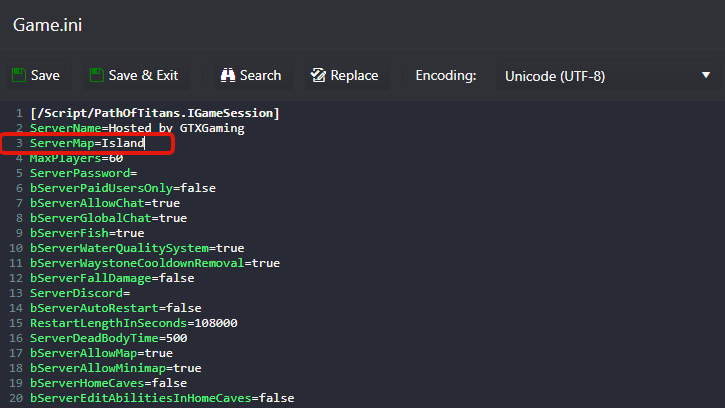
ServerMap=line toServerMap=Islandas in the image below, then press Save & Exit.
- Start your server.
Change to the Panjura map
- Stop your server.
- Go to the Configuration Files button and edit the
Game.inifile with the TEXT EDITOR option. - Change the
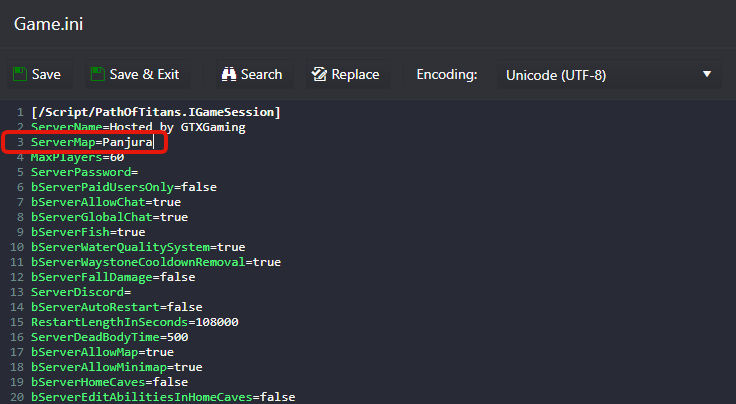
ServerMap=line toServerMap=Panjuraas in the image below, then press Save & Exit.
- Start your server.
Change to the Cerulean Island map
- Stop your server.
- Go to the Configuration Files button and edit the
Game.inifile with the TEXT EDITOR option. - Change the
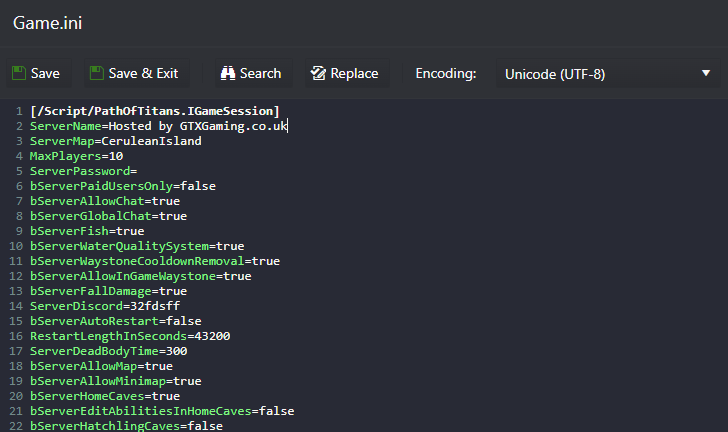
ServerMap=line toServerMap=CeruleanIslandas in the image below, then press Save & Exit.
- Now edit the
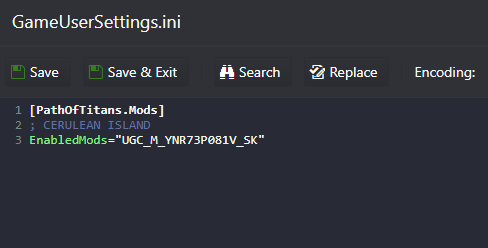
GameUserSettings.inifile and add the ModID lineEnabledMods="UGC_M_YNR73P081V_SK"as in the example below (under[PathOfTitans.Mods]), then press Save & Exit.
- Start your server.
Warning: server not changing to the Cerulean map
WARNING! Server not changing to Cerulean map? Check these points in order:
- The server always starts with the Panjura map. It only changes to Cerulean Island a few seconds after the first player joins. While the server is empty, the server list shows the Panjura map.
- If the Cerulean map still doesn't show with players inside playing, the Cerulean ModID is wrong, or another mod on the list has an invalid ModID. Review the ModID of every mod carefully.
- If all ModIDs are correct and Cerulean Island still doesn't show, a mod or another map on the mod list conflicts with it. Add the Cerulean ModID first on the list, then add the other mods gradually and test in between. That tells you which mod breaks Cerulean Island.
More on mod IDs and the mod list: How to install mods for your Path of Titans server.
Path of Titans map questions
How do I change the map on my Path of Titans server?
Stop the server, open Configuration Files, edit Game.ini with the TEXT EDITOR and set ServerMap=Island for Gondwa, ServerMap=Panjura for Panjura or ServerMap=CeruleanIsland for Cerulean Island. Save & Exit and start the server. Cerulean Island also needs EnabledMods="UGC_M_YNR73P081V_SK" in GameUserSettings.ini.
Why does my server list still show Panjura after switching to Cerulean Island?
The server always starts on Panjura and only changes to Cerulean Island a few seconds after the first player joins. If it still shows Panjura with players online, check the ModIDs of all your mods and try the Cerulean ModID first on the list.
Which ServerMap value is Gondwa?
On your GTX server, Gondwa is ServerMap=Island in Game.ini, as shown in the screenshot above.
Want your own Path of Titans server? Take a look at Path of Titans server hosting.
Related guides
Map still not changing? Open a support ticket.


