
How to download tracks for MX Bikes and install them: upload the server version of a custom track to your MX Bikes dedicated server, set it in dedicated.ini and copy the default version to your PC.
A custom track has to be on both your dedicated server and every player's computer, so this guide has two parts: installing the track on your server and installing it on your computer.
How to download MX Bikes tracks
- In this guide we use the custom track Redwick as an example. You can download it here: https://mxb-mods.com/redwick/. It's a motocross map, so it goes in the
motocrossfolder. - Try to find maps that are updated to the latest version of the game.
- Try to find maps that have a server version to download. The server version goes on your server, the default version on players' PCs.
- Tracks go in a category folder under
mods\tracks\:enduro,motocross,supercrossorsupermoto.
How to install the custom track on your server
- Stop your server: press STOP.
- Go to the Configuration Files button, edit
mxbikes.iniwith the Config Editor option, enable the Enable mods option and press Save & Exit.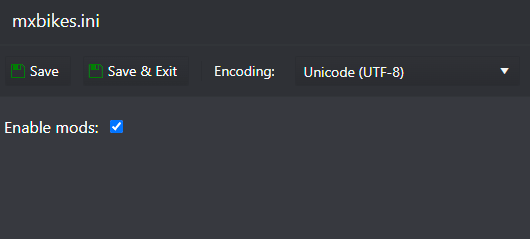
- Download the Redwick map. Be sure to download the SERVER VERSION.
- Go to the File Manager button and navigate to the folder
\mods\tracks\motocross\(this is a motocross map). Press the Upload button, find theRedwick.pkzfile you just downloaded and upload it.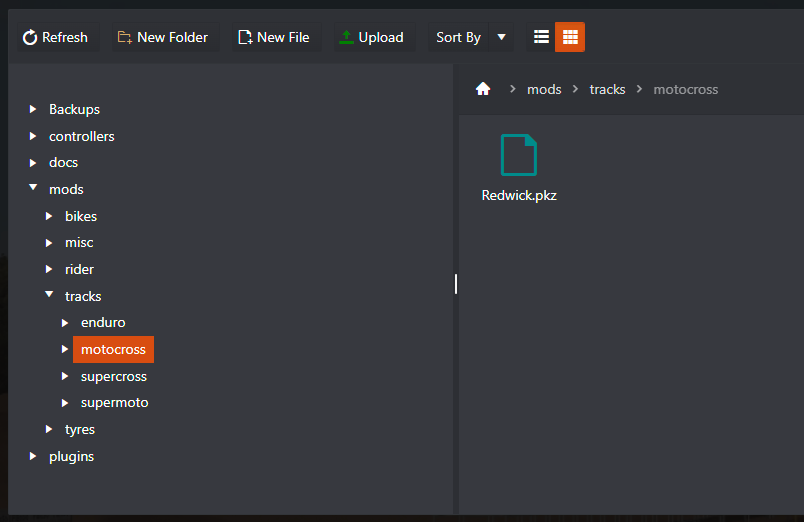
- Go to the Configuration Files button and edit the
dedicated.inifile. - Add the track name to the
trackfield under the[event]section. The track name is the file name without.pkz, for example:[event] track = Redwick
- Save and start your server with START.
Big track files upload faster over SFTP. See How to connect to your server via SFTP.
How to install the custom track on your computer
- Close the MX Bikes game.
- Download the Redwick map. Be sure to download the DEFAULT VERSION.
- Copy the
Redwick.pkzfile to the\Documents\PiBoSo\MX Bikes\mods\tracks\motocross\folder on your computer.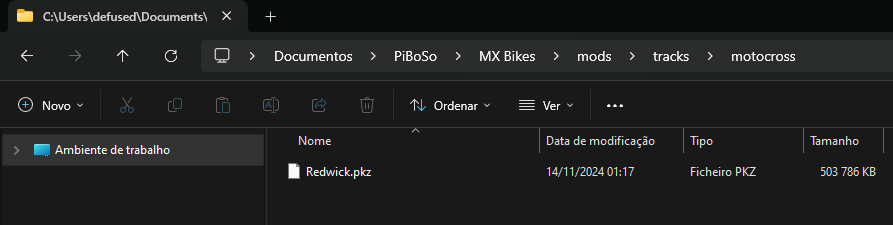
- Open the MX Bikes game and join your server.
Every player who wants to ride on your server needs the same track installed the same way.
Questions
How do I download tracks on MX Bikes?
Custom MX Bikes tracks come from community sites such as MXB-Mods. Download the track, then copy the .pkz file into the right category folder under \Documents\PiBoSo\MX Bikes\mods\tracks\, for example motocross. Restart the game and the track shows up.
The server won't start after I changed the track. What now?
Open the Log Viewer. Most often the name in track = doesn't match the file name exactly, the file is in the wrong folder, or Enable mods is not ticked in mxbikes.ini.
Players can't join my server with the custom track. Why?
They need the same track and the same track version on their PC as the server runs. Ask them to download the track again from the same page and put it in the right category folder under \Documents\PiBoSo\MX Bikes\mods\tracks\.
Related guides
If you have any questions or need our help, don't hesitate to contact our support system.


