
Set up your Trackmania dedicated server in two parts: add a server account login to dedicated_cfg.txt, then join it in-game as a Room in your Trackmania Club.
Hosting your own Trackmania dedicated server lets you race with friends on custom tracks, run events and personalise every setting. You connect to it through the in-game Club system: your Club becomes the hub where you create and manage racing rooms, apply server settings and organise custom competitions.
Set up your Trackmania dedicated server with a server account login
- Go to your Trackmania account page: https://www.trackmania.com/player/dedicated-servers. Create a new server login, then copy the Login name and Password.
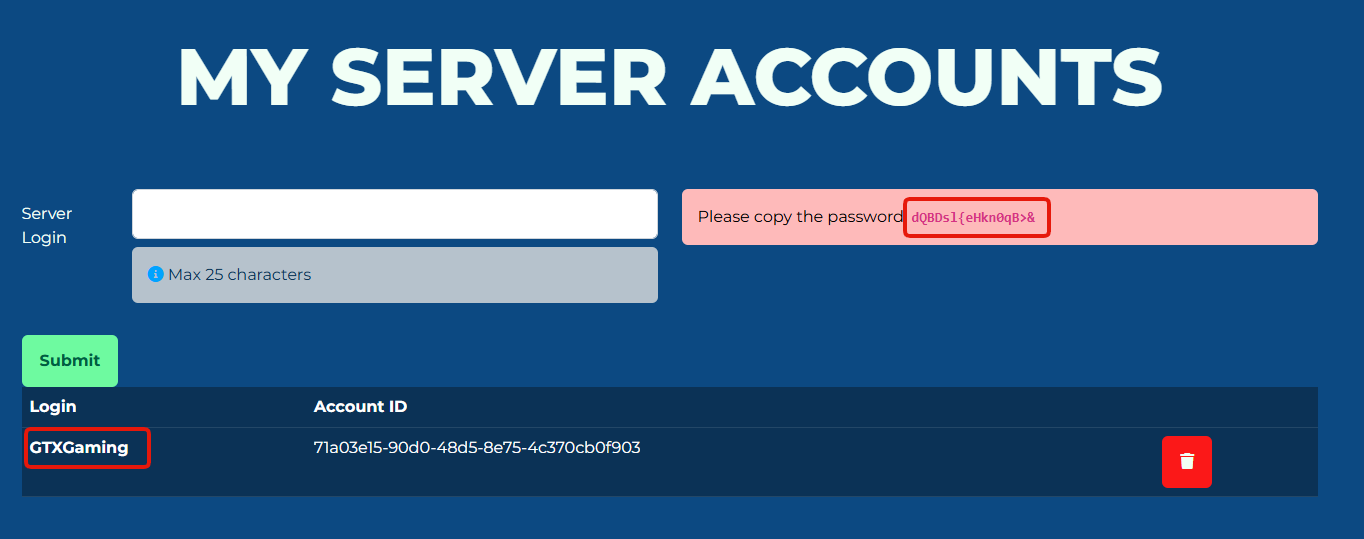
- Stop your server, then open the Configuration Files section in your control panel. Edit the file
dedicated_cfg.txtand paste your Login and Password under the ACCOUNT SETTINGS section.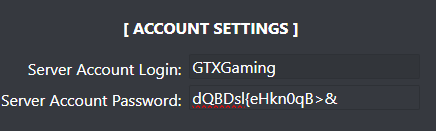
The server login password works like a password for your server account. Keep it private and don't share screenshots of it.
How to join and link your Trackmania server
- Log in to your game server control panel and start your Trackmania server.
- Launch Trackmania via Ubisoft Connect or Steam.
- From the main menu, open the Clubs section.
- Create a new Club or select one you already own.
- Open the Administration menu within your Club.
- Click the Plus (+) icon to add a new Club Activity.
- Choose Room as the activity type, then select Use Dedicated Server.
- Enter a Room Name and select the Server Account linked to your dedicated server.
- Click Create to finish the setup.
Your dedicated server now appears as a Club Room, so you and your friends can join directly from the in-game menu.
Final thoughts
A Trackmania dedicated server gives you full control over your races, maps and competitions, for small friend groups and big community events alike. Next steps: set your game mode and maps.
Trackmania dedicated server questions
How do I set up a Trackmania dedicated server?
Create a server login on trackmania.com/player/dedicated-servers, paste its Login and Password under ACCOUNT SETTINGS in dedicated_cfg.txt (Configuration Files, server stopped) and start the server. Then add it to your Club as a Room with Use Dedicated Server.
How do my friends join my Trackmania server?
Through the Club: once you create a Room activity that uses your dedicated server, it shows as a Club Room that members can join from the in-game menu.
Ready to host your own Trackmania server? See https://www.gtxgaming.co.uk/trackmania-server-hosting/ and start racing with your community today.
Related guides
Any questions? Our support team is available 24/7: open a support ticket.


