
How to Install mod.io Mods on Your Insurgency: Sandstorm Dedicated Server
In this guide, we will cover how to install mod.io mods on your Insurgency: Sandstorm dedicated server.
Recent updates require you to link your mod.io account to the server in order to add mods by subscribing to them on mod.io.
By the end of this guide, you will know how to link your account, subscribe/install mods, and configure them as maps or mutators.
Guide Navigation
Important Notes Before Installing Mods
Important
- You must have a valid mod.io account: https://mod.io/g/insurgencysandstorm
- Always read the mod instructions before installing. Many mods require post-installation configuration.
- Some mods are outdated and may not work, may crash the server, or prevent it from starting. Check the mod’s last update date before using it.
1. Link the Server to Your mod.io Account
- Stop your server.
- Go to the Mod.io Account button on your game panel.
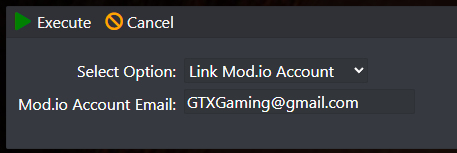
- Select Link Mod.io Account and enter your mod.io email address.
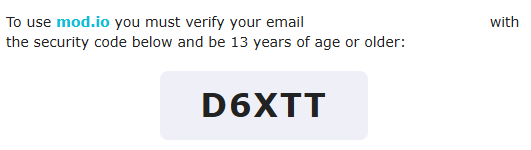
- Open your email and copy the security code you received. If you do not see it, check your spam folder.
- Go to Configuration Files, edit the Start.bat file, and at the bottom enable Mod.io and paste the security code.
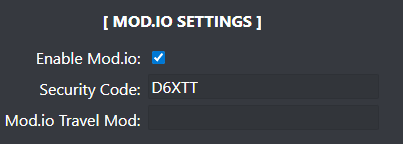
Your server is now ready to accept mods. Continue below to subscribe and install mods.
2. Install and Subscribe to Mods
Now that your server is linked to your mod.io account, you only need to subscribe to the mods you want on mod.io. The server will automatically detect them and download them.
- Go to the Insurgency: Sandstorm mod.io page: https://mod.io/g/insurgencysandstorm
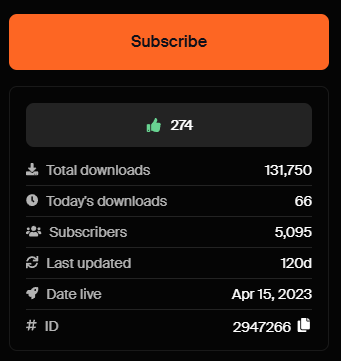
- Find the mods you want and click Subscribe.
- Start or restart your server.
Warning
- If mods are large or you subscribe to many mods, downloads may take some time.
- Mods are downloaded into:
\mod.io\254\mods\
3. Setup and Configure the Mods
Most mods have post-installation instructions. Always read the instructions on each mod page before installing.
If it’s a Mutator
- Check the mutator loading line provided by the mod.
- Add it to Start.bat under the Mutators section.

If it’s a Map (Map Rotation)
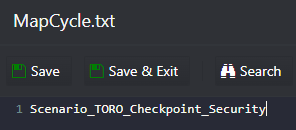
- Add the map to MapCycle.txt if you want it included in the map rotation.
If it’s a Map (Set as Starting Map)
- Add it to the Mod.io Travel Mod field using the format shown below.

Unlink Your mod.io Account
If you need to unlink your mod.io account, you can do it from the Mod.io Account button in your panel.
This action will also delete all downloaded mods from the server.

Final Thoughts
Once your server is linked, installing mods becomes as simple as subscribing on mod.io and restarting the server.
If you encounter issues, double-check the mod instructions and update date. Outdated mods are one of the most common causes of crashes or server startup problems.
Get Your Insurgency: Sandstorm Server Hosting Today!
Ready to set up your own server with mod.io support? Order your Insurgency: Sandstorm server here and get started in minutes.