Install Staxel mods on your server: add them with Staxel's Mod Manager Tool in Steam, then replace the server's bin\ and content\ folders with the ones from your game folder over FTP.
Staxel mods are installed on your own PC first. Your server then gets the modded game files from your installation folder.
How to install Staxel mods on your server
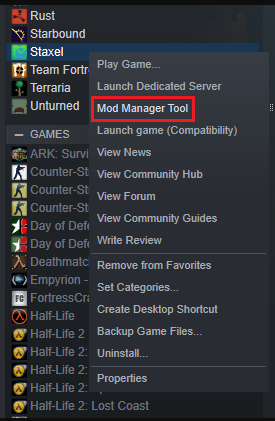
- Open the Mod Manager Tool on your Steam: right-click Staxel in your Steam library and choose Mod Manager Tool.
Screenshot: the Mod Manager Tool in your Steam library
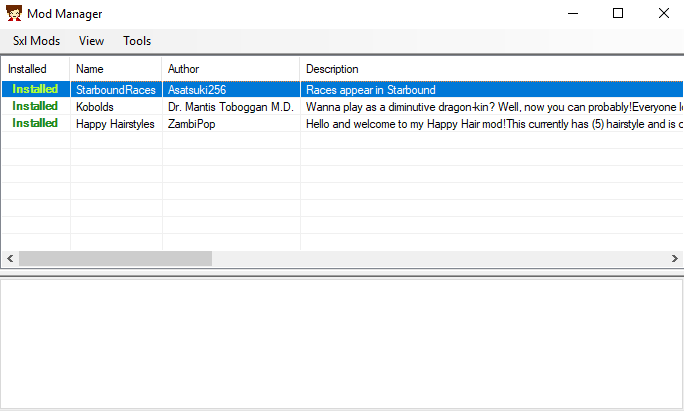
- Install the mods you want.
Screenshot: mods installed in the Staxel Mod Manager
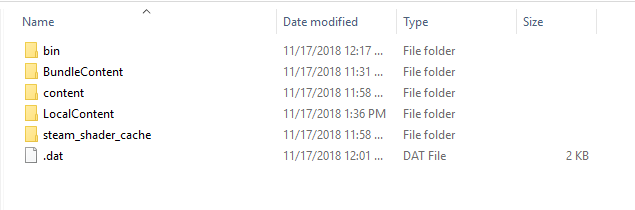
- Open the game installation folder (usually
C:\Program Files (x86)\Steam\steamapps\common\staxel) and you will see thebin\andcontent\folders.
Screenshot: the bin and content folders in the Staxel installation folder
- Stop the server, connect to your server FTP, delete the
bin\andcontent\folders on your server and upload the ones from your computer. Need help connecting? See How to connect to your server FTP (FTP Guide). - Start your server.
Deleting folders can't be undone, so back up your server before you replace bin\ and content\.
Staxel mods questions
How do I add Staxel mods to my server?
Install the mods with the Mod Manager Tool in Steam, then stop the server, connect over FTP, delete the server's bin\ and content\ folders and upload the ones from your Staxel installation folder. Start the server again.
Where is my Staxel installation folder?
Usually C:\Program Files (x86)\Steam\steamapps\common\staxel. You can also right-click Staxel in Steam and choose Manage, then Browse local files.
Want your own Staxel server? See Staxel server hosting.
Related guides
If you have any questions or you need our help, don't hesitate to contact us. Our support team is available 24/7: open a support ticket.