
Change the Rust decay tick rate, decay times and upkeep costs on your server by adding decay commands to Custom Commands in Start.bat. All variables and their default values are listed below.
Decay variables let you slow down, speed up or switch off building decay and tune how much upkeep your players pay. You set them once in the game panel and they load every time the server starts.
Set the Rust decay tick rate and decay variables
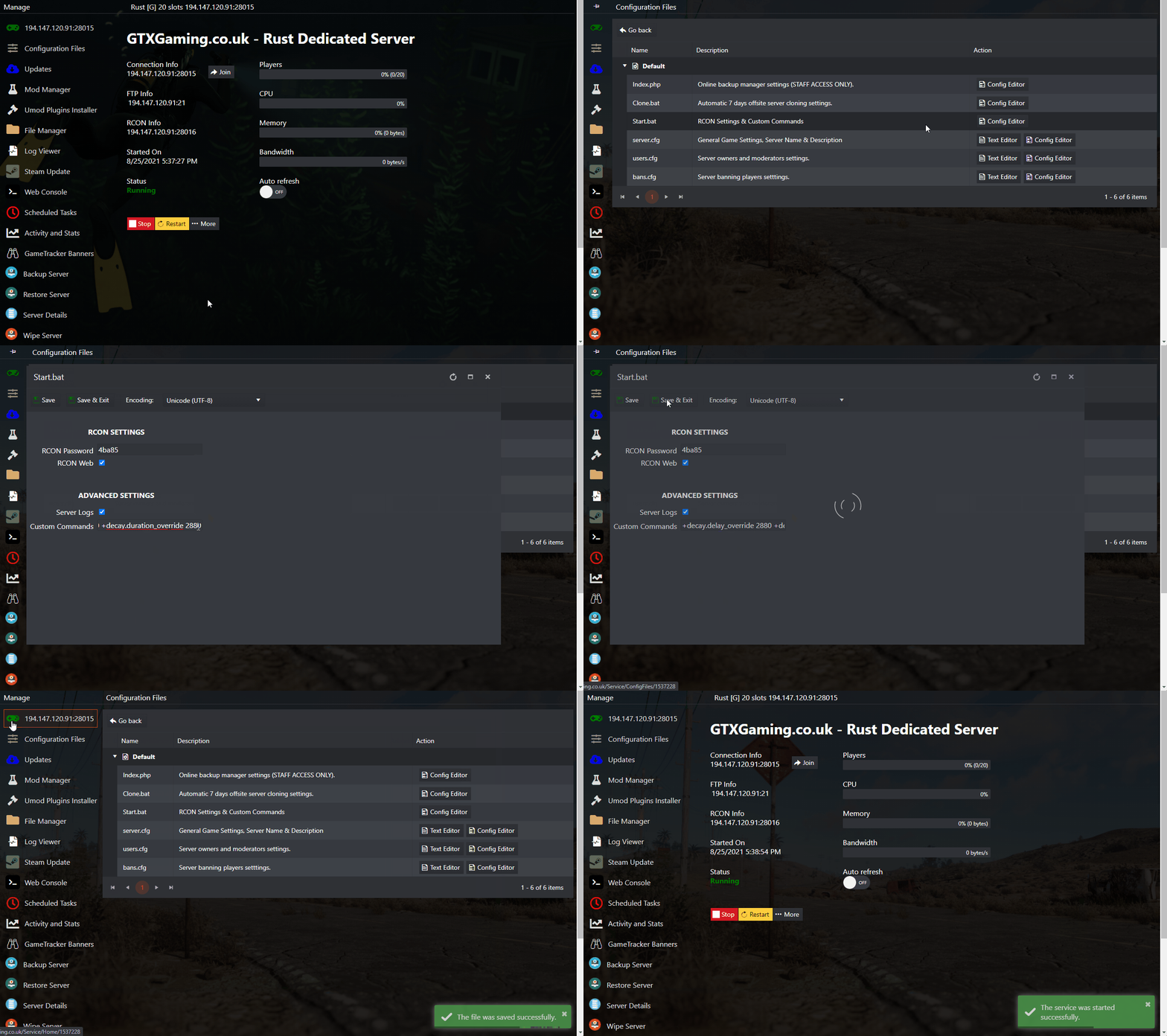
- Stop the server in the game panel and go to Configuration Files. Open
Start.batwith the Config Editor. - In the Custom Commands box, enter any of the commands below. They need a + sign at the start and a space afterwards, for example:
+decay.delay_override 2880 +decay.duration_override 2880 - Press Save & Exit on the
Start.batand then Start the server.
Decay tick and decay scale
The game shows no description for these two, so here is what they do in practice:
decay.tick(default600) - how often the server runs a decay update, in seconds. 600 means every 10 minutes.decay.scale(default1) - multiplies the decay speed.0.5is half speed and0stops decay.
Want players to keep their bases longer? Raising the delay and duration values gives them more time. To change the decay of one building grade only, use its own delay_ or duration_ variable instead of the overrides.
Decay upkeep variables
Each line shows the command, its default value and what it does.
Upkeep cost brackets
decay.bracket_0_blockcount- default15. Between 0 and this value are considered bracket 0 and will cost bracket_0_costfraction per upkeep period to maintain.decay.bracket_0_costfraction- default0.1. Blocks within bracket 0 will cost this fraction per upkeep period to maintain.decay.bracket_1_blockcount- default50. Between bracket_0_blockcount and this value are considered bracket 1 and will cost bracket_1_costfraction per upkeep period to maintain.decay.bracket_1_costfraction- default0.15. Blocks within bracket 1 will cost this fraction per upkeep period to maintain.decay.bracket_2_blockcount- default125. Between bracket_1_blockcount and this value are considered bracket 2 and will cost bracket_2_costfraction per upkeep period to maintain.decay.bracket_2_costfraction- default0.2. Blocks within bracket 2 will cost this fraction per upkeep period to maintain.decay.bracket_3_blockcount- default200. Between bracket_2_blockcount and this value (and beyond) are considered bracket 3 and will cost bracket_3_costfraction per upkeep period to maintain.decay.bracket_3_costfraction- default0.333. Blocks within bracket 3 will cost this fraction per upkeep period to maintain.
Decay delay (hours)
decay.delay_metal- default0. How long should this building grade decay be delayed when not protected by upkeep, in hours.decay.delay_override- default0. When set to a value above 0, everything will decay with this delay.decay.delay_stone- default0. How long should this building grade decay be delayed when not protected by upkeep, in hours.decay.delay_toptier- default0. How long should this building grade decay be delayed when not protected by upkeep, in hours.decay.delay_twig- default0. How long should this building grade decay be delayed when not protected by upkeep, in hours.decay.delay_wood- default0. How long should this building grade decay be delayed when not protected by upkeep, in hours.
Decay duration (hours)
decay.duration_metal- default8. How long should this building grade take to decay when not protected by upkeep, in hours.decay.duration_override- default0. When set to a value above 0, everything will decay with this duration.decay.duration_stone- default5. How long should this building grade take to decay when not protected by upkeep, in hours.decay.duration_toptier- default12. How long should this building grade take to decay when not protected by upkeep, in hours.decay.duration_twig- default1. How long should this building grade take to decay when not protected by upkeep, in hours.decay.duration_wood- default3. How long should this building grade take to decay when not protected by upkeep, in hours.
Upkeep and other settings
decay.debug- defaultfalse. No description (N/A).decay.outside_test_range- default50. Maximum distance to test to see if a structure is outside. Higher values are slower but accurate for huge buildings.decay.scale- default1. No description in the game (N/A), see decay tick and decay scale.decay.tick- default600. No description in the game (N/A), see decay tick and decay scale.decay.upkeep- defaultTrue. Is upkeep enabled.decay.upkeep_heal_scale- default1. Scale at which objects heal when upkeep conditions are met. The default of 1 is the same rate at which they decay.decay.upkeep_inside_decay_scale- default0.1. Scale at which objects decay when they are inside, default of 0.1.decay.upkeep_period_minutes- default1440. How many minutes does the upkeep cost last? 1440 = 24 Hours.decay.upkeep_grief_protection- default1440. How many minutes can the upkeep cost last after the cupboard was destroyed?
Rust decay questions
What is the Rust decay tick rate?
decay.tick sets how often the server runs a decay update, in seconds. The default is 600, so every 10 minutes. You change it like any other decay variable: add +decay.tick with your value to Custom Commands in Start.bat.
How do I turn off decay on my Rust server?
Add +decay.scale 0 to the Custom Commands box in Start.bat, save and start the server. Set it back to 1 for normal decay.
How do I make bases decay slower?
Raise the decay delay and duration. For all grades at once, use +decay.delay_override and +decay.duration_override with a value above 0. For one grade, use its own variable, for example +decay.duration_stone.
Want your own Rust server? Set decay, gather rates and plugins your way: see Rust server hosting.
Related guides
Need help with your decay settings? Open a support ticket.


