
Restart your Valheim dedicated server automatically every X hours with a scheduled task: it saves the world, makes a backup and restarts the server, for example every 6 hours.
Valheim does not support sending messages inside the game. Unfortunately, right now it's not possible to have an automatic restart system that sends the 10 minutes warning messages like other games. Once in-game messages are supported by Valheim, we will add them to our game panel.
This task will restart your server every X hours you define: it saves the world, performs a backup and restarts the server. Warning messages are still not supported by Valheim.
Restart your Valheim dedicated server every 6 hours
Set up a 6 hours restart example:
- Go to the Scheduled Tasks button in your game panel.
- Create a new Scheduled Task and select the Scheduled Start/Stop/Restart option.
- Give it a name of your choice, 6 Hours Restart for example.
- Select the date/hour you want the next restart to happen (*).
- Select Recur Every: 1 Days.
- Select the Repeat task option.
- Select Repeat Every: 6 Hours.
- Select For: 24 Hours.
- Save the task.
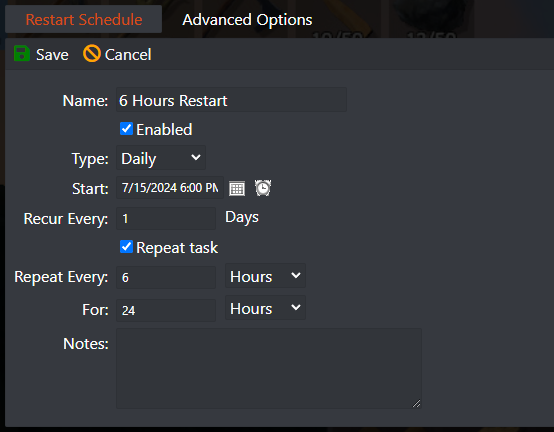
In this example the task restarts your server every 6 hours. Want another number of hours? Just change Repeat Every from 6 hours to any number of hours of your choice.
(*) Match the restart time to the server time
Servers restart based on the machine's local hour. You can view the machine's local hour under Server Details › Machine Local Time button.
If needed, adjust your game panel profile timezone to match the machine's local hour: click on your name in the top right corner › My Profile › Timezone.
Valheim restart questions
How do I restart my Valheim dedicated server automatically?
In the game panel, go to Scheduled Tasks, create a Scheduled Start/Stop/Restart task, set Recur Every to 1 Days, tick Repeat task, set Repeat Every to the number of hours you want (for example 6) and For to 24 Hours, then save.
Can my Valheim server warn players before a restart?
Not in the game. Valheim does not support sending in-game messages from the server, so the restart task can't send the 10 minutes warning other games get. Once Valheim supports in-game messages, they will be added to the game panel.
How do I reset my Valheim dedicated server to a fresh world?
A restart keeps your world. For a fresh start, generate a new world with the World Manager and load it in Start.bat: see How to generate a custom seed world on your Valheim server. Your old world stays on the server.
Want your own Valheim server? Scheduled restarts and backups are built into the game panel: see Valheim server hosting.
Related guides
If you have any questions or need our help, open a support ticket.


