How to Create a Server Cluster with Your Soulmask Dedicated Servers
In this guide, we will show you how to link your Soulmask servers into a cluster, allowing players to travel between different maps and servers.
We will cover how to configure both the master server and the slave server to ensure everything works correctly.
Follow each step carefully to successfully set up your cluster.
Guide Navigation
- Important Notes Before Starting
- How to Setup the Master Server
- How to Setup the Slave Server
- Tips and Warnings
- Common Transfer Errors
- Final Thoughts
Important Notes Before Starting
- You need at least 2 servers to create a cluster.
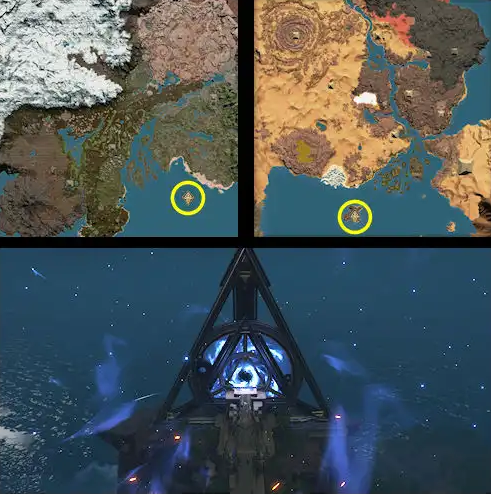
- Players must visit the mysterious island portal on either map to transfer between servers - TRAVEL LOCATION IN THE MAPS
- Your initial character cannot travel between servers; you must use a tribesman.
- If using a password, both servers must have the same password.
- Cross-server Mode admin setting must be enabled on all servers.
- The master server should always start first and stop last.
How to Setup the Master Server
- Open your Master Server game panel.
- Stop the server.
- Go to Configuration Files and edit the Start.bat file.
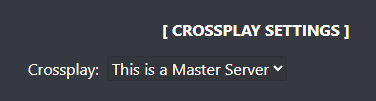
- Enable This is a Master Server from the Crossplay dropdown.
- Start the server and join it.
- Login as admin.
- Open the admin menu, then go to the coefficients menu.
- Find Cross-server Mode and enable it.
How to Setup the Slave Server
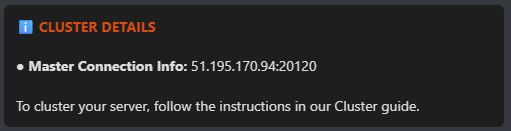
You must copy the Master Connection Info from the master server before configuring the slave server.
- Open the Master Server panel.
- Click Server Details and copy the Master Connection Info.
- Open the Slave Server panel.
- Edit the Start.bat file under Configuration Files.
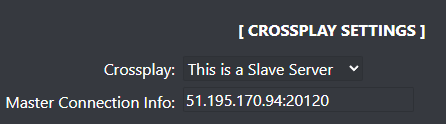
- Enable This is a Slave Server from the Crossplay dropdown.
- Paste the Master Connection Info you copied.
- Start the server and join it.
- Login as admin.
- Open the admin menu, go to the coefficients menu.
- Enable Cross-server Mode.
Tips and Warnings
- Always ensure both servers are online before attempting transfers.
- Keep server configurations consistent across the cluster.
- Using the same password avoids transfer interruptions.
- Restart servers in the correct order to prevent issues.
Common Transfer Errors
- Server restart issues: The master server must start first and stop last; otherwise, transfers may fail or servers may hang.
- Password mismatch: If passwords differ, players may be kicked to the main menu during transfer.
- Initial character restriction: Your starting character cannot transfer; use a tribesman instead.
- Cross-server disabled: Transfers will fail if "Cross-server Mode" is not enabled in server settings.
Final Thoughts
Setting up a Soulmask cluster allows players to explore multiple maps and enhances the overall gameplay experience.
Make sure all settings are correctly configured on both servers to ensure smooth and reliable transfers.
Get Your Soulmask Server Hosting Today!
Order your server here and start building your cluster today.