
Install ARK API plugins on your ARK: Survival Evolved server: add the ARK Server API from the Mod Manager, then upload each plugin to the ArkApi Plugins folder and extract it.
The ARK Server API lets you extend your ARK: Survival Evolved dedicated server with custom functionality such as admin tools, gameplay changes and automation. Follow the steps below to set everything up quickly and correctly.
On this page
Important notes before installing ARK API plugins
- Your server must be fully stopped before you install the ARK API or plugins.
- Make sure your server is up to date to avoid compatibility issues.
- Only download plugins from trusted sources to avoid crashes or security issues.
Getting ARK API plugins
You can browse and download available plugins from the official ARK API forums:
https://ark-server-api.com/forums/ase-plugins.7/
Download the plugin files you want to your computer. Plugins usually come as a .zip file.

How to install ARK API
- Stop your server with STOP.
- Go to the Mod Manager in your game panel.
- Find and install ARK API.
- Wait for the installation to complete.
How to install ARK API plugins
- Open your game panel.
- Go to the File Manager.
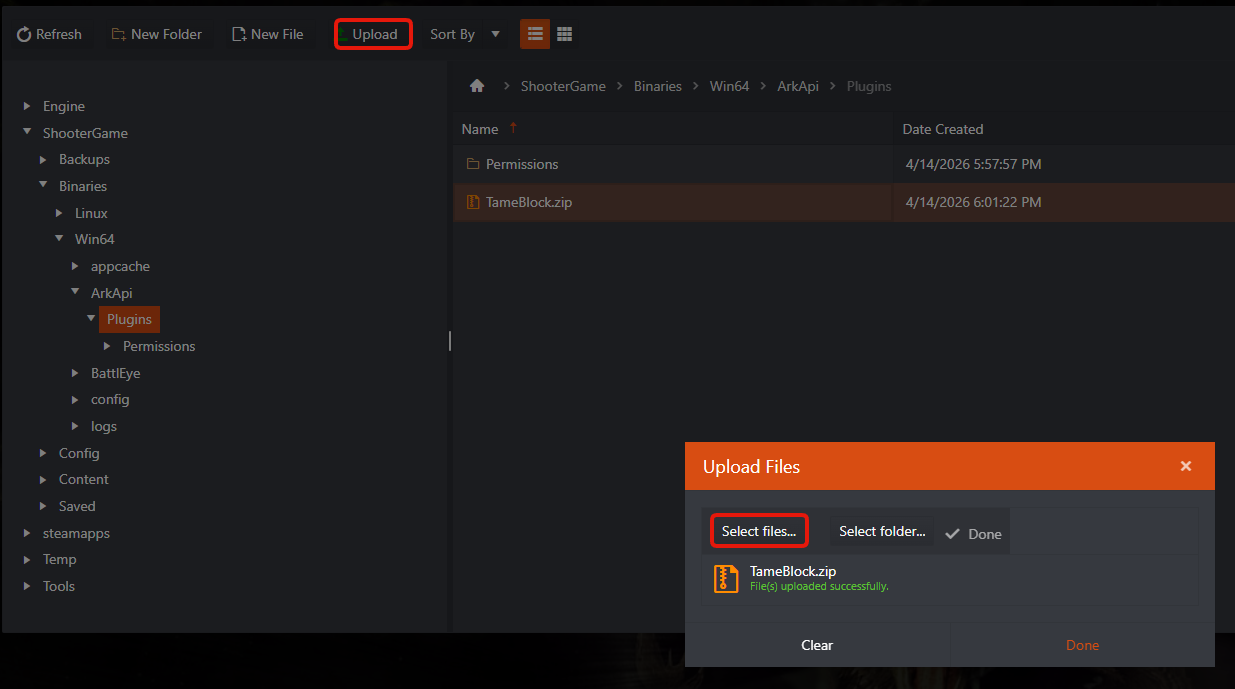
- Navigate to the following folder:
\ShooterGame\Binaries\Win64\ArkApi\Plugins\ - Click Upload › Select Files and upload your downloaded plugin.
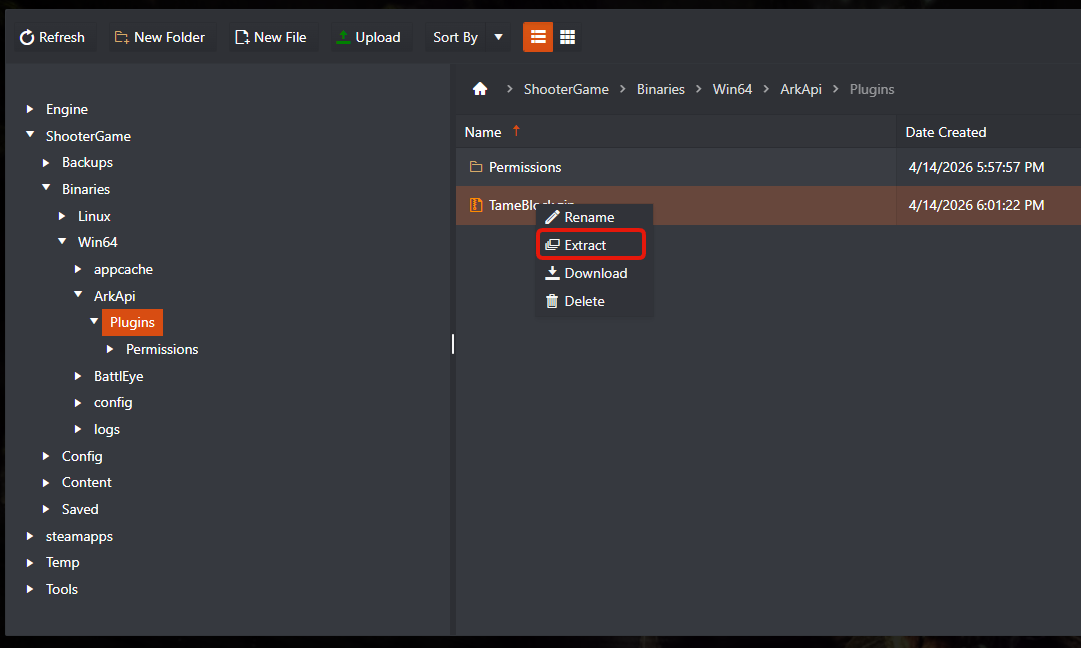
- After the upload is complete, right-click the file and select Extract.
- Start your server.
Tips and warnings
- Some plugins need extra configuration files after installation.
- If your server fails to start, remove the last installed plugin and try again.
- Always keep backups before you install new plugins. You can take one with Backup Server.
Installing the ARK API and plugins is a quick way to add powerful features and custom functionality to your server. Test each plugin on its own to make sure it is stable and works with your server setup.
ARK API questions
Where do ARK API plugins go?
Upload ARK API plugins to \ShooterGame\Binaries\Win64\ArkApi\Plugins\ with the File Manager, then right-click the uploaded file and choose Extract. Install ARK API itself from the Mod Manager first, with the server stopped.
My server won't start after adding a plugin. What now?
Remove the last plugin you installed and start the server again. If you took a backup first, you can also roll back: see how to restore your ARK: Survival Evolved server from a backup.
Do these plugins work on ARK: Survival Ascended?
No. This guide and the linked forum section are for ARK: Survival Evolved (ASE) plugins. ARK: Survival Ascended is a separate game with its own server files.
Want your own ARK server? GTX ARK: Survival Evolved servers come with a game panel, a Mod Manager with ARK API and full file access: see ARK: Survival Evolved server hosting.
Related guides
Any questions, or need help with a plugin? Our support team is available 24/7: Open a support ticket.


