
Allocate more RAM to Minecraft on your PC by changing the -Xmx value in the Minecraft Launcher: open Installations, edit your version, open More Options and set -Xmx4G for 4GB.
This only allocates more RAM to your game on your PC, not your server! Want more RAM on your GTX Minecraft server? See How to upgrade or downgrade your server RAM package.
How to allocate more RAM to Minecraft in the launcher
- Open your Minecraft launcher on your PC.
- Click on Installations.
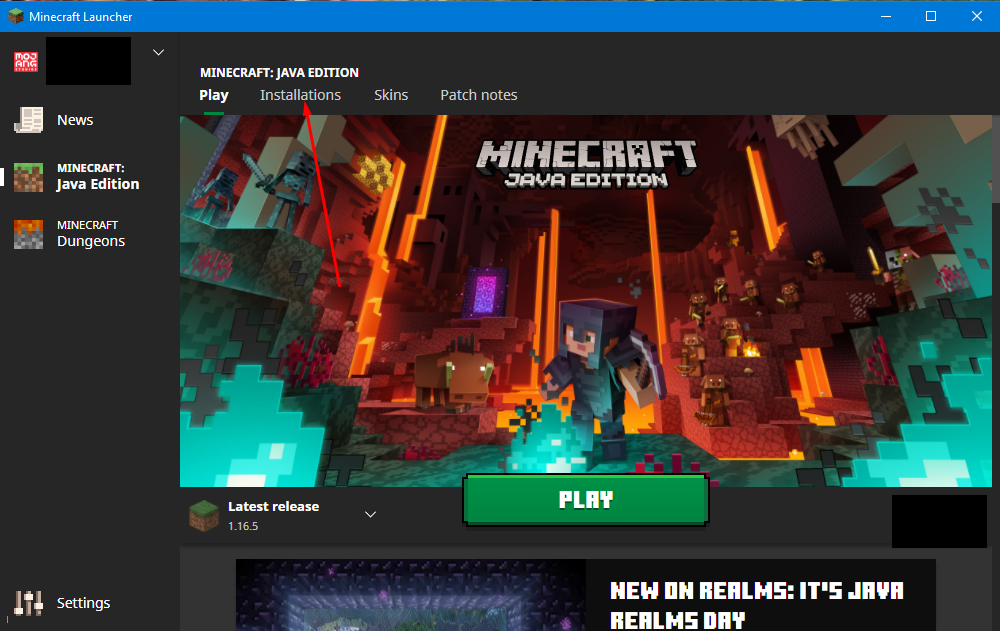
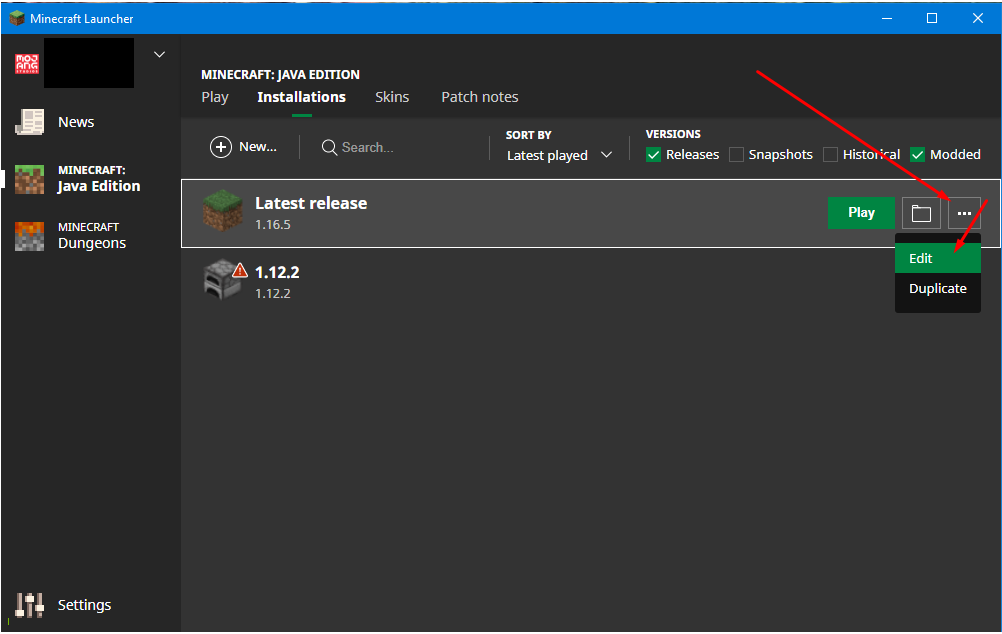
- Click on the 3 dots next to the version of Minecraft you are using and then click Edit.
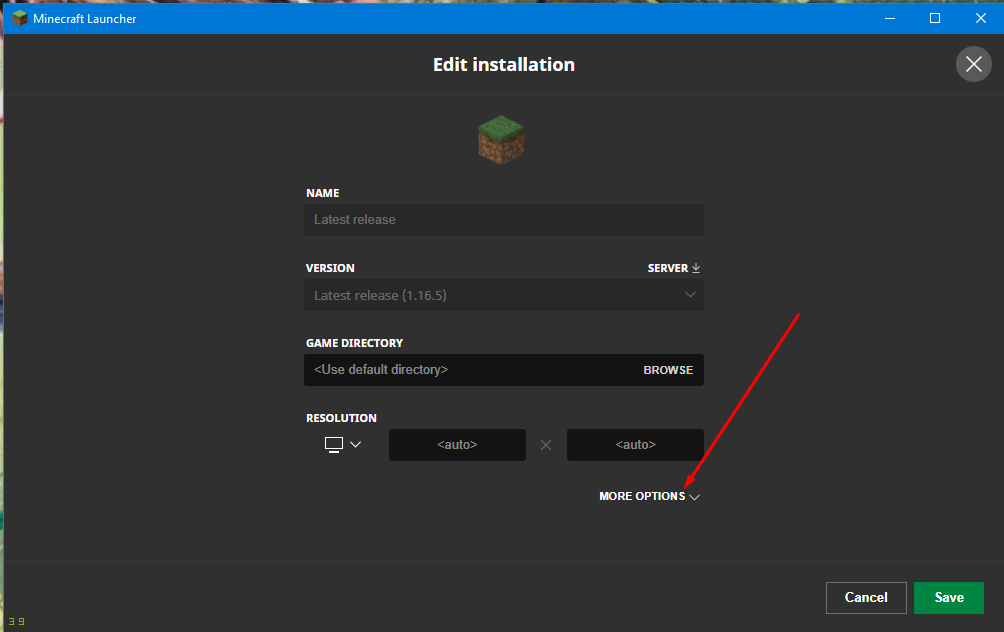
- Click on More Options down the bottom.
- In the JVM Arguments field, adjust the
-Xmx1Gto your liking. The "1G" means 1GB RAM. If you want 4GB, change it to-Xmx4G, 3GB-Xmx3G, and so on. Only change the number in that first argument and leave the rest of the line as it is. - Click Save to apply the changes.
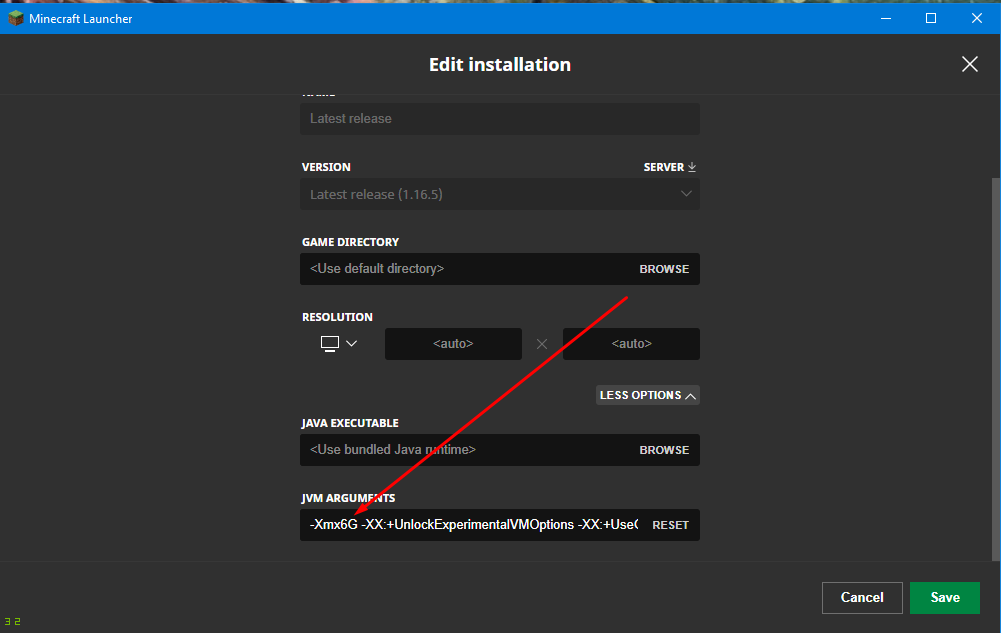
You have now allocated more RAM to your Minecraft game. The number your launcher shows after -Xmx may differ from -Xmx1G (the screenshot shows -Xmx6G): just change it to the amount you want.
Please ensure your PC has enough RAM available before changing the value. Your PC needs memory for Windows and other programs too, so don't give Minecraft all of it.
More RAM for your Minecraft server
Lag on a server with lots of players or mods is down to the server's memory, not your PC. Your server's RAM is part of your hosting package: change it in the Client Area under Upgrade/Downgrade Options, as explained in How to upgrade or downgrade your server RAM package.
Minecraft RAM questions
How do I allocate more RAM to Minecraft?
Open the Minecraft Launcher, click Installations, click the 3 dots next to your version and choose Edit. Click More Options, change -Xmx1G to the amount you want (for example -Xmx4G for 4GB) and click Save.
What does -Xmx mean?
-Xmx sets the maximum amount of memory Java may use for Minecraft. The number is followed by G for gigabytes, so -Xmx3G means Minecraft can use up to 3GB RAM.
Does this give my Minecraft server more RAM?
No. This only allocates more RAM to your game on your PC, not your server. To give your GTX server more RAM, upgrade its RAM package in the Client Area under Upgrade/Downgrade Options.
Want your own Minecraft server? See our Minecraft server hosting.
Related guides
Need a hand? Our support team is available 24/7. Open a support ticket.


