
To authorise someone in Stormworks so they can use the workbench on your server, open the player list, note their ID and type ?add_auth with that ID in chat.
This guide shows you how to give players workbench access on your Stormworks: Build and Rescue server, and how to fix the most common workbench error messages.
How to authorise someone in Stormworks to use the workbench
Admins don't need this. If a player is an admin of the server, they automatically have permission to use the workbench, unless there's an error. Check the common workbench error messages and solutions below.
- Join your server with the player you want to give workbench authorization to.
- Press the ` key to open the player list. Your keyboard can have a different key assigned: check the controls settings for the correct key.
- With the player list open, take note of the ID of the player you want to add.
- Open chat with the ENTER key and type:
Replace?add_auth Player_ID_herePlayer_ID_herewith the player's ID from the list. - That player will now have permissions to use the workbench.
To make someone a full admin instead, see How to add admins and use admin commands on your Stormworks server.
Common workbench error messages and solutions
"You must be authorised to use workbench"
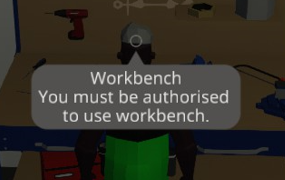
The player is not added correctly as admin or not correctly authorised.
- If you added the player as admin in the config file, review the Steam64ID in the config file.
- Or confirm the player in the player list and authorise them with the steps above.
- Double-check you are using the correct admin command.
"Vehicle editing is disabled"
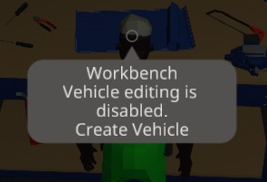
The vehicle spawn setting is disabled.
- Press STOP on your server.
- Press Configuration Files.
- Edit the
server_config.xmlfile with the Text Editor option. - Set this setting to true:
vehicle_spawn="true" - Save the file and press START.
Prefer an editor with toggles for every setting? See How to change all settings easily on your Stormworks server.
Both messages at once
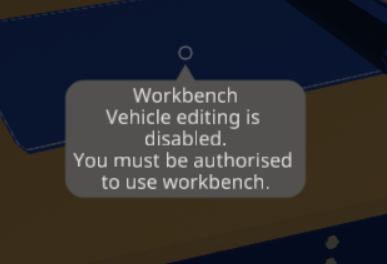
The vehicle spawn setting is disabled and the player is not added as admin or not authorised. Apply both solutions above.
Questions
How do I authorise someone in Stormworks?
Have the player join your server, press the ` key (or the player list key in your controls settings) and note their ID. Then open chat with ENTER and type ?add_auth followed by that ID. The player can now use the workbench.
Do admins need to be authorised to use the workbench?
No. Server admins automatically have permission to use the workbench. If an admin still sees "You must be authorised to use workbench", check their Steam64ID in the config file and that they were added with the correct admin command.
Why does the workbench say "Vehicle editing is disabled"?
The vehicle spawn setting is turned off on your server. Stop the server, open server_config.xml in Configuration Files with the Text Editor, set vehicle_spawn="true", save and start the server.
Want your own Stormworks server? See Stormworks: Build and Rescue server hosting.
Related guides
Still can't use the workbench? Open a support ticket. Our team is here 24/7.


