
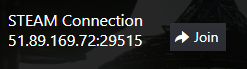
ARK direct connect from Steam: start your server and press JOIN next to the STEAM Connection in your game panel. You can also add the IP:PORT to your Steam favourites or find the server in the in-game browser.
Here are three ways to join your ARK: Survival Evolved Server from the STEAM Store version of the game. Playing on the Epic Games Store? See connect from EPIC Store.
Use ARK direct connect if your server is not on the list
SERVER NOT SHOWING ON THE LIST
If your server is not showing on the server list, don't worry: it's a known issue with ARK for years. The ARK server list only lists 5000 servers at the same time, and there are around 30,000 servers.
Not all servers are listed every time. Sometimes a server shows on the list today, then the next day doesn't show anymore. Unfortunately, that's how the ARK server list works and it's out of our control. If you can't find your server on the list, please use one of the methods below to connect to it.
#1 Direct connect method
- Start your server and wait for it to go online.
- Open the ARK game on your Steam.
- Go to your Game Panel and click the JOIN button in front of the STEAM Connection, as the image below shows.
- The game should join the server.
Only a copy button next to STEAM CONNECTION in your panel? Copy the IP:PORT and use the Steam favourites method below.
#2 Steam favourites method
- Start your server and wait for it to go online.
- From your Game Panel, copy the IP:PORT from the STEAM connection section.
- Open your Steam, go to the VIEW menu, then the SERVERS menu.
- Click the ADD A SERVER button, paste the IP:PORT you got in step 2 and press ADD THIS ADDRESS TO FAVOURITES.
- Right-click on it and select CONNECT TO SERVER. If it gives you an error popup, press REFRESH a couple of times and try to connect again.
Watch an example video below, click fullscreen to watch it bigger.
#3 In-game server browser list method
- Stop your server.
- Go to the Configuration Files button, edit the
GameUserSettings.inifile and set a nice and unique name for your server. - Start your server and wait for it to go online.
- Open ARK on your Steam, go to the JOIN menu, then on the Server Browser list change SESSION FILTER to UNOFFICIAL and search for the server name you defined in step 2.
ARK direct connect questions
How do I direct connect to my ARK server on Steam?
Start your server and wait for it to go online, open ARK on Steam, then press the JOIN button next to the STEAM Connection in your GTX game panel. Or copy the IP:PORT, add it to your Steam favourites (View, Servers, Add a server) and connect from there.
Why is my ARK server not showing in the server list?
The ARK server list only lists 5000 servers at the same time, out of around 30,000, so a server can show one day and not the next. It's out of our control: use direct connect or Steam favourites to join.
Can Epic players join my Steam server?
Yes, once you enable the CROSSPLAY option in Config.bat. Epic players then connect with the EPIC Connection IP:PORT: see how to connect to your ARK: Survival Evolved Server from EPIC Store in our knowledgebase.
Want your own ARK server? See ARK: Survival Evolved server hosting.
Related guides
If you have any questions or you need our help, don't hesitate to contact our support team, available 24/7: Open a support ticket.


