Set up an automatic graceful restart with messages on your ARK: Survival Evolved server: one scheduled task warns players at 10, 5, 2 and 1 minutes, saves the world and restarts the server.
This scheduled task will send a warning message at 10 minutes / 5 Minutes / 2 Minutes / 1 Minute, it will save the world 1 minute before the restart, and restart the server. Your players on your ARK: Survival Evolved server get time to find a safe spot, and the world is saved before it goes down.
How to set up a graceful restart with messages on ARK
- Go to the Scheduled Tasks tab in your Control Panel.
- Create a new Scheduled Task and select the Graceful Restart and Messages option.
- Give it a Name of your choice, 12 Hour Restart for example.
- Select the date/hour you want the next restart to happen (*). See server time below.
- Select Recur Every 1 Days.
- Select the Repeat task option.
- Select Repeat Every 12 hours.
- Select For 24 Hours.
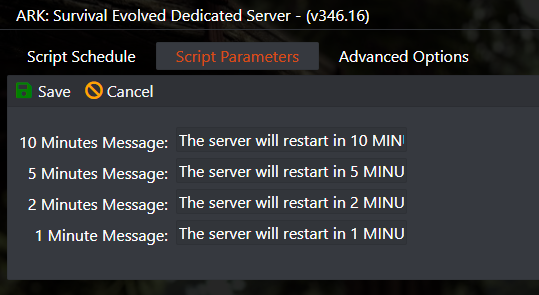
- Select the Script Parameters tab on top and adjust the messages if you want.
- Save the task.
In this example it will restart your server every 12 hours. If you want any other number of hours, just change Repeat Every 12 hours to any number of hours of your choice, for example 4 hours.
Examples
Restart example (4 hours restart or 12 hours)
The task settings on the Script Schedule tab. The screenshot shows a 12 hours restart; for a 4 hours restart, set Repeat Every to 4 instead. In the task window the script may show as Restart with Messages.

Change the predefined messages if you want
On the Script Parameters tab you can edit the 10 minutes, 5 minutes, 2 minutes and 1 minute messages.

Server time (*)
(*) Servers restart based on the machine local hour. You can view the machine local hour under Server Details › Machine Local Time button. If needed, adjust your game panel profile timezone to match: click on your name on the top right corner › My Profile, then Timezone.
ARK graceful restart questions
What does a graceful restart with messages do on ARK?
It sends warning messages to players 10, 5, 2 and 1 minute before the restart, saves the world 1 minute before the restart, then restarts the server. One scheduled task does all of it.
Can I change the restart warning messages?
Yes. When you create or edit the task, open the Script Parameters tab and change the 10, 5, 2 and 1 minute messages, then save the task.
Why does my ARK server restart at the wrong time?
The task runs on the machine local hour, which may differ from your own time. Check it under Server Details, Machine Local Time, and if needed set your game panel profile timezone under your name (top right), My Profile, Timezone.
Want your own ARK server? See ARK: Survival Evolved server hosting.
Related guides
If you have any questions or you need our help, don't hesitate to contact our support team, available 24/7: Open a support ticket.