






 DayZ
DayZ Palworld


 Enshrouded














Windrose Server Hosting USA
Rent Your Windrose Dedicated Server
About Windrose server hosting
Premium Windrose server hosting from GTX Gaming's US and worldwide datacenters. Rent a Windrose dedicated server for your pirate crew with instant setup, 6, 8 or 10 player slots, up to 10GB of RAM and 100GB of NVMe storage included, invite code or Direct IP joining, Easy to Custom world settings, daily automatic backups, enterprise DDoS protection and 24/7 support. Your world stays online even when the captain logs off. Rent your Windrose dedicated server from $10.65/mo.
Windrose Server Hosting: Plans & Pricing
- Instant setup
- Up to 10GB RAM included
- One-click Nexus Mods
- Daily automatic backups
- 24/7 support
- Up to 10GB RAM included
- Easy to Custom worlds
- Several worlds per server
- Daily automatic backups
- Enterprise DDoS protection
- Up to 10GB RAM included
- RAM upgradable to 64GB
- Several worlds per server
- Daily automatic backups
- Enterprise DDoS protection
- 24/7 support
- DDoS protection
- Instant setup
Windrose dedicated servers, priced by slots, with up to 10GB of RAM included free. Every plan includes up to 100GB of NVMe storage, DDoS protection and daily backups, and you can change your slots or memory at any time without losing your world.
The Windrose Server Hosting Control Panel
Our custom panel puts your Windrose server's settings, mods, files and backups in a browser, with a Config Editor for the server files and a Nexus Mods tool that installs mods in one click.
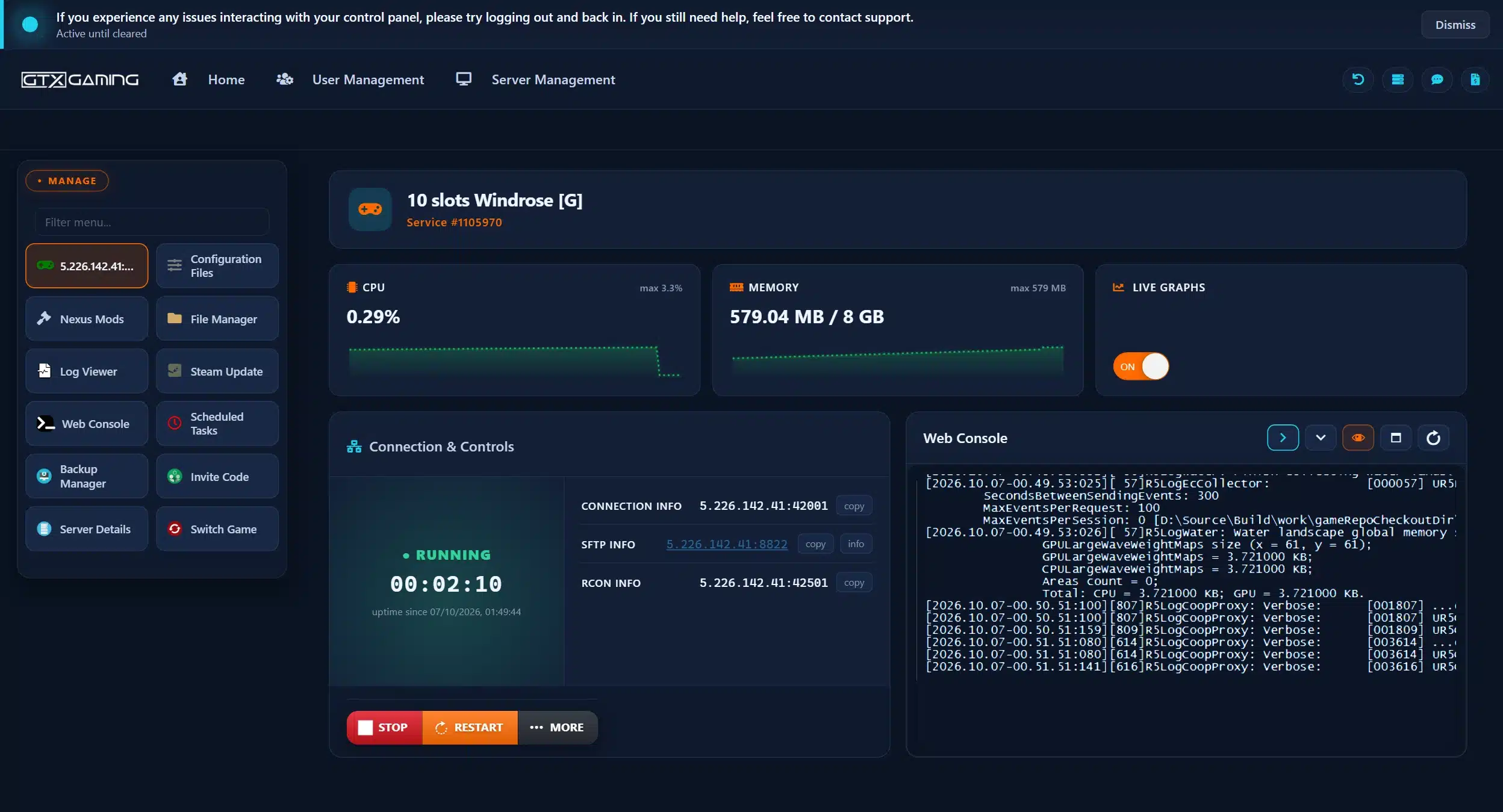
- 🎛️One-click controlsStart, stop and restart your server with a single button, and see its status, connection details and SFTP details at a glance.
- 🧭Invite Code toolFind the invite code your crew needs to join right in the panel, no digging through the console.
- 🧩Nexus Mods in one clickBrowse Windrose mods from Nexus Mods by endorsements or category inside the panel and press Install.
- 📂Config Editor & File ManagerChange server and world settings in the Config Editor or the Text Editor, and upload a world in the browser, with SFTP for big uploads.
- 💾Backup Manager & Scheduled TasksDaily automatic backups plus the Backup Manager, so a lost ship or a broken world is a restore, not a wipe. Scheduled Tasks handle restarts on a timer.
- 📊Steam Update, Web Console & live graphsUpdate the server when Windrose patches with Steam Update, follow the server output in the Web Console and Log Viewer, and watch CPU and memory on live graphs.
Windrose Server Hosting: Worlds, Mods & Settings
Your crew joins with an invite code, mods install from Nexus Mods in one click, and every setting the Windrose dedicated server offers is yours: difficulty, enemies, ships, boarding and shared quests.
Your server prints an invite code when it starts. Your crew pastes it under Play, Connect to Server, and they are aboard. Prefer an address? Switch the server to Direct IP and players join with the IP instead.
Easy JoiningPick a difficulty preset for your world, or go Custom and set it yourself. Your server, your rules, and nobody else's crew sailing in uninvited.
World PresetsScale enemy health and damage, AI ship health and damage, boarding difficulty and combat difficulty, and choose shared quests for the whole crew, in each world's WorldDescription.json.
Full ControlKeep more than one world on your server and choose which one loads with a single line in ServerDescription.json. Start a hardcore run without losing your crew's main world.
Multiple WorldsStarted on someone's PC? Copy the world folder from your save into the server, point the server at it, and carry on with your bases, ships and loot.
Save TransferBrowse Windrose mods from Nexus Mods inside your control panel, sorted by endorsements, and press Install. More Mineral Resources, MoreStacks and More Backpack Slots are a click away.
Nexus ModsCopy your world folder from your own game or old server into your GTX server through the File Manager, set its ID in ServerDescription.json and restart. Your bases, ships and treasure come with it. Our 24/7 team can help with the move or handle it for you.
How Many Slots & How Much RAM Does My Windrose Server Need?
Pick a slot for every player who will be online at the same time. Every server includes up to 10GB of RAM free, and you can add slots or memory whenever your crew grows.
| Slots | Best for | From (10GB RAM included) |
|---|---|---|
| 6 slots | A small crew sailing together | $10.65/mo |
| 8 slotsRecommended | A full co-op crew with room for friends | $11.66/mo |
| 10 slots | The biggest crews and community worlds | $14.58/mo |
| Memory | When to choose it | Adds |
|---|---|---|
| Up to 10GB | Included free with every server: room for a crew of four, the size the developers recommend | Free |
| Up to 12GB | Extra headroom for a crew of six to eight | $8.86/mo |
| Up to 16GB | A full crew of ten, as the official server guide lists | $13.93/mo |
| Up to 24GB | Late-game worlds packed with bases and ships | $22.80/mo |
| Up to 32GB | Several big worlds kept on one server | $30.41/mo |
The Windrose team's dedicated server guide lists 8GB of RAM for 2 players, 12GB for 4 and 16GB for 10, and recommends crews of up to 4 for the smoothest performance in the late game. The memory picks above are our sizing advice based on that guide; watch live memory use in the control panel and change your RAM, up to 64GB, at any time from your client area.
Windrose Server Hosting Locations: Low Ping USA & Worldwide
Windrose servers deploy in 19 locations: New York, Ashburn, Chicago, Dallas, Miami, Los Angeles and Portland in the USA; Quebec in Canada; London, Paris, Frankfurt, Amsterdam, Stockholm and Madrid in Europe; Sydney, Tokyo, Singapore and Mumbai in Asia-Pacific; plus Moscow. Run a quick test to see your latency to our network.
What's Included With Your Windrose Server Hosting?
Every server ships fully loaded. Upgrade any part of it whenever you like.
| Resource | Included | Optional upgrade |
|---|---|---|
| Player slots | 6, 8 or 10 slots, chosen at checkout | Change your slot count any time |
| Memory | Up to 10GB of RAM on every server | Tiers from 12GB to 64GB, changed any time |
| Storage | Up to 100GB NVMe free | Tiers up to 200GB, plus extreme 14,000MB/s NVMe |
| Worlds | Easy, Medium, Hard or Custom worlds, several per server | Included on every server |
| CPU priority | Normal priority on high-frequency cores | High and Realtime tiers |
| Protection | Enterprise DDoS mitigation | Included on every server |
| Backups | Daily automatic backups, restore and rollback | Included on every server |
Slots, RAM, storage, CPU priority and clock boosts are all picked at checkout and can be changed later without losing your world. Players need their own copy of Windrose on PC to join, on the same game version as the server.
Windrose Server Hosting Features: Everything Built In
Every server ships with the full GTX feature set, no hidden add-ons.
Windrose Server Hosting: the essentials
GTX Gaming Server Hosting Reviews
Verified Trustpilot reviews from GTX Gaming customers.
GTX gaming absolutely excels at customer service
GTX gaming excels at customer service. Every ticket is answered within minutes and issues resolved promptly and professionally. Nothing but wonderful things to say about the service GTX provides. I’ve had the pleasure of interacting with several of their support agents: Tom H, Rui P, Jamie R, John K, Robert P, James K, and man they’re all excellent! Kudos to the entire team and thank you for the service you provide to the gaming community. They’ve enabled our entire crew to spend many hours having a total blast.
TOP!!!
Speed, competence, and understanding. It's the first time I've found such a good support team from a server hosting provider. Top service, top support!
Thank you Mr. Gibbs
Absolutely loved the friendliness and the quick response time. Even though I felt a little dumb for not realizing the problem myself, it felt twice as good to know that the fix was simple and clear.
Windrose Server Hosting FAQ
How fast is Windrose server setup?
+What is Windrose server hosting?
+How do I join my Windrose server?
+Can I install mods on my Windrose server?
+Can I change the difficulty and world settings?
+How many players can join my Windrose server?
+How much RAM does a Windrose server need?
+Can I move my existing Windrose world to GTX Gaming?
+What happens when Windrose gets an update?
+Which locations can I host a Windrose server in?
+Is Windrose PvP?
+How much does Windrose server hosting cost in the USA?
+Can I upgrade my Windrose server later?
+What is your refund policy?
+Do you offer monthly Windrose server hosting with no contract?
+The Complete Guide to Windrose Server Hosting in the USA & Worldwide
Everything you need to know before you rent a Windrose server in the USA or any of GTX Gaming's worldwide datacenters, from the game itself and joining with an invite code to server and world settings, Nexus Mods, moving an existing world, updates during Early Access, slots, RAM, pricing and locations.
What Is Windrose Server Hosting?
Windrose server hosting is a managed service that runs the Windrose dedicated server on professional hardware in a datacenter, around the clock, so your crew's world keeps running whether or not the captain is online. Every GTX Gaming Windrose server includes up to 10GB of RAM, up to 100GB of NVMe storage, daily automatic backups, enterprise DDoS protection and a web control panel with a Config Editor, an Invite Code tool and one-click Nexus Mods.
People look for it as a Windrose dedicated server, a Windrose game server, a Windrose private server or simply a Windrose server to rent, and they all mean the same thing: a home for your own Windrose server, with your settings, your mods and nobody else's crew sailing in uninvited.
What Is Windrose?
Windrose is a survival adventure set in an alternative Age of Piracy, made by Kraken Express and published with Pocketpair Publishing. You are a captain who dares to challenge Blackbeard, and the classic build, craft, survive loop meets soulslite combat, exploration and naval warfare. It launched in Early Access on Steam on 14 April 2026, sold a million copies in its first six days and passed 2,000,000 copies in May 2026. According to the developers, it brings:
- Ship and shore: move seamlessly between your ship and the land, trade cannon fire at range or close in for boarding actions, and sail anything from a nimble ketch to a brig or a monstrous frigate.
- Building and settlements: gather resources and build from simple shelters to mansions and forts, then recruit NPCs to speed up harvesting and production.
- Exploration: procedurally generated biomes and over 100 hand-crafted dungeons and points of interest, full of treasure and danger.
- Soulslite combat: sabers, rapiers, halberds, greatswords, pistols and muskets, with parries, dodges, talents, armor sets, food and potion buffs, and challenging bosses.
- Co-op: play solo offline or with friends, on a self-hosted world or a dedicated server.
The game is still growing: the developers are working on Ashlands, the first major content update, with a fourth biome and a bigger main story.
Why Rent a Windrose Server?
Anyone can host a Windrose world from inside the game, but then the world only exists while the host is playing. Most crews rent a dedicated server instead:
- Always online: your world runs 24 hours a day, so crewmates on different schedules can build, farm and sail whenever they like, without waiting for the host.
- Nothing to run at home: no second PC to leave on and no router settings, and the host's own PC stays free for playing. The Windrose team notes that a self-hosted server needs extra RAM on top of the game.
- Your rules: choose the difficulty, tune enemies, ships and boarding, share quests across the crew and decide who gets the invite code.
- Proper hardware: high-frequency CPUs and NVMe storage in a datacenter, with DDoS protection at the network edge, so a boss fight is decided by your crew and not by someone's home connection.
- Backups and support: daily automatic backups, restore in the panel and a 24/7 support team mean a broken world or a bad mod is an inconvenience, not the end of your voyage.
Getting Started & Joining Your Windrose Server
Your server is set up the moment you order. From there, getting your crew aboard typically looks like this:
- Order: choose your slots, memory and location, and your server is set up and started instantly.
- Get the invite code: open the Invite Code tool in your control panel. The server creates a code such as f1014dc1 on its first start, and you can set your own.
- Name it and lock it: stop the server, then set your server name, a password and the number of players in ServerDescription.json with the Config Editor.
- Join: in Windrose choose Play, then Connect to Server, and paste the invite code. Your crew does the same.
Windrose joins through the developers' connection service by default. If a player's network blocks it, switch the server to Direct IP: players then join with the server's IP address and the invite code no longer works.
Server Settings: ServerDescription.json
Windrose splits its server settings into two files, both in Configuration Files in your control panel, with a Config Editor so you never have to touch the JSON by hand. Always stop the server before you edit them: the server can reset fields it cannot read when it starts. ServerDescription.json holds the settings for the whole server:
- ServerName: the name players see, handy when invite codes look alike.
- InviteCode: your own code, at least 6 characters of 0-9, a-z and A-Z, case-sensitive.
- IsPasswordProtected and Password: lock the server so only your crew gets in.
- MaxPlayerCount: how many players can be online at once, up to your slot count.
- WorldIslandId: which world loads when the server starts.
- UseDirectConnection: switches the server to Direct IP joining.
World Settings: Difficulty Presets & Custom Worlds
Each world has its own WorldDescription.json. Set WorldPresetType to Easy, Medium or Hard for a ready-made balance, or change any value and the world becomes Custom on its next start. Custom worlds let you tune:
- Enemies: mob health and mob damage multipliers.
- Ships: AI ship health and damage multipliers, and boarding difficulty.
- Combat difficulty: the overall combat setting.
- Co-op: shared quests for the crew, plus co-op stat corrections for players and ships.
- Exploration: the EasyExplore option.
You can keep several worlds on one server, each in its own folder with its own settings, and choose which one loads with WorldIslandId. That makes a hardcore side run or a fresh world for new crewmates easy, without risking your main world.
Nexus Mods on Your Windrose Server
Windrose has a growing mod scene on Nexus Mods, and your GTX control panel has a Nexus Mods tool built in: browse Windrose mods by endorsements or category, press Install and restart the server. Popular mods available this way include:
- More Mineral Resources and More Tree Resources: bigger harvests and faster respawns.
- MoreStacks: larger item stacks.
- More Backpack Slots: more room in your inventory.
- Better Minimap Range: clears more fog of war as you explore.
Windrose is in Early Access, so a game update can break a mod until its author updates it. Read each mod's page on Nexus Mods to see whether players need it too, and take a backup before you add mods to a long-running world.
Moving an Existing World to Your Server
Already playing on a world hosted from someone's game? Bring it with you. The Windrose team's guide describes the move:
- Find the world: on the host's PC it is a folder under AppData/Local/R5/Saved/SaveProfiles/[profile]/RocksDB/[game version]/Worlds.
- Copy it: upload the whole folder to the same path under R5/Saved/SaveProfiles/Default on your server with the File Manager or SFTP.
- Point the server at it: set WorldIslandId in ServerDescription.json to the folder's exact name and start the server.
Never rename a world folder: the game's database relies on its ID. Stop the server and keep a backup before any move, and if you would rather not do it yourself, our support team can handle the whole move for you.
Updates & Early Access
Windrose is in Early Access and the developers patch it often. A player can only join a server that runs the same version as their game, so after every patch update your server with Steam Update in the control panel, then restart. The developers recommend keeping a backup before updates; our daily automatic backups and the Backup Manager cover that, and the Windrose server also creates an automatic save backup when it starts and can load the latest one if a world is damaged.
How Much Does Windrose Server Hosting Cost in the USA?
You pay for the number of slots you choose, with up to 10GB of RAM and up to 100GB of NVMe storage included on every server:
- Ketch, 6 slots: $10.65/mo. A small crew sailing together.
- Brig, 8 slots: $11.66/mo. Our recommended size for a full co-op crew with room for friends.
- Frigate, 10 slots: $14.58/mo. The biggest crews and community worlds.
- 16GB RAM upgrade: add $13.93/mo for a full crew of ten.
All plans include instant setup, one-click Nexus Mods, DDoS protection, daily automatic backups and 24/7 support, with no setup fee and no contract. Billing is monthly by default, with three-month, six-month and yearly cycles available at a discount, and you can change plan or cancel at any time.
How Many Slots & How Much RAM Does a Windrose Server Need?
Choose a slot for every player who will be online at the same time; our plans go up to 10. The Windrose team recommends crews of up to 4 for the smoothest performance in the late game, and its dedicated server guide lists 8GB of RAM for 2 players, 12GB for 4 and 16GB for 10. The 10GB included with every server is plenty for a crew of four; for six to eight players consider 12GB, and for a full crew of ten the 16GB upgrade. The control panel shows live memory and CPU graphs, so you can see exactly when your world needs more and upgrade, up to 64GB, without losing anything.
Locations for Windrose Server Hosting
Parries, dodges and boarding fights feel best with a low ping, so host close to your crew. GTX Gaming runs Windrose server hosting from seven US locations, with New York preselected on this page and Ashburn, Chicago, Dallas, Miami, Los Angeles and Portland covering the rest of the country, plus 12 more locations worldwide: Quebec in Canada; London, Paris, Frankfurt, Amsterdam, Stockholm and Madrid in Europe; Sydney, Tokyo, Singapore and Mumbai in Asia-Pacific; plus Moscow. Some locations carry a surcharge, shown at checkout. Use the live ping test above to find the lowest-latency location for your crew, pick it at checkout, and if you need to move later our support team can migrate your server.
Windrose Server Hosting Glossary
Quick definitions of the terms you'll meet across Windrose, our control panel and your server settings:
- Dedicated Server
- A server that runs your world by itself, around the clock, without a player hosting it from their own game.
- Invite Code
- The code players paste under Play, Connect to Server to join. Find it with the Invite Code tool in your panel.
- Direct IP
- An option that lets players join with the server's IP address instead of the invite code.
- ServerDescription.json
- The file with your server's name, invite code, password, player count and which world loads.
- WorldDescription.json
- One per world: its name, difficulty preset and custom world settings.
- WorldIslandId
- The ID of a world. ServerDescription.json uses it to choose which world the server loads.
- Custom preset
- A world whose settings you tuned yourself instead of Easy, Medium or Hard.
- Boarding
- Closing in on an enemy ship and fighting its crew on deck. Servers can make it easier or harder.
- Soulslite
- Windrose's combat style: timing, parries and dodges against tough enemies and bosses.
- Nexus Mods
- The mod site our control panel installs Windrose mods from in one click.
- Early Access
- Windrose is still in development and updates often; keep your server on the same version as the game.
- Ashlands
- The first major content update the developers are working on, with a fourth biome.
Setup Guides & Help for Your Windrose Server
Once your Windrose server is live, the Windrose team's own dedicated server guide on Steam explains every setting, and the Help Guides in your control panel cover the common tasks: finding your invite code, setting a password, changing world settings, installing mods, uploading a world and restoring a backup. Our 24/7 support team is on live chat and tickets for anything the guides don't cover:
Explore Other Services
Host more of your favorites with the same instant setup and 24/7 support.
Last Updated: October 7, 2026