






 DayZ
DayZ Palworld


 Enshrouded














Space Engineers Server Hosting USA
Rent Your Dedicated Space Engineers Server in the USA
About Space Engineers server hosting
Official Space Engineers server hosting, developed in collaboration with the game's creators. Instant setup from GTX Gaming's US and worldwide datacenters, full mod support, crossplay for PC, Xbox and PlayStation 5, scheduled offsite backups, enterprise DDoS protection and 24/7 support. Rent your dedicated Space Engineers server from $11.39/mo.
Space Engineers Server Hosting: Plans & Pricing
- Instant setup
- DDoS protection
- Up to 10GB RAM free
- Scheduled offsite backups
- Up to 12GB RAM for mods
- Easy mod installs
- Crossplay: PC, Xbox, PS5
- Full config access
- Priority 24/7 support
- Built for busy public servers
- Up to 16GB RAM headroom
- Heavy script and mod loads
- Up to 200 slot upgrades
- 24/7 support
- DDoS protection
- Instant setup
Three sized presets, one product. Instant setup, full mod support and crossplay on every plan.
The Space Engineers Server Hosting Control Panel
Our custom panel makes running a Space Engineers server effortless, no command line required.
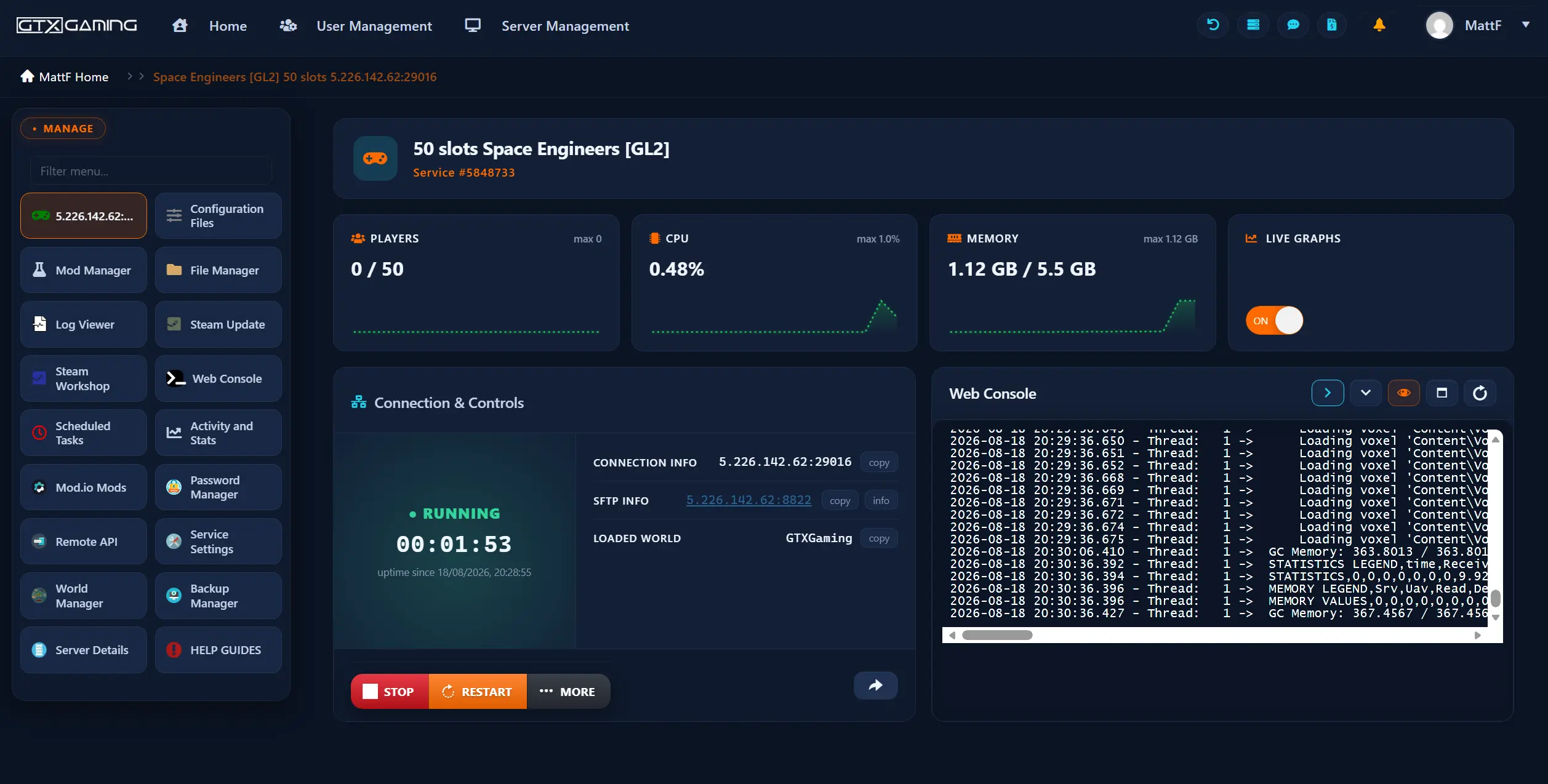
- 🎛️One-click controlsStart, stop, restart and update your server with a single button.
- 🧩Easy mod installsAdd Steam Workshop mods to your server's world configuration, or upload files with the built-in file manager or SFTP, no command line needed.
- ⚙️Config editor & web consoleEdit your server name, password, world settings and game rules, grab your connection and SFTP details and watch the live console.
- 📂Full file accessBuilt-in file manager, log viewer and SFTP for configs and server files.
- 💾Backups & restoreScheduled offsite backups you can restore in a couple of clicks with the Backup Manager.
- 📊Live statsReal-time player, CPU, disk and memory monitoring with live graphs.
Space Engineers Server Hosting: Mods, Worlds & Auto Updates
The official dedicated server build, kept in sync with every Keen Software House update automatically.
The official Space Engineers dedicated server build, deployed instantly and updated automatically with every Keen Software House release, on hosting developed in collaboration with the creators.
Always CurrentAdd Steam Workshop mods, blocks, skyboxes and in-game scripts to your world configuration, and manage everything through the control panel or SFTP in a couple of clicks.
Deep Mod SceneStart from any official scenario or premade world, tune the world settings, or upload an existing save from another host or your own PC.
Your WorldOur knowledge base walks you through adding Steam Workshop mods and scripts, world settings, saves and backups, and 24/7 support is there when you get stuck.
Space Engineers Server Hosting Locations: Low Ping USA & Worldwide
Run a quick test to see your latency to our global datacenters.
What's Included With Your Space Engineers Server Hosting?
Every server ships fully loaded. Upgrade any part of it whenever you like.
| Resource | Included | Optional upgrade |
|---|---|---|
| Slots | Your choice of 10 to 200 players | Change your slot count any time from the client area |
| Memory | Up to 10GB RAM free | Tiers up to 64GB for big worlds and heavy mod packs |
| Storage | Up to 100GB NVMe free | Tiers up to 200GB, plus extreme 14,000MB/s NVMe |
| CPU priority | Normal priority on high-frequency cores | High and Realtime tiers |
| CPU clock | Standard high-frequency clocks | +5%, +10% and +20% clock boost tiers |
| Protection | Enterprise DDoS mitigation | Included on every server |
| Backups | Scheduled offsite backups | Included on every server |
Slots, memory, storage and CPU priority are all picked at checkout and can be changed later without losing any server data.
Space Engineers Server Hosting Features: Everything Built In
Every server ships with the full GTX feature set, no hidden add-ons.
Space Engineers Server Hosting: the essentials
GTX Gaming Server Hosting Reviews
Real Trustpilot reviews from GTX Gaming Space Engineers customers.
Genuinely Blown Away, 5*
Having explained my frustrations with other hosting services regarding a space engineers server, Matt was able to identify exactly what I needed and assist me with getting the correct service and setup requirements I needed for my group's needs and ambitions. The interface for GTX is incredibly user friendly with easy setup and access to customer service for any further issues or concerns with prompt response and genuine attention given to the customer.
I have used many Game Server Hosting…
I have used many Game Server Hosting companies, and GTXGaming.co.uk is the best by far. Super fast and helpful support, good priced, has a really user friendly server panel for managing the servers, and has mod support for the servers, also for addition support you can join their discord. I have used servers for: 7 days to die, ARK, Conan, Terraria, Valheim, Rust and Minecraft. All 10/10 experiences!
A good service with a great support team.
I had been looking for a dedicated server to set up and play Space Engineers with friends. I came across this service and it looked exactly like what I needed. I was new to setting up servers, so I was a little bit reluctant at first, but the information provided on the control panel helped get the ball rolling and soon enough we were playing.
Space Engineers Server Hosting FAQ
How fast is Space Engineers server setup?
+What is included with a Space Engineers server?
+Can I install mods on my Space Engineers server?
+Does my Space Engineers server support crossplay?
+How many players can join a Space Engineers server?
+Can I upgrade my Space Engineers server later?
+Which locations can I host a Space Engineers server in?
+Can I choose my world or scenario?
+What affects Space Engineers server performance?
+Should I host a Space Engineers server from my own PC?
+What is your refund policy?
+What is the best Space Engineers server hosting in the United States?
+Is GTX Gaming the cheapest Space Engineers server hosting in the USA?
+Do you offer monthly Space Engineers server hosting with no contract?
+The Complete Guide to Space Engineers Server Hosting in the United States & Worldwide
Everything you need to know before you rent a Space Engineers server in the United States or any of GTX Gaming's worldwide datacenters, from what the engineering sandbox actually asks of a server to Steam Workshop and Mod.io mods, crossplay, world settings and scenarios, sizing slots and RAM, pricing and locations.
What Is Space Engineers Server Hosting?
Space Engineers server hosting is a managed online service that runs the official Space Engineers dedicated server software on professional hardware in a datacenter, around the clock, so your world stays online and your community always has a persistent place to build. GTX Gaming's hosting is official partner hosting, developed in collaboration with the game's creators, and every server comes with your choice of 10 to 200 player slots, enterprise DDoS protection, scheduled offsite backups and a web control panel that turns admin jobs like editing world settings, adding Steam Workshop or Mod.io content, restoring a backup and watching live performance into a few clicks.
What Is Space Engineers?
Space Engineers is an open-world sandbox game of engineering, construction, exploration and survival, developed and published by Keen Software House. Players build ships, stations, rovers and planetary bases from functional blocks in a volumetric physics world where everything can be assembled, damaged and destroyed. Since its release the game has grown through years of major updates and remains one of the most popular engineering sandboxes on Steam, with crossplay connecting PC, Xbox and PlayStation 5 players on dedicated servers.
- Creative and survival: build without limits in creative mode, or mine, refine and manage power, oxygen and thrust in survival.
- Volumetric physics: ships and stations are functional machines; damage is structural and deformation is real.
- Planets and space: fully destructible voxel planets, moons, asteroid fields and open space in one world.
- Automation: programmable blocks, rotors, pistons and sensors enable everything from drills to drone fleets.
Why Rent a Space Engineers Server?
Keen Software House publish free dedicated server software for Space Engineers, so you could self-host from a spare PC. Most communities rent instead, for reasons that show up the first time a big build pushes simulation speed down while the host is asleep:
- 24/7 persistent world: your grids keep running, refineries keep working and friends in any timezone can log in and build.
- Simulation speed: Space Engineers is one of the most CPU-hungry sandbox games there is. Dedicated high-frequency cores keep sim speed at 1.0 where a home PC or budget host stutters.
- DDoS protection: public servers attract attacks; enterprise mitigation at the datacenter edge keeps yours online.
- Automatic updates: a managed server keeps itself in sync with every Keen Software House release; a home server waits for you to notice.
Mods, Scripts & Workshop Content
Modding keeps Space Engineers worlds fresh, and our servers support the full spectrum. On PC-focused servers, add Steam Workshop mods, blocks, skyboxes and world scripts to your configuration straight from the control panel's Mod Manager. Crossplay servers use Mod.io content, which works on every platform, and the panel manages both sources the same way:
- Steam Workshop: thousands of community mods, from quality-of-life tweaks and new blocks to full progression overhauls.
- Mod.io: the cross-platform mod service Space Engineers uses for consoles; pick Mod.io versions of your mod list when Xbox or PlayStation players need to join.
- In-game scripts: programmable-block scripts run inside your world for automation, displays and fleet control.
- Easy management: enable, disable and reorder your mod list from the panel, restart, done. We support all Space Engineers mods and DLC.
What Hardware Does Space Engineers Server Hosting Need?
Space Engineers looks like a building game until the physics engine has to simulate every grid, rotor, piston and script in your world at once. Simulation speed is single-thread CPU bound, and large worlds with long-lived builds lean hard on RAM. Budget hosts run this kind of server on oversubscribed shared cores, and it shows as sim speed dropping exactly when your community's builds get interesting. GTX Gaming Space Engineers servers run on:
- High-frequency Intel and AMD Ryzen CPUs: fast cores keep simulation speed at 1.0 while grids multiply.
- RAM sized to your world: up to 10GB free, with tiers through 12GB and 16GB all the way to 64GB for big worlds, long mod lists and high slot counts.
- NVMe storage: up to 100GB free for the server build, world saves and backups, with tiers to 200GB and an extreme 14,000MB/s NVMe option.
- CPU priority and clock boosts: High and Realtime CPU priority plus +5% to +20% clock boost tiers squeeze out extra headroom for the busiest worlds.
As a rule of thumb: a 10-slot vanilla world is comfortable on the included RAM; a modded server or a bigger community should step up a RAM tier; and a large public server running heavy scripts benefits from 16GB or more plus a CPU priority upgrade.
How Much Does Space Engineers Server Hosting Cost in the United States?
Pricing scales with the two resources that actually matter: player slots and RAM. The three presets below cover most communities, and every part of them can be adjusted at checkout:
- Basic: 10 slots, up to 10GB RAM, up to 100GB NVMe from $11.39/mo. Small engineering crews.
- Recommended: 30 slots, up to 12GB RAM from $41.94/mo. Modded community servers, most buyers.
- Ultra: 60 slots, up to 16GB RAM from $77.81/mo. Big public servers and heavy mod packs.
- Custom build: your choice of 10 to 200 slots, RAM to 64GB, storage and CPU priority, from $11.39/mo.
All plans include instant setup, DDoS protection, scheduled offsite backups, full mod support, full config access and 24/7 support, with no setup fees and no contracts. Billing is monthly and you can change slots, RAM and upgrades or cancel at any time.
Locations for Space Engineers Server Hosting
Latency decides how multiplayer building and combat feel. GTX Gaming runs Space Engineers server hosting from United States datacenters in New York, Ashburn, Chicago, Dallas, Miami, Los Angeles and Portland, plus 9 more locations worldwide: Quebec, London, Paris, Frankfurt, Amsterdam, Moscow, Mumbai, Singapore and Sydney. Use the live ping test above to find the lowest-latency location for your group, pick it at checkout, and if you get it wrong our support team can migrate your server to another location.
Space Engineers Server Hosting Glossary
Quick definitions of the terms you'll meet across the game, our control panel and the knowledge base:
- Dedicated Server
- The official standalone Space Engineers server software running on its own machine rather than inside a player's game client. What GTX Gaming hosts for you.
- Slots
- The maximum number of players who can be connected at once. Changeable at any time from 10 to 200 on our servers.
- Sim Speed
- Simulation speed. 1.0 means the physics world runs in real time; below 1.0 the whole server slows down. The key health metric for any Space Engineers server.
- Grid
- Any built structure: a ship, station or rover. Grid count and complexity are the main drivers of server load.
- Steam Workshop
- Steam's mod library for the PC version. Workshop mods, blocks and scripts install on your server through the control panel.
- Mod.io
- The cross-platform mod service Space Engineers uses so console players can run mods. Required for modded crossplay servers.
- Programmable Block
- An in-game computer that runs player-written scripts for automation, from airlocks to autonomous drones.
- Scenario
- A predefined starting world such as an earth start, moon base or empty space. Your server can run any official scenario or a custom world.
- World Settings
- The rules of your world: inventory size, welder and grinder speeds, meteors, economy and more. All editable from the control panel.
- Crossplay
- The feature that lets Steam, Xbox and PlayStation 5 players join the same dedicated server.
Setup Guides & Help for Your Space Engineers Server
Once your Space Engineers server is live, our knowledge base covers the common tasks: first boot, editing your server name and password, choosing a scenario and world settings, adding Steam Workshop and Mod.io mods, scheduling backups and getting your community connected. Our 24/7 support team is on live chat and tickets for anything the guides don't cover:
Or start with the complete Space Engineers server guide: from your first world to crossplay, mods, Torch plugins, admin and backups.
→ Space Engineers Help Guides & Knowledge Base
Have any questions? Contact Us
Explore Other Services
Host more of your favorites with the same instant setup and 24/7 support.
Last Updated: October 17, 2026