






 DayZ
DayZ Palworld


 Enshrouded














I want my own Arma 3 server
Your own PC or ours, the first settings to change, and how your unit joins.
Start with the basics
Popular game servers
Your panels
Arma 3 knowledge hub
Everything you need to run an Arma 3 server your unit can rely on: your own PC or a rented server, server.cfg and basic.cfg, missions and rotations, Workshop mods and keys, Creator DLC, admins and BattlEye, the Headless Client, restarts, backups and server performance. Written by the team that hosts them.
No guides match your search. Try a shorter word, or browse a topic above.
Not sure where to begin? Choose the one that sounds like you.
Your own PC or ours, the first settings to change, and how your unit joins.
Start with the basicsMods and keys, missions, Creator DLC and admins.
Mods and missionsServer FPS, AI, the Headless Client, RAM and slots.
Performance guidesRanked by visits from Google Search, July to October 2026.
Prefer to read it in order? 15 short chapters, about 24 minutes in all, from your first start to a modded unit server with a Headless Client.
Start readingServer details, files, SFTP, logs, FAQ
8 guides
Good to knowChange files only while the server is stopped, and read the Web Console if it stops straight after START: the last lines name the file or mod that failed.
Creator DLC, PBO missions, panel modules
3 guides
Good to knowCreator DLC codes go in the -mod= field with a semicolon after each one, for example -mod=gm;vn; and the DLC mission goes in template= in server.cfg.
Owners guide, traders, maps
8 guides
Good to knowInstall a new Exile map first and test the server before you add other mods: when something breaks, you know where to look.
Whitelists, MySQL, Redis
4 guides
Good to knowA player only appears in the Altis Life players table after joining your server once: ask them to join, then set their level.
Server messages, listings, donations
3 guides
Good to knowServer messages run on the server's clock in 24-hour format: check the machine time under Server Details before you set them.
Scheduled restarts, backups, restores
6 guides
Good to knowAutomatic backups run alongside restarts, so a daily scheduled restart also keeps your backups fresh.
Headless Client, RAM, slots, CPU
6 guides
Good to knowLots of AI is processor work: move it to a Headless Client or cut the AI count before you add RAM, and add RAM when big mod sets fill the memory graph.
The complete guide
server.cfg (the settings that matter)..pbo files to the MPMissions folder, then pick one in game as admin or set up a mission rotation (missions and rotation)..bikey into the keys folder and leave signature checks on, so only players with the same mods get in (mods and keys).Arma 3 is the military sandbox from Bohemia Interactive, released on Steam on 12 September 2013 and still updated: Game Update 2.22 arrived on 11 August 2026, followed by a hotfix on 26 August and a mini-update on 30 September 2026. Every multiplayer session runs on a server, and there are three ways to host one:
Arma 3 is played on PC through Steam. Bohemia's experimental Mac port is on version 2.22 too and can join Windows servers when both run the same version; the old Linux client port was discontinued, but the dedicated server still runs natively on Linux.
Running your own dedicated server costs nothing but hardware, power and your connection, and it is a good way to learn how Arma 3 servers work. Bohemia's documentation covers the steps:
app_update 233780 validate. SteamCMD needs a Steam login and caches it, so Bohemia suggests a separate Steam account with no purchases for the server.server.cfg (the settings that matter) and start arma3server_x64.exe with -config=server.cfg, -port=2302 and -profiles= for the profile folder. On Linux: ./arma3server_x64 -name=server -config=server.cfg; Bohemia notes that -profiles does not work there.Free software, plus hardware, power and your upload. Online only while the PC is on. You set up SteamCMD, the configs and the router ports, copy mods and keys by hand, and script your own updates and restarts. Every player sees your home address.
A monthly fee with no setup fee. Online 24/7 and ready when you order. Mods install from the panel, and Steam Update, scheduled restarts and backups are built in. Players join a datacentre address with DDoS protection.
Our view after hosting game servers since 2008: a squad with a spare PC and a good upload can start at home. Rent one when the server must run while you are offline, when you run a modded unit server or a public server, or when a full op would swamp your home upload. See our Arma 3 server hosting plans for current prices and locations.
A GTX Arma 3 server is installed when you order it and starts as a clean vanilla server for your own mods and missions. Open it in the game panel and the Connection & Controls box shows CONNECTION INFO (the address and game port players join), QUERY INFO, RCON INFO and SFTP INFO. Your game port is not always 2302: use the one shown there. Then:
server.cfg, basic.cfg, Start.bat (the startup line, including -mod=), Workshop.mods, the BattlEye configs and the difficulty profile open in your browser.Workshop.mods keeps your Workshop and server-only mods in one list (mods and keys). Creator DLC, phpMyAdmin and Server Messages come from the Mod Manager.MPMissions with the File Manager or over SFTP.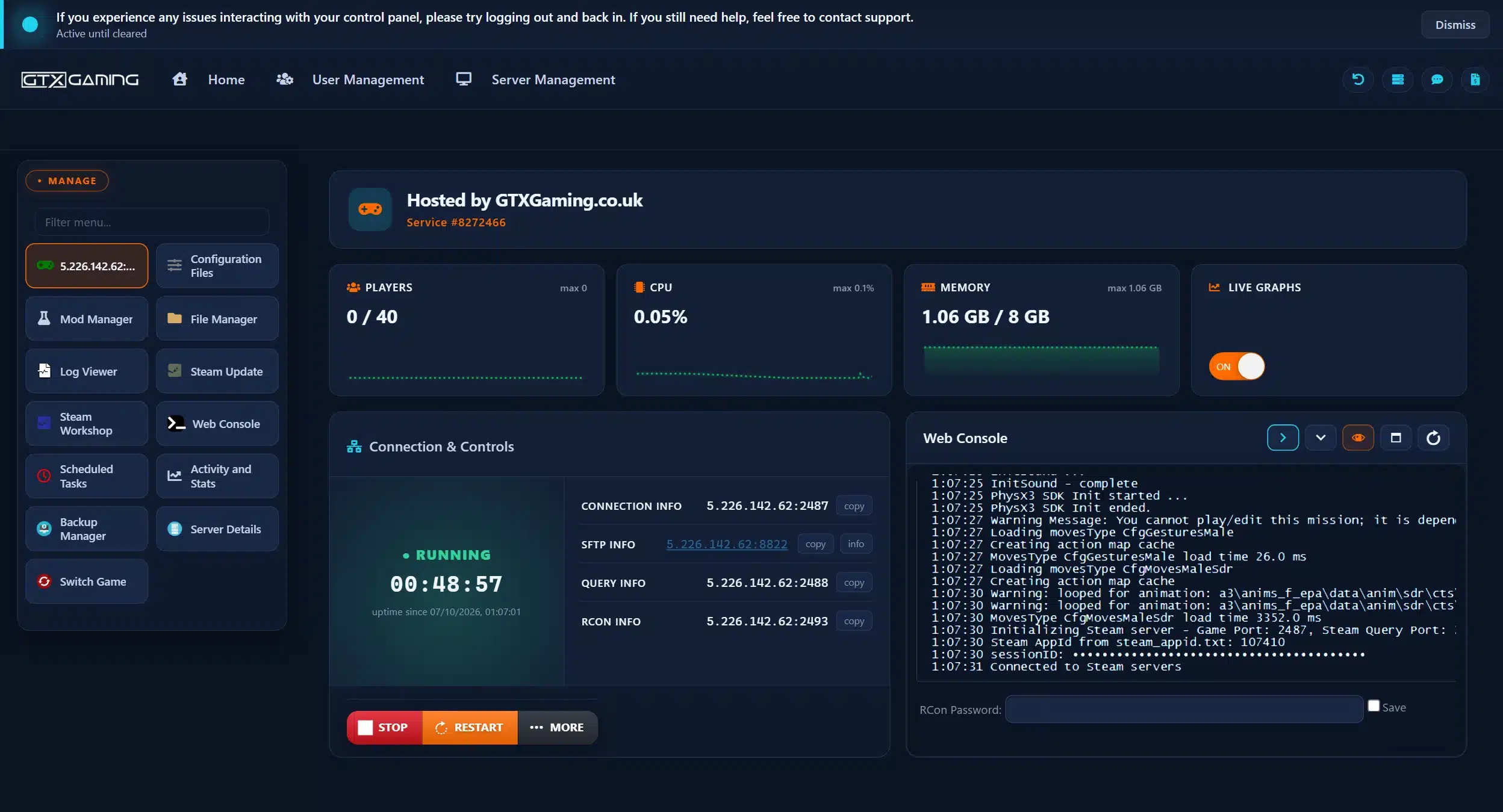
The other buttons cover daily running: Log Viewer and Activity and Stats (logs and live graphs of players, CPU and memory), Steam Update (game updates), Scheduled Tasks (restarts and backups), Backup Manager, Server Details (passwords and ports in one place) and Switch Game. Moving an existing server to us? Upload your server.cfg, missions, mod folders and keys with the File Manager or over SFTP, restart, and the server carries on where it left off.
Arma 3 reads its server settings from the file given with -config (the name server.cfg is only a habit) and its network tuning from the file given with -cfg, usually basic.cfg. On a GTX server both are under Configuration Files. The settings most owners change first, with the defaults from Bohemia's server config reference:
hostname = "My Unit Server"; the name in the server browser.password = ""; set one for a private server. passwordAdmin is the password for #login (admins).maxPlayers = 40; the default on a dedicated server is 64. The real limit is the lower of this and the mission's playable slots, and Headless Clients count as players.motd[] = { "Welcome", "Teamspeak and rules on our Discord" }; welcome lines, shown one by one every motdInterval seconds.BattlEye = 1; on by default. Every player then needs BattlEye running to join.verifySignatures = 2; the default: every addon is checked against its signature and your keys (keys). 0 switches the check off.kickDuplicate = 1; kicks a second player who joins with an ID that is already playing.persistent = 1; keeps a mission running after the last player leaves, for missions with base or instant respawn.voteThreshold = 0.33; the share of votes needed (default 0.5), and voteMissionPlayers, how many players must be connected before mission voting starts.disableVoN = 0; keeps in-game voice on; vonCodec = 1 uses the OPUS codec.forcedDifficulty = "regular"; Recruit, Regular, Veteran or Custom. A difficulty set in the mission rotation wins over it.class Missions the mission rotation (missions), and headlessClients[] / localClient[] for a Headless Client (Headless Client).battlEye = 1, verifySignatures = 2, allowedFilePatching = 0, the allowedLoadFileExtensions lists from its example, and both passwordAdmin and serverCommandPassword set to strong passwords.basic.cfg holds the network tuning: MaxMsgSend (default 128 messages per frame), MinBandwidth (default 131072 bps), MaxBandwidth, MaxSizeGuaranteed (512) and MaxSizeNonguaranteed (256). Bohemia warns that too optimistic bandwidth values can increase lag and CPU load, so change one value at a time and test it on a full server. The difficulty profile (server.Arma3Profile) holds the Custom difficulty options, such as third-person view, crosshair and name tags; they only apply when the server runs the Custom difficulty.
An Arma 3 server always runs a mission: a .pbo file named mission.terrain, for example MyOp.Altis.pbo, that sets the map, the factions and the rules. Upload missions to the server's MPMissions folder (on GTX with the File Manager or over SFTP). Then pick what runs:
#missions to choose from the list, or #mission MyOp.Altis Veteran to start one directly with a difficulty.server.cfg: class Missions { class Op1 { template = "MyOp.Altis"; difficulty = "Regular"; }; };. template is the mission name plus the terrain, without .pbo, and both template and difficulty are required. Write the keyword class in lower case, or the file will not parse.class Params inside each entry changes the mission's own parameters, such as respawn delay or tickets. randomMissionOrder = true; shuffles the rotation.persistent = 1, the -autoInit startup parameter starts the mission without waiting for the first player; it is skipped when persistent is not set.Official and Creator DLC missions use their template names too: S.O.G. Prairie Fire's first co-op mission, for example, is vn_coop_01.cam_lao_nam. Zeus, the free game master mode, lets a player place units, objectives and events live during a Zeus mission. To change a mission's files, unpack the .pbo with PBO Manager, edit it, repack it and upload it under the same name with the server stopped (editing a mission with PBO Manager).
forcedDifficulty, so set it in one place.Mods are where Arma 3 lives: Bohemia counts over 160,000 user-generated items on the Steam Workshop. A server loads them in two ways, according to Bohemia's startup parameters:
-mod=@CBA_A3;@ace loads mod folders that players need as well, separated by semicolons.-serverMod= loads server-side mods that are not broadcast to players.-mod paths relative to the Arma 3 folder, and watch file names: Bohemia notes that some mods, such as CUP Terrains, fail when their files contain capital letters.Keys and signatures. A signed mod ships a .bikey file. Copy it into the server's keys folder: with verifySignatures = 2 the server checks every addon against those keys, so players with unknown or unsigned addons cannot join. That is how a server keeps its mod list clean.
Workshop.mods in Configuration Files: it lists your Workshop mods and any server-only mods in one place..bikey into the keys folder with the File Manager.Most unit setups build on CBA_A3 (the base most big mods need), ACE3, a radio mod such as TFAR or ACRE2, and CUP's terrains, weapons and vehicles. Add mods a few at a time and test after each batch: when the server stops starting, you know which mod to look at. Running a complete mod framework instead, such as Exile or Altis Life? See mod servers.
Arma 3's DLC does not split a server's players. Under Bohemia's DLC restrictions, players who do not own a DLC still play alongside owners, with limits:
Creator DLC are third-party expansions published by Bohemia, and their data is not part of a regular install. Bohemia's Creator DLC page links free "compatibility data for non-owners" on the Steam Workshop for each pack, so non-owners can join a server that runs one, while the Creator DLC terrains stay owner-only. Since the 2.22 hotfix the Launcher offers that compatibility data when a non-owner tries to join. Server admins do not need to own a Creator DLC to host it.
On GTX, stop the server, install Arma 3 Creator DLC from the Mod Manager, add the DLC's code to the -mod= field in Workshop.mods or Start.bat, and set a DLC mission as the template (the Creator DLC guide has the mission names). The codes, each ending in a semicolon:
gm; and S.O.G. Prairie Fire: vn;csla; and Western Sahara: ws;spe;, Reaction Forces: rf; and Expeditionary Forces: ef;Arma 3 has two kinds of in-game admin. A logged-in admin types #login and the passwordAdmin password in chat; players whose IDs are listed in admins[] = { "<UID>" }; can type #login alone. A voted-in admin is chosen by the players and has fewer commands: Bohemia's example is that a voted admin can kick but only a logged-in admin can ban. Without BattlEye RCon, only one admin is logged in at a time: a second admin waits until the first types #logout, and a logged-in admin takes over from a voted one.
The commands you will use most, from Bohemia's server command list (always with the # in front):
#missions opens the mission list; #restart restarts the mission; #reassign starts over with role selection.#kick name, #exec ban "name" and #exec unban "UID"; in Arma 3, #exec needs the name, UID or player number in quotes.#lock and #unlock stop or allow new players joining.#restartserver, #restartserveraftermission and #shutdown; #init reloads the server config.#monitor 1 shows the server's performance every second; #monitor 0 stops it.BattlEye is Arma 3's built-in anti-cheat (BattlEye = 1). Its RCon lets you run admin commands without being in the game: Bohemia's BattlEye page sets RConPassword (and optionally RConPort, which must stay outside the game's ports 2302 to 2306) in BEServer_x64.cfg in the server's BattlEye folder, and then you connect with an RCon tool. BattlEye's GUID and IP bans are kept in bans.txt in the same folder. On GTX, the BattlEye configs are under Configuration Files, the RCon address is the RCON INFO line, and the Web Console has an RCon Password field to run commands from your browser.
admins[].Every AI unit on the map is simulated by the server, which is what makes big co-op ops heavy. A Headless Client is an extra Arma 3 instance with no player that takes AI calculations off the server. It is built into the game and the dedicated server, on Windows and Linux. How it works, from Bohemia's Headless Client page:
headlessClients[] (several are allowed); list the IP in localClient[] as well to give it unlimited bandwidth.-client -connect=<server IP> -password=<server password> and takes a free Headless Client slot.maxPlayers, it is excluded from signature checks, and -serverMod does not work with -client.We sell the Headless Client as its own server, Arma 3 Headless Client server hosting. To link it: stop the main server and add the Headless Client's IP to localClient[] and headlessClients[] in server.cfg; stop the Headless Client and put the main server's IP and game port in the -connect= field of its Start.bat (and the password in -password=); then start the main server first and the Headless Client second (full Headless Client setup).
An Arma 3 server's work is simulation: AI, scripts, vehicles and the players themselves. What Bohemia documents about server performance:
-limitFPS changes it (5 to 1000). Since update 2.20 an empty server limits itself to 30 FPS, and 2.22 added idleFPSLimit to server.cfg to set that empty-server cap yourself.-exThreads should not be used any more, and advises using -maxMem only if you have memory problems. Since 2.20 the 32-bit build is deprecated: run arma3server_x64.-loadMissionToMemory keeps the mission pre-processed in memory for the next players who join, which saves server CPU.#monitor 1 shows the server's performance in game; on GTX, Activity and Stats graphs players, CPU and memory over the day.Players: pick a slot for every player online at the same time, plus one for each Headless Client. The real limit is the lowest of your slots, maxPlayers and the mission's playable slots. Our Arma 3 plans, from the plans page:
Up to 5 GB RAM included. A squad, a small unit or friends' co-op nights.
Our recommended build for modded unit ops with ACE3 and CBA_A3.
Public servers, Antistasi and King of the Hill.
RAM tiers up to 32 GB, up to 100 GB of NVMe storage included, and High or Realtime CPU priority.
As a rule of thumb from our own servers: the 5 GB included with every server suits vanilla missions for a squad, while big mod sets such as ACE3, CUP or RHS, large terrains, persistent campaigns and lots of AI need more. We recommend 8 GB for a modded 40 player unit and 12 GB for 80 players or heavy mod lists. Low server FPS with lots of AI is processor work, not memory: cut the AI count or move it to a Headless Client, and add RAM when the memory graph fills up. Slots, RAM and CPU priority can be changed at any time from the Client Area.
Bohemia updates the dedicated server together with the game: each update note lists the Windows and Linux dedicated servers among the changes. Because players can only join a server on their own version, update the server on patch day. A safe routine on GTX:
Restarts. A Scheduled Restart task in Scheduled Tasks restarts the server on a timer, for example every 6 hours, and the automatic backups run alongside restarts. Arma 3 can also restart itself: missionsToServerRestart = 8; restarts the server process after eight mission ends, and #restartserveraftermission does it once from chat.
Backups. Keep copies of server.cfg, basic.cfg, the profile, MPMissions and keys, and for Exile, Altis Life or Epoch the database as well. On GTX the Backup Manager holds dated backups you can download, Restore Server puts the server back to one, and a Scheduled Backup task makes them for you. A reinstall wipes every server file but keeps your backups and MySQL databases, so download a backup first.
Some Arma 3 game modes are complete frameworks with their own mission file, server-side mods and a database. We run them as their own server types, each with its own page: Arma 3 Exile, Altis Life, Arma 3 Epoch, A3Wasteland and Desolation Redux. What owners ask us most:
-mod= line of Start.bat, install the matching Map Pack and pick the Exile template in config.cfg. Install the map first and test it before you add other mods.config.cpp twice: with a quality and price in class CfgExileArsenal, and in a category of class CfgTraderCategories.players table in the server's MySQL database (in the standard framework coplevel 0 to 7, mediclevel and adminlevel 0 to 5). Edit them with Navicat or phpMyAdmin; a player appears only after joining once.appendonly.aof and dump.rdb in the DB folder. Stop the server, edit a copy on your PC and upload both files back.Every framework's mission is a .pbo in mpmissions: keep an untouched copy before you edit it. All the step-by-step guides are listed under Exile servers and Altis Life and Epoch above.
Read the last lines of the Web Console. A missing semicolon or bracket in server.cfg, or Class with a capital C in the mission rotation, stops the config from parsing.
A mod's .bikey is missing from keys, or the player runs a different version of a mod. Update both sides and copy the key.
It needs a mod or a DLC the server has not loaded. Add it to -mod= (Creator DLC codes are above) and restart.
After a patch, the server and the players must be on the same version and branch. Update with Steam Update, or try Direct Connect with the CONNECTION INFO address.
Only one admin can be logged in at a time, and every command needs the #. Check passwordAdmin, or list your UID in admins[].
The mission must be built for it, its IP must be in headlessClients[], and the main server has to start first.
Run #monitor 1 and watch Activity and Stats. Reduce the AI, add a Headless Client, then look at RAM (performance).
Restore the last backup from before the update, then add the mods back one at a time. Still stuck? Our support team is there 24/7.
Install the free Arma 3 dedicated server with Steam (Library, Tools, Arma 3 Server) or SteamCMD (app_update 233780), write a server.cfg with your server name, passwords and player limit, start arma3server_x64 with -config=server.cfg and open UDP ports 2302 to 2306. Or rent one: on GTX it is set up when you order, and you edit the same files under Configuration Files in the game panel.
No. Bohemia's dedicated server guide says the server package is free and does not need a copy of Arma 3; SteamCMD only needs a Steam login, and Bohemia suggests a separate account with no purchases. Every player who joins needs their own copy of Arma 3.
Five UDP ports counted from the game port, 2302 by default: 2302 for the game and voice, 2303 for Steam queries, 2304 for the Steam master server, 2305 reserved for voice and 2306 for BattlEye. On a GTX server they are set up for you: players join the address under CONNECTION INFO in the game panel, and your game port may not be 2302.
Set passwordAdmin in server.cfg and type #login followed by that password in chat. Players whose UIDs are in admins[] can type #login alone. Without BattlEye RCon only one admin can be logged in at a time, so the next admin waits until the first types #logout.
Load mods players also need with -mod= and server-only mods with -serverMod=, and copy each mod's .bikey into the keys folder so signature checks let players with the same mods join. On GTX, press STOP, install mods with the Steam Workshop button (they are listed in Workshop.mods), copy the keys and press START.
The dedicated server default is 64, set with maxPlayers, and the real limit is the lower of maxPlayers and the mission's playable slots; Headless Clients count as players. GTX Arma 3 plans run from 10 to 120 slots: take one for every player online at the same time.
Bohemia lists 2 GB as the minimum and 4 GB as recommended for the bare server, but mods, players and AI push it up. Every GTX Arma 3 server includes up to 5 GB, which suits vanilla missions for a squad; we recommend 8 GB for a modded 40 player unit and 12 GB for 80 players or heavy mod lists.
A Headless Client is an extra Arma 3 instance with no player that takes AI calculations off the server. The mission must be built for it, the server lists its IP in headlessClients[], and it takes a player slot. Most vanilla and small co-op servers do not need one; we sell it as a separate Arma 3 Headless Client server.