






 DayZ
DayZ Palworld


 Enshrouded














I want my own ARK server
ASA or ASE, your PC or rented, and the first five steps to a world that stays up.
Start with the basics
Popular game servers
Your panels
ARK knowledge hub
Everything you need to run an ARK server that stays up, for ARK: Survival Ascended and ARK: Survival Evolved: your own PC or rented, the start line and ports, crossplay, settings, mods, clusters, admin, backups and RAM. From a team that has hosted game servers since 2008.
No guides match your search. Try a shorter word, or browse a topic above.
Not sure where to begin? Choose the one that sounds like you.
ASA or ASE, your PC or rented, and the first five steps to a world that stays up.
Start with the basicsSettings and maps, PvP or PvE, mods, admin and clusters.
Settings and mod guidesRAM per map, player counts, restarts and backups, and what to check first.
Performance guidesRanked by visits from Google Search, July to October 2026.
Prefer to read it in order? 16 short chapters, about 21 minutes in all, from picking ASA or ASE to keeping a busy cluster fast.
Start readingJoining, maps, mods and start options
4 guides
Good to knowASA dedicated servers run on Windows only, load CurseForge mods with -mods= and can let PC, Xbox and PS5 players in with crossplay.
Steam, Epic, the server list, files
9 guides
Good to knowARK's server list never shows every server at once, so join with the panel's JOIN button, Steam favourites or the open console command.
PvP, difficulty, maps, DLC, events, clusters
11 guides
Good to knowStop the server before you edit GameUserSettings.ini or Game.ini: a running server writes its own values back over your changes.
Admin password, whitelist, RCON, messages
7 guides
Good to knowAnyone who knows the admin password can use every admin command, so keep it private and give co-admins a whitelist entry or a panel sub-user.
Steam Workshop, auto-updates, ARK API
3 guides
Good to knowThe official wiki says the preaquatica branch (358.24) works with most Steam Workshop mods but not with Aquatica, and Studio Sirens keeps it available for good.
Saves, restarts, updates, rollbacks, wipes
12 guides
Good to knowARK saves every 15 minutes by default; scheduled tasks can add saves, warn players before restarts and keep the server on the current version.
RAM, CPU, slots, stats, logs
7 guides
Good to knowEvery GTX ARK: Survival Evolved plan includes 10 GB of RAM; big maps such as Genesis Part 2 and long mod lists need more, so upgrade before you switch.
Playing with friends, boss fights
2 guides
Good to knowThese guides are about ARK: Survival Evolved; ASA is a separate game, so check the in-game numbers there.
The complete guide
ARK: Survival Evolved is the original game, fully released in August 2017. ARK: Survival Ascended is Studio Wildcard's remake of it in Unreal Engine 5, released on Steam on 25 October 2023 and also on Xbox and PlayStation 5. Both are published by Studio Wildcard and Snail Games USA. A server runs one or the other, so settle this first: almost every step after it is different. The differences that matter for a server, from the official ARK wiki and the Steam store:
| What | ARK: Survival Ascended | ARK: Survival Evolved |
|---|---|---|
| Who can join | PC (Steam and Microsoft Store), Xbox and PlayStation 5, with crossplay | PC players on Steam and the Epic Games Store, with Steam and Epic crossplay |
| Mods | CurseForge, by Project ID | Steam Workshop, by mod ID |
| Server program (SteamCMD) | App 2430930, Windows only | App 376030, Windows or Linux |
| Install size | About 11 GiB | About 18 GiB |
| Memory, empty The Island | 8 to 10 GiB | 3.5 to 4.5 GiB |
| Default player limit | 70 (-WinLiveMaxPlayers) | 70 (MaxPlayers) |
In short: pick ASA if your group includes console players or wants the newest maps and creatures. Pick ASE for its long list of Steam Workshop mods and maps, or when the server has to run on less memory: an empty ASE map needs about half the memory of the same map on ASA, or less.
Both games are still updated, and every update you install on the server changes what your players need. The points that matter if you run or plan a server, from Studio Wildcard's and Studio Sirens' Steam announcements:
preaquatica branch available permanently. The official wiki says it installs build 358.24, works with most Steam Workshop mods but not with Aquatica, and players must switch their game to the same branch to join (mods).The dedicated server is a free download from Valve's SteamCMD tool with an anonymous login, so you do not need a second copy of the game. The official wiki's steps, for either edition:
C:\arkserver.steamcmd +force_install_dir C:\arkserver +login anonymous +app_update 2430930 validate +quit for ASA, or the same with 376030 for ASE.ShooterGameServer.exe TheIsland?SessionName=MyTribe?ServerPassword=joinpass?Port=7777?QueryPort=27015?MaxPlayers=20?ServerAdminPassword=adminpass. ASA needs a few changes, covered in the next chapter.ShooterGame/Saved folder before you do.| Question | Your own PC or home server | A rented server |
|---|---|---|
| Online when you are not | Only while the machine is on | 24/7 |
| Setup | SteamCMD, a start file, router and firewall | ASE: order it and start it in the game panel. ASA: a VPS or dedicated server you set up with the same steps |
| Memory | The server shares your PC's RAM with the game and Windows | Its own RAM, which you can upgrade |
| Your home address | Shared with everyone who joins | A datacentre address with DDoS protection |
| Cost | Free software, plus power and your connection | A monthly fee |
Our view after hosting game servers since 2008: if a few friends play while you are online, and your PC has memory to spare, start at home. ASA is the harder one to self-host, because an empty map already takes 8 GiB or more on top of the game you are playing. Rent when the world must stay up while you are offline, when the tribe grows, or when you want backups and restarts handled. We run ASE as a ready-made server on our ARK Server Hosting plans, ready within about 15 minutes of ordering. For ASA we offer Ryzen 9 VPS and dedicated machines that you set up yourself: see ARK: Survival Ascended Server Hosting.
ASA's server is set up the same way as ASE's, with a few rules of its own that catch out almost everyone the first time. From the official wiki's dedicated server setup and server configuration pages:
-port=7777, not ?Port=, or the server always uses 7777.?ServerAdminPassword= must be the last option joined with a question mark: anything after it is read as part of the password.-WinLiveMaxPlayers= replaces MaxPlayers in GameUserSettings.ini, which would otherwise be forced back to 70.TheIsland_WP, TheCenter_WP or ScorchedEarth_WP (maps).-mods= takes CurseForge Project IDs, and the server updates them every time it starts (mods).-ServerPlatform= sets who can join: PC, XSX, PS5, WINGDK (Microsoft Store) or ALL. With no option every platform is allowed (crossplay).Put together, a start line for one map looks like this: ArkAscendedServer.exe TheIsland_WP?SessionName=MyTribe?ServerPassword=joinpass?ServerAdminPassword=adminpass -port=7777 -WinLiveMaxPlayers=20 -ServerPlatform=ALL. The wiki recommends 4 logical cores for each ASA server, with fast single-core speed mattering more than the number of cores, and notes that Windows Server editions need an extra certificate step before an ASA server shows up in the list (troubleshooting).
On GTX, ASA runs on a Ryzen 9 Bare Metal VPS (8 assigned cores, 32 GB of DDR5 memory and 200 GB of NVMe storage, with Windows Server) or a Ryzen dedicated server. You connect with Remote Desktop and install the server with exactly the steps above, so the start line, ports and mods are entirely yours.
ARK: Survival Evolved servers on GTX run in our game panel and are ready within about 15 minutes of ordering. This is the order we tell new customers to work in:
Config.bat holds the map, total conversions, events and the crossplay switch. GameUserSettings.ini holds the server name (SessionName), passwords, PvP and active mods. Game.ini holds the advanced rules. Edit them with the Config Editor and press Save.open console command (how).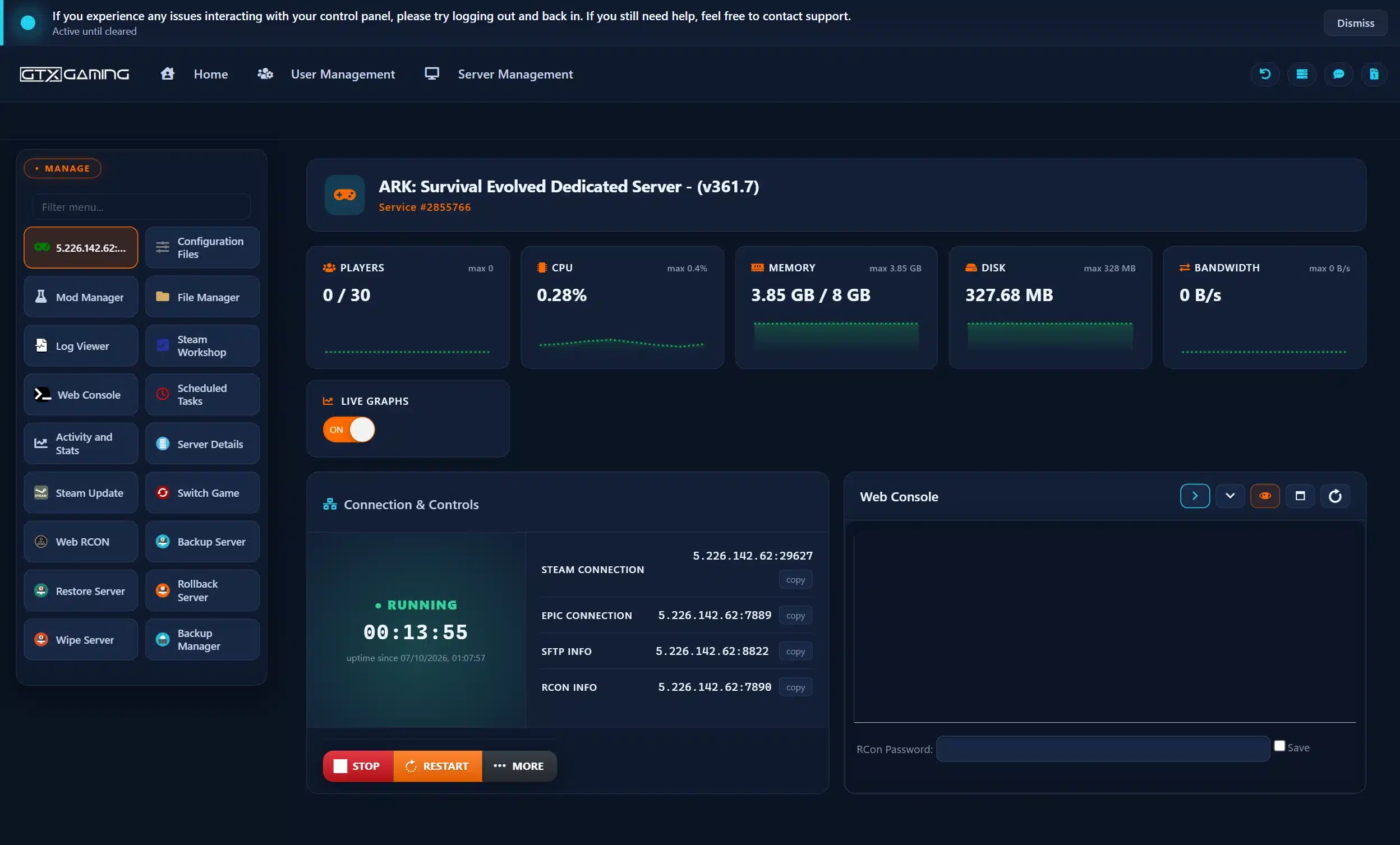
The in-game list is the least reliable way to find an ARK server. In our support team's experience it only shows part of the unofficial servers at any one time, and a brand-new server can take hours or even days to appear, so it is normal not to see yours at first. The ways in that always work:
-crossplay option also needs -PublicIPForEpic=; on GTX, enable CROSSPLAY at the bottom of Config.bat. Epic players then start a single-player session, open the console and type open followed by the Epic address and port.open followed by the IP and game port. It is unreliable on password-protected servers, and Xbox and PlayStation players cannot join by IP at all.-ServerPlatform decides who is let in, and console players can only use mods that support crossplay, so keep the mod list crossplay-friendly when they join.Most of what makes your ARK yours lives in two files in ShooterGame\Saved\Config\WindowsServer (LinuxServer on a Linux ASE server): GameUserSettings.ini for the everyday settings, mostly under [ServerSettings], and Game.ini for the advanced rules. The official wiki lists every option and its default. Stop the server before you edit either file.
ServerPVE in GameUserSettings.ini is the main switch: True means players cannot damage each other, their tames or their structures. Two settings in Game.ini fine-tune it: bDisableFriendlyFire stops damage inside a tribe, and bAutoPvETimer switches the server to PvE during set hours. PreventOfflinePvP protects a tribe's base once all its members have been offline for a while.
OverrideOfficialDifficulty sets how high wild dino levels go. Official servers run at 5.0, which gives most wild dinos a maximum of level 150; as a rule of thumb the maximum is 30 times your value. Dinos already on the map keep their levels, so run cheat destroywilddinos afterwards to respawn them. Your tames are not touched.
| Map | ASA name | ASE name |
|---|---|---|
| The Island | TheIsland_WP | TheIsland |
| The Center | TheCenter_WP | TheCenter |
| Scorched Earth | ScorchedEarth_WP | ScorchedEarth_P |
| Ragnarok | Ragnarok_WP | Ragnarok |
| Aberration | Aberration_WP | Aberration_P |
| Extinction | Extinction_WP | Extinction |
| Astraeos and Lost Colony (ASA only) | Astraeos_WP, LostColony_WP | - |
| Valguero, Genesis Part 1 and 2 | See below | Valguero_P, Genesis, Gen2 |
| ASE only | - | CrystalIsles, LostIsland, Fjordur, Aquatica |
Valguero and Genesis Part 1 came to ASA later (October 2025 and July 2026); check their start-line names on the wiki when you set them up. On a GTX ARK: Survival Evolved server you pick the map from the list in Config.bat instead of typing it. A Steam Workshop map is installed like a mod and then picked from the same list, and its mod ID must load first in your active mods. Events work much the same way: the -ActiveEvent= launch option turns on a seasonal event.
Admin rights in ARK come from the admin password. Set ServerAdminPassword in GameUserSettings.ini (or on the start line), start the server, join it, open the console and type enablecheats followed by the password. Admin commands then work for you in game; the official wiki keeps the full console command list.
AllowedCheaterSteamIDs.txt gets admin rights without typing the password. On GTX, a panel sub-user lets a co-admin manage the server without your login.-exclusivejoin launch option only lets in players on its allow list.RCONEnabled=True with an RCONPort (TCP 27020 by default) and an admin password lets an RCON tool connect. On GTX, the panel's Web RCON sends commands without any tool: SaveWorld saves the world, ListPlayers shows who is on with their IDs, and Broadcast messages everyone.Scheduled RCON tasks in the panel do the routine work for you: a broadcast every two hours, a saveworld every few minutes, or any command on a timer.
The two games take mods from different places, so a guide for one rarely works for the other.
ActiveMods in GameUserSettings.ini for you. Steam Workshop Installed has an Update All button, and a scheduled Workshop Update task keeps mods current every 12 hours.-automanagedmods option downloads and updates Workshop mods for you (Steam only), with the mod IDs listed in Game.ini.preaquatica branch (build 358.24) works with most Workshop mods, while it does not support Aquatica. Studio Sirens keeps that branch available for good, and players have to switch their game to it as well. Back up before you change branch.-mods=, separated by commas. The server downloads them and updates them every time it starts, so a restart picks up mod updates. -passivemods= loads a mod's data without its features, handy in a cluster.Whichever ARK you run, add one or two mods at a time and test before the next. When a server stops starting after a mod change, remove the newest mods first and read the log.
A cluster links two or more ARK servers so survivors can take their character, items and tames from one map to another. The wiki describes the same two launch options for both games: -clusterid= names the cluster and -ClusterDirOverride= points every server at one shared folder for the transfer data. Every map in the cluster needs the same two values and its own ports.
PreventDownloadSurvivors, PreventDownloadItems, PreventDownloadDinos and the matching PreventUpload settings under [ServerSettings] decide what can cross. -NoTransferFromFiltering keeps single-player and unclustered characters out.SaveWorld, stop them, and open a support ticket naming the servers. Our team links them and tells you when to start them again.ARK saves the world every 15 minutes by default (AutoSavePeriodMinutes). Everything that matters, from the world and tribes to player profiles, settings, logs and cluster data, lives in the ShooterGame/Saved folder, so a copy of that folder is a complete backup. The wiki recommends one before every server update.
saveworld every 5 to 10 minutes means less is lost after a crash.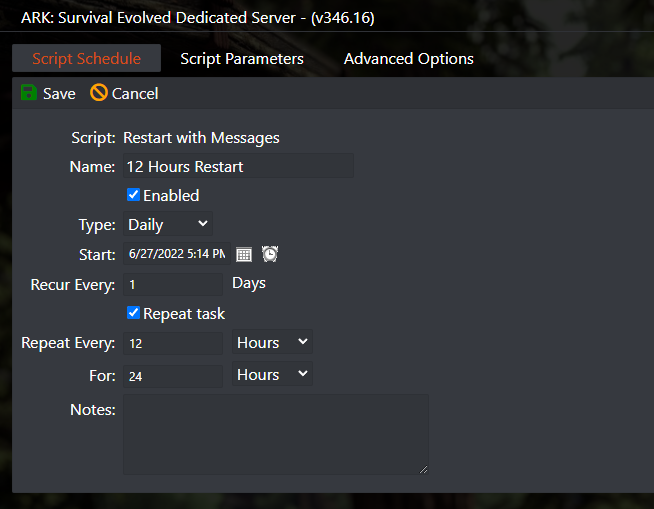
Memory is what an ARK server runs out of first. The official wiki measured each map on a new world with no players; a live world uses more with every player, base, tame and mod, and on ASE each connected player adds roughly 50 to 150 MiB.
| Map, empty server | ASA | ASE |
|---|---|---|
| The Island | 8 to 10 GiB | 3.5 to 4.5 GiB |
| The Center | 10.5 to 12 GiB | 3 to 4 GiB |
| Scorched Earth | 7.5 to 9 GiB | 3 to 4 GiB |
| Aberration | 8 to 10 GiB | 3 to 4 GiB |
| Extinction | 7 to 8.5 GiB | 3 to 4 GiB |
| Genesis Part 2 | - | 10 to 12.5 GiB |
Our sizing advice for the plans we sell, not an official figure:
| Server | What we suggest |
|---|---|
| ASE, a small tribe | The 10 GB of RAM every GTX ARK: Survival Evolved plan includes |
| ASE, about 30 players, Crystal Isles or Lost Island | 12 GB |
| ASE, about 60 players or Genesis Part 2 | 16 GB |
| ASE, 100 players or a big mod list | 24 GB, and 32 to 64 GB for the largest servers |
| ASA, one or two busy maps | 10 to 14 GB per map plus a few GB for Windows: the 32 GB Ryzen 9 VPS |
| ASA, three or more maps | A dedicated server with 64 GB or more |
Both games default to 70 players, and on GTX the slots you order set your ASE server's limit. The wiki recommends 4 logical cores per ASA server and notes that most of the game logic runs on one thread, so a fast core beats many slow ones. When a world gets slow, the order we try is: update the server and mods, check the memory graph in Activity and Stats, schedule a restart every 6 to 12 hours, remove the newest mod, then add RAM. On GTX you change RAM, CPU and slots from the Client Area under Upgrade/Downgrade Options without losing the world.
open plus the address. On ASA, also check the filters: Unofficial, Show Player Servers and, with a join password, Show Password Protected Servers.Ark.UseServerList 0 and a game restart.-port= with a dash, not ?Port=.Once the server is running, these guides help your tribe play it: getting your friends onto one server, and preparing for the boss fights. They are about ARK: Survival Evolved; ASA is a separate game, so numbers can differ there, and the in-game values always win. They are in one list: browse the play guides.
On a Windows PC or server, download it with SteamCMD (app 2430930, anonymous login), write a start line with the map, session name and passwords, use -port= for the port and keep ?ServerAdminPassword= as the last question-mark option, open UDP 7777 and 7778, then find it in the Unofficial list. Want it online 24/7? See ARK: Survival Ascended Server Hosting.
No. The ASA dedicated server is a Windows program, so it runs on a PC or a rented server, not on the console itself. Xbox and PlayStation 5 players join it through the Unofficial list with crossplay, as long as the server lets their platform in with -ServerPlatform.
UDP 7777 (game) and 7778 (always the game port plus one), UDP 27015 for the Steam server browser and, if you use RCON, TCP 27020. A second server on the same machine takes the next ports, such as 7779, 7780, 27016 and 27021.
The official wiki measured an empty ASA server at about 7 to 12 GiB depending on the map, and an empty ASE server at 3 to 5 GiB on most maps, up to 7 GiB on Crystal Isles and Lost Island and 10 to 12.5 GiB on Genesis Part 2. Players, bases, tames and mods add more, so leave room to grow.
On ASA on PC, open the console from the main menu and type open followed by the IP and game port; Xbox and PlayStation players join through the Unofficial list instead. On ASE, add the address to your Steam favourites, or on Epic start a single-player session and use the same open command.
ASE uses the Steam Workshop: add mod IDs to ActiveMods, or on GTX press Install in the panel's Steam Workshop. ASA uses CurseForge: list the Project IDs in -mods= on the start line and the server downloads and updates them each time it starts.
Set ServerAdminPassword, join the server, open the console and type enablecheats followed by the password. On ASE you can also add your Steam64ID to AllowedCheaterSteamIDs.txt to get admin rights without the password.
The list never shows every server and a new server can take a while to appear. On ASA, tick Show Player Servers on the Unofficial tab (and Show Password Protected Servers if you set a password) and wait for the server to finish starting. On ASE, join through Steam favourites or the panel's JOIN button meanwhile.