






 DayZ
DayZ Palworld


 Enshrouded
















On this pagePalworld difficulty: Casual, Normal, Hard and Custom
Customize the Palworld server hosting world settings to align with your desired experience. Explore Palworld with a comprehensive list of settings, along with recommended configurations for beginners, casual players, and seasoned veterans of survival games.
Palworld difficulty: Casual, Normal, Hard and Custom
Palworld has three difficulty presets and a Custom option. Casual focuses on exploring, catching Pals and base building with fewer survival hazards, and you keep your items when you die. Normal balances the two: you drop your items on death (since 1.0 your equipped gear stays with you) and have to fetch them. Hard is for hardcore survival: you lose your items and the Pals in your team when you die. Custom lets you change individual settings, for example making Pals easier to catch while slowing their health regeneration.
Pick the difficulty before you enter the world: on the world screen choose Change World Settings, move the slider under Difficulty Options and open Custom Difficulty for single settings. On a dedicated server you set the same values in PalWorldSettings.ini; see how to change your Palworld server settings.
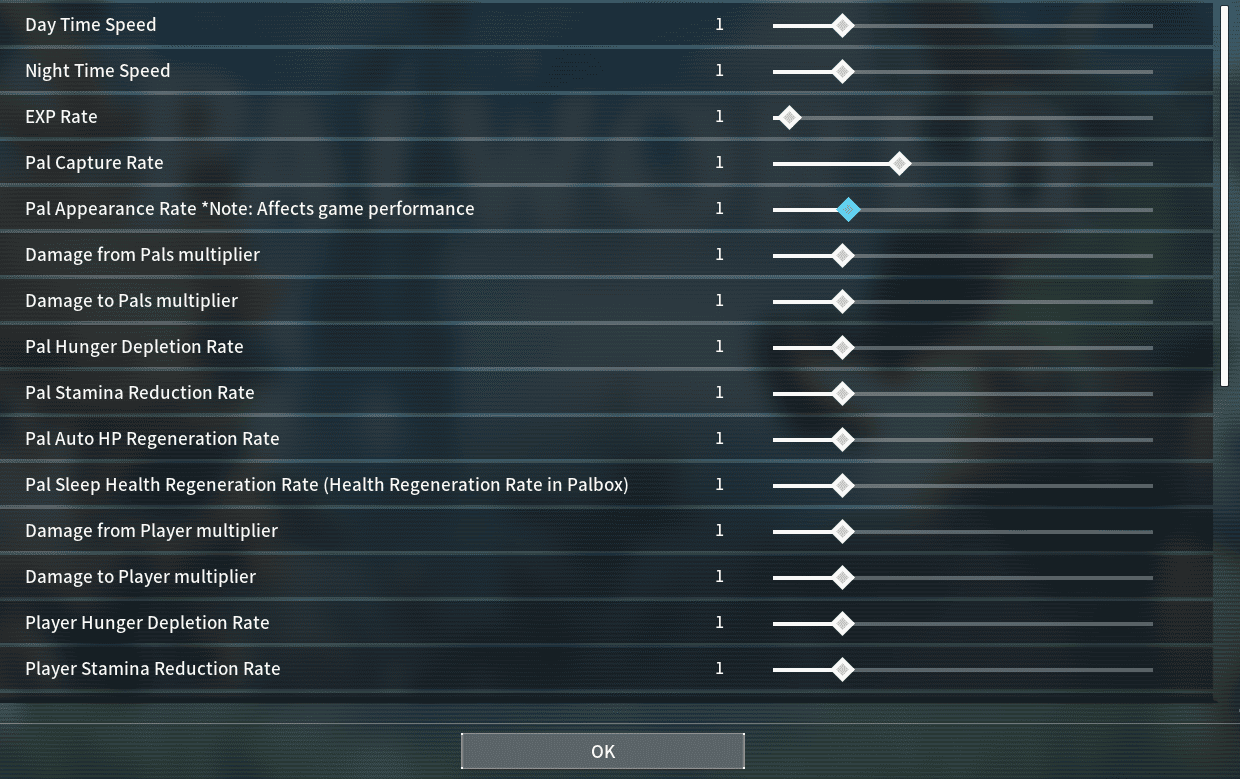
New to Survival Games: For an optimal introduction, select the settings suitable for newcomers to survival games.
Some Survival Experience: Experience Palworld with the default settings for a standard gameplay experience.
Veteran of Survival Games: Tailor the world settings to your preferences if you're a seasoned player of survival games, ensuring a challenging and immersive gaming experience.
New to Survival Games
For those unfamiliar with survival games, it is recommended to choose the Casual difficulty setting for an optimal beginner experience. Even after selecting a difficulty level, you retain the ability to customize all world settings, tailoring the gaming experience to your personal preferences.
Game Settings
| Difficulty | Casual |
| EXP Rate | 2 |
| Damage from Pals Multiplier | 0.3 |
| Pal Capture Rate | 2 |
| Damage from Player Multiplier | 2 |
| Damage to Player Multiplier | 0.5 |
| Player Hunger Depletion Rate | 0.3 |
| Player Stamina Depletion Rate | 0.3 |
| Dropped Items Multiplier | 2 |
| (h) to Incubate Massive Egg | 24 |
| Enable Raid Events | Disable |
Click a column heading to sort.
The configurations listed in the table above have been slightly modified from the game's suggested Casual difficulty settings to enhance the experience for beginners.
Some Survival Experience
The suggested settings provided by the game for the Standard experience are satisfactory as they are. However, you still have the freedom to customize a few settings according to your preferences.
Game Settings
| Option | Recommended Setting |
|---|---|
| Difficulty | Normal |
| Pal Appearance Rate | 2 |
| Death Penalty | Drop all Items except Equipment |
We suggest enhancing your gaming experience by fine-tuning the settings outlined in the table above. Please be mindful that increasing the Pal Appearance Rate might have an impact on performance.
Veteran of Survival Games
If you're a veteran or a seasoned player of survival games, you might want to consider choosing the hardest difficulty Palworld has to offer to give you more challenge in-game.
Game Settings
| Option | Recommended Setting |
|---|---|
| Difficulty | Hard |
| Pal Appearance Rate | 2 |
| Damage to Pals | 0.8 |
| Dropped Items Multiplier | 1 |
| Gatherable Objects Respawn Interval | 2 |
Even on the most challenging difficulty level, you retain the freedom to modify world settings to suit your preferences. We recommend adjusting the settings listed in the table above to make the experience more demanding yet ultimately rewarding.
More Palworld guides: Palworld Game Server Admin Commands, Palworld: FPS Boost & Max Performance and Palworld Official Troubleshooting Guide.
Running your own server? Our support guides show how to change your Palworld server settings.
Recommended Settings for Each Difficulty
Game Settings
| Day Time Speed | 1 | 1 | 1 |
| Night Time Speed | 1 | 1 | 1 |
| EXP Rate | 2 | 1 | 0.5 |
| Pal Capture Rate | 2 | 1 | 1 |
| Pal Appearance Rate | 1 | 1 | 1 |
| Damage from Pals Multiplier | 0.5 | 1 | 2 |
| Damage to Pals Multiplier | 2 | 1 | 0.5 |
| Pal Hunger Depletion Rate | 0.5 | 1 | 1.5 |
| Pal Stamina Reduction Rate | 0.5 | 1 | 1.5 |
| Pal Auto HP Regeneration Rate | 2 | 1 | 0.5 |
| Pal Sleep Health Regeneration Rate | 2 | 1 | 0.5 |
| Damage from Player Multiplier | 2 | 1 | 0.7 |
| Damage to Player Multiplier | 0.5 | 1 | 4 |
| Player Hunger Depletion Rate | 0.3 | 1 | 1 |
| Player Stamina Reduction Rate | 0.3 | 1 | 1 |
| Player Auto HP Regeneration Rate | 2 | 1 | 0.6 |
| Player Sleep Regeneration Rate | 2 | 1 | 0.6 |
| Damage to Structure Multiplier | 2 | 1 | 0.7 |
| Structure Deterioration Rate | 0.2 | 1 | 1 |
| Maximum Number of Dropped Items in a World | Max | Max | Max |
| Gatherable Items Multiplier | 3 | 1 | 0.8 |
| Gatherable Objects HP Multiplier | 0.5 | 1 | 1 |
| Gatherable Objects Respawn Interval | 0.5 | 1 | 2 |
| Dropped Items Multiplier | 2 | 1 | 0.7 |
| (h) to Incubate Massive Egg | 24 | 36 | 36 |
| Enable Raid Events | Disable | Enable | Enable |
| Death Penalty | No Items Dropped | Drop all Items except Equipment | Drop all Items and all Pals on Team |
| Max Number of Guilds | 20 | 20 | 20 |
No row matches. Try a shorter word.
Click a column heading to sort.
Keep playing: more Palworld guides
- CrossplayPalworld pal trading: swap Pals with friends4 min read
- PlayPalworld Pals Guide: The Full List52 min read
- SettingsBest world settings for Palworld4 min read
- PlayPalworld Coal Guide: All Coal Farming Locations Revealed!3 min read
- PlayPalworld Stairs 101: A Beginner's Guide to Building Stairs3 min read
- PlayPalworld Ore Locations Revealed! Farm Rare Materials Easily3 min read