






 DayZ
DayZ Palworld


 Enshrouded
















Quick answer
To play Minecraft with friends, everyone needs the same edition (Java or Bedrock) and the same version. On the same Wi-Fi, open your world to LAN on Java, or host a LAN game on Bedrock. Anywhere else, use a Realm (Mojang's subscription server, up to 10 friends online with you), join a server by its address, or run your own server on your PC or with a host. On consoles, multiplayer needs the console's online subscription.
On this pageWhich way should you play?
- Which way should you play?
- Before you start: same edition, same version
- How to play Minecraft with friends on the same Wi-Fi
- How to play Minecraft with friends online on Bedrock
- How to play with friends on Minecraft Java
- Realms: Mojang's always-on server
- How to join a Minecraft server
- Run your own Minecraft server for friends
- Can Java and Bedrock players play together?
- How to play modded Minecraft with friends
- Friend can't join? Check these
- Playing Minecraft with friends FAQ
Below: which way suits your group, step-by-step LAN, Realms and server instructions for Java, Bedrock and consoles, how Java and Bedrock players can play together, and what to check when a friend can't connect.
Checked against Minecraft Java Edition 26.3 and Bedrock Edition 26.52, October 2026.
Which way should you play?
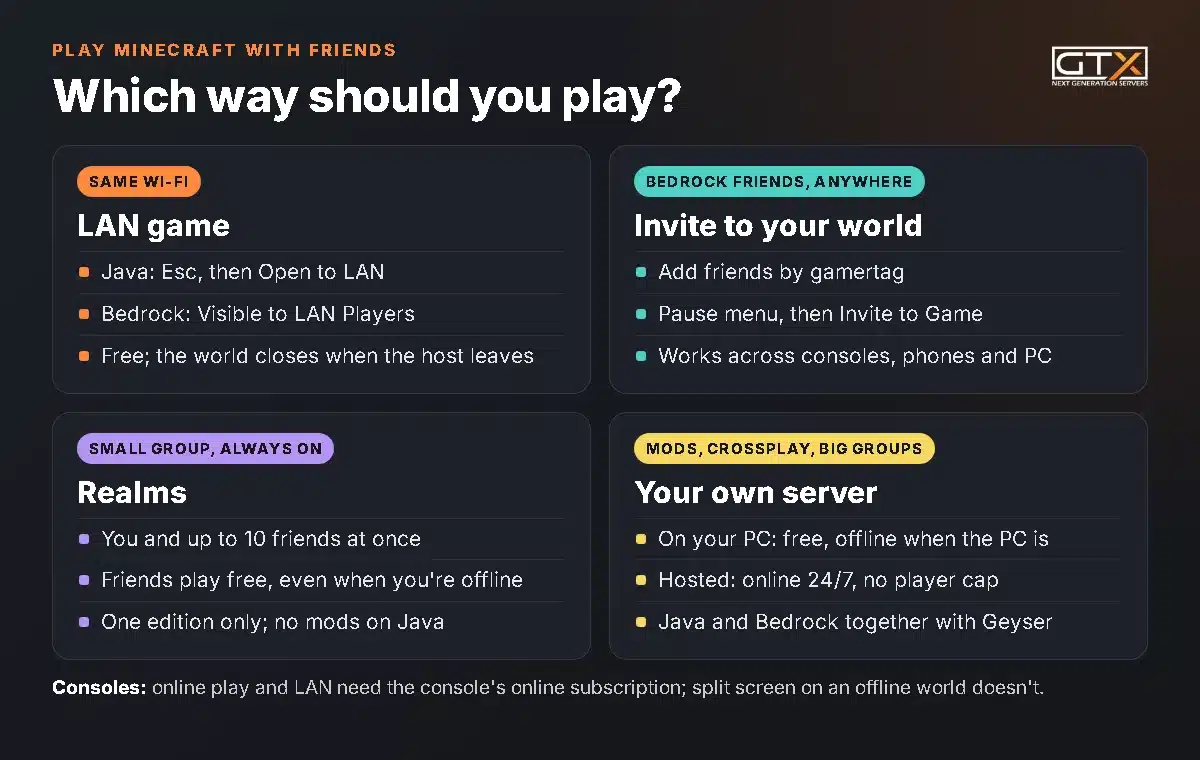
Five routes cover every group. Two questions decide it: are your friends in the same house, and does the world need to stay online when you're not playing?
| Way | Best for | Friends in other homes | World online without you | Mods |
|---|---|---|---|---|
| LAN (same Wi-Fi) | Family, flatmates, a LAN party | No | No | Java mods, if everyone has the same ones |
| Invite to your world (Bedrock) | Bedrock friends on any device | Yes | No | Add-ons |
| Realms | Small groups who want no setup | Yes | Yes | No mods on Java Realms |
| A server on your PC | Learning, or one or two friends | Yes, with port forwarding | Only while your PC is on | Yes |
| A hosted server | Groups that play most days, modpacks, bigger groups | Yes | Yes, 24/7 | Yes, mods and plugins |
Before you start: same edition, same version
Minecraft comes in two editions, and they don't mix on their own:
- Java Edition runs on Windows, Mac and Linux. Java players can only play with other Java players. It's the edition with mods and plugins.
- Bedrock Edition runs on Xbox, PlayStation, Nintendo Switch, phones, tablets, Chromebooks and Windows. Bedrock players can play together across all of those devices.
Not sure which one you have? On consoles and phones it's Bedrock, and "Minecraft for Windows" is Bedrock too. The PC version sold today (Minecraft: Java & Bedrock Edition for PC) includes both, so PC players can switch to whichever edition their friends use.
Three more things to line up before anyone tries to join:
- The same version. Your game has to match the version of the world or server you join. Snapshot and preview builds usually can't join normal servers.
- A Microsoft account for every player. You need one to play multiplayer.
- The console's online subscription on Xbox, PlayStation and Switch (Xbox Game Pass, PlayStation Plus or Nintendo Switch Online). According to the Minecraft Wiki, that includes LAN games on consoles.
How to play Minecraft with friends on the same Wi-Fi
LAN (local network) play is free and needs no server: one player hosts the world and everyone on the same network joins it. The world closes when the host stops playing.
Java Edition: Open to LAN
- The host loads a world, presses Esc and clicks Open to LAN.
- Choose the game mode for the other players, whether cheats (commands) are allowed, and a port if you want a fixed one. Leave the port empty and the game picks one. Click Start LAN World.
- Friends click Multiplayer. The world appears under "Scanning for games on your local network". Select it and click Join Server.
If the world doesn't appear, a friend can use Direct Connection with the host's local IP address and the port the game shows in the host's chat, for example 192.168.1.20:51234. A firewall on the host's PC is the usual blocker: when Windows asks, allow Java on private networks.
Bedrock Edition: LAN game
- The host opens the world's settings and, under Multiplayer, checks that Multiplayer Game and Visible to LAN Players are on. Then load the world.
- Friends on the same network select Play, open the Friends tab and pick the world from the LAN games.
LAN players don't have to be on the host's friends list; being on the same network is enough.
Split screen on consoles
On Xbox, PlayStation and Switch, up to four players can share one screen in Bedrock Edition. Connect another controller and press its Menu, + or Options button to join the running game; each player picks their own profile. If the world is a multiplayer game, every profile needs the console's online subscription. Split screen isn't available on PC, phones or Java Edition.
How to play Minecraft with friends online on Bedrock
Bedrock has a friends list, so you can host a world for friends anywhere, from any Bedrock device:
- Add your friends: select Play, open the Friends tab, select Add Friend and type their gamertag.
- Load your world, open the pause menu and select Invite to Game.
- Tick the friends you want and select Send invites. They accept the invite, or join from their own Friends tab.
Phones, Xbox, PlayStation, Switch and Windows can all join the same world. The catch: the world only runs while the host is playing, so nobody can carry on without you. That's what Realms and servers are for.
How to play with friends on Minecraft Java
Java Edition has no friends list or invite button. Once your friends aren't on your Wi-Fi, there are three ways to play together:
- A Realm for Java: Mojang's own server for you and up to 10 friends at once (next section).
- The same server: a public server or one a friend runs. You only need its address (see how to join a server below).
- Your own server, on your PC or with a host. You give your friends the address and decide who gets in.
Java players on Windows, Mac and Linux can all play together. Bedrock players on consoles and phones can't join a Java world or Realm, but they can join a Java server that runs Geyser (more on that below).
Realms: Mojang's always-on server
Realms is a subscription from Mojang that keeps your world online on their servers. Only the owner pays: invited friends play free, and they can play the active world even when the owner is offline. Every Realm has three world slots.
| Plan | Edition | Players at the same time |
|---|---|---|
| Realms | Bedrock | You and 2 friends |
| Realms Plus | Bedrock | You and 10 friends, plus the Marketplace Pass catalogue |
| Realms for Java | Java | You and 10 friends |
You can invite more people than that; the limit is how many play at once. On Bedrock, select Play, the edit button next to your Realm and Members, then invite friends by gamertag or send them a share link. On Java, open Minecraft Realms from the main menu, configure your Realm, open Players and invite friends by their player name.
What Realms can't do: a Realm only works within one edition, Java Realms can't run mods or plugins, and you get far fewer settings than on a server. If mods are the plan, our guide to whether you can mod a Realm covers the options. When your group outgrows 10 players, compare Realms and your own server side by side.
How to join a Minecraft server
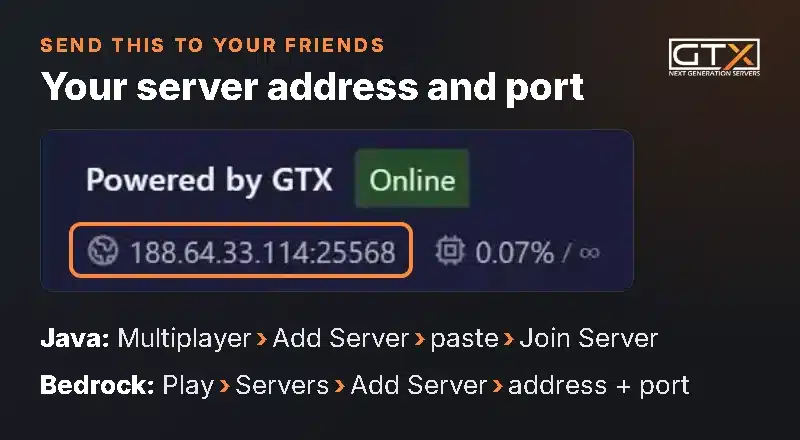
Every server has an address: a name like play.example.com or an IP address (numbers and dots), sometimes followed by a port such as :25568. Ask the server owner for it, then:
Java Edition
- Click Multiplayer on the main menu. The first time, read the online safety note and click Proceed.
- Click Add Server, give it any name and paste the full address, port included. Click Done.
- Select the server in the list and click Join Server. Direct Connection joins once without saving it.
Bedrock Edition on PC, phone and tablet
- Select Play and open the Servers tab.
- Scroll to the bottom and select Add Server. Enter a name, the address and the port (the Bedrock default is 19132).
- Select Play to connect now, or Save to keep it in your list.
Xbox, PlayStation and Switch
Console versions of Bedrock can't add a server by address. They can join the featured servers in the Servers tab, Realms, and games on the same LAN. Community workarounds that send the console through a custom DNS (BedrockConnect is the best known) exist, but Mojang doesn't support them. For a group with console players, a Realm or an invite to a Bedrock world is the simple route.
Run your own Minecraft server for friends
A server has no player cap from Mojang, runs any mods or plugins you like, and puts every setting in your hands. You can run one yourself for free or rent one.
On your own PC (free)
Mojang gives away the Java server (server.jar) and the Bedrock Dedicated Server for Windows and Ubuntu. In short: install the right Java version (Java 25 for Minecraft 26.x), start the server once, set eula=true in eula.txt, start it again, and forward the port on your router to your PC (25565 TCP for Java, 19132 UDP for Bedrock). Friends then join with your public IP address.
It works, with trade-offs: the world is offline whenever your PC is off or asleep, everyone you invite gets your home IP address, your upload speed limits how many can play smoothly, and some internet providers (those using CGNAT) make port forwarding impossible. Our comparison of a free home server and a hosted one goes through both sides.
A hosted server
A hosted server runs in a data centre, so it's online around the clock, and the address you share isn't your home connection. On a GTX server:
- Choose Java or Bedrock and a location near your group when you order. The server is set up straight away.
- Copy the server address from the top of the game panel and send it to your friends.
- Make yourself operator and turn on the whitelist before the address goes anywhere public: admin and whitelist on Minecraft.
- Want a friend to help run it? Add them as a sub-user with only the permissions they need, instead of sharing your password.
Every GTX plan has unlimited player slots, so the memory you pick is what you size for your group and your mods.
Can Java and Bedrock players play together?
Not on their own: Java and Bedrock can't join each other's worlds, LAN games or Realms. The fix is a Java server running Geyser, a free community project that lets Bedrock players join Java servers:
- Geyser runs as a plugin on Paper or Spigot servers, as a mod on Fabric or NeoForge servers, or on a proxy.
- Bedrock players connect to the server's address on Geyser's port, 19132 UDP by default.
- With Floodgate added, Bedrock players don't need a Java account at all.
- Only server-side mods work for Bedrock players, so crossplay suits plugin servers better than modpacks.
Phones, tablets and Windows can add a Geyser server directly; console players need the same workarounds as for any other server. On GTX, our support team can help you set Geyser up, and every step, the ports and the console workarounds are in our guide to Java and Bedrock crossplay with Geyser. More on picking an edition in our Java or Bedrock server guide.
How to play modded Minecraft with friends
Mods are a Java Edition thing (Bedrock has add-ons instead), and every player needs the same mod loader, the same mods and the same versions as the world they join. For a quick session on the same Wi-Fi, the host installs a modpack, opens the world to LAN, and friends with the same pack join as usual. For a modded world your group can play any time, you need a server, because Realms can't run mods. Our step-by-step guide on how to make a modded Minecraft server covers loaders, modpacks, Java versions and RAM.
Friend can't join? Check these
- Different editions. A Bedrock player can't see a Java world, and the other way round, unless the server runs Geyser.
- Different versions. An "outdated" or "incompatible" client or server message means the versions don't match. Update the game, or set the server to the version your group plays.
- Wrong address or port. Copy the whole address, including the part after the colon.
- The whitelist. If the server says you aren't whitelisted, the owner needs to add your player name.
- LAN world not showing. Check both devices are on the same network (guest Wi-Fi often keeps devices apart) and that the host's firewall allows Minecraft.
- Bedrock settings. Multiplayer Game must be on in the world's settings, and console players need their online subscription.
Playing Minecraft with friends FAQ
Can you play Minecraft with friends for free?
Yes, once everyone owns the game. LAN games, inviting friends to a Bedrock world on PC or phone, and a server on your own PC cost nothing extra. Realms and hosted servers are paid, and on consoles, playing online or over LAN needs the console's online subscription (split screen on an offline world doesn't).
How do I add friends on Minecraft PC?
In Bedrock Edition on Windows, select Play, open the Friends tab, select Add Friend and type their gamertag. Java Edition has no friends list: you play together on the same server, LAN world or Realm instead.
How many friends can play Minecraft together?
A Realm takes you and 2 friends at once (Bedrock Realms) or you and 10 (Realms Plus and Realms for Java). A server has no limit from Mojang; memory and your connection decide. Every GTX plan has unlimited player slots.
Can my friends play on my world when I'm offline?
Only on a Realm or a server. A LAN world, or a Bedrock world you invite friends into, closes when you stop playing. On a Realm, invited friends can play the active world any time.
Can PC and console players play Minecraft together?
Yes, on Bedrock: Windows, Xbox, PlayStation, Switch and phones play together through invites, Realms and featured servers. Java on PC can't play with consoles unless the Java server runs Geyser, and console players then need a workaround to reach it.
Do my friends need to pay for my Realm?
No. Only the Realm owner subscribes; invited friends play free. They still need their own copy of Minecraft in the same edition as the Realm.
We've hosted game servers since 2008. When your group wants a world that's always on, with mods or room for everyone, our Minecraft server hosting runs Java and Bedrock with unlimited player slots and one-click modpacks. For everything else about running a server, from the first install to backups and admin commands, read our Minecraft server guide.