






 DayZ
DayZ Palworld


 Enshrouded















Quick answer
To make a modded Minecraft server, pick one mod loader (NeoForge, Forge or Fabric) and one Minecraft version, install that loader's server, put your mods or the modpack's server files in the server's mods folder, set the Java version that Minecraft version needs (Java 25 for 26.x, Java 21 for 1.20.5 to 1.21.11), accept the EULA and start it. Every player then installs the same mods. On a GTX server, the Modpacks page does the install in one click.
On this pageWhat you need before you start
- What you need before you start
- Step 1: Choose your mod loader
- Step 2: Pick a modpack or your own mods
- Step 3: Install the modded server
- Step 4: Set the right Java version
- Step 5: Get your friends connected
- How much RAM does a modded Minecraft server need?
- Modded server won't start? Check these
- Modded Minecraft server FAQ
Below: how to choose a loader, which mods belong on the server and which don't, the install on a hosted server and on your own PC, the right Java version and RAM, and what to check when a modded server won't start.
Checked against Minecraft Java Edition 26.3 and the NeoForge, Fabric and Forge server installers, October 2026.
What you need before you start
- Minecraft Java Edition. Mods from CurseForge and Modrinth are Java mods. Bedrock (consoles, phones, Windows Bedrock) uses add-ons instead and can't run them.
- One loader and one Minecraft version for everything. A mod is built for one loader and one game version. A Fabric mod won't load on NeoForge, and a mod for 1.21.1 won't load on 26.3.
- Enough memory. Mods use far more RAM than vanilla: plan on 6 GB for a small modpack and 8 to 12 GB for the big ones (details below).
- A backup if the server already has a world you care about. Installing a modpack can wipe the server's files.
Step 1: Choose your mod loader
The loader is the part that lets Minecraft load mods. If you're installing a modpack, the pack decides for you: its page says which loader and version it uses. If you're building your own mod list, choose the loader first and only pick mods made for it.
| Loader | Choose it when | Good to know |
|---|---|---|
| NeoForge | You want big content mods and current modpacks | A fork of Forge since 2023, with releases up to Minecraft 26.3 |
| Fabric | You want lighter mods, performance mods and quick updates to new versions | Most Fabric mods also need the Fabric API mod in the mods folder |
| Forge | Your modpack or mods are built for Forge, which many packs for older versions are | Still updated (it has builds for 26.3), but Forge and NeoForge mods aren't interchangeable |
| Paper (plugins) | You want plugins, not mods: players join with a normal game | Plugins aren't mods. See our server types guide |
There are hybrid servers that run mods and plugins together (Mohist, Arclight), but expect more things to break. For a first modded server, stick to one loader.
Step 2: Pick a modpack or your own mods
A modpack (easiest)
A modpack is a tested set of mods, configs and versions that already work together. Many packs publish separate server files on their download page; that's the version you put on the server. Your friends install the normal pack through a launcher such as CurseForge, Modrinth or Prism.
Your own mod list
Fine for a handful of mods, but you're the one testing that they get on. For every mod, check three things on its page: the loader, the Minecraft version, and where it runs. Mods fall into three groups:
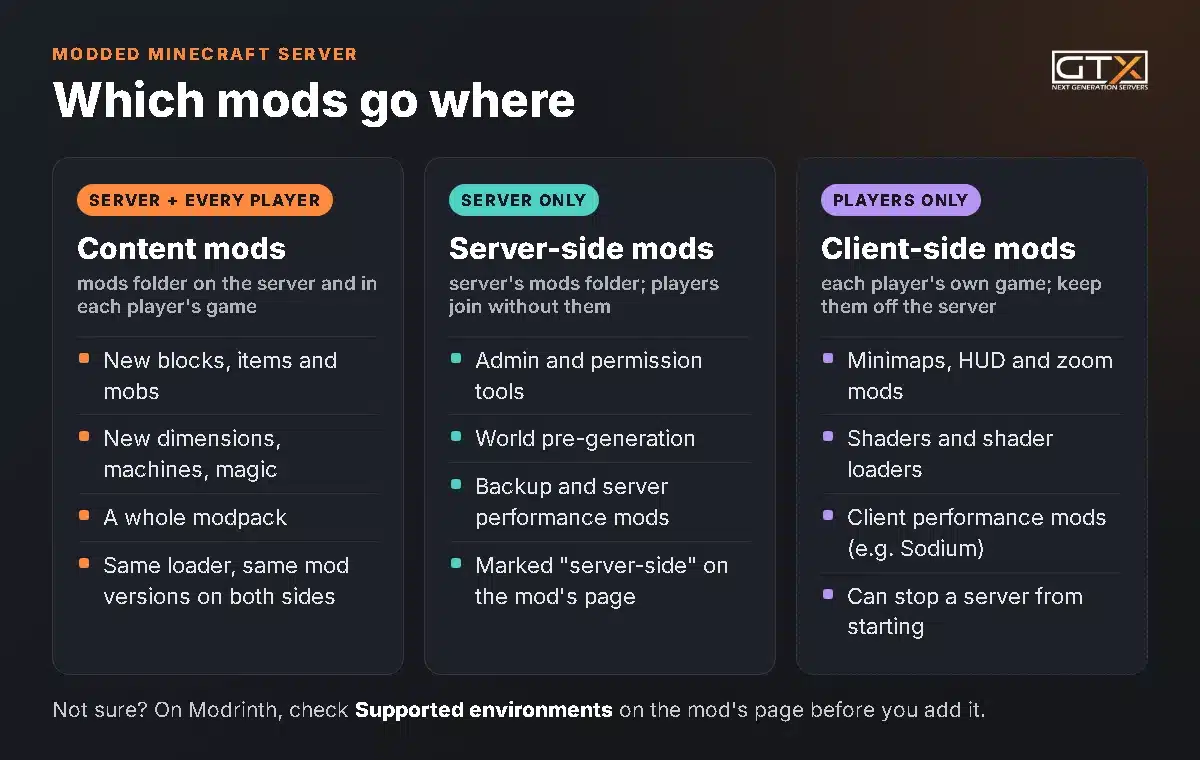
On Modrinth, each mod lists its Supported environments. Sodium, for example, is marked client-side only: it belongs in your own game, not on the server. Client-side mods (minimaps, shaders, HUD and zoom mods) can stop a dedicated server from starting, so leave them out of the server's mods folder. Want ideas? Our picks of survival mods for hardcore players, magic mods and building mods.
Step 3: Install the modded server
On a GTX server: one-click modpack
The quickest route, because the panel installs the right loader for you:
- Log in to the game panel and click Manage Server.
- Open Modpacks in the left menu and choose a provider: CurseForge, Modrinth, Feed The Beast, Technic, ATLauncher or Voids Wrath.
- Search for the pack and click its download button.
- Pick the pack version your friends will play. Switch on Delete files for a clean install: it removes everything on the server, your world included, so make a backup first if you want to keep it.
- Click Install modpack, wait until you're back on the Modpacks page, then start the server.
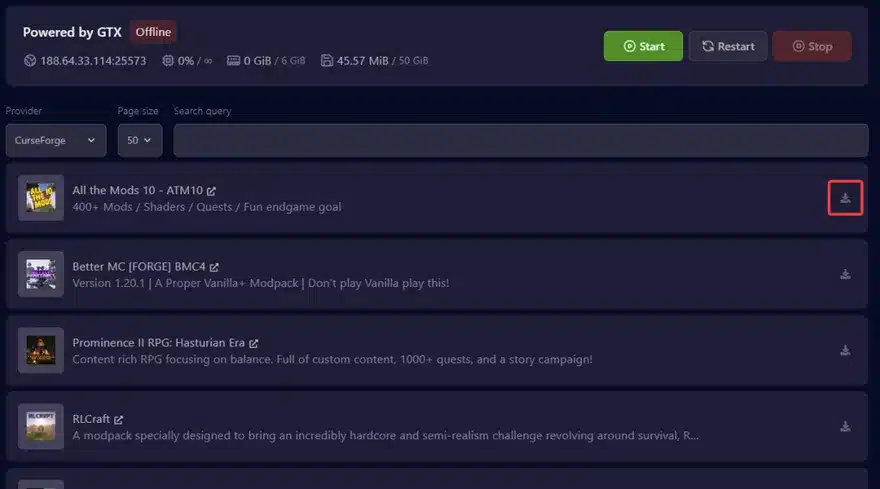
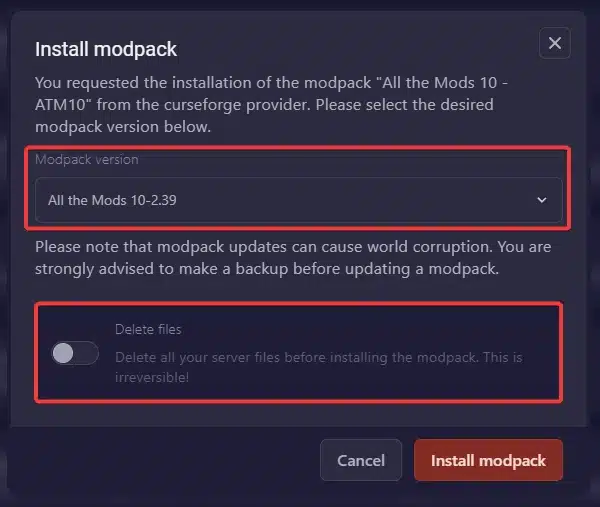
Full steps with every screen: installing a modpack on your Minecraft Java server. A pack that isn't in the list can be uploaded from its server files instead: install any modpack from its server files.
On a GTX server: your own mods
- Back up, then open Versions, choose NeoForge, Fabric or Forge and the Minecraft version, and install it.
- Start the server once so it creates its folders, then stop it.
- Upload your mod
.jarfiles to themodsfolder with the Files page or over SFTP (connect to your server with SFTP). On Fabric, add Fabric API too. - Start the server and watch the Console until it says
Done.
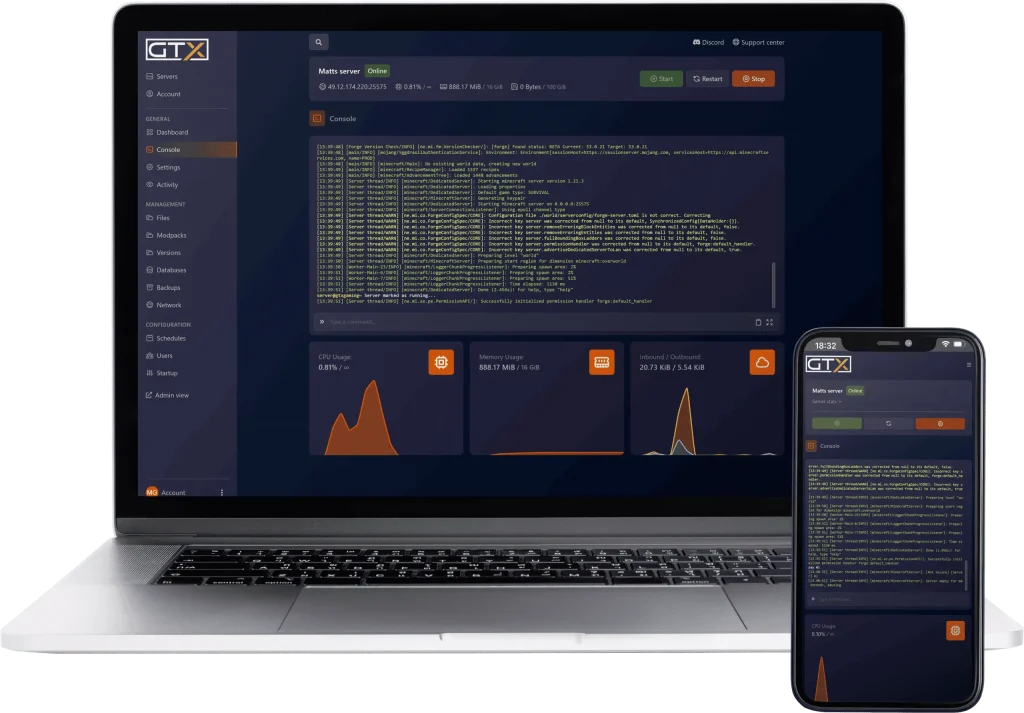
On your own PC
Running it at home is free and a good way to learn. Make a new, empty folder for the server and install the Java version from Step 4 first.
- NeoForge: download the installer from neoforged.net and run it from that folder with
java -jar neoforge-<version>-installer.jar --installServer. Start the server withrun.bat(Windows) or./run.sh(Linux, macOS). Set its memory inuser_jvm_args.txt, for example-Xmx6G. - Forge: run the installer from the official Forge download site, choose Install server and point it at the folder. Recent versions also create
run.bat,run.shanduser_jvm_args.txt. - Fabric: download the server launcher from fabricmc.net for your Minecraft version and start it with the command shown on that page, adding the memory you want, for example
-Xmx6G.
Whichever you choose, the first start stops straight away and creates eula.txt. Open it, change eula=false to eula=true to accept Mojang's EULA, put your mods in the new mods folder and start it again. Friends outside your home also need port 25565 forwarded on your router, and the server is only online while your PC is. Our guide to running a server on your PC or hosted covers both sides honestly.
Step 4: Set the right Java version
A wrong Java version is the most common reason a modded server won't start. Modpacks and loaders follow the Minecraft version they're built for:
| Minecraft version | Java version |
|---|---|
| 26.1 and newer | Java 25 |
| 1.20.5 to 1.21.11 | Java 21 |
| 1.18 to 1.20.4 | Java 17 |
| 1.17 and 1.17.1 | Java 16 |
| 1.12 to 1.16.5 | Java 8 |
On GTX, set it on the Startup page under Docker Image (how to set the Java version). If the console says Could not find or load main class @unix_args.txt, the server is on Java 8 while newer Forge and NeoForge need a newer one: pick the Java version for your Minecraft version and start again.
Step 5: Get your friends connected
- Everyone installs the same modpack, or the same mods, in the same versions. With a modpack, a launcher such as CurseForge, Modrinth or Prism does this in one click.
- Share the server address from the top of the panel. In Minecraft: Multiplayer, Add Server, paste the address including the port.
- Make yourself operator and turn on the whitelist before you post the address anywhere, so only your group gets in: admin and whitelist on Minecraft.
If a friend gets an error about missing or mismatched mods when joining, their mods or pack version differ from the server's. Put both on the same version. For every other way to play together, from the same Wi-Fi to Realms and crossplay, see how to play Minecraft with friends.
How much RAM does a modded Minecraft server need?
Memory is the real limit on a modded server, more than player slots (every GTX plan has unlimited slots). These are the ranges we recommend from the modded servers we host:
| Your server | RAM | GTX plan |
|---|---|---|
| A few light mods or a small modpack, up to about 15 players | 6 GB | Redstone |
| Mid-size modpacks, 15 to 25 players | 8 GB | Emerald (our most popular) |
| Large modpacks such as All the Mods, RLCraft or Better MC | 12 GB | Zeus |
| Heavy modpacks and bigger communities | 16 GB | Titan |
Two habits keep a modded server smooth: pre-generate the world before people explore, and schedule a daily restart. If the memory graph sits near the top of your plan, remove a heavy mod or move up a plan; you can change your RAM plan at any time. The full table, vanilla sizes included, is in our RAM and performance guide.
Modded server won't start? Check these
- Wrong Java version. See Step 4. Always check this first.
- A client-side mod on the server. Remove minimap, shader, HUD and zoom mods from the server's
modsfolder. - A missing dependency. The console names it, for example Fabric API or a library mod. Add the version it asks for.
- Mixed versions or loaders. One Forge mod on a NeoForge server, or a 1.21.1 mod on 26.3, is enough to stop it.
- Not enough memory. An "OutOfMemoryError" in the log means the pack needs more RAM than the server has.
- EULA not accepted. On a fresh install,
eula.txtmust sayeula=true.
The console shows the error that stopped the server. On GTX, our 24/7 support can go through it with you if it isn't clear.
Modded Minecraft server FAQ
Can I add mods to an existing world?
Yes, on the same Minecraft version. Back up the world first. Mods that change world generation only affect chunks nobody has explored yet, so new biomes and ores appear further out. Moving a world to an older Minecraft version isn't safe.
Can I turn my Realm into a modded server?
Yes. Realms can't run mods, but you can download your Realm world and upload it to a modded server. Our Minecraft Realms mods guide walks through it step by step.
Do my friends need the mods too?
For content mods, yes: everyone needs the same mods in the same versions. Server-side mods are the exception; players can join without them.
Can Bedrock players join a modded Java server?
Only partly. The Geyser plugin or mod lets Bedrock players join some Java servers, but blocks, items and mobs added by mods won't work for them. In practice a modded server is for Java players.
Can I run mods and plugins on the same server?
Only with a hybrid server such as Mohist or Arclight, and compatibility issues are common. If you mainly want plugins (ranks, land claims, minigames), a Paper server is the simpler choice.
Is a modded Minecraft server free?
Running one on your own PC is free; the server software and the loaders cost nothing. The trade-offs are that it's offline when your PC is, your home connection carries the traffic, and big modpacks need a lot of your PC's memory.
We've hosted game servers since 2008. If you'd rather skip the installers, our Minecraft server hosting installs NeoForge, Fabric, Forge and over 5,000 modpacks from the panel. For everything else about running a server, from the first install to backups and admin commands, read our Minecraft server guide.