






 DayZ
DayZ Palworld


 Enshrouded














Unturned Server Hosting For PC
Rent Your Unturned Dedicated Game Server
About Unturned server hosting
Premium Unturned server hosting from GTX Gaming in Canadian and worldwide datacentres. Rent an Unturned server for your friends or your whole community with instant setup, 20 to 100 slots at just CA$0.53 per slot, 5GB of RAM and 100GB of NVMe storage included, Steam Workshop maps and mods, Rocket (LDM) and OpenMod plugins, full server settings control, daily automatic backups, enterprise DDoS protection and 24/7 support. Rent your Unturned dedicated server from CA$10.60/mo.
Unturned Server Hosting: Plans & Pricing
- Instant setup
- 5GB RAM included
- Workshop maps & mods
- Daily automatic backups
- 24/7 support
- 5GB RAM included
- Rocket (LDM) & OpenMod plugins
- PvP or PvE, your rules
- Daily automatic backups
- Enterprise DDoS protection
- 8GB RAM
- Room for big Workshop maps
- RAM upgradable to 32GB
- Daily automatic backups
- Enterprise DDoS protection
- 24/7 support
- DDoS protection
- Instant setup
Unturned servers are priced per player slot, with 5GB of RAM included free. Every plan includes up to 100GB of NVMe storage, Workshop and plugin support and DDoS protection, and you can change your slots or memory at any time without losing your world.
The Unturned Server Hosting Control Panel
Our custom panel puts your Unturned server's settings, Workshop content, plugins, files and backups in a browser: edit Commands.dat in the Config Editor, install maps and mods from the Steam Workshop browser, and add Rocket (LDM) or OpenMod from the Mod Manager.
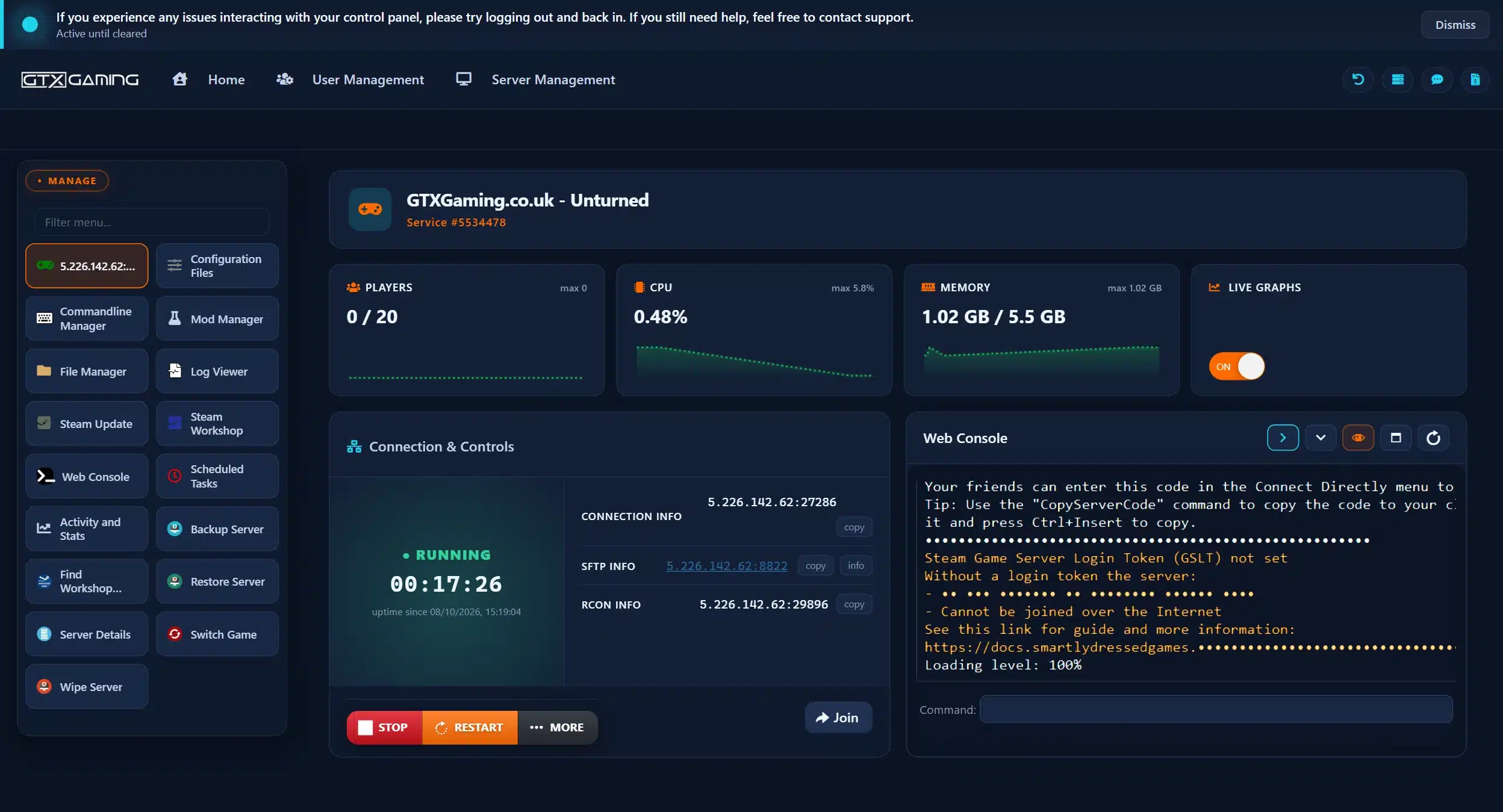
- 🎛️One-click controlsStart, stop and restart your server with a single button, and see its connection, SFTP and RCON details at a glance, with a Join button that opens the game on your server.
- 🗺️Steam Workshop browserBrowse the Unturned Workshop inside the panel and press Install on a map, mod or whole collection; Find Workshop Map Name gives you the exact name for the Map command.
- 📂Configuration Files & File ManagerEdit Commands.dat in the Config Editor, Config.txt and WorkshopDownloadConfig.json in the Text Editor, and upload your world through the File Manager or SFTP.
- 🧩Mod Manager: Rocket, OpenMod, uScriptInstall Rocket Mod, OpenMod or uScript in one click, then follow your plugins in the Web Console and Log Viewer.
- 💾Backups, restores & wipesDaily automatic backups plus Backup Server, Restore Server and Wipe Server for a fresh start. Scheduled Tasks handle saves and restarts on a timer.
- 🔄Steam Update & live graphsBring your server up to date with Steam Update, and watch players, CPU and memory on live graphs.
Unturned Server Hosting: Workshop, Plugins, Settings & Admin Tools
Install Workshop maps and mods, run Rocket (LDM) and OpenMod plugins, set your rules in Commands.dat and the difficulty file, and run your server with the tools Unturned communities use.
Browse the Unturned Steam Workshop inside your control panel and install maps, mods and whole collections with one click, or list File IDs in WorkshopDownloadConfig.json. Players download everything automatically when they join.
Steam WorkshopSet your server name, map, player limit, password, PvP or PvE, perspective and cheats in Commands.dat, and the gameplay rules in the Config.txt difficulty file, all through Configuration Files in your browser.
Configuration FilesInstall Rocket Mod (the SDG-maintained LDM fork) or OpenMod from the Mod Manager in one click, then drop plugins into their folders through the File Manager. Both frameworks run on every GTX server, side by side if you like.
Mod ManagerSet your Owner in Commands.dat, add admins with the Admin command, decide whether Cheats are allowed, and run Save, Kick, Ban and every other runtime command from the Web Console.
Web ConsoleAdd a free Game Server Login Token and your server is listed in Unturned's Internet server list under its own name, with a server code that never changes.
Internet ListedKeep your server on the latest Unturned version with one click, and roll back with the Backup Manager if a patch or a plugin breaks something.
Daily BackupsAn Unturned world is the folder of your server inside Servers, with its Level, Players and config files. Stop the server, upload the folder through the File Manager or SFTP into the same place, keep the same Map command in Commands.dat, and start the server again.
How Many Slots & How Much RAM Does My Unturned Server Need?
Pick a slot for every player who will be online at the same time. Every server includes 5GB of RAM free, and you can add slots or memory whenever your community grows.
| Slots | Best for | From (5GB RAM included) |
|---|---|---|
| 20 slots | You and your friends | CA$10.60/mo |
| 24 slotsRecommended | An active group with room to grow | CA$12.72/mo |
| 30 slots | Small communities and roleplay servers | CA$15.90/mo |
| 40 slots | Public servers and clans | CA$21.20/mo |
| 50 slots | Busy public servers | CA$26.50/mo |
| 60 slots | Large modded communities | CA$31.80/mo |
| 80 slots | Big public servers | CA$42.40/mo |
| 100 slots | The biggest slot count we offer | CA$53.00/mo |
| Memory | When to choose it | Adds |
|---|---|---|
| Up to 5GB | Included free with every server: up to 40 players on official maps | Free |
| Up to 8GB | Our pick for 50 or more players, or a big Workshop map with mods | CA$5.32/mo |
| Up to 12GB | Our pick for a full 100 slot server with a large modpack | CA$12.44/mo |
| Up to 16GB | Heavily modded public servers with many plugins | CA$19.55/mo |
| Up to 24GB | Headroom for the biggest modded servers | CA$32.01/mo |
| Up to 32GB | The most memory we offer on an Unturned server | CA$42.68/mo |
Unturned is lighter on memory than most survival games: on our own demo server a freshly installed server used about 1GB with nobody online. Big Workshop maps, many mods and a full server of players add to it. The picks above are our sizing advice, not figures from Smartly Dressed Games. Watch live memory use in the control panel and change your RAM at any time from your client area.
Unturned Server Hosting Locations: Low Ping Canada & Worldwide
Unturned servers deploy in 18 locations: Quebec in Canada; New York, Ashburn, Chicago, Dallas, Miami, Los Angeles and Portland in the USA; London, Paris, Frankfurt, Amsterdam, Stockholm and Madrid in Europe; Sydney, Singapore and Mumbai in Asia-Pacific; plus Moscow. Run a quick test to see your latency to our network.
What's Included With Your Unturned Server Hosting?
Every server ships fully loaded. Upgrade any part of it whenever you like.
| Resource | Included | Optional upgrade |
|---|---|---|
| Player slots | 20 to 100 slots, CA$0.53/mo per slot | Change your slot count any time |
| Memory | Up to 5GB of RAM on every server | Tiers from 8GB to 32GB, changed any time |
| Storage | Up to 100GB NVMe free | Tiers up to 200GB, plus extreme 14,000MB/s NVMe |
| Maps & mods | Official maps plus Steam Workshop maps and mods | Steam Workshop browser in the panel |
| Plugins | Rocket (LDM) and OpenMod | One click in the Mod Manager |
| CPU priority | Normal priority on high-frequency cores | High and Realtime tiers |
| Protection | Enterprise DDoS mitigation | Included on every server |
| Backups | Daily automatic backups and restore | Included on every server |
Slots, RAM, storage, CPU priority and clock boosts are all picked at checkout and can be changed later without losing your world. Unturned is free on Steam, so every player just needs the game installed to join.
Unturned Server Hosting Features: Everything Built In
Every server ships with the full GTX feature set, no hidden add-ons.
Unturned Server Hosting: the essentials
GTX Gaming Server Hosting Reviews
Verified Trustpilot reviews from GTX Gaming customers.
GTX gaming absolutely excels at customer service
GTX gaming excels at customer service. Every ticket is answered within minutes and issues resolved promptly and professionally. Nothing but wonderful things to say about the service GTX provides. I’ve had the pleasure of interacting with several of their support agents: Tom H, Rui P, Jamie R, John K, Robert P, James K, and man they’re all excellent! Kudos to the entire team and thank you for the service you provide to the gaming community. They’ve enabled our entire crew to spend many hours having a total blast.
TOP!!!
Speed, competence, and understanding. It's the first time I've found such a good support team from a server hosting provider. Top service, top support!
Thank you Mr. Gibbs
Absolutely loved the friendliness and the quick response time. Even though I felt a little dumb for not realizing the problem myself, it felt twice as good to know that the fix was simple and clear.
Unturned Server Hosting FAQ
How fast is Unturned server setup?
+What is Unturned server hosting?
+How do I join my Unturned server?
+How do I install Workshop maps and mods on my Unturned server?
+How do I make myself an admin on my Unturned server?
+Can I use Rocket (LDM) or OpenMod plugins on my Unturned server?
+How many players can join my Unturned server?
+How much RAM does an Unturned server need?
+Can I run PvE and PvP on the same Unturned server?
+Can I upload my existing Unturned world?
+Does my Unturned server need a Steam login token?
+How do I update my Unturned server?
+Which locations can I host an Unturned server in?
+How much does Unturned server hosting cost in Canada?
+Can I upgrade my Unturned server later?
+What is your refund policy?
+Do you offer monthly Unturned server hosting with no contract?
+The Complete Guide to Unturned Server Hosting in Canada & Worldwide
Everything you need to know before you rent an Unturned server in Canada or any of GTX Gaming's worldwide datacentres, from joining and server settings to Workshop maps and mods, Rocket (LDM) and OpenMod plugins, admins, the Steam login token, savegames, updates, slots, RAM, pricing and locations.
What Is Unturned Server Hosting?
Unturned server hosting is a managed service that runs the Unturned Dedicated Server on professional hardware in a datacentre, around the clock, so your world keeps going whether or not anyone is online. Every GTX Gaming Unturned server includes up to 5GB of RAM, up to 100GB of NVMe storage, daily automatic backups, enterprise DDoS protection and a web control panel with Configuration Files for every setting, a Steam Workshop browser that installs maps and mods in one click, and a Mod Manager that installs Rocket (LDM) and OpenMod.
People look for it as an Unturned dedicated server, an Unturned game server, an Unturned private server or simply an Unturned server to rent, and they all mean the same thing: a home for your own Unturned server, with your map, your rules, your plugins and only the players you invite.
What Is Unturned?
Unturned is an open-world zombie survival sandbox from Smartly Dressed Games, free to play on Steam with no pay-to-win mechanics, only cosmetic items. As one of the few not yet turned, you have to stay among the living:
- Survive the apocalypse: scavenge for supplies, hunt for food and build shelter in a world overrun by zombies.
- Explore big maps: travel by air, land and sea across official maps such as PEI, Washington, Yukon, Russia and Germany, find hidden secrets and NPCs to help and trade with.
- Build your home: fortify a base, then head back out for airdrops, deadzones and hordes of supernatural undead.
- Cooperate or fight: team up to arrest the bandits, or face off in PvP raids.
- Endless creativity: create, share and play custom maps and mods through the Steam Workshop, and now rebuild the game itself: Smartly Dressed Games released the source code and project files on GitHub on 7 July 2026 for non-commercial use.
Unturned first reached Steam in July 2014 and left Early Access on 7 July 2017, and it is still updated: version 3.26.3.13 arrived on 30 September 2026. The game runs on Windows, macOS and Linux; the dedicated server runs on Windows and Linux.
Why Rent an Unturned Server?
Anyone can run the Unturned Dedicated Server from their own PC, but most groups rent one instead, for reasons that show up the first time someone wants to raid a deadzone while the host is asleep:
- Always online: your world runs 24 hours a day, so players on different schedules can loot, build and defend whenever they like.
- Nothing to run at home: no port forwarding on your router and no PC left running, and your own PC stays free for playing.
- Listed and reachable: a GTX server has a public IP address, so players can connect directly, and with a Steam login token your server shows in the Internet server list under its own name.
- Workshop and plugins without the hassle: install Workshop maps and mods, Rocket (LDM) and OpenMod plugins from the control panel.
- Your rules: set the map, PvP or PvE, perspective, difficulty and cheats, and decide who gets admin.
- Backups and support: daily automatic backups, the Backup Manager and a 24/7 support team mean a griefer, a broken plugin or a bad update is an inconvenience, not the end of your world.
Getting Started & Joining Your Unturned Server
Your server is set up the moment you order. From there, getting your friends into the world typically looks like this:
- Order: choose your slots, memory and location, and your server is set up instantly.
- Name it: set your server name, map and, if you like, a password in Commands.dat through Configuration Files.
- Make yourself admin: add the line Owner followed by your SteamID64 to Commands.dat and restart.
- Get listed: add a free Steam Game Server Login Token so your server appears in the Internet server list (see the token section).
- Join: in Unturned, open Play, Servers, and find your server in the list, or connect directly with the IP address and port from your control panel.
Your server's IP address and port are shown at the top of your control panel, ready to copy, and the Join button there opens the game straight onto your server. The Web Console shows the server log live, and RCON and SFTP details sit next to the connection info.
Server Settings, Maps, PvP & Difficulty
Unturned's server settings live in a few plain-text files, and on a GTX Gaming server you edit them in your browser through Configuration Files, with a Config Editor for Commands.dat so you never have to type a command from memory. Commands.dat holds the server itself, one command per line:
- Name and Password: the name players see in the server list, and an optional password.
- Map: the level to load, from the official maps PEI, Washington, Yukon, Russia and Germany to any Workshop map you have installed.
- MaxPlayers: the player limit, set to your slot count.
- Owner and Cheats: your SteamID64 as the server owner, and whether admins may use cheat commands.
- PvE and Perspective: turn player combat off, and limit the camera to first person, third person, both, or vehicle only.
- Config.txt: the difficulty file with the gameplay rules, from item spawn chances and zombie strength to the server browser icon and description, VAC and BattlEye, and the Login_Token slot for your Steam token.
- WorkshopDownloadConfig.json: the File_IDs list of Workshop content your server downloads at startup.
Most settings only load when the server starts, so restart after a change. The difficulty file holds the gameplay rules, with separate Easy, Normal and Hard presets that the Difficulty command switches between. Unturned has no built-in autosave: the Save command writes the world while it runs and Shutdown saves and closes it cleanly, so most owners schedule a Save through the panel's Scheduled Tasks or automatic console commands, and our daily backups cover the rest.
Steam Workshop Maps & Mods
The Unturned Steam Workshop holds the maps, items, vehicles and mods that keep the game fresh, from curated maps such as Hawaii to total conversions. Installing them on a GTX server takes a few minutes:
- Browse and install: open Steam Workshop in your control panel, sort by popularity or search, and press Install on a map or mod; a whole Workshop collection installs the same way.
- Or add the File ID: copy the number at the end of the item's Steam Workshop address into the File_IDs list in WorkshopDownloadConfig.json under Configuration Files. The server downloads the content, and its dependencies, when it starts.
- Load a Workshop map: set the map's name with the Map command in Commands.dat; the panel's Find Workshop Map Name tool shows the exact name to use. Restart the server.
- Keep it current: Workshop content is updated when the server restarts, so a restart after a map update keeps everyone on the same version.
Players download the content automatically when they connect to your server, so your friends never install a mod by hand. Curated maps and some arena maps are only available through the Workshop, so they need to be installed this way before the Map command can load them. Our Workshop guide walks through the install, and removing content is just as quick.
Rocket (LDM) & OpenMod Plugins
Plugins are what turn an Unturned server into a community: kits, teleports, economies, shops, ranks and anti-grief rules all come from plugin frameworks. There are two on Unturned, and GTX Gaming servers run both:
- Rocket (LDM): the classic framework. Its original team stepped down in December 2019, and Smartly Dressed Games now maintains a fork called the Legally Distinct Missile, kept in step with the game and shipped with the dedicated server. On a GTX server it installs in one click from the Mod Manager (Rocket Mod (latest)), ready for plugins in the Rocket/Plugins folder.
- OpenMod: the spiritual successor to Rocket, from one of Rocket's original maintainers, with its own plugin framework and compatibility with existing Rocket plugins. It installs side by side with Rocket, so you can use both. The Mod Manager installs it in one click too (OpenMod (latest)), and uScript, a scripting framework for custom server logic, is listed beside it.
- Plugin files and settings: plugin files and their configs live in your server's Rocket and OpenMod folders, which you reach through the File Manager or SFTP, and the Web Console shows what each plugin loads and logs.
Our guides cover installing Rocket, installing and configuring Rocket plugins, Rocket admin commands, automatic Rocket updates and installing OpenMod and its plugins.
Admins, Owner, Cheats & the Console
Unturned keeps admin rights simple, and you manage them through Configuration Files and the Web Console:
- Owner: the SteamID64 on the Owner line of Commands.dat has full control of the server, including every admin command in the game's console.
- Admins: add trusted players with the Admin command while the server runs, or list their SteamID64 in Adminlist.dat, and remove them with Unadmin.
- Cheats: the Cheats line in Commands.dat decides whether admins may use cheat commands such as Give, Vehicle and Teleport; leave it off on a public survival server.
- Bans and whitelist: Ban, Unban and the Blacklist.dat and Whitelist.dat files keep griefers out and, if you like, let only invited players in.
- Plugins: Rocket (LDM) and OpenMod add permission groups, kits, economies and much more; our Rocket admin commands guide lists the most useful ones.
Runtime commands such as Save, Shutdown, Admin, Kick and Ban can be typed into the Web Console in your control panel, or in the in-game chat prefixed with @ or / once you are an admin. The panel's Scheduled Tasks and automatic console commands can run them on a timer, for example a Save every 10 minutes and a restart message before a nightly restart.
Steam Login Token & the Internet Server List
Unturned servers are hidden from the Internet server list until they have a Game Server Login Token (GSLT). Without one a server is "anonymous": players can still join through a Steam invite, the server code or the IP address and port, but nobody finds it by browsing. Getting listed takes a few minutes:
- Create a token: on Steam's game server account management page, create a token for app ID 304930 (Unturned) with a memo so you remember which server it belongs to.
- Add it to your server: paste the token into the Login_Token line of Config.txt under Configuration Files, save, and the server reads it on its next start.
- Restart: after a restart your server appears in the Internet list under its name, and your server code stays the same across restarts instead of changing every launch.
Our Steam login token guide shows each step with screenshots. Internet servers should follow the developer's server hosting rules.
Savegames, Backups & Keeping Your Server Updated
Already playing with friends or with another host? An Unturned world is the folder of your server inside Servers, with its Level, Players and config files. Stop the server, upload the folder through the File Manager or SFTP into the same place, keep the same Map command in Commands.dat, and start the server again. Our support team can handle the whole move for you, from copying your files to checking the map loads.
Press Steam Update in your control panel and your server is brought up to the latest Unturned version. Players must run the same game version as the server to join, so update when Smartly Dressed Games releases a patch, and take a backup first if you run plugins, since some need their own update after a game patch. At the time of writing the current version is 3.26.3.13, released on 30 September 2026, and recent patches have been security fixes, so keeping your server current matters. Every GTX server has daily automatic backups, and the Backup Manager lets you take and restore your own at any time.
How Much Does Unturned Server Hosting Cost in Canada?
You pay per player slot, from 20 to 100 slots at CA$0.53/mo each, plus any extra memory, with up to 5GB of RAM and up to 100GB of NVMe storage included on every server. Our three recommended builds are:
- Campfire, 20 slots with 5GB RAM: CA$10.60/mo. You and your friends.
- Safezone, 24 slots with 5GB RAM: CA$12.72/mo. Our recommended size for an active group with room to grow.
- Military Base, 60 slots with 8GB RAM: CA$37.12/mo. Public servers and big modded communities.
Every slot count from 20 to 100 is available, see the full list under our plans or set your own on the order form. All plans include instant setup, Workshop and plugin support, DDoS protection, daily automatic backups and 24/7 support, with no setup fee and no contract. Billing is monthly by default, with three-month, six-month and yearly cycles available at a discount, and you can change plan or cancel at any time.
How Many Slots & How Much RAM Does an Unturned Server Need?
Choose a slot for every player who will be online at the same time. A group of friends is well served by 20 slots, an active community by 24 to 40, and public servers by 50 or more, up to 100. Memory is the other half, and Unturned is light on it compared with most survival games. On our own demo server, a freshly installed Unturned server used about 1GB of RAM with nobody online. Big Workshop maps, many mods and a full server of players add to it, so as a guide the included 5GB covers up to 40 players, 8GB suits 50 or more, and 12GB a full 100 slot server with a large modpack. The control panel shows live memory and player graphs, so you can see exactly when your server needs more and upgrade, up to 32GB, without losing anything.
Locations for Unturned Server Hosting
A low ping makes every firefight and every zombie swing feel responsive, so host close to your players. GTX Gaming runs Unturned server hosting from a Canadian datacentre in Quebec plus 17 more locations worldwide: New York, Ashburn, Chicago, Dallas, Miami, Los Angeles and Portland in the USA; London, Paris, Frankfurt, Amsterdam, Stockholm and Madrid in Europe; Sydney, Singapore and Mumbai in Asia-Pacific; plus Moscow. Some locations carry a surcharge, shown at checkout. Use the live ping test above to find the lowest-latency location for your group, pick it at checkout, and if you need to move later our support team can migrate your server.
Best Unturned Server Hosting: What to Compare Before You Rent
Most offers to rent an Unturned server look alike at first glance. These are the things that decide how your server actually plays once your community moves in:
- Price per slot: Unturned is a free game with a young player base, so a fair per-slot price matters. Every GTX Gaming slot costs the same, from 20 to 100, with 5GB of RAM included.
- Workshop and plugins: a good host installs Workshop content, Rocket (LDM) and OpenMod from the panel. Ours does.
- CPU: Unturned runs on one main thread, so single-core speed decides how a full server feels. Our servers run on high-frequency CPUs, with CPU priority and clock boost available as upgrades.
- Location: ping decides how a firefight feels. We run Unturned servers in 18 locations across Europe, North America and Asia-Pacific (see Locations).
- Control and backups: full access to your config files, a File Manager and SFTP for your saves, and backups you can restore yourself. Every GTX Gaming server has daily automatic backups and the Backup Manager.
- Billing and refunds: monthly billing with no contract, no setup fee and a 24-hour money-back guarantee, so you can try an Unturned dedicated server without risk.
Not sure which size fits your group? Compare our builds under pricing, or ask our 24/7 support team to size your server with you.
Unturned Server Hosting Glossary
Quick definitions of the terms you'll meet across Unturned, our control panel and your server settings:
- Dedicated Server
- A server that runs your world by itself, around the clock, without a player hosting it from their own game. Unturned calls its tool U3DS.
- Commands.dat
- The server config file: one command per line, such as Name, Map, MaxPlayers, Password, PvE, Perspective, Cheats and Owner.
- Config.txt
- The difficulty and gameplay settings file, with Easy, Normal and Hard presets. Older servers used Config.json.
- WorkshopDownloadConfig.json
- The file that lists the Steam Workshop File IDs your server downloads and sends to players when they join.
- GSLT
- Game Server Login Token: a free Steam token that lists your server in the Internet server list and keeps its server code fixed.
- Server Code
- A 17-digit code players can enter under Connect Directly to join a server without knowing its IP address.
- Owner
- The Commands.dat line that gives a SteamID64 full admin rights, including cheat commands if Cheats is enabled.
- Adminlist.dat
- The file that lists additional admins by SteamID64; the Admin command adds one while the server runs.
- Rocket (LDM)
- The classic Unturned plugin framework, maintained by Smartly Dressed Games as the Legally Distinct Missile fork.
- OpenMod
- The successor plugin framework from one of Rocket's original maintainers; runs side by side with Rocket.
- Safezone
- A map area where combat is disabled, usually a trading town on a PvP server.
- Deadzone
- A radiation area on a map that needs a gas mask and holds the best loot.
- Airdrop
- A supply crate dropped by plane at intervals, a fight magnet on busy servers.
- Perspective
- The camera rule for your server: first person only, third person only, both, or vehicle only.
- Curated Map
- A community-made map approved by the developer, available through the Steam Workshop, such as Hawaii.
- Workshop File ID
- The number at the end of a Steam Workshop address, used to install a map or mod on your server.
Setup Guides & Help for Your Unturned Server
Once your Unturned server is live, our knowledge base walks you through the common tasks: adding yourself as owner or admin, adding a Steam login token, installing Workshop mods and maps, using the admin console and scheduling console commands such as Save. Our 24/7 support team is on live chat and tickets for anything the guides don't cover:
Explore Other Services
Host more of your favourites with the same instant setup and 24/7 support.
Last Updated: 17 October 2026