

Enshrouded Server Hosting Canada
Rent Your Enshrouded Dedicated Server
Premium Enshrouded server hosting from GTX Gaming's Canadian and worldwide datacentres. Rent an Enshrouded server for up to 16 players with instant setup, difficulty presets and custom game settings, player roles with their own passwords, up to 5GB of RAM and 100GB of NVMe storage included, daily automatic backups, enterprise DDoS protection and 24/7 support. Rent your Enshrouded dedicated server from CA$7.69/mo.
★★★★★ 4.7/5 on Trustpilot · 1,400+ reviewsEnshrouded Server Hosting: Plans & Pricing
One Enshrouded server, priced by player slots. Every plan includes up to 5GB of RAM, up to 100GB of NVMe storage and DDoS protection, and you can change your slots at any time without losing your world.
- Instant setup
- Up to 5GB RAM included
- Up to 100GB NVMe storage
- Daily automatic backups
- 24/7 support
- Difficulty presets & custom settings
- Player roles & passwords
- Daily automatic backups
- Enterprise DDoS protection
- Room for several parties at once
- Player roles & passwords
- Daily automatic backups
- Enterprise DDoS protection
- The game's maximum of 16 players
- RAM upgradable to 32GB
- Daily automatic backups
- Enterprise DDoS protection
The Enshrouded Server Hosting Control Panel
Our custom panel puts your Enshrouded server's settings, files and backups in a browser, so running it never needs a command line.
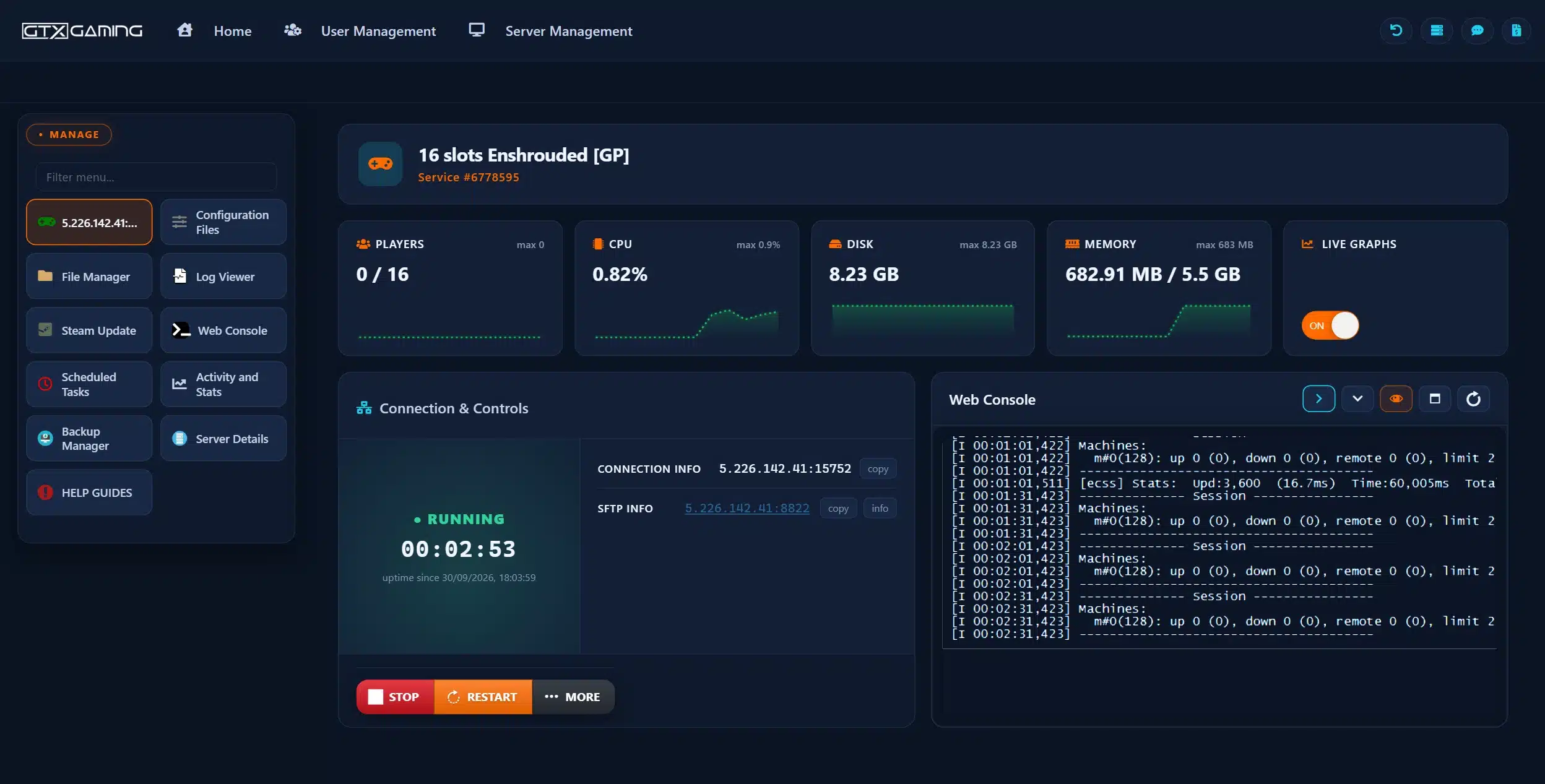
- 🎛️One-click controlsStop and restart your server with a single button, and see its status, player count and connection details at a glance.
- ⚙️Configuration FilesEdit your server name, slot count, difficulty preset, game settings and role passwords in the browser.
- 📂File Manager & SFTPBrowse your server files and upload an existing world in the browser, with SFTP access for bigger transfers.
- 🔄Steam UpdateUpdate the dedicated server from the panel when Keen Games releases a new version of Enshrouded.
- 💾Backup Manager & Scheduled TasksDaily automatic backups you can restore in a couple of clicks, plus Scheduled Tasks for restarts and other jobs on a timer.
- 📊Web Console, logs & live statsRead the Web Console and Log Viewer when something needs a closer look, and watch CPU, disk and memory on live graphs.
Enshrouded Server Hosting: Settings, Presets & Roles
The official Enshrouded dedicated server, ready to play. Pick a difficulty preset or tune the game setting by setting, and decide what each player is allowed to do in your world.
Five presets set the tone of your world: Default, Relaxed for builders and light-hearted adventuring, Hard for tougher combat, Survival for extra survival mechanics, and Custom for full control.
Default to SurvivalWith the Custom preset you tune the game one value at a time: player health, mana and stamina, enemy numbers, experience gain, resource yields, plant growth, weapon durability, hunger and more.
Your RulesEnshrouded uses roles instead of one server password. Each user group has its own password and permissions, from Admin with kick and ban rights down to Visitor, who can look but not touch.
Admin to VisitorSwitch voice chat and text chat on or off for your server, and choose whether voice is proximity based or heard across the whole server.
Proximity or GlobalThe world lives on the server and is saved every five minutes, while each player's character stays on their own PC. Friends can drop in and keep building when the usual host is offline.
Persistent WorldYour server appears in the in-game server browser under the name you give it. Friends search for it, mark it as a favourite and enter the password for their role.
Easy to JoinAlready playing on your own PC or with another host? Upload your world save through the File Manager or SFTP and carry on where you left off. Our 24/7 team can help with the move or handle it for you.
How Many Slots Does My Enshrouded Server Need?
Pick a slot for everyone who will be online at the same time. Every server includes up to 5GB of RAM, and you can add slots or memory whenever your group grows.
| Slots | Best for | From |
|---|---|---|
| 4 slotsStart Here | Solo players, duos and a small party of friends | CA$7.69/mo |
| 6 slots | A close group that plays together most evenings | CA$10.67/mo |
| 8 slots | A regular group with room for a few guests | CA$13.52/mo |
| 10 slots | Two parties exploring different parts of the map | CA$16.37/mo |
| 12 slots | Bigger communities building side by side | CA$18.79/mo |
| 14 slots | Busy community servers with players in several timezones | CA$21.17/mo |
| 16 slots | The full 16 players Enshrouded supports | CA$23.34/mo |
On memory: Keen Games states that the dedicated server uses around 4.4GB when idle, plus up to 100MB per player, and should not need more than about 6GB in total. The included 5GB suits smaller groups; for a busy server of up to 16 players the 8GB upgrade adds CA$5.32/mo. Watch live usage in the control panel and change your slots or memory at any time from your client area.
Enshrouded Server Hosting Locations: Low Ping Canada & Worldwide
Enshrouded servers deploy in 18 locations: Quebec in Canada; New York, Ashburn, Chicago, Dallas, Miami, Los Angeles and Portland in the USA; London, Paris, Frankfurt, Amsterdam and Madrid in Europe; Sydney, Tokyo, Singapore and Mumbai in Asia-Pacific; plus Moscow. Run a quick test to see your latency to our network.
What's Included With Your Enshrouded Server Hosting?
Every server ships fully loaded. Upgrade any part of it whenever you like.
| Resource | Included | Optional upgrade |
|---|---|---|
| Player slots | 4 to 16 slots, chosen at checkout | Change your slot count any time |
| Memory | Up to 5GB of RAM on every server | Tiers from 8GB to 32GB, changed any time |
| Storage | Up to 100GB NVMe free | Tiers up to 200GB, plus extreme 14,000MB/s NVMe |
| Game settings | Difficulty presets, custom settings and player roles | Included on every server |
| CPU priority | Normal priority on high-frequency cores | High and Realtime tiers |
| CPU clock | Standard high-frequency clocks | +5%, +10% and +20% clock boost tiers |
| Protection | Enterprise DDoS mitigation | Included on every server |
| Backups | Daily automatic backups | Included on every server |
Slots, RAM, storage, CPU priority and clock boosts are all picked at checkout and can be changed later without losing your world. Players need their own copy of Enshrouded on Steam to join.
Enshrouded Server Hosting Features: Everything Built In
Every server ships with the full GTX feature set, no hidden add-ons.
Enshrouded Server Hosting: the essentials
GTX Gaming Server Hosting Reviews
Verified Trustpilot reviews from GTX Gaming customers.
GTX gaming absolutely excels at customer service
GTX gaming excels at customer service. Every ticket is answered within minutes and issues resolved promptly and professionally. Nothing but wonderful things to say about the service GTX provides. I’ve had the pleasure of interacting with several of their support agents: Tom H, Rui P, Jamie R, John K, Robert P, James K, and man they’re all excellent! Kudos to the entire team and thank you for the service you provide to the gaming community. They’ve enabled our entire crew to spend many hours having a total blast.
TOP!!!
Speed, competence, and understanding. It's the first time I've found such a good support team from a server hosting provider. Top service, top support!
Thank you Mr. Gibbs
Absolutely loved the friendliness and the quick response time. Even though I felt a little dumb for not realizing the problem myself, it felt twice as good to know that the fix was simple and clear.
Enshrouded Server Hosting FAQ
How fast is Enshrouded server setup?
+What is Enshrouded server hosting?
+How do I join my Enshrouded server?
+How do I password protect my Enshrouded server?
+Can I change the difficulty on my Enshrouded server?
+Can I upload my existing Enshrouded world?
+How many players can join my Enshrouded server?
+How much RAM does an Enshrouded server need?
+Can I upgrade my Enshrouded server later?
+Which locations can I host an Enshrouded server in?
+Is Enshrouded on console, and is there crossplay?
+Does Enshrouded have mods or PvP?
+Should I host an Enshrouded server on my own PC?
+How much does Enshrouded server hosting cost in Canada?
+What is your refund policy?
+Do you offer monthly Enshrouded server hosting with no contract?
+The Complete Guide to Enshrouded Server Hosting in Canada & Worldwide
Everything you need to know before you rent an Enshrouded server in Canada or any of GTX Gaming's worldwide datacentres, from joining through the server browser and choosing a difficulty preset to player roles, world saves, slots, RAM sizing, pricing and locations.
What Is Enshrouded Server Hosting?
Enshrouded server hosting is a managed service that runs the official Enshrouded dedicated server on professional hardware in a datacentre, around the clock, so your world stays online whether or not you are at your PC. Every GTX Gaming Enshrouded server includes up to 5GB of RAM, up to 100GB of NVMe storage, daily automatic backups, enterprise DDoS protection and a web control panel that turns jobs like restarting the server, editing the configuration file or restoring a backup into a few clicks.
People look for it as an Enshrouded dedicated server, an Enshrouded game server or simply an Enshrouded server to rent, and they all mean the same thing: a private, always-on home for your own Enshrouded server, with your rules, your settings and your friends.
What Is Enshrouded?
Enshrouded is a co-op survival crafting action RPG from the German studio Keen Games, built on the studio's own Holistic engine. You play a Flameborn, woken in a fallen kingdom that has been swallowed by a corrupting fog called the Shroud, and set out to survive, fight and rebuild. The game entered Early Access on Steam on 24 January 2024, and its full 1.0 release is planned for 15 October 2026.
- Survive the Shroud: the fog hides the best loot and the worst enemies, and your time inside it is limited.
- Build anything: a voxel-based building system lets you shape terrain and raise anything from a hut to a great hall.
- Action RPG combat: dodge, parry and cast your way through beasts and bosses, with a large, open skill tree to shape your character.
- Co-op for up to 16: the whole game can be played solo, but it is designed to be shared with friends.
Enshrouded is a co-operative game. Keen Games says there is no PvP mode and none is currently planned, so a server is a shared world to explore and build in together.
Why Rent an Enshrouded Server?
Enshrouded lets one player host a session from their own PC, and the dedicated server software comes with the game on Steam, so you could run it from a spare machine at home. Most groups rent an Enshrouded server instead, for reasons that show up the first time the host logs off in the middle of a build:
- Always online: the world runs 24 hours a day, so friends in any timezone can log in without waiting for the host.
- Nothing to run at home: Keen Games recommends a machine with 16GB of RAM and a fast six to eight core CPU for the dedicated server. Renting leaves your own PC free for the game itself.
- Proper hardware: high-frequency CPUs and NVMe storage in a datacentre, with DDoS protection at the network edge.
- Backups and support: daily automatic backups and a 24/7 support team mean a bad setting or a broken save is an inconvenience, not a disaster.
Getting Started & Joining Your Enshrouded Server
Your server is set up the moment you order and starts on the Default difficulty preset. From there, getting everyone into the world typically looks like this:
- Order: choose your slots and location, and your server is set up instantly.
- Name it: give the server its own name in the configuration file so it is easy to find.
- Set your passwords: decide which roles you want and give each its own password.
- Join: in Enshrouded choose Join from the main menu, make sure dedicated servers are shown in the server filter and search for your server name.
Mark the server as a favourite and it sorts to the top of the list next time. If it does not show up in the in-game browser, add the IP address and port from your control panel as a favourite in the Steam client under View, Game Servers.
Enshrouded Server Settings & Difficulty Presets
An Enshrouded dedicated server is configured through a single file, enshrouded_server.json, which you edit from Configuration Files in the control panel. It holds the server name, the slot count, voice and text chat options and the difficulty preset. Keen Games documents every option in its dedicated server configuration guide. The presets are:
- Default: the standard experience, recommended for first-time players.
- Relaxed: fewer enemies and more resources and loot, for groups most interested in base building and light-hearted adventuring.
- Hard: more enemies, and more aggressive ones, for a tougher combat experience.
- Survival: additional survival mechanics on top of more aggressive enemies.
- Custom: unlocks the individual settings, so you can tune the game one value at a time.
With Custom selected you can adjust player health, mana and stamina, how long characters can stay in the Shroud, the number of enemies and how many attack at once, experience gain, mining and resource yields, plant growth, workshop speed, weapon durability, hunger and the length of day and night. Restart the server after saving and the new rules apply to everyone.
Player Roles & Passwords on an Enshrouded Server
Instead of one password for the whole server, Enshrouded uses roles. Each user group in the configuration file has its own password and its own permissions, and the password a player types when joining decides which role they get. A typical setup has four:
- Admin: full access, including kicking and banning players and placing or removing Flame Altars.
- Friend: can use chests, build and terraform, but cannot extend the base with new Flame Altars.
- Guest: can fight, loot and explore, but cannot open chests or change your bases.
- Visitor: can look around, but cannot change the world or your bases.
You can change what each group is allowed to do and reserve slots for a group, so your regulars always have a place even when the server is busy.
World Saves, Backups & Moving Your Enshrouded World
Enshrouded splits its saves in two. The world, with everything you have built and unlocked in it, is stored on the server and saved every five minutes. Characters are stored on each player's own PC, so a character, with its equipment and skills, can move between servers.
That split makes moving an existing world simple: upload the world save files to your server's save folder through the File Manager or SFTP, restart, and everyone joins with the character they already have. On top of the game's own saves, GTX Gaming takes daily automatic backups that you can restore from the Backup Manager, and Scheduled Tasks let you add restarts or extra backups on a timer.
How Much Does Enshrouded Server Hosting Cost in Canada?
Pricing is simple: you pay for the number of player slots, with up to 5GB of RAM and up to 100GB of NVMe storage included on every server:
- 4 slots: from CA$7.69/mo. Solo players, duos and a small party.
- 6 slots: from CA$10.67/mo. A close group of friends.
- 8 slots: from CA$13.52/mo. A regular group with room for guests.
- 10 slots: from CA$16.37/mo. Two parties exploring at once.
- 12 slots: from CA$18.79/mo. Bigger communities.
- 14 slots: from CA$21.17/mo. Busy community servers.
- 16 slots: from CA$23.34/mo. The full 16 players the game supports.
All plans include instant setup, DDoS protection, daily automatic backups and 24/7 support, with no setup fee and no contract. Billing is monthly by default, with three-month, six-month and yearly cycles available at a discount, and you can change plan or cancel at any time.
How Many Slots & How Much RAM Does an Enshrouded Server Need?
Choose a slot for everyone who will be online at the same time, not for everyone who has ever been invited: a group of ten where six play on a typical evening is comfortable on six or eight slots. On memory, Keen Games states that the dedicated server uses around 4.4GB when idle, plus up to 100MB for each connected player, and should not need more than about 6GB in total. The up to 5GB included with every server therefore suits smaller groups, and the 8GB upgrade, which adds CA$5.32/mo, gives a busy server of up to 16 players comfortable headroom. The control panel shows live memory use, so the sensible approach is to start on the included allocation, watch the graph once your group is playing, and upgrade from your client area in a couple of clicks if you are running close to the limit.
Locations for Enshrouded Server Hosting
Combat in Enshrouded rewards well-timed dodges and parries, so a low ping matters: host close to your players. GTX Gaming runs Enshrouded server hosting from a Canadian datacentre in Quebec plus 17 more locations worldwide: New York, Ashburn, Chicago, Dallas, Miami, Los Angeles and Portland in the USA; London, Paris, Frankfurt, Amsterdam and Madrid in Europe; Sydney, Tokyo, Singapore and Mumbai in Asia-Pacific; plus Moscow. Some locations carry a surcharge, shown at checkout. Use the live ping test above to find the lowest-latency location for your group, pick it at checkout, and if you need to move later our support team can migrate your server.
Enshrouded Server Hosting Glossary
Quick definitions of the terms you'll meet across Enshrouded, our control panel and the knowledge base:
- Enshrouded
- The co-op survival crafting action RPG from Keen Games that your server runs.
- The Shroud
- The corrupting fog that covers parts of the world. Time inside it is limited, and the best loot is found there.
- Flameborn
- The player characters, woken to reclaim the fallen kingdom.
- Flame Altar
- The object that claims an area as your base and lets you build in it. Upgrading it extends the base.
- Dedicated Server
- A server that runs the world by itself, around the clock, without a player hosting it from their own game.
- enshrouded_server.json
- The configuration file: server name, slot count, chat options, difficulty preset, game settings and user groups.
- Slots
- The maximum number of players that can be connected at once, from 1 to 16, set by slotCount in the config.
- Difficulty Preset
- One of Default, Relaxed, Hard, Survival or Custom. Custom unlocks the individual game settings.
- User Group
- A role with its own password and permissions, such as Admin, Friend, Guest or Visitor.
- Server Browser
- The in-game list, reached from Join in the main menu, where players find and join your server.
- Query Port
- The port the server uses to list itself and accept players, shown with the IP address in your control panel.
- World Save
- The file holding your world's progress. It lives on the server, while characters live on each player's PC.
Setup Guides & Help for Your Enshrouded Server
Once your Enshrouded server is live, our Enshrouded guides and support team cover the common tasks: naming your server, setting role passwords, choosing a difficulty preset, uploading a world, scheduling restarts and restoring a backup. Our 24/7 support team is on live chat and tickets for anything the guides don't cover:
Explore Other Services
Host more of your favourites with the same instant setup and 24/7 support.
Last Updated: 30 September 2026