






 DayZ
DayZ Palworld


 Enshrouded














ARK Server Hosting Canada
Rent Your ARK: Survival Evolved (ASE) Dedicated Server
About ARK: Survival Evolved server hosting
Premium ARK server hosting from GTX Gaming's Canadian and worldwide datacentres, for ARK: Survival Evolved (ASE), the original ARK on Unreal Engine 4. Rent a server for your tribe with instant setup, every official map including the DLC maps and Aquatica, Steam Workshop mods, cross-ARK clusters, Steam and Epic crossplay on unmodded servers, 10 to 250 slots, up to 10GB of RAM and 100GB of NVMe storage included, daily automatic backups, enterprise DDoS protection and 24/7 support. Rent your ARK dedicated server from CA$17.77/mo.
ARK Server Hosting: Plans & Pricing
- Instant setup
- Up to 10GB RAM included
- Every official map
- Daily automatic backups
- 24/7 support
- 12GB RAM
- All maps + DLC maps
- Steam Workshop mods
- Cross-ARK clusters
- Enterprise DDoS protection
- 16GB RAM
- Room for Genesis Part 2
- RAM upgradable to 64GB
- Daily automatic backups
- Enterprise DDoS protection
- 24/7 support
- DDoS protection
- Instant setup
ARK: Survival Evolved servers, priced by slots, with up to 10GB of RAM included free. Every plan includes up to 100GB of NVMe storage, every official map, Steam Workshop mods and DDoS protection, and you can change your slots or memory at any time without losing your world.
The ARK Server Hosting Control Panel
Our custom panel puts your ARK: Survival Evolved server's map, mods, plugins, settings, files and backups in a browser, with a Steam Workshop tool and a Mod Manager that installs ARK: Server API in one click.
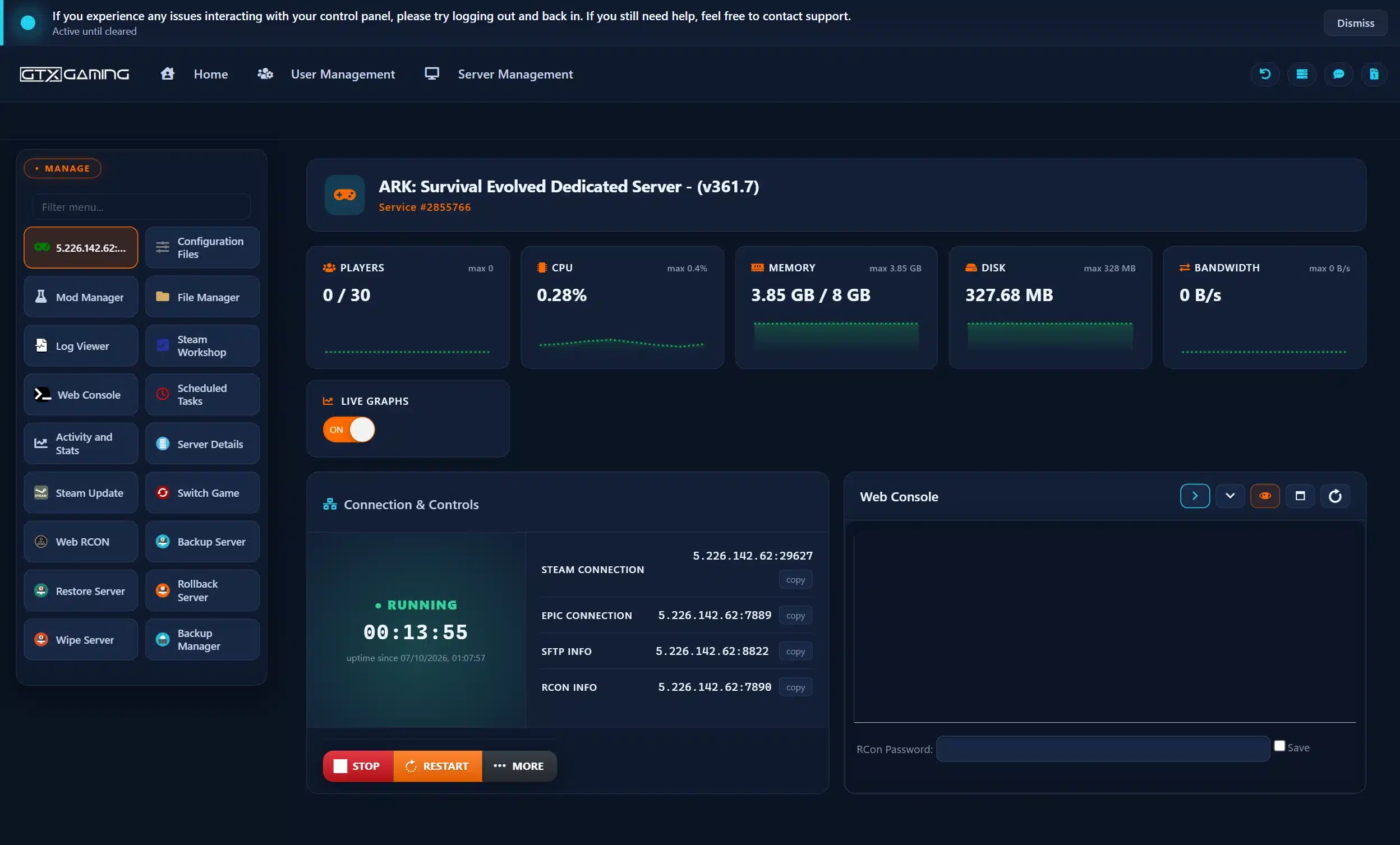
- 🎛️One-click controlsStart, stop and restart your server with a single button, and see its Steam connection and Epic connection addresses, SFTP and RCON details at a glance.
- 🗺️Map, events & settingsPick your map, a total conversion or events in the Config Editor, and edit GameUserSettings.ini and Game.ini in Configuration Files.
- 🧩Steam Workshop & Mod ManagerInstall Workshop mods from the panel, kept updated, and add ARK: Server API, MySQL Database or phpMyAdmin in one click from the Mod Manager.
- 📂File Manager & SFTPUpload a save, plugins or config files in the browser, with SFTP access for big uploads.
- 💾Backup, Restore & RollbackDaily automatic backups plus Backup Server, Restore Server, Rollback Server and the Backup Manager, so a griefer or a broken mod is a rollback, not a fresh start. Scheduled Tasks automate jobs such as auto-saves.
- 📊Web Console, logs & live graphsFollow the server in the Web Console and Log Viewer, run admin commands with Web RCON, update with Steam Update, and watch players, CPU, memory, disk and bandwidth on live graphs.
ARK Server Hosting: Maps, Mods, Clusters & Crossplay
Every official ARK: Survival Evolved map, the Steam Workshop, cross-ARK travel between your servers, Steam and Epic players together, and every rate and rule in your hands.
Host The Island, The Center, Scorched Earth, Ragnarok, Aberration, Extinction, Valguero, Genesis Part 1 and 2, Crystal Isles, Lost Island, Fjordur or Aquatica. Pick it in the Config Editor. Players need to own a DLC map to play on it.
All Maps + DLCBrowse and install ARK: Survival Evolved mods from the Steam Workshop inside your control panel, from quality-of-life tweaks and structure packs to new creatures and mod maps, kept updated.
Steam WorkshopRun two or more servers and our support team links them into a cluster, so players carry their survivors, items and tames from one map to the next through obelisks and transmitters.
Cross-ARK TravelYour server has a Steam connection and an Epic connection address, so Steam and Epic Games Store players play together. Epic players cannot load Workshop mods, so crossplay works on unmodded servers.
CrossplayInstall ARK: Server API in one click from the Mod Manager, then add plugins from ark-server-api.com for extra admin tools and gameplay systems. MySQL Database and phpMyAdmin are there for plugins that need a database.
Server PluginsSet XP, taming, harvesting and breeding rates, run PvP or PvE, and tune your settings in GameUserSettings.ini and Game.ini with the Config Editor.
Your RulesUpload your server's save files through the File Manager or SFTP and carry on where you left off, bases, tames and all. Keep the same mods installed so modded items and creatures load. Our 24/7 team can help with the move or handle it for you.
How Many Slots & How Much RAM Does My ARK Server Need?
Pick a slot for every player who will be online at the same time. Every server includes up to 10GB of RAM free, and you can add slots or memory whenever your tribe grows.
| Slots | Best for | From (10GB RAM included) |
|---|---|---|
| 10 slots | A small tribe or a group of friends | CA$17.77/mo |
| 20 slots | Two or three tribes sharing a map | CA$24.91/mo |
| 30 slotsRecommended | Active tribes and busy community servers | CA$37.34/mo |
| 40 slots | Growing communities and cluster maps | CA$42.68/mo |
| 50 slots | Public PvE and boosted-rate servers | CA$51.57/mo |
| 60 slots | Public PvP and big multi-tribe servers | CA$60.47/mo |
| 70 slots | Busy public servers and boosted-rate PvP | CA$64.03/mo |
| 100 slots | Big public PvP and PvE servers with many tribes | CA$72.92/mo |
| 150 slots | Large public servers and cluster hub maps | CA$85.38/mo |
| 200 slots | Big public communities and busy cluster maps | CA$99.61/mo |
| 250 slots | Our biggest slot count, for the largest public servers | CA$113.84/mo |
Your server's player limit is set to the slots you order, and every tier from 10 to 250 slots is listed under our plans. Bigger servers need more memory too: see our picks below.
| Memory | When to choose it | Adds |
|---|---|---|
| Up to 10GB | Included free with every server: most maps for a small tribe | Free |
| Up to 12GB | Our pick for 30 players, Crystal Isles or Lost Island | CA$12.44/mo |
| Up to 16GB | Our pick for 60 players, and the starting point for Genesis Part 2 | CA$19.55/mo |
| Up to 24GB | Our pick for 100 players, big mod lists and worlds full of tames | CA$32.01/mo |
| Up to 32GB | Our pick for 150 to 200 players, or big servers with heavy mods | CA$42.68/mo |
| Up to 64GB | Our pick for 250 slot servers and the biggest modded worlds | CA$78.26/mo |
An ARK server uses more memory with a bigger map, more players online, more structures and tames, and more mods. The memory picks above are our own sizing advice; watch live memory use in the control panel and change your RAM at any time from your client area.
ARK Server Hosting Locations: Low Ping Canada & Worldwide
ARK servers deploy in 19 locations: Quebec in Canada; New York, Ashburn, Chicago, Dallas, Miami, Los Angeles and Portland in the USA; London, Paris, Frankfurt, Amsterdam, Stockholm and Madrid in Europe; Sydney, Tokyo, Singapore and Mumbai in Asia-Pacific; plus Moscow. Run a quick test to see your latency to our network.
What's Included With Your ARK Server Hosting?
Every server ships fully loaded. Upgrade any part of it whenever you like.
| Resource | Included | Optional upgrade |
|---|---|---|
| Player slots | 10 to 250 slots, chosen at checkout | Change your slot count any time |
| Memory | Up to 10GB of RAM on every server | Tiers from 12GB to 64GB, changed any time |
| Storage | Up to 100GB NVMe free | Tiers up to 200GB, plus extreme 14,000MB/s NVMe |
| Maps | All 13 official maps, DLC maps included | Players need to own a DLC map to play it |
| Mods | Steam Workshop mods and ARK: Server API plugins | Unmodded servers for Steam and Epic crossplay |
| CPU priority | Normal priority on high-frequency cores | High and Realtime tiers, plus clock boosts |
| Protection | Enterprise DDoS mitigation | Included on every server |
| Backups | Daily automatic backups and restore | Included on every server |
Slots, RAM, storage, CPU priority and clock boosts are all picked at checkout and can be changed later without losing your world. Players need their own copy of ARK: Survival Evolved on Steam or the Epic Games Store to join.
ARK Server Hosting Features: Everything Built In
Every server ships with the full GTX feature set, no hidden add-ons.
ARK Server Hosting: the essentials
GTX Gaming Server Hosting Reviews
Verified Trustpilot reviews from GTX Gaming customers.
GTX gaming absolutely excels at customer service
GTX gaming excels at customer service. Every ticket is answered within minutes and issues resolved promptly and professionally. Nothing but wonderful things to say about the service GTX provides. I’ve had the pleasure of interacting with several of their support agents: Tom H, Rui P, Jamie R, John K, Robert P, James K, and man they’re all excellent! Kudos to the entire team and thank you for the service you provide to the gaming community. They’ve enabled our entire crew to spend many hours having a total blast.
TOP!!!
Speed, competence, and understanding. It's the first time I've found such a good support team from a server hosting provider. Top service, top support!
Thank you Mr. Gibbs
Absolutely loved the friendliness and the quick response time. Even though I felt a little dumb for not realizing the problem myself, it felt twice as good to know that the fix was simple and clear.
ARK Server Hosting FAQ
How fast is ARK server setup?
+What is ARK server hosting?
+Is this server for ARK: Survival Evolved or ARK: Survival Ascended?
+How do I join my ARK server?
+How do I install Steam Workshop mods on my ARK server?
+Can Steam and Epic players play together on my ARK server?
+Can I link several ARK servers into a cluster?
+How do I use admin commands on my ARK server?
+How do I play ARK with friends on a private server?
+Which ARK maps can I host?
+How many players can join my ARK server?
+How much RAM does an ARK server need?
+What should I pick on the ARK order form?
+Can I move my existing ARK world to GTX Gaming?
+Which locations can I host an ARK server in?
+Can PlayStation or Xbox players join my ARK server?
+How much does ARK server hosting cost in Canada?
+Is renting an ARK server better than hosting one for free?
+Do you offer monthly ARK server hosting with no contract?
+The Complete Guide to ARK Server Hosting in Canada & Worldwide
Everything you need to know before you rent an ARK server in Canada or any of GTX Gaming's worldwide datacentres, from ARK: Survival Evolved versus Ascended and joining to every official map, Steam Workshop mods, cross-ARK clusters, Steam and Epic crossplay, server settings, moving an existing world, slots, RAM, pricing and locations.
What Is ARK Server Hosting?
ARK server hosting is a managed service that runs the ARK: Survival Evolved dedicated server on professional hardware in a datacentre, around the clock, so your tribe's world keeps running whether or not anyone is online. Your tames keep their stats, your bases stay standing and nobody has to leave a PC switched on at home. Every GTX Gaming ARK server includes up to 10GB of RAM, up to 100GB of NVMe storage, daily automatic backups, enterprise DDoS protection and a web control panel.
People look for it as an ARK dedicated server, an ARK game server, an ARK private server, an ARK: Survival Evolved server or simply an ARK server to rent, and they all mean the same thing: a home for your own ARK server, with your map, your mods, your rates and nobody else's tribe wandering in uninvited.
What Is ARK: Survival Evolved?
ARK: Survival Evolved is the dinosaur survival game from Studio Wildcard, developed with Instinct Games, Efecto Studios and Virtual Basement and published by Studio Wildcard and Snail Games USA. You wake up on a beach with nothing, then gather, craft and build your way up the engram list from stone tools to metal bases and tek gear, while taming, riding and breeding dinosaurs and other creatures with your tribe. It runs on Unreal Engine 4, entered Early Access on Steam in June 2015 and was fully released in August 2017.
Studio Wildcard's official ASE servers closed in 2023, so today ARK: Survival Evolved is played online on private and rented servers like ours. The game is still played and still updated: the paid ARK: Aquatica DLC map arrived in July 2025, followed by further patches and fixes.
ARK: Survival Evolved or ARK: Survival Ascended?
There are two ARK survival games on PC, and they do not mix. ARK: Survival Evolved (ASE) is the original game on Unreal Engine 4, and it is what this page hosts. ARK: Survival Ascended (ASA) is the 2023 Unreal Engine 5 remaster: a different game with its own server files. A few things follow from that:
- Players and servers: an ASE player cannot join an ASA server, and the other way round. Your whole group needs to play the same game.
- Mods: ASE mods come from the ARK: Survival Evolved Steam Workshop and do not run on ASA.
- Saves: an ASE world does not carry over to ASA, so your tames and bases stay in the game they were made in.
If your group plays ARK: Survival Ascended, see our ARK: Survival Ascended page, linked under the plans above. If you are on ARK: Survival Evolved, you are in the right place.
Why Rent an ARK Server?
You can run the ARK: Survival Evolved dedicated server from a spare machine at home, but most tribes rent one instead, for reasons that show up the first time someone's baby Rex needs feeding at 3am:
- Always online: your world runs 24 hours a day, so tribemates on different schedules can log in, farm, tame and imprint whenever they like.
- Nothing to run at home: no ports to open on your router and no PC left running, and your own PC stays free for playing.
- Your rules: no official rule set. Pick your map, boost the taming and breeding rates, choose PvP or PvE and decide who gets in.
- Proper hardware: high-frequency CPUs and NVMe storage in a datacentre, with DDoS protection at the network edge, so a raid is decided by your tribe and not by someone's home connection.
- Backups and support: daily automatic backups and a 24/7 support team mean a griefer, a bad mod update or a lost base is an inconvenience, not the end of your world.
Getting Started & Joining Your ARK Server
Your server is set up the moment you order. From there, getting your tribe onto the beach typically looks like this:
- Order: choose your slots, memory and location, and your server is set up instantly.
- Name it: set your server name, a server password if you want it private and an admin password in GameUserSettings.ini, using the Config Editor in Configuration Files.
- Pick a map and mods: choose your map in Config.bat with the Config Editor, install any mods you want with the Steam Workshop tool and restart the server.
- Join: Steam players use the Steam connection address and Epic players the Epic connection address from your control panel's home page, or find the server under Join ARK in the unofficial server list.
Once you are in, log in with your admin password in the in-game console to use admin commands while you play, or add your admins to AllowedCheaterSteamIDs.txt in Configuration Files.
Maps & DLC on Your ARK Server
Your server can run any of the 13 official ARK: Survival Evolved maps. Each server runs one map at a time, chosen in Config.bat with the Config Editor in your control panel, and you can change it later:
- The Island: the original map that comes with the game.
- Free maps: The Center, Ragnarok, Valguero, Crystal Isles, Lost Island and Fjordur.
- Paid DLC maps: Scorched Earth, Aberration, Extinction, Genesis Part 1, Genesis Part 2 and Aquatica, the newest map, released in July 2025.
The server can host a DLC map, but players need to own that DLC to play on it; the free maps are open to everyone who owns the game. ARK: Survival Evolved also supports mod maps from the Steam Workshop. Running several maps at once? Order one server per map and link them into a cluster, below.
Steam Workshop Mods & Plugins on Your ARK Server
Mods are a huge part of ARK, and the ARK: Survival Evolved Steam Workshop is full of them, from small quality-of-life fixes and structure packs to new creatures, overhauls and whole mod maps. Open the Steam Workshop tool in your control panel, browse and install the mods you want, and restart the server: Workshop mods installed from the panel are kept updated. A few things are worth knowing:
- Same mods for everyone: every player needs the same mods as the server to join, so share your mod list or a Workshop collection with your tribe.
- Steam only: Steam Workshop mods are for Steam players. Epic players cannot load them, so a modded server is a Steam server.
- Keep your mods when you move: modded items, structures and creatures only load if the same mods are installed.
Beyond Workshop mods, the Mod Manager installs ARK: Server API (latest version) in one click with the server stopped. ARK Server API runs server-side plugins, such as extra admin tools and gameplay systems, that players do not need to download: get them from ark-server-api.com and upload them with the File Manager to ShooterGame\Binaries\Win64\ArkApi\Plugins, as our help guide on installing ARK API plugins explains. Plugins that need a database can use the Mod Manager's MySQL Database and phpMyAdmin tools. The Mod Manager also has a Timecapsule Update that rolls the server back to the older timecapsule version, but most mods and existing worlds will not work on it.
Clusters & Cross-ARK Travel
A cluster links two or more ARK servers so players can travel between them. Every server in the cluster shares the same cluster ID and cluster storage, and players upload their survivor, items and tamed creatures at an obelisk or transmitter on one map and download them on another. A typical cluster runs The Island next to Scorched Earth, Aberration and Extinction so a tribe can work through the story maps without starting again.
Our support team sets clusters up for you: order one server per map, ideally in the same location, save and stop them, and open a support ticket, as our help guide on cross-travel clusters describes. Tell us if you want to limit what can be transferred, for example to stop tames or items from boosted maps reaching the others.
Steam & Epic Crossplay
ARK: Survival Evolved is sold on Steam and on the Epic Games Store, and the dedicated server supports crossplay between the two. Every GTX ARK server ships ready for it: your control panel's home page shows a Steam connection address and an Epic connection address, and our help guides cover connecting from Steam and from the Epic Games Store, so a mixed group of friends can play together. Because Epic players cannot load Steam Workshop mods, crossplay works on unmodded servers. Crossplay is between PC versions only: PlayStation and Xbox players cannot join a PC server.
Server Settings: Rates, PvP, PvE & ini Files
When you run your own server you choose the rules. Configuration Files in your control panel opens each settings file in a Text Editor or a Config Editor:
- Config.bat: the server's map, total conversion, events, auto-save and other starting line settings.
- GameUserSettings.ini: the server name, server password, admin password, mods and the general multipliers such as XP, taming and harvesting rates.
- Game.ini: PvP and PvE rules, egg incubation and breeding speed, and the other multipliers.
- Player lists: PlayersExclusiveJoinList.txt is your whitelist and AllowedCheaterSteamIDs.txt lists your admins.
Popular setups range from a boosted-rate PvE server where a small tribe can tame and breed quickly to a classic PvP server with official-style rates. Web RCON gives you remote admin access from the browser, the message of the day is yours to edit, and our help guides cover scheduled auto-saves and custom XP levels.
ARK Admin Commands & Cheat Commands: Quick Reference
To use admin commands, set an admin password (ServerAdminPassword) in GameUserSettings.ini with the Config Editor and restart the server. Then join, press Tab to open the console and type enablecheats followed by your admin password. On a server, commands take the admincheat prefix. These are the core commands the official ARK wiki lists for ARK: Survival Evolved:
- admincheat ListPlayers: list everyone online, with the IDs the other commands need.
- admincheat KickPlayer [SteamID] and admincheat BanPlayer [SteamID]: remove or ban a player; admincheat UnbanPlayer [SteamID] lifts a ban.
- admincheat Broadcast [message]: show a message to every player; admincheat ServerChat [message] sends it to the chat instead.
- admincheat SaveWorld: save the world straight away, for example before a restart; admincheat DoExit shuts the server down as soon as possible.
- admincheat SetTimeOfDay [hour]:[minute]:[second]: set the time of day, handy when night falls mid-build.
- admincheat TeleportToPlayer [PlayerID]: jump straight to a player who needs help.
- admincheat God, Fly, Ghost and Walk: admin movement modes for building and checking reports; Walk takes you back to normal.
- ShowMyAdminManager: opens the in-game admin menu.
You do not have to be in game to run them: Web RCON in your control panel sends commands from your browser, and Scheduled Tasks automate jobs such as auto-saves. To make tribemates admins too, add them to AllowedCheaterSteamIDs.txt in Configuration Files.
Moving an Existing ARK World
Already playing on your own PC, a non-dedicated session or another host? Upload your server's save files, the map save plus the player and tribe files, through the File Manager or SFTP, restart, and your survivors, bases and tames carry on. Install the same mods first so modded items and creatures load, and keep a copy of the original files. ARK: Survival Evolved saves stay in ASE: they do not carry over to ARK: Survival Ascended. Our support team can handle the whole move for you, from copying your files to checking your mods load.
How Much Does ARK Server Hosting Cost in Canada?
You pay for the number of slots and the memory you choose, with up to 10GB of RAM and up to 100GB of NVMe storage included on every server. Our three recommended builds are:
- Small Tribe, 10 slots with 10GB RAM: CA$17.77/mo. A small tribe or a group of friends.
- Medium Tribe, 30 slots with 12GB RAM: CA$49.78/mo. Our recommended size for active tribes and community servers.
- Large Tribe, 60 slots with 16GB RAM: CA$80.02/mo. Public PvP, big multi-tribe servers and Genesis Part 2.
Every slot count from 10 to 250 is listed under our plans, and you can add slots at any time as your server grows. All plans include instant setup, every official map, Steam Workshop mods, DDoS protection, daily automatic backups and 24/7 support, with no setup fee and no contract. Billing is monthly by default, with three-month, six-month and yearly cycles available at a discount, and you can change plan or cancel at any time. A cluster costs one server per map.
How Many Slots & How Much RAM Does an ARK Server Need?
Choose a slot for every player who will be online at the same time: your server's player limit is set to the slots you order. A small tribe is well served by 10 or 20 slots, an active community by 30 to 40, public servers by 50 to 100 and the biggest public servers and cluster hubs by 150 to 250. More players need more memory, so as a guide we recommend at least 24GB of RAM for 100 slots or more.
Memory depends on the map more than anything. According to the official ARK wiki's dedicated server guide, an empty server needs roughly:
| Map | Empty server RAM |
|---|---|
| The Center, Scorched Earth, Aberration, Extinction, Valguero | About 3 to 4GB |
| The Island | About 3.5 to 4.5GB |
| Ragnarok, Fjordur | About 4 to 5GB |
| Genesis Part 1 | About 5 to 6GB |
| Crystal Isles | About 5.5 to 6.5GB |
| Lost Island | About 5.5 to 7GB |
| Genesis Part 2 | About 10 to 12.5GB |
Every player online adds roughly 50 to 150MB, and mods, structures and tames add more as a world grows. The 10GB included with every server runs most maps for a small tribe. As a guide we recommend 12GB for 30 players, 16GB for 60 players, and at least 16GB for any Genesis Part 2 server. The control panel shows live memory use, so you can see exactly when your world needs more and upgrade, up to 64GB, without losing anything.
Locations for ARK Server Hosting
Host close to your players: a low ping makes flying, fighting and dodging a raid feel right. GTX Gaming runs ARK server hosting from a Canadian datacentre in Quebec plus 18 more locations worldwide: New York, Ashburn, Chicago, Dallas, Miami, Los Angeles and Portland in the USA; London, Paris, Frankfurt, Amsterdam, Stockholm and Madrid in Europe; Sydney, Tokyo, Singapore and Mumbai in Asia-Pacific; plus Moscow. Some locations carry a surcharge, shown at checkout. Use the live ping test above to find the lowest-latency location for your tribe, pick it at checkout, and keep every server of a cluster in the same location. A move to another location later goes through a support ticket.
Best ARK Server Hosting: What to Compare Before You Rent
Most offers to rent an ARK server look alike at first glance. These are the things that decide how your world actually plays once your tribe moves in:
- The right game: ARK: Survival Evolved and ARK: Survival Ascended servers do not mix, so check a plan is for the game your tribe plays. This page hosts ARK: Survival Evolved (ASE).
- Memory for your map: RAM depends on the map more than anything. The official ARK wiki puts an empty Genesis Part 2 server at about 10 to 12.5GB, against 3.5 to 4.5GB for The Island. Every GTX Gaming ARK server includes up to 10GB, and you can upgrade up to 64GB without losing your world.
- CPU and storage: the ARK wiki notes the server favours single-threaded performance, so look for high-frequency CPUs. Ours run on high-frequency CPUs with up to 100GB of NVMe storage included.
- Location: ping decides how flying, fighting and raids feel. Pick a datacentre close to your tribe: we run ARK servers in 19 locations worldwide, from London to Sydney (see Locations).
- Maps, mods and clusters: every official map, Steam Workshop mods installed from the panel and kept updated, ARK: Server API plugins from the Mod Manager, and clusters our team links for you on a support ticket.
- Backups and control: daily automatic backups with Restore and Rollback, full access to GameUserSettings.ini and Game.ini, and Web RCON for admin commands from the browser.
- Billing: monthly billing with no contract, no setup fee and a 24-hour money-back guarantee, so you can try an ARK dedicated server without risk.
Renting or hosting at home? The ARK: Survival Evolved dedicated server software is free, so you can host it yourself. Then the PC has to stay on around the clock, you have to forward UDP ports 7777, 7778 and 27015 on your router, and the official ARK wiki says the server needs 64-bit Windows or Linux, about 18GB of disk space and roughly 3.5 to 4.5GB of memory for an empty Island, more on bigger maps. A rented server stays online 24/7 on datacentre hardware with DDoS protection, daily automatic backups and 24/7 support.
Not sure which size fits your tribe? Compare the plans under pricing and Slots & RAM, or ask our 24/7 support team to size your server with you.
ARK Server Hosting Glossary
Quick definitions of the terms you'll meet across ARK: Survival Evolved, our control panel and your server settings:
- ARK: Survival Evolved (ASE)
- The original ARK on Unreal Engine 4, fully released in August 2017. This page hosts it.
- ARK: Survival Ascended (ASA)
- The 2023 Unreal Engine 5 remaster: a different game with its own server files, mods and saves.
- Dedicated Server
- A server that runs your world by itself, around the clock, without a player hosting it from their own game.
- Tribe
- A group of players who share structures, tames and resources on a server.
- Taming
- Knocking out or passively feeding a wild creature until it joins you. Server rates can make it faster.
- Breeding & Imprinting
- Raising baby creatures from your tames. Imprinting boosts a baby's stats while it grows.
- Engrams
- The crafting recipes you unlock with points as you level up, from stone tools to tek gear.
- Obelisk
- The giant towers on many maps, used for boss fights and to transfer survivors, items and tames between servers.
- Cluster
- Two or more servers sharing a cluster ID and storage, so players can travel between them.
- Cross-ARK Travel
- Uploading a survivor, items or tames on one server of a cluster and downloading them on another.
- DLC Map
- A paid map, such as Scorched Earth or Aquatica. Your server can host it; players need to own it.
- Steam Workshop
- Steam's mod library, where ARK: Survival Evolved mods and mod maps are published.
- GameUserSettings.ini
- The file that holds your server's main settings: name, passwords, mods and general multipliers.
- Game.ini
- The file for PvP and PvE rules, egg incubation and breeding speed and other multipliers.
- Config.bat
- The starting line settings: map, total conversion, events and auto-save, edited in the Config Editor.
- Mod Manager
- The control panel tool that installs ARK: Server API, MySQL Database and phpMyAdmin in one click.
- ARK Server API
- A plugin framework for ARK servers that runs server-side plugins players do not need to download. Install it from the Mod Manager.
- Crossplay
- Steam and Epic players on the same server. On ARK: Survival Evolved it works on unmodded servers.
- RCON
- Remote console access for admin commands without being in the game, in your panel as Web RCON.
Setup Guides & Help for Your ARK Server
Once your ARK server is live, the help guides in our knowledgebase cover the common jobs: connecting from Steam and from the Epic Games Store, scheduled auto-saves, custom XP levels, adding your server to ARKServers, installing ARK API plugins and enabling cross-travel clusters. Our 24/7 support team is on live chat and tickets for anything the guides don't cover:
Explore Other Services
Host more of your favourites with the same instant setup and 24/7 support.
Last Updated: 8 October 2026