



 DayZ
 Palworld


 Enshrouded











V Rising Server Hosting Canada
Rent Your V Rising Dedicated Server
About V Rising server hosting
Premium V Rising server hosting from GTX Gaming's Canadian and worldwide datacentres. Rent your own V Rising server for 10 to 100 players with instant setup, an always-on V Rising dedicated server for your clan, PvE or PvP presets, castle, clan and loot settings in the browser, BepInEx mods from Thunderstore, up to 10GB of RAM and 100GB of NVMe storage included, daily automatic backups, enterprise DDoS protection and 24/7 support. Rent your V Rising dedicated server from CA$19.30/mo.
V Rising Server Hosting: Plans & Pricing
- Instant setup
- Up to 10GB RAM included
- Up to 100GB NVMe storage
- Daily automatic backups
- 24/7 support
- PvE or PvP presets
- BepInEx mods from Thunderstore
- Up to 10GB RAM included
- Daily automatic backups
- Enterprise DDoS protection
- Castle, clan and loot settings
- Scheduled restarts with warnings
- RAM upgradable to 64GB
- Daily automatic backups
- Enterprise DDoS protection
- 24/7 support
- DDoS protection
- Instant setup
One V Rising server, priced by slots, from 10 players for your own clan up to 100 for a public world. Every plan includes up to 10GB of RAM, up to 100GB of NVMe storage and DDoS protection, and you can change your slots or add memory at any time without losing your world. Playing on PlayStation 5? Order the V Rising PS5 server instead: same slots, same prices, same locations.
V Rising Server Hosting Control Panel
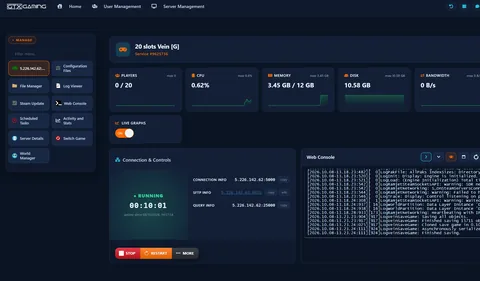
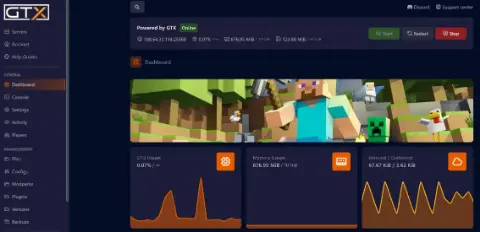
Our custom panel puts your server's settings, mods, files, restarts and backups in a browser, so you spend your nights hunting V Blood instead of hunting through config files.

- 🎛️One-click controlsStart, stop and restart your server with a single button, and see its status and connection, query, RCON and SFTP details at a glance.
- ⚙️Configuration FilesServerHostSettings.json for your server name, password, slots and presets, ServerGameSettings.json for PvE or PvP, castles, clans and loot, plus adminlist.txt and banlist.txt, each with an editor in the browser.
- 🧩Mod Manager & ThunderstoreInstall BepInEx from the Mod Manager, list your Thunderstore mods and press ThunderStore.io Mods to install them, then hand players the matching plugins with Download BepInEx ModPack.
- ⏰Scheduled restarts & updatesScheduled Tasks restart your server on a timer with 10, 5, 2 and 1 minute warnings, update it through Steam Update when a new version is out, and refresh your Thunderstore mods.
- 💾Backup ManagerDaily automatic backups, plus Backup World, Restore World, Wipe World and Download Backups in the Backup Manager, with copies kept offsite for up to 6 months.
- 📊Web Console, logs & DiscordFollow the server's output in the Web Console and Log Viewer, watch CPU and memory on live graphs, and post restart and update messages to your Discord from Service Settings.
V Rising Server Hosting: PvE, PvP, Castles & Clans
Two JSON files decide how your world plays: ServerHostSettings.json for the server itself and ServerGameSettings.json for the rules of Vardoran, from PvE or PvP and castle raids to clan size, loot and how long a night lasts.
GameSettingsPreset loads one of Stunlock's presets, such as StandardPvP, or set GameModeType yourself in ServerGameSettings.json for a co-op PvE world or full PvP.
Your Game ModeCastleDamageMode, the raid and siege timers and the PlayerInteractionSettings windows decide whether castles can be raided at all, only at set hours or at any time.
Your Siege RulesClanSize caps how many vampires share a clan (4 by default), while DeathContainerPermission, BloodBoundEquipment and TeleportBoundItems set what you keep and lose.
Your RiskGameDifficultyPreset switches between Difficulty_Easy, Difficulty_Normal and Difficulty_Brutal, and the loot, yield and crafting modifiers tune the grind.
Your PaceGameTimeModifiers sets how long a day lasts (18 minutes by default) and when the sun rises and sets, so you decide how much of each cycle is safe for a vampire.
Your ClockServerHostSettings.json holds your Name, Description, Password and MaxConnectedUsers, and ListOnSteam and ListOnEOS decide where your server is listed.
Your ServerAlready running a V Rising server with another host, or a co-op world from your own PC? Upload the save folder with the File Manager or SFTP, point the server at it, and our 24/7 team can help with the move or handle it for you.
How Many Slots Does My V Rising Server Need?
Pick a slot for every player who will be online at the same time. Most V Rising clans are small, and every plan includes up to 10GB of RAM.
| Slots | Best for | From |
|---|---|---|
| 10 slots | A clan of friends with the map to yourselves | CA$19.30/mo |
| 20 slotsRecommended | Several clans, allies and rivals in one world | CA$28.38/mo |
| 40 slots | Public PvE or PvP servers with regular raids | CA$45.10/mo |
| 60 slots | Busy public servers and communities | CA$58.89/mo |
| 80 slots | Large communities and events | CA$72.67/mo |
| 100 slots | The biggest V Rising world we offer | CA$86.46/mo |
Every tier from 10 to 100 slots is in the full plan list above. On memory, our 20-slot demo server used about 2.4GB of RAM after ten minutes with nobody online. More players, more castles and more mods use more, so busy servers need more. Watch live memory use in the control panel and add memory from 12GB to 64GB at any time from your client area.
V Rising Server Hosting Locations: Low Ping Canada & Worldwide
V Rising servers deploy in 19 locations: Quebec in Canada; New York, Ashburn, Chicago, Dallas, Miami, Los Angeles and Portland in the USA; London, Paris, Frankfurt, Amsterdam, Stockholm and Madrid in Europe; Sydney, Tokyo, Singapore and Mumbai in Asia-Pacific; plus Moscow. Run a quick test to see your latency to our network.
What's Included With Your V Rising Server Hosting?
Every server ships fully loaded. Upgrade any part of it whenever you like.
| Resource | Included | Optional upgrade |
|---|---|---|
| Player slots | 10 to 100 slots, chosen at checkout | Change your slot count any time |
| Memory | Up to 10GB of RAM on every server | Tiers from 12GB to 64GB, changed any time |
| Storage | Up to 100GB NVMe free | Tiers up to 200GB, plus extreme 14,000MB/s NVMe |
| Game version | The current V Rising release | Updated with Steam Update, on a schedule if you like |
| CPU priority | Normal priority on high-frequency cores | High and Realtime tiers |
| CPU clock | Standard high-frequency clocks | +5%, +10% and +20% clock boost tiers |
| Protection | Enterprise DDoS mitigation | Included on every server |
| Backups | Daily automatic backups, kept offsite | Backup Manager for your own |
Slots, RAM, storage, CPU priority and clock boosts are all picked at checkout and can be changed later without losing your world. Players need their own copy of V Rising on Steam to join; the server software itself is free and installed for you.
V Rising Server Hosting Features: Everything Built In
Every server ships with the full GTX feature set, no hidden add-ons.
V Rising Server Hosting: the essentials
GTX Gaming Server Hosting Reviews
Verified Trustpilot reviews from GTX Gaming customers.
GTX gaming absolutely excels at customer service
GTX gaming excels at customer service. Every ticket is answered within minutes and issues resolved promptly and professionally. Nothing but wonderful things to say about the service GTX provides. I’ve had the pleasure of interacting with several of their support agents: Tom H, Rui P, Jamie R, John K, Robert P, James K, and man they’re all excellent! Kudos to the entire team and thank you for the service you provide to the gaming community. They’ve enabled our entire crew to spend many hours having a total blast.
TOP!!!
Speed, competence, and understanding. It's the first time I've found such a good support team from a server hosting provider. Top service, top support!
Thank you Mr. Gibbs
Absolutely loved the friendliness and the quick response time. Even though I felt a little dumb for not realizing the problem myself, it felt twice as good to know that the fix was simple and clear.
V Rising Server Hosting FAQ
How fast is V Rising server setup?
+What is V Rising server hosting?
+How do I join my V Rising server?
+Can I move my existing V Rising save to my server?
+Does my server work with V Rising on PlayStation 5?
+How many players can join my V Rising server?
+How much RAM does a V Rising server need?
+How much does V Rising server hosting cost in Canada?
+Which locations can I host a V Rising server in?
+Can I run my V Rising server as PvE or PvP?
+How do I become an admin on my V Rising server?
+Can I install mods on my V Rising server?
+Can I schedule restarts and updates on my V Rising server?
+Can I upgrade my V Rising server later?
+The Complete Guide to V Rising Server Hosting in Canada & Worldwide
Everything you need to know before you rent a V Rising server in Canada or any of GTX Gaming's worldwide datacentres, from joining and server settings to PvE and PvP presets, castles and clans, admins, BepInEx mods from Thunderstore, restarts and backups, slots, pricing and locations.
What Is V Rising Server Hosting?
V Rising server hosting is a managed service that runs a V Rising dedicated server on professional hardware in a datacentre, around the clock, so your clan can hunt, build and raid whether or not you are at your PC. Every GTX Gaming V Rising server includes up to 10GB of RAM, up to 100GB of NVMe storage, daily automatic backups, enterprise DDoS protection and a web control panel, so jobs like switching to PvP, adding an admin or installing a mod take a few clicks.
People look for it as a V Rising dedicated server, a V Rising private server, a V Rising game server or V Rising server rental. They all mean the same thing: your own always-on V Rising server, with your world, your settings and your rules.
What Is V Rising?
V Rising is a vampire survival action RPG from Stunlock Studios. It entered Early Access on Steam on 17 May 2022, launched as 1.0 on 8 May 2024 and is also available on PlayStation 5. You awaken as a weakened vampire in the gothic open world of Vardoran, hunt for blood to regain your strength, hide from the scorching sun, raise a castle and convert humans into loyal servants, all the way to the showdown with Dracula.
- Gothic open world: forests, farmlands, caverns and cities full of holy soldiers, bandits and supernatural bosses whose V Blood grants you their powers.
- Castle building: gather resources, build a castle worthy of your name, protect your loot and craft coffins for servants and friends.
- Compete or cooperate: hunt with friends, raid other players' castles or play the diplomat; the game supports PvE co-op as well as full PvP.
- Updates: Secrets of Gloomrot (May 2023) and the free 1.1 Invaders of Oakveil update (April 2025) added new regions and systems, and Stunlock Studios counted over 5 million players at the 1.1 launch. Stunlock Studios says the journey to Dracula is complete and no further content update is in development, with hotfixes still arriving, the latest in September 2026.
Why Rent Your Own V Rising Server?
V Rising lets you host from your own game, but your friends can only play while your PC is on. Most clans rent a server instead, for reasons that show up within the first week:
- Always online: the server runs 24 hours a day, so your castle, your servants and your clanmates in other time zones never depend on one person's PC.
- Nothing to run at home: no ports to open on your router and no gaming rig left running all night.
- Room for everyone: from 10 slots for a clan of friends to 100 for a public PvP world.
- Proper hardware: high-frequency CPUs and NVMe storage in a datacentre, with DDoS protection at the network edge.
- Backups and support: daily automatic backups and a 24/7 support team mean a bad raid, a broken mod or a rough update is an inconvenience, not the end of your world.
Getting Started & Joining Your V Rising Server
Your server is installed and started the moment you order. From there, getting your clan into Vardoran typically looks like this:
- Order: choose your slots and your location, and your server is set up instantly.
- Name it: set Name, Description and, for a private world, Password in ServerHostSettings.json through Configuration Files.
- Pick your rules: choose a GameSettingsPreset such as StandardPvP, or edit ServerGameSettings.json for a PvE world, then restart.
- Make yourself admin: add your Steam ID to adminlist.txt, so you can use admin commands in the game.
- Join: start V Rising, choose Play, Online Play and Find Servers, search for your server's name and join, or connect directly with the address and game port from your control panel.
Your control panel shows your server's address and its game, query, RCON and SFTP details. If your server does not appear in the list, check that it is running and that ListOnSteam or ListOnEOS is enabled, or ask our 24/7 team.
ServerHostSettings.json: Name, Password, Slots & Saves
Stunlock Studios splits a V Rising server's settings into two JSON files. ServerHostSettings.json is about the server itself, and you edit it through Configuration Files in the control panel:
- Name and Description: what players see in the server list.
- Password: set one for a private world, or leave it empty for a public server.
- MaxConnectedUsers and MaxConnectedAdmins: your player cap (the server software technically supports up to 128) and how many admins may join even when the server is full.
- ListOnSteam and ListOnEOS: whether the server is listed on Steam and on the Epic Online Services list that the game searches by default.
- AutoSaveInterval and AutoSaveCount: how often the world is saved and how many saves are kept.
- ResetDaysInterval and DayOfReset: scheduled wipes, for example a fresh world every 14 days on a Saturday, with the old save backed up.
- Secure and Rcon: VAC protection, and an RCON connection for announcements and scheduled shutdowns.
Stop the server before you edit a settings file, save it, then start the server again for the change to take effect. Keep a backup before big changes, so you can always go back.
ServerGameSettings.json: PvE, PvP, Castles & Clans
ServerGameSettings.json holds the rules of your world. The quickest route is a preset: GameSettingsPreset picks one of Stunlock's game settings presets, such as StandardPvP, and GameDifficultyPreset switches between Difficulty_Easy, Difficulty_Normal and Difficulty_Brutal. For anything finer, edit the file itself:
- GameModeType: PvE for a co-op world where vampires cannot hurt each other, or PvP for open conflict.
- CastleDamageMode, the raid and siege timers and PlayerInteractionSettings: whether castles can be raided never, always or only inside set time windows, and when PvP is on.
- ClanSize and CastleLimit: how many vampires may share a clan (4 by default) and how many castles each player may hold.
- DeathContainerPermission, BloodBoundEquipment and TeleportBoundItems: who can loot your body, whether equipped gear is kept on death and whether items block waygate travel.
- Loot, yield and crafting modifiers: material yields, drop rates, blood essence, build and recipe costs and crafting speed, each a multiplier.
- GameTimeModifiers: how long a day lasts (18 minutes by default), when the sun rises and sets and how often a blood moon comes.
Rules like PvE or PvP and castle damage shape the whole world, so set them before your clan starts building; the smaller multipliers can be tuned any time with a restart.
Admins, Bans & the Console
Running a community means keeping order:
- Admins: add each admin's Steam ID to adminlist.txt, one per line, through Configuration Files; the server picks it up without a restart.
- Authenticate: in the game, enable the console in the options menu, open it with the tilde key and run adminauth.
- Commands: kick, banuser, bancharacter, banned and unban, plus the temporary ban and mute commands added in October 2025; bans land in banlist.txt, which you can also edit by hand.
- RCON: announce, announcerestart, shutdown and cancelshutdown over an RCON connection, with a password set in ServerHostSettings.json.
Mods: BepInEx & Thunderstore
V Rising mods are BepInEx plugins, and most of them are shared on Thunderstore. In your control panel: stop the server, install BepInEx from the Frameworks category of the Mod Manager (never as a mod), list the mods you want in the mods file under Configuration Files, press the ThunderStore.io Mods button and start the server. Mods you upload yourself go in with the File Manager or SFTP instead. Some mods need the same plugins on every player's PC: the Download BepInEx ModPack button packs your server's plugins and configs into one file to hand out. Install one mod at a time, read its page for dependencies and the game version it supports, and take a backup first, because mods can stop working after a game update until their makers catch up. A Scheduled Task can keep your Thunderstore mods updated on a timer.
Restarts, Updates & Backups
Stunlock Studios recommends restarting a V Rising server daily, ideally when it is quiet, and keeping backups of the save files before and after every patch. The control panel does all of it on a schedule:
- Backup and Restart with Messages: a Scheduled Task that warns players at 10, 5, 2 and 1 minutes, saves the world, restarts the server and takes a backup, every 6 hours or whatever you choose.
- Steam Update: the same warnings and backup, then an update, and with Update only if a new version is available ticked the server only restarts when there really is a patch.
- Backup Manager: Backup World, Restore World, Wipe World and Download Backups, next to the automatic daily backups, which are also kept offsite for up to 6 months.
- Discord: paste a webhook URL into Service Settings and the restart, update and start/stop messages are posted to your channel.
How Much Does V Rising Server Hosting Cost in Canada?
Pricing is simple: you pay for the number of slots, with up to 10GB of RAM and up to 100GB of NVMe storage included on every server:
- 10 slots: from CA$19.30/mo. A clan of friends with the map to yourselves.
- 20 slots: from CA$28.38/mo. Several clans, allies and rivals in one world.
- 40 slots: from CA$45.10/mo. Public PvE or PvP servers with regular raids.
- 60 slots: from CA$58.89/mo. Busy public servers.
- 100 slots: from CA$86.46/mo. The biggest V Rising world we offer.
Every tier in between is in the full plan list at the top of this page. All plans include instant setup, DDoS protection, daily automatic backups and 24/7 support, with no setup fee and no contract. Billing is monthly by default, with three-month, six-month and yearly cycles available at a discount, and you can change plan or cancel at any time. PlayStation 5 players rent the V Rising PS5 server at the same prices.
How Many Slots and How Much RAM Does a V Rising Server Need?
Choose a slot for every player who will be online at the same time. 10 slots suits a clan of friends, 20 slots a world with several clans, and 40 slots or more a public server; the server software technically supports up to 128 connected players. On memory, our 20-slot demo server used about 2.4GB of RAM after ten minutes with nobody online. More players, more castles and more mods use more, so busy servers need more. The up to 10GB included with every server is the place to start, the control panel shows live memory use, and you can add memory from 12GB to 64GB at any time.
Locations for V Rising Server Hosting
V Rising combat is about aimed skillshots and dodges, and nobody wins a duel on a laggy connection, so host close to your players. GTX Gaming runs V Rising server hosting from a Canadian datacentre in Quebec plus 18 more locations worldwide: New York, Ashburn, Chicago, Dallas, Miami, Los Angeles and Portland in the USA; London, Paris, Frankfurt, Amsterdam, Stockholm and Madrid in Europe; Sydney, Tokyo, Singapore and Mumbai in Asia-Pacific; plus Moscow. Some locations carry a surcharge, shown at checkout. Use the live ping test above to find the lowest-latency location for your clan, pick it at checkout, and if you need to move later our support team can migrate your server.
V Rising Server Hosting Glossary
Quick definitions of the terms you'll meet across V Rising, our control panel and your V Rising dedicated server:
- Dedicated Server
- A server that runs your world by itself, around the clock, without a player hosting it from their own game.
- Vardoran
- The gothic open world of V Rising, from the Farbane Woods to Oakveil.
- V Blood
- The blood of a boss: drink it to steal its powers and unlock new abilities and recipes.
- Castle Heart
- The core of your castle, fed with blood essence to keep it standing and raidable only under your server's rules.
- Clan
- A group of vampires who share a castle and loot, capped by the ClanSize setting.
- Preset
- A ready-made set of game settings, such as StandardPvP, loaded with GameSettingsPreset.
- ServerHostSettings.json
- The file for your server name, password, player cap, listing and autosaves.
- ServerGameSettings.json
- The file for your world's rules: PvE or PvP, castles, clans, loot and time.
- adminlist.txt
- The list of Steam IDs allowed to authenticate as admins with adminauth.
- BepInEx
- The plugin framework that V Rising mods run on, installed from the Mod Manager.
- Thunderstore
- The site where V Rising mods are shared and that the panel installs from.
- RCON
- A remote console connection for announcements and scheduled shutdowns.
- SFTP
- Secure file transfer for moving saves and mods between your PC and your server.
Setup Guides & Help for Your V Rising Server
Once your V Rising server is live, our help guides cover the common jobs, such as adding mods to your V Rising server, setting up automatic restarts with warning messages and managing your backups, and the help guides in your client area list the rest. Our 24/7 support team is on live chat and tickets for anything the guides don't cover:
Explore Other Services
Host more of your favourites with the same instant setup and 24/7 support.
Last Updated: October 23, 2026