

DayZ Server Hosting Canada
Rent Your DayZ Dedicated Server for PC
Premium DayZ server hosting from GTX Gaming's Canadian and worldwide datacentres. Rent a DayZ server for PC with instant setup, one-click Steam Workshop mods, a Mod Manager with 10 community maps, the DayZ Expansion Bundle and VPPAdminTools, Chernarus, Livonia and Sakhal, DZSA Launcher sync, up to 10GB of RAM and 100GB of NVMe storage included, offsite backups, enterprise DDoS protection and 24/7 support. Rent your DayZ dedicated server from CA$19.55/mo.
★★★★★ 4.7/5 on Trustpilot · 1,400+ reviewsDayZ Server Hosting: Plans & Pricing
One DayZ server for PC, priced by slots. Every plan includes up to 10GB of RAM, up to 100GB of NVMe storage, Steam Workshop, the Mod Manager and DDoS protection, and you can change your plan at any time without losing your world.
- Instant setup
- Up to 10GB RAM included
- Up to 100GB NVMe storage
- Steam Workshop & Mod Manager
- 24/7 support
- 12GB RAM
- High CPU Priority
- Up to 100GB NVMe storage
- Community maps in one click
- 16GB RAM
- High CPU Priority
- +5% CPU clock boost
- Up to 120GB NVMe storage
- 10 to 127 slots
- RAM up to 64GB
- CPU priority & clock boost
- Storage up to 200GB
DayZ Server Hosting for Badlands & Nasdara
DayZ Badlands is the new expansion from Bohemia Interactive, with a brand-new map, Nasdara, and it comes with Update 1.30 on 15 October 2026. Update your GTX server from the control panel and our 24/7 team can help you move your server to Nasdara.
Coming 15 October 2026DayZ Badlands and Update 1.30 arrive on 15 October 2026. Get your server ready now.
Install the Experimental Update tool from the Mod Manager in one click and run your server on the DayZ experimental branch, where Update 1.30 has been in testing since 16 September 2026. Take a backup first: 1.30 changes animations, so animation mods may break until their authors update them.
DayZ Badlands is a paid expansion from Bohemia Interactive, and Bohemia sets the rules for who can play on Nasdara: check the official DayZ news for the details.
The DayZ Server Hosting Control Panel
Our custom panel puts your DayZ server's mods, maps, settings, backups and RCON in a browser. Thousands of hours of development went into it, so new and veteran admins alike have every tool a DayZ server needs.
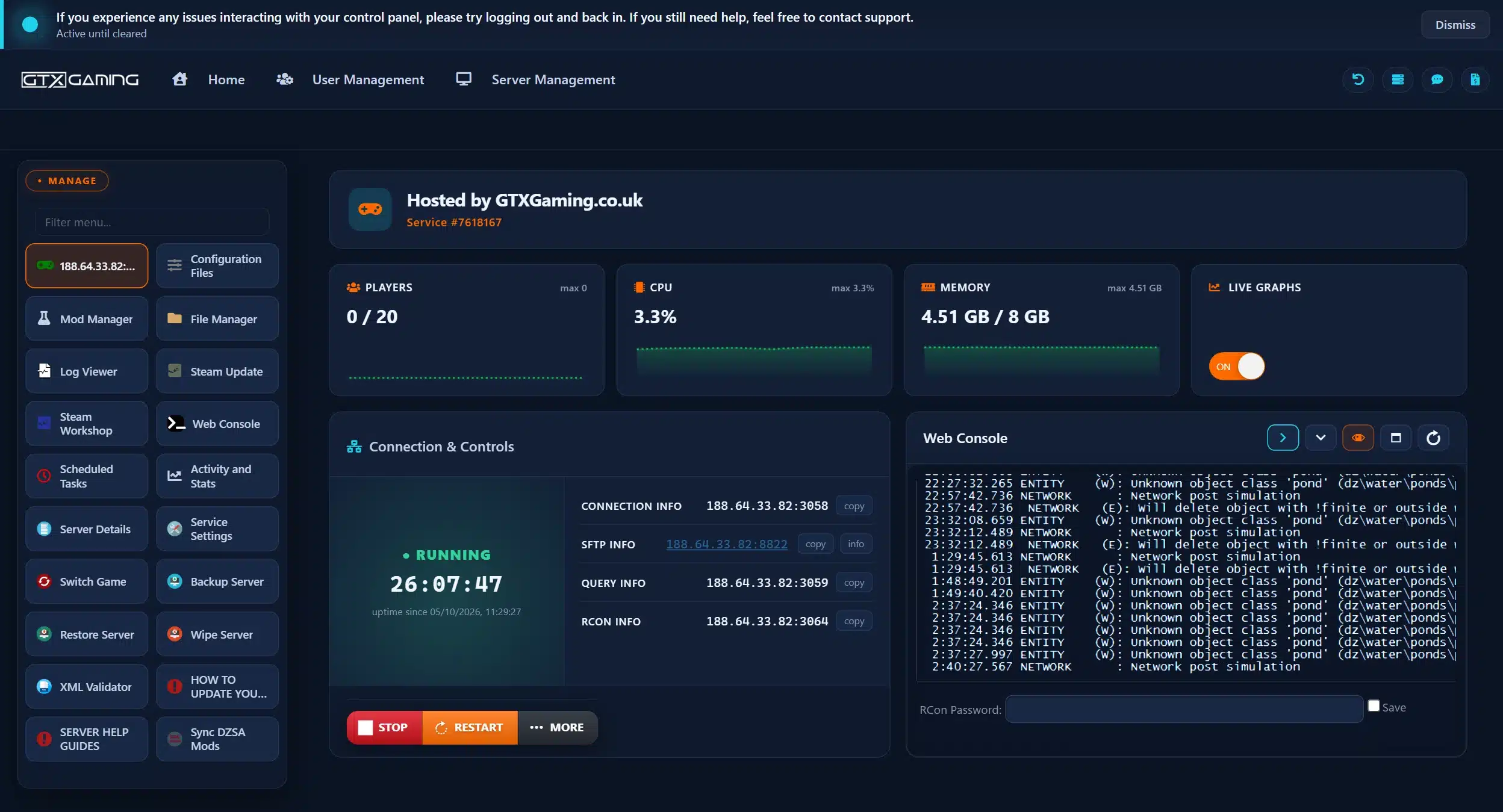
- 🎛️One-click controlsStop and restart your server with a single button, and see players, CPU and memory at a glance with your connection details beside them.
- 🧩Steam Workshop & Mod ManagerOne-click installs of Workshop mods, community maps, the DayZ Expansion Bundle, VPPAdminTools and more.
- 📝Configuration Files & XML ValidatorSimple editors for your server settings, priority queue, whitelist, ban list and messages, plus an XML Validator that checks your files.
- ⌨️Web Console (RCON)Send RCON commands in your browser and follow the server output in the Web Console and Log Viewer, with your RCON details under Server Details.
- 💾Backup, Restore & WipeBack up and restore your server in a couple of clicks, get an offsite backup on every restart, and use Wipe Server for a fresh start.
- ⏰Scheduled Tasks & live graphsPut restarts, broadcasts, game updates and mod updates on a timer, and watch players, CPU and memory on live graphs.
DayZ Server Hosting: Mods, Maps & Admin Tools
Steam Workshop and a one-click Mod Manager are built into your control panel. Install mods, community maps and admin tools without touching a file, and keep everything in sync with the DZSA Launcher.
Install or uninstall any Workshop mod in one click from your control panel, and let Scheduled Tasks keep your mods up to date.
One-Click InstallNamalsk Island, Deer Isle, Banov, BanovFrost, Chiemsee, Bitterroot, Prominsk, Siberia 5.0, TakistanPlus and Newyork, each one click away in the Mod Manager.
10 MapsInstall the DayZ Expansion Bundle in one click from the Mod Manager, and give your server the RAM a big mod pack needs.
Community ModIn-game admin tools in one click: manage players, teleport and spawn items, alongside the Web Console for RCON.
Admin ToolsSync your mod list with the DZSA Launcher in one click, so players can find your modded server and download its mods.
Easy JoiningEdit your server settings, priority.txt, whitelist.txt, ban.txt, messages.xml and the BattlEye RCON file, and check XML files for errors before you restart.
Your RulesAlready running a DayZ server on your own PC or with another host? Upload your mission files, mods and configuration through the File Manager or SFTP and carry on where you left off. Our 24/7 team can help with the move or handle it for you.
How Many Slots Does My DayZ Server Need?
Pick a slot for every player who will be online at the same time. Every server includes up to 10GB of RAM, and you can add slots or memory whenever your community grows.
| Slots | Best for | From |
|---|---|---|
| 10 slotsStart Here | A private server for you and your friends | CA$19.55/mo |
| 20 slots | A squad or a small whitelisted community | CA$24.89/mo |
| 30 slots | Modded community servers | CA$32.01/mo |
| 40 slots | Growing PvP and PvE communities | CA$40.90/mo |
| 60 slots | Large public and roleplay servers | CA$53.35/mo |
| 100 slots | High-population public servers | CA$106.73/mo |
| 127 slots | Our largest DayZ server | CA$160.10/mo |
On memory: the included 10GB is plenty for a vanilla server, and our own test server used about 4.5GB with no players online and no mods. Big mod packs such as the DayZ Expansion Bundle, community maps and a full server all add to that, so a busy modded server is better off with 12GB or 16GB, as in our Infected and Zombie Madness plans. Watch live usage in the control panel and change your slots or memory at any time from your client area.
DayZ Server Hosting Locations: Low Ping Canada & Worldwide
DayZ servers deploy in 19 locations: Quebec in Canada; New York, Ashburn, Chicago, Dallas, Miami, Los Angeles and Portland in the USA; London, Paris, Frankfurt, Amsterdam, Stockholm and Madrid in Europe; Sydney, Tokyo, Singapore and Mumbai in Asia-Pacific; plus Moscow. Run a quick test to see your latency to our network.
What's Included With Your DayZ Server Hosting?
Every server ships fully loaded. Upgrade any part of it whenever you like.
| Resource | Included | Optional upgrade |
|---|---|---|
| Player slots | 10 to 127 slots, chosen at checkout | Change your slot count any time |
| Memory | Up to 10GB of RAM on every server | Tiers from 12GB to 64GB, changed any time |
| Storage | Up to 100GB NVMe free | Tiers up to 200GB, plus extreme 14,000MB/s NVMe |
| Mods & maps | Steam Workshop, Mod Manager and 10 community maps in one click | DZSA Launcher sync included |
| CPU priority | Normal priority on high-frequency cores | High and Realtime tiers |
| CPU clock | Standard high-frequency clocks | +5%, +10% and +20% clock boost tiers |
| Protection | Enterprise DDoS mitigation | Included on every server |
| Backups | Backup Manager plus an offsite backup on every restart | Included on every server |
| Support | 24/7 live chat and tickets | VIP ticket priority add-on |
Slots, RAM, storage, CPU priority and clock boosts are all picked at checkout and can be changed later without losing your settings. Players need their own copy of DayZ on Steam to join, plus any mods your server uses.
DayZ Server Hosting Features: Everything Built In
Every server ships with the full GTX feature set, no hidden add-ons.
DayZ Server Hosting: the essentials
GTX Gaming Server Hosting Reviews
Verified Trustpilot reviews from GTX Gaming customers.
GTX gaming absolutely excels at customer service
GTX gaming excels at customer service. Every ticket is answered within minutes and issues resolved promptly and professionally. Nothing but wonderful things to say about the service GTX provides. I’ve had the pleasure of interacting with several of their support agents: Tom H, Rui P, Jamie R, John K, Robert P, James K, and man they’re all excellent! Kudos to the entire team and thank you for the service you provide to the gaming community. They’ve enabled our entire crew to spend many hours having a total blast.
TOP!!!
Speed, competence, and understanding. It's the first time I've found such a good support team from a server hosting provider. Top service, top support!
Thank you Mr. Gibbs
Absolutely loved the friendliness and the quick response time. Even though I felt a little dumb for not realizing the problem myself, it felt twice as good to know that the fix was simple and clear.
DayZ Server Hosting FAQ
How fast is DayZ server setup?
+What is DayZ server hosting?
+How do I join my DayZ server?
+Can I rent an Xbox or PlayStation DayZ server?
+Can I install Steam Workshop mods on my DayZ server?
+Which maps can I run on my DayZ server?
+Will my DayZ server be ready for DayZ Badlands and Nasdara?
+How do I set up a priority queue, whitelist or admins on my DayZ server?
+How many players can join my DayZ server?
+How much RAM does a DayZ server need?
+Can I upgrade or downgrade my DayZ server later?
+Can I wipe my DayZ server?
+Which locations can I host a DayZ server in?
+How much does DayZ server hosting cost in Canada?
+What is your refund policy?
+Do you offer monthly DayZ server hosting with no contract?
+The Complete Guide to DayZ Server Hosting in Canada & Worldwide
Everything you need to know before you rent a DayZ server in Canada or any of GTX Gaming's worldwide datacentres, from setup, Steam Workshop mods and the DZSA Launcher to maps, admin tools, priority queues, wipes, DayZ Badlands, slots, RAM, pricing and locations.
What Is DayZ Server Hosting?
DayZ server hosting is a managed service that runs the official DayZ dedicated server on professional hardware in a datacentre, around the clock, so your survivors can log in whether or not you are at your PC. Every GTX Gaming DayZ server includes up to 10GB of RAM, up to 100GB of NVMe storage, offsite backups, enterprise DDoS protection and a web control panel with Steam Workshop, a Mod Manager, Configuration Files and a Web Console for RCON.
Players look for it as a DayZ dedicated server, a DayZ game server, a DayZ Standalone server or simply a DayZ server to rent, and they all mean the same thing: a private, always-on home for your own DayZ server, with your mods, your map, your rules and your community. Whether you want to host a DayZ server for five friends or run a 127 slot public server, the setup is the same.
What Is DayZ?
DayZ is the open-world survival game from Bohemia Interactive, who develop and publish it. It was released on Steam on 13 December 2018. You spawn on the coast with almost nothing, and every hour after that is about staying alive: finding food, water and medicine, avoiding the infected, and deciding whether the next survivor you meet is a friend or a threat.
- Official maps: Chernarus, the classic DayZ map; Livonia; and Sakhal, the island map of the Frostline DLC.
- Survival first: hunger, thirst, temperature, injuries and disease all matter, and every life counts.
- Bases and vehicles: build a base, hide your stashes and get cars and trucks back on the road.
- Built for mods: thousands of mods and community maps on the Steam Workshop, from admin tools to whole new worlds.
The next chapter is DayZ Badlands, a new expansion with the map Nasdara, which comes with Update 1.30 on 15 October 2026. More on getting your server ready for it below.
Why Rent a DayZ Server?
You can host a DayZ server yourself with the DayZ Server tool on Steam, but most communities rent a DayZ server instead, for reasons that show up in the first week:
- Always online: the server runs 24 hours a day, so players can log in whenever they like without waiting for someone to start it.
- Nothing to run at home: no ports to open on your router and no PC left running all night, and your own PC stays free for playing.
- Mods in one click: Steam Workshop and the Mod Manager install mods, community maps and admin tools for you.
- Proper hardware: high-frequency CPUs and NVMe storage in a datacentre, with DDoS protection at the network edge, so a raid is not decided by a home connection.
- Backups and support: an offsite backup on every restart and a 24/7 support team mean a broken mod is an inconvenience, not a lost world.
PC, PlayStation or Xbox: Which DayZ Server Can You Rent?
GTX Gaming hosts DayZ servers for the PC version of the game on Steam. We do not host Xbox or PlayStation DayZ community servers, and console players cannot join a PC server, because the PC and console versions of DayZ are separate. If you were looking for a PS4, PS5 or Xbox DayZ server, a GTX server will not show up in the console server browser.
On PC, everything in this guide applies: Steam Workshop mods, community maps, the DZSA Launcher and full access to your server files through the File Manager and SFTP. That freedom is the reason most modded DayZ communities play on PC.
How to Set Up a DayZ Server
Your server is set up the moment you order. From there, a typical first evening looks like this:
- Order: choose your slots, RAM and location, and your server is set up instantly.
- Name it: open Configuration Files and set your server name, a password for a private server, the message of the day and your respawn settings.
- Add mods: install Workshop mods from Steam Workshop or one-click packs from the Mod Manager, then restart.
- Choose your map: stay on Chernarus, or switch to Livonia, Sakhal or a community map.
- Set your rules: fill in priority.txt, whitelist.txt and ban.txt, and set your BattlEye RCON password.
- Join: find your server in the DayZ server browser or the DZSA Launcher, or connect by IP address.
The Server Details button shows your IP address, ports and RCON details, and the Web Console shows the server's own output, so you can see straight away whether a mod loaded. If an edit to an XML file goes wrong, the XML Validator in your control panel checks your files for errors before you restart.
Installing DayZ Mods: Steam Workshop, Mod Manager & DZSA Launcher
Mods are a big part of DayZ, and your server is ready for them. There are several ways to add them:
- Steam Workshop: install or uninstall mods from the DayZ Steam Workshop in one click from your control panel. Your mod list is kept in the Workshop.mods file.
- Mod Manager: one-click installs of the most requested packs: the DayZ Expansion Bundle, VPPAdminTools, five Hunter Mods (Battery Charger Plus, Country Filter, Improved Weapon Raise, Mystery Boxes and Starter Kit) and Server Messages for scheduled broadcasts.
- Workshop Mods Manual Downloader: a Mod Manager tool that downloads Workshop mods manually and directly to your server.
- DZSA Launcher: many players join modded servers through the DZSA Launcher, which downloads a server's mods for them. Press Sync DZSA Mods in your control panel after changing your mods so the launcher sees the right list.
Every player needs the same mods to join. Scheduled Tasks can update your mods automatically, paired with a restart and a warning message to players. Take a backup before adding a big mod pack, and keep an eye on RAM: every mod adds to what the server uses.
DayZ Maps: Chernarus, Livonia, Sakhal & Community Maps
Every GTX DayZ server can run the official maps:
- Chernarus: the original DayZ map, with forests, towns, military bases and a long coastline.
- Livonia: the map of the Livonia DLC, with dense forests, lakes and rivers.
- Sakhal: the island map of the Frostline DLC. Our knowledgebase explains every step: How to run the Sakhal map from the Frostline DLC on your DayZ dedicated game server.
Community maps install from the Mod Manager in one click: Namalsk Island, Deer Isle, Banov, BanovFrost, Chiemsee, Bitterroot, Prominsk, Siberia 5.0, TakistanPlus and Newyork. Install a community map on a vanilla server with no other mods, take a backup first, and follow the instructions shown at the end of the installation. Community maps are made by the community, and players download them like any other mod.
DayZ Badlands & Nasdara: Getting Your Server Ready
DayZ Badlands is the next expansion from Bohemia Interactive. It brings a brand-new map, Nasdara, and comes with Update 1.30 on 15 October 2026. Bohemia has announced:
- Sandstorms: new weather that changes how you travel and fight.
- Rebuilding: houses you can rebuild in the world around you.
- Motorcycles: a moped and an enduro bike.
- Radio and Morse code: radio gameplay with Morse code that leads to underground shelters.
- Regional gear: regional firearms, clothing and loot.
- Wildlife and diseases: dogs, desert monitors and mouflons, plus regional diseases.
- Underground facilities: a new terrain-hole system that other maps and modders can use too.
To get your server ready, take a backup, then update it with Steam Update in your control panel to get Update 1.30, and ask our 24/7 team if you want help moving your server to Nasdara. To test before release day, install the Experimental Update tool from the Mod Manager: it runs your server on the DayZ experimental branch, where Update 1.30 has been in testing since 16 September 2026. One warning: 1.30 changes animations, so animation mods may break until their authors update them. DayZ Badlands is a paid expansion, and Bohemia sets the rules for who can play on Nasdara, so check the official DayZ news for the details.
Admin Tools, Priority Queue & Whitelists
Running a community means managing players, and your control panel has the tools:
- Web Console (RCON): send RCON commands and watch the server output from your browser. Your RCON details are under Server Details.
- BattlEye RCON: set your RCON password in the BattlEye configuration file in Configuration Files.
- Priority queue: add your regulars and supporters to priority.txt so they get in first when the server is full.
- Whitelist: list players in whitelist.txt to run a private whitelisted server.
- Ban list: keep troublemakers out with ban.txt.
- VPPAdminTools: install it from the Mod Manager in one click for in-game admin tools such as teleporting, spawning items and managing players.
- Server messages: set timed messages in messages.xml, or install Server Messages from the Mod Manager for scheduled broadcasts over RCON.
Wipes, Backups & Restarts
DayZ communities wipe their servers for a fresh start, often after a big update or at the start of a new season. The Wipe Server button resets your server's world in one click. Before you wipe, take a backup with Backup Server: any backup can be brought back with Restore Server, and every time your server restarts a clone backup is also saved to our offsite backup machine.
Scheduled Tasks put the routine work on a timer: restarts, broadcast messages, game updates, Steam updates, mod updates and RCON commands. A common setup restarts the server every few hours, with a broadcast warning players a few minutes before.
How Much Does DayZ Server Hosting Cost in Canada?
You pay for the number of slots, with up to 10GB of RAM and up to 100GB of NVMe storage included on every server:
- 10 slots: from CA$19.55/mo. A private server for you and your friends.
- 20 slots: from CA$24.89/mo. A squad or a small whitelisted community.
- 30 slots: from CA$32.01/mo. Modded community servers.
- 60 slots: from CA$53.35/mo. Large public and roleplay servers.
- 127 slots: from CA$160.10/mo. Our largest DayZ server.
Want a ready-made build? The Infected plan (30 slots, 12GB of RAM and High CPU Priority) is CA$53.33/mo, and Zombie Madness (60 slots, 16GB of RAM, High CPU Priority, a 5% clock boost and 120GB of storage) is CA$103.10/mo. All plans include instant setup, Steam Workshop, the Mod Manager, DDoS protection, offsite backups and 24/7 support, with no setup fee and no contract. Billing is monthly by default, with three-month, six-month and yearly cycles available at a discount, and you can change plan or cancel at any time.
How Many Slots & How Much RAM Does a DayZ Server Need?
Choose a slot for every player who will be online at the same time. Small groups of friends are well served by 10 or 20 slots, growing communities by 30 to 60, and big public servers by 80 slots and up, to a maximum of 127. On memory, every server includes up to 10GB of RAM. Our own test server used about 4.5GB with no players online and no mods, so a vanilla server has room to spare. Mods change the picture: big mod packs such as the DayZ Expansion Bundle, community maps and a full server all add memory, so a busy modded server is better off with 12GB or 16GB. The control panel shows live memory use, so you can see exactly what your server needs and upgrade before it gets close to the limit.
Locations for DayZ Server Hosting
In a firefight every millisecond counts, so host close to your players. GTX Gaming runs DayZ server hosting from a Canadian datacentre in Quebec plus 18 more locations worldwide: New York, Ashburn, Chicago, Dallas, Miami, Los Angeles and Portland in the USA; London, Paris, Frankfurt, Amsterdam, Stockholm and Madrid in Europe; Sydney, Tokyo, Singapore and Mumbai in Asia-Pacific; plus Moscow. Some locations carry a surcharge, shown at checkout. Use the live ping test above to find the lowest-latency location for your community, pick it at checkout, and if you need to move later, open a ticket and our support team will move your server.
DayZ Server Hosting Glossary
Quick definitions of the terms you'll meet across DayZ, our control panel and the Mod Manager:
- DayZ Standalone
- Another name for DayZ, the survival game from Bohemia Interactive that your server runs.
- Dedicated Server
- A server that runs your DayZ world by itself, around the clock, without a player hosting it from their own game.
- Steam Workshop
- Steam's library of DayZ mods and maps. Install them on your server in one click from the control panel.
- Mod Manager
- The control panel tool for one-click installs of community maps, the DayZ Expansion Bundle, VPPAdminTools and more.
- DZSA Launcher
- A community launcher many players use to find modded DayZ servers and download their mods automatically.
- Community Map
- A map made by the DayZ community, such as Namalsk Island or Deer Isle, installed like a mod.
- DayZ Expansion
- A popular community mod bundle that adds a lot to the game, installed from the Mod Manager in one click.
- VPPAdminTools
- A community admin mod with in-game tools for managing players, teleporting and spawning items.
- RCON
- Remote console: send admin commands to your server without being in the game, from the Web Console.
- BattlEye
- The anti-cheat that protects DayZ servers. Its configuration file holds your RCON password.
- Priority Queue
- A list of players, kept in priority.txt, who get in first when the server is full.
- Whitelist
- A list of players, kept in whitelist.txt, who are allowed to join a private server.
- Wipe
- A reset of your server's world for a fresh start. Back up first so you can restore it.
- mpmission
- The mission folder with the core files of your map. The Advanced Settings tool in the Mod Manager opens it up for editing.
- Experimental Branch
- The DayZ test version where new updates are tried before release. The Experimental Update tool switches your server to it.
- Nasdara
- The new map of DayZ Badlands, which comes with Update 1.30 on 15 October 2026.
Setup Guides & Help for Your DayZ Server
Once your DayZ server is live, the Server Help Guides in your control panel cover the common tasks: naming your server, setting passwords, installing mods and maps, becoming an admin, setting up the priority queue and restoring a backup. Our 24/7 support team is on live chat and tickets for anything the guides don't cover:
Explore Other Services
Host more of your favourites with the same instant setup and 24/7 support.
Last Updated: 6 October 2026