






 DayZ
DayZ Palworld


 Enshrouded
















Quick answer
Minecraft server commands are typed in the server console without a slash, or in game chat with a slash once you're an operator. The admin essentials are op Name and deop Name for admin rights, whitelist on and whitelist add Name to keep the server private, kick Name, ban Name and pardon Name to deal with trouble, and list, save-all and stop to run it. Bedrock servers use allowlist and have no ban command.
On this pageWhere do you type Minecraft server commands?
- Where do you type Minecraft server commands?
- How to OP someone (make a player admin)
- How to whitelist players on your server
- How to kick and ban players
- Everyday server commands cheat sheet
- Game rule commands: the new names on 26.x
- Java vs Bedrock: what's different
- Command not working? Check these
- Minecraft server commands FAQ
Below: where to type commands, how to OP someone and set admin levels, the whitelist (and Bedrock's allowlist), kicking and banning, a cheat sheet of everyday commands, the new game rule names on 26.x, and what to check when a command won't work.
Checked against Minecraft Java Edition 26.3 and Bedrock Edition 26.52 (Bedrock Dedicated Server), October 2026.
Where do you type Minecraft server commands?
There are two places to type them, and the main difference is the slash.
- The server console. Type the command without a slash, for example
op Steve. The console runs everything with full rights, so it works before anyone on the server is an operator. On a GTX server, it's the Console page in the game panel. - In game. Open chat (T, or / to open it with the slash already typed) and enter
/op Steve. You have to be an operator first.
Press Tab while typing to complete command and player names. help lists every command your server knows, and help whitelist shows the syntax of one. Paper and modded servers have these vanilla commands too, plus their own.
On a Bedrock server, most in-game commands also need cheats switched on. Set allow-cheats=true in server.properties, or type changesetting allow-cheats true in the console (that one doesn't change the file, so set it there too if you want it to stay). Commands typed in the console work either way.
How to OP someone (make a player admin)
An operator (OP) is a player who can use admin commands in game. OP only people you trust: by default an operator on a Java server can ban players, OP others and stop the server.
On Java Edition
- Console:
op Stevemakes Steve an operator;deop Stevetakes it away. Use the player's exact in-game name. - GTX game panel: click Manage Server, open Players and click the add-OP button (+) next to the player's name. Click the same button again (it now shows a minus) to remove it. Step by step: make a player admin on a Java server.

Java permission levels
Java has numbered levels, and op gives level 4 unless you change op-permission-level in server.properties. Each level includes everything below it:
| Level | Name | What the player can do |
|---|---|---|
| 1 | Moderator | Build inside the spawn protection area |
| 2 | Gamemaster | Gameplay commands such as gamemode, tp, give and gamerule, and command blocks |
| 3 | Admin | Player management: kick, ban, op and whitelist |
| 4 | Owner | Everything, including save-all and stop |
To give a helper less power, stop the server, change their "level" in ops.json (3 for a moderator who can kick and ban, 2 for a builder who only needs creative tools) and start it again. The same entry has bypassesPlayerLimit: set it to true and that player can still join when the server is full.
On Bedrock Edition
Bedrock has no numbered levels to hand out: a player is a visitor, a member or an operator. Ask the player to join, then type op "Gamer Tag" in the console (the quotes are only needed when the gamertag has a space). deop "Gamer Tag" removes it. The player has to be online. For someone who's offline, add their XUID with "permission": "operator" to permissions.json, then restart the server or type permission reload. Our guides: OP a player on a Bedrock server, including the permissions.json format.
How to whitelist players on your server
With the whitelist on, only the players on the list can join. Switch it on before you share your server's address anywhere. New in Java 26.3: a newly created server has the whitelist switched on by default (white-list=true in server.properties), so if friends can't get into a brand-new server, add them to it.
Java Edition whitelist commands
whitelist on |
Only players on the list (and operators) can join |
whitelist add Name |
Adds a player; they don't need to be online |
whitelist remove Name |
Takes a player off the list |
whitelist list |
Shows everyone on the list |
whitelist reload |
Reloads whitelist.json after you've edited the file by hand |
whitelist off |
Lets anyone join again |
Click a column heading to sort.
Two things catch people out. Operators can always join a Java server, listed or not, so you don't have to whitelist yourself once you're OP. And switching the whitelist on doesn't remove anyone who's already playing. Set enforce-whitelist=true in server.properties and players who aren't on the list are kicked whenever the whitelist reloads. On GTX, you edit server.properties on the panel's Files page, and our admin and whitelist guide has the same commands for the panel console.
Bedrock Edition: the allowlist
Bedrock renamed the whitelist to the allowlist in version 1.18.10, and there's no allowlist on command. Set allow-list=true in server.properties and restart, then manage it from the console:
allowlist add "Gamer Tag"lets a player in, andallowlist remove "Gamer Tag"takes them off.allowlist listshows the list;allowlist reloadrereadsallowlist.jsonafter a manual edit.
Unlike Java, operators must be on the allowlist too, so add yourself first. These are console commands: operators can't run them in game on a dedicated server. Full steps with the file format: whitelist on your Bedrock server.
How to kick and ban players
A kick disconnects a player, and they can rejoin straight away. A ban keeps them out until you lift it, and it beats the whitelist: a banned player stays out even if they're listed.
kick Name reason |
Disconnects the player and shows them the reason (optional) |
ban Name reason |
Bans the account; the reason is shown to them and written to the log |
ban-ip Name |
Bans the IP address of an online player (or type the address itself) |
pardon Name |
Lifts a ban |
pardon-ip 203.0.113.7 |
Lifts an IP ban |
banlist |
Lists bans; banlist ips shows only IP bans |
Click a column heading to sort.
Ban the account first. Keep ban-ip for someone who keeps coming back on new accounts, because it also blocks everyone else on that connection. On GTX Java servers, the Players page has a kick and a ban button next to every online player, and lists bans so you can lift one with a click: kick and ban players on Java.
Banning on Bedrock
Bedrock has kick "Gamer Tag" reason but no ban command. The way to keep someone out is the allowlist: make sure allow-list=true is set, take them off with allowlist remove "Gamer Tag", then kick them. They can't get back in.
Vanilla Minecraft has no warn or temporary-ban command, and Java has no mute either. Servers that need them run a moderation plugin, which needs a plugin server such as Paper: see our guide to Minecraft server types. EssentialsX adds mutes, temporary bans and jails; it's in our list of the best Minecraft server plugins.
Everyday server commands cheat sheet
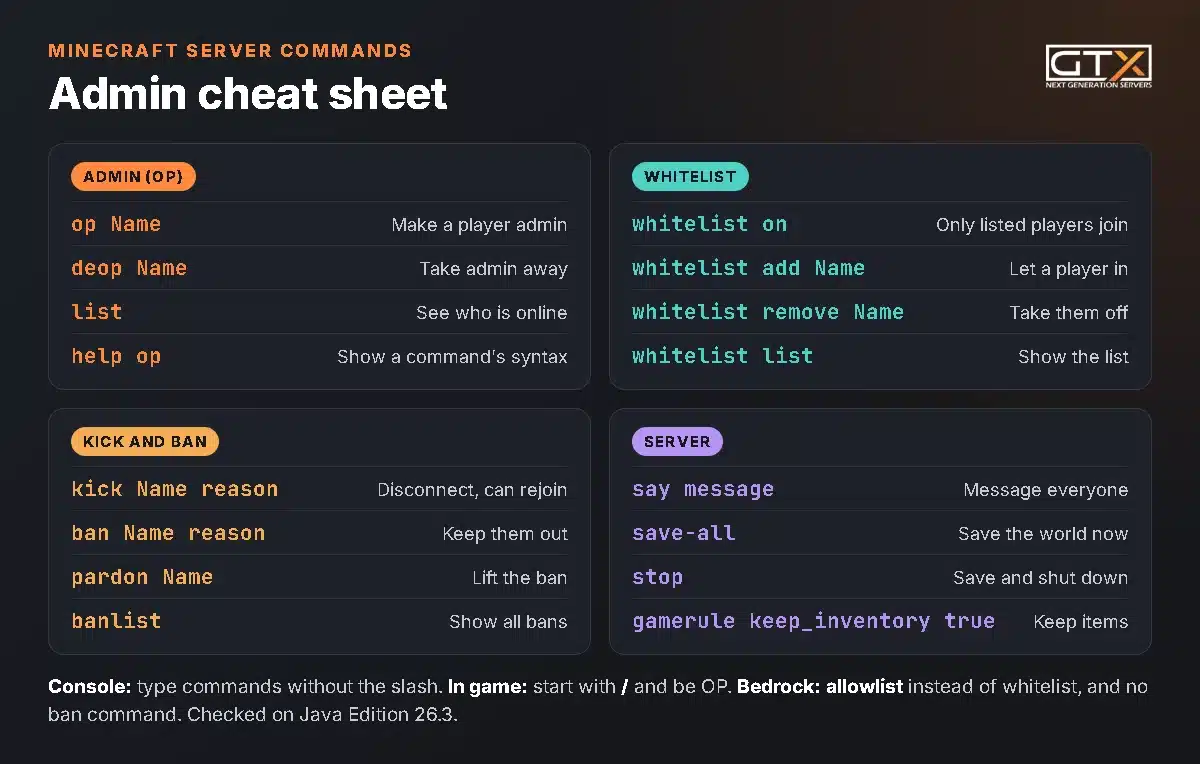
Beyond the admin commands, these are the ones server owners use most. They're written the console way; add a slash in game.
list |
Shows who's online |
say Restart in 5 minutes |
Sends a message to everyone |
msg Name hello |
Sends one player a private message |
tp Name1 Name2 |
Teleports Name1 to Name2 (or to coordinates: tp Name 100 64 -200) |
gamemode creative Name |
Changes one player's game mode: survival, creative, adventure or spectator |
defaultgamemode survival |
Sets the game mode for new players |
difficulty hard |
Changes the difficulty for everyone |
time set day |
Sets the time: day, noon, night or midnight |
weather clear |
Clear, rain or thunder |
setworldspawn |
Makes your current spot the spawn point (in game) |
give Name diamond 64 |
Gives a player items |
save-all |
Saves the world now (Java) |
stop |
Saves the world and shuts the server down |
Click a column heading to sort.
For coordinates and moving players around, see our guide to showing coordinates and teleporting. To run commands automatically, enable command blocks on your server.
Game rule commands: the new names on 26.x
Java 1.21.11 renamed every game rule to lower case with underscores, so older guides give names that no longer work on a 26.x Java server. Bedrock kept its own names. You set them with gamerule, for example gamerule keep_inventory true.
| Keep items and XP on death | keep_inventory |
keepInventory |
keepinventory |
| Fewer sleepers skip the night (0 = one player) | players_sleeping_percentage |
playersSleepingPercentage |
playerssleepingpercentage |
| Stop creepers and endermen breaking blocks | mob_griefing |
mobGriefing |
mobgriefing |
| Stop the day/night cycle | advance_time |
doDaylightCycle |
dodaylightcycle |
| Stop the weather changing | advance_weather |
doWeatherCycle |
doweathercycle |
| No phantoms | spawn_phantoms |
doInsomnia |
doinsomnia |
Click a column heading to sort.
Not sure of a name? Type /gamerule and a space, and the game suggests every rule it knows. Protecting builds is covered in our guide to stopping mob griefing, and the rules most servers change are in the commands and game rules chapter of our server guide.
Java vs Bedrock: what's different
| Make someone admin | op Name, in the console or in game |
op "Gamer Tag" in the console with the player online, or permissions.json |
| Admin levels | 1 to 4, set in ops.json |
Visitor, member or operator |
| Turn on the whitelist | whitelist on |
allow-list=true in server.properties |
| Add a player | whitelist add Name |
allowlist add "Gamer Tag" |
| Do operators need to be listed? | No | Yes |
| Ban | ban, ban-ip, pardon |
No ban command: use the allowlist |
| In-game commands need | OP | OP, and cheats on for most commands |
Click a column heading to sort.
Command not working? Check these
- A slash in the console. Leave it off:
op Steve, not/op Steve. - It works in the console but not in game. You aren't OP, or your level is too low for that command (on Java,
kick,banandwhitelistneed level 3). - An error with the command repeated back. Java marks the spot it couldn't read with
<--[HERE]; Bedrock says "Unknown command" or "Syntax error". Check the spelling, and check the command exists on your edition:bandoesn't on Bedrock, and old game rule names don't on Java 26.x. - A Bedrock gamertag with a space. Put it in double quotes.
- Bedrock
opcan't find the player. They have to be online. Otherwise, usepermissions.json. - A file edit didn't take. After editing
whitelist.json,allowlist.jsonorpermissions.jsonby hand, run the matchingreloadcommand or restart, and check the commas: one missing comma and the server can't read the file.
Minecraft server commands FAQ
How do I get admin commands on my Minecraft server?
Make yourself an operator. Type op YourName in the server console (no slash), or on a GTX Java server click the add-OP button next to your name on the Players page. You can then use admin commands in game with a slash.
Do I need to whitelist myself?
On Java, no: operators can always join, even when they're not on the whitelist. On Bedrock, yes: every player must be on the allowlist, operators included, so add yourself before you switch it on.
Why can't my friends join my new 26.3 server?
Since Java 26.3, a newly created server has the whitelist on by default (white-list=true). Add each friend with whitelist add Name, or type whitelist off if you want an open server.
What's the difference between kick and ban?
A kick only disconnects the player, who can rejoin straight away. A ban keeps the account out until you use pardon, and it overrides the whitelist.
Can you ban someone on Bedrock?
Not with a command: Bedrock has no ban. Turn the allowlist on, remove the player from it and kick them; they won't be able to rejoin.
How do I let a friend help run the server without my password?
In game, OP them at a lower level (Java) so they can moderate without stopping the server. For the panel, add them as a sub-user and tick only what they need, such as the console and restarts: create a sub-user.
We've hosted game servers since 2008. On our Minecraft server hosting, the panel puts OP, kick and ban one click away on the Players page, and our 24/7 support can help with any command. Running mods? The same commands work on a modded Minecraft server. For backups, RAM, server types and everything else, read our Minecraft server guide.