




 DayZ
DayZ Palworld


 Enshrouded
















Quick answer
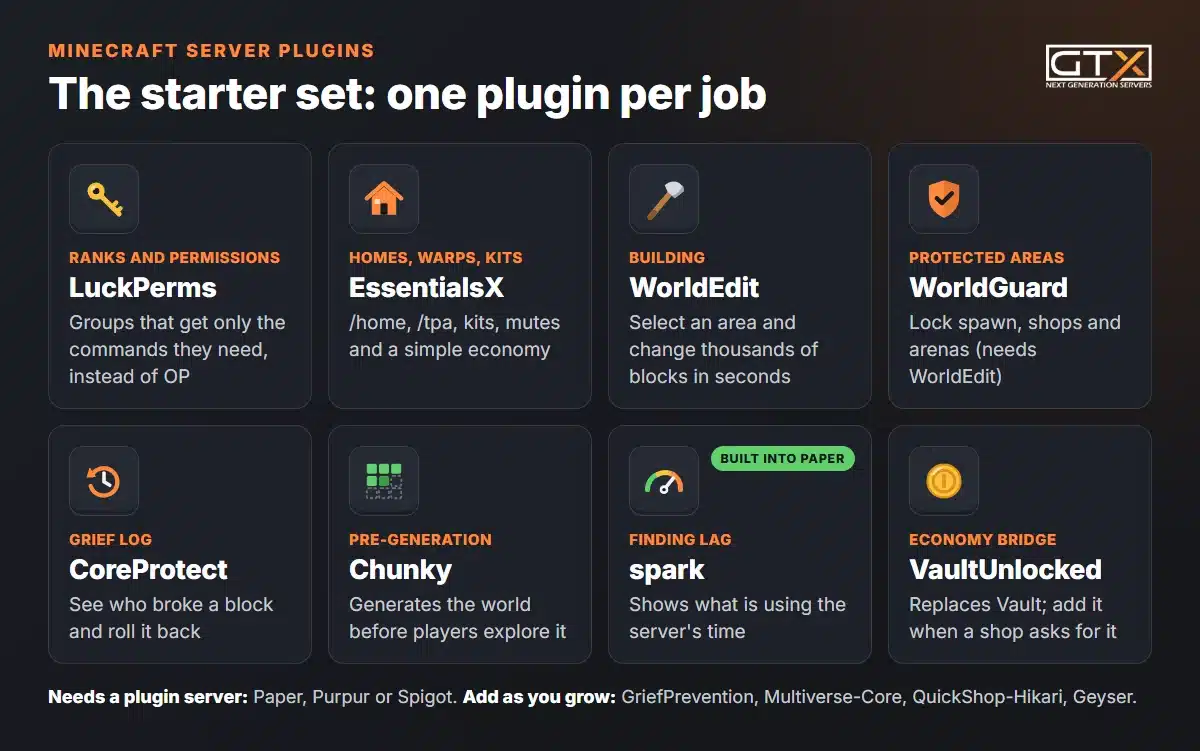
Start with LuckPerms for ranks and permissions, EssentialsX for homes, warps, kits and a simple economy, WorldEdit and WorldGuard for building and protected areas, CoreProtect to see who broke what and roll it back, and Chunky to pre-generate the world. Add Vault or VaultUnlocked when a shop or economy plugin asks for it. Plugins need a plugin server such as Paper, Purpur or Spigot, not vanilla, Forge or Fabric. Paper already includes the spark profiler.
On this pageWhat do you need to run plugins?
- What do you need to run plugins?
- The essential plugin set at a glance
- Permissions: LuckPerms instead of OP
- Homes, warps and kits: EssentialsX
- Protection from griefers: WorldGuard, CoreProtect and GriefPrevention
- Building and extra worlds: WorldEdit and Multiverse-Core
- Performance: spark and Chunky
- Economy and shops: Vault and QuickShop-Hikari
- Anti-cheat: Paper's Anti-Xray first, then Grim
- Bedrock players: Geyser and Floodgate
- Backups: use your server's backups, not a plugin
- How to install a plugin
- Before you update Minecraft, check your plugins
- Minecraft server plugins FAQ
Below: what a server needs to run plugins, the essential set grouped by job with each plugin's status on Minecraft 26.3, how to install a plugin on a GTX server or your own PC, and what to check before you update Minecraft.
Checked against Minecraft Java Edition 26.3, Paper 26.3 and each plugin's own download page, October 2026.
What do you need to run plugins?
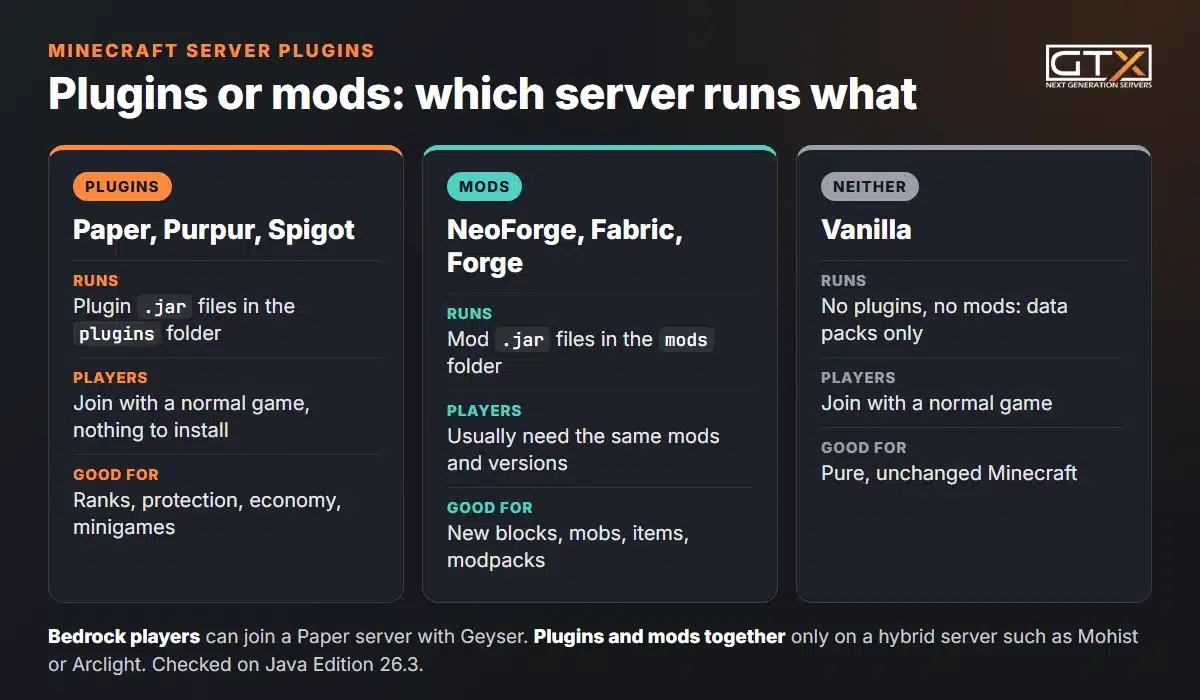
A plugin server. Plugins are .jar files for Paper, Purpur, Spigot and other servers built on the Bukkit API. The vanilla server from Mojang can't load them, and neither can Forge, NeoForge or Fabric, which load mods instead. If mods are what you're after, our guide on how to make a modded Minecraft server covers that route.
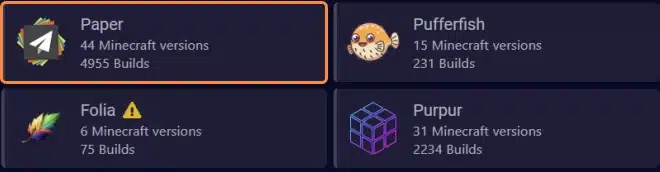
- Paper is the one to start with. It runs Spigot and Bukkit plugins, and Paper's own docs call it a drop-in replacement for Spigot. A vanilla world converts automatically the first time Paper starts.
- Purpur is built on Paper and runs Bukkit, Spigot and Paper plugins, with many extra gameplay settings.
- Spigot runs the same Bukkit plugins, but plugin makers such as EngineHub (WorldEdit, WorldGuard) and EssentialsX recommend Paper.
Players don't install anything: plugins run on the server, so everyone joins with a normal Java Edition game. The plugins on this page are for Java Edition servers; Bedrock players can still join a Paper server through Geyser (more below). Not sure which server type fits? See our guide to server types.
The essential plugin set at a glance
We picked one plugin per job by evidence rather than taste: each is free, available from its maker's own page, widely used and, Vault aside, updated in 2026. bStats, which counts servers that send it anonymous plugin statistics, showed EssentialsX on about 63,000 servers, WorldEdit on about 55,000, WorldGuard on about 53,000 and CoreProtect on about 31,000 on 15 October 2026. LuckPerms has been downloaded over 8.7 million times from SpigotMC alone.
| Ranks and permissions | LuckPerms | Yes (v5.5.71) |
| Homes, warps, kits, moderation | EssentialsX | Development builds only; release 2.22.0 stops at 26.1.2 |
| Building tools | WorldEdit | Yes (7.4.6) |
| Protected areas | WorldGuard (needs WorldEdit) | Yes (7.0.19) |
| Grief log and rollback | CoreProtect | Not yet: v24.1 supports up to 26.2 |
| Player land claims | GriefPrevention | Yes (16.18.7) |
| Extra worlds | Multiverse-Core | Yes (5.8.1) |
| Pre-generating the world | Chunky | Yes (1.5.3) |
| Finding lag | spark | Built into Paper |
| Economy bridge | Vault or VaultUnlocked | Vault: last update 2020; VaultUnlocked: yes (2.20.3) |
| Chest shops | QuickShop-Hikari | Yes (6.3.0.3) |
| Anti-cheat | Paper Anti-Xray, then Grim | Anti-Xray: built in. Grim: newest build lists 26.2 |
| Bedrock players | Geyser and Floodgate | Yes: Geyser supports Java 26.3 |
Click a column heading to sort.
Status means the version the plugin's own page lists for 26.3 on Modrinth or its official site. Plugins update often, so check the page again on the day you install.
Permissions: LuckPerms instead of OP
OP is a blunt tool: by default an operator gets permission level 4, which can run every command, server management included. That's fine for you and a co-owner, but not for a helper who only needs to kick griefers. Our guide to Minecraft server commands and OP explains what OP gives away.
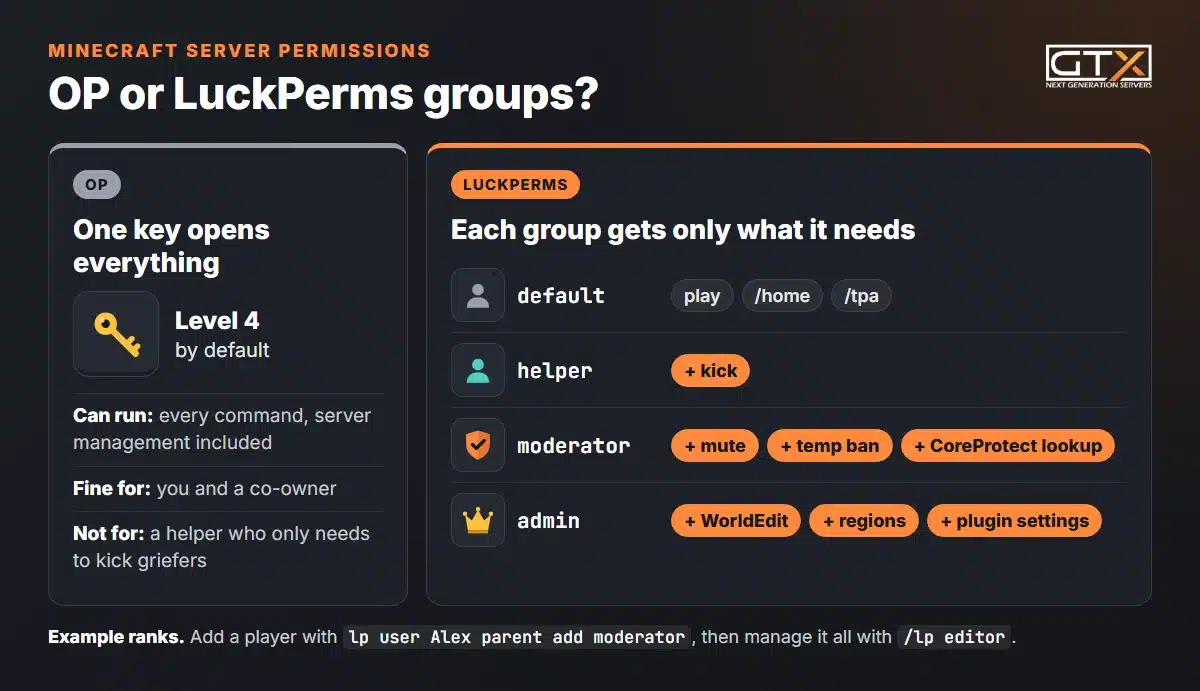
LuckPerms lets you create groups (default, helper, moderator, admin), give each group exactly the permissions it needs, and put players in groups. You can do it with commands, in the config files, or in its web editor. When it's first installed nobody can use its commands, so start in the server console:
- Give yourself full access:
lp user YourName permission set luckperms.* true - Create a group:
lp creategroup moderator - Give the group a permission:
lp group moderator permission set minecraft.command.kick true - Put a player in it:
lp user Alex parent add moderator
Then type /lp editor in game and open the link it gives you to manage everything in your browser. Most plugins use permissions to decide who can use what, so set LuckPerms up first.
Homes, warps and kits: EssentialsX
EssentialsX is the all-round toolbox: over 130 commands, including /sethome and /home, warps, kits, teleport requests with /tpa, nicknames, and moderation tools such as mutes, temporary bans and jails. It also has a built-in economy with /balance, /pay and sign shops.
- It comes as a core plugin plus optional modules (Chat, Spawn, Protect, AntiBuild, GeoIP, Discord). Install only the ones you need, and keep every module on the same version.
- Its makers recommend LuckPerms for permissions, and it needs Vault for chat prefixes and suffixes.
- On 26.3: the latest release, 2.22.0 (31 May 2026), supports 26.1.2. The EssentialsX team updated its code for 26.3 on 15 September 2026, so use a development build from essentialsx.net until the next release.
Protection from griefers: WorldGuard, CoreProtect and GriefPrevention
WorldGuard: protect spawn and shared areas
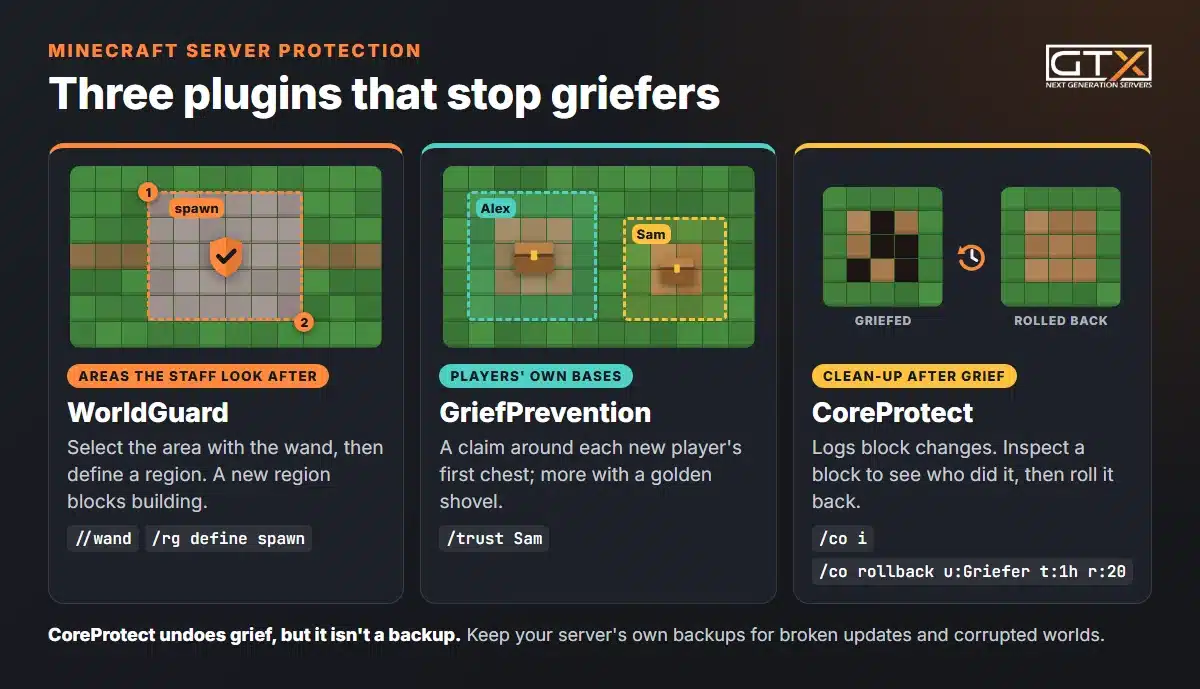
WorldGuard protects regions you define, such as spawn, a shopping street or an arena. It needs WorldEdit installed too, because you select the area with WorldEdit's wand: type //wand, left-click one corner and right-click the opposite one. Then /rg define spawn creates the region, and a new region blocks building straight away. Let your build team in with /rg addmember spawn g:builders.
CoreProtect: see who did it and undo it
CoreProtect logs block changes, so you can find out who broke something and roll it back. Type /co i to turn on the inspector and click a block to see its history. /co rollback u:Griefer t:1h r:20 undoes everything that player did in the last hour within 20 blocks of you. Add #preview to see the result before you commit.
On 26.3: CoreProtect's latest release, v24.1 (24 September 2026), added support for 26.2. On 15 October, 26.3 wasn't listed yet, so check its page before you update.
GriefPrevention: let players protect their own builds
On a bigger survival server you can't define every player's base by hand. GriefPrevention gives new players an automatic claim around their first chest, and extra claims are made with a golden shovel. Players then trust their friends into their claims themselves. Use GriefPrevention for player claims and WorldGuard for areas the staff look after.
Creepers and Endermen are a different problem: see how to stop mob griefing.
Building and extra worlds: WorldEdit and Multiverse-Core
WorldEdit is an in-game map editor: select an area with the wand and create, replace or delete thousands of blocks in seconds. Builders use it for big projects, and WorldGuard needs it. Version 7.4.6, released on 15 October 2026, supports 26.3.
Multiverse-Core runs several worlds on one server: a survival world, a creative world, an event world. /mv create creative normal makes a new normal world called creative, and /mv tp creative takes you there. Version 5.8.1 lists 26.3.
Performance: spark and Chunky
spark finds what's causing lag. You don't need to install it on Paper: since 1.21, Paper includes it. Run /spark profiler start --timeout 600 while the lag is happening; after 10 minutes it gives you a link to a report that shows what is using the server's time.
Chunky pre-generates the world, so the server isn't creating new chunks while players explore. Set the size with /chunky radius 3000 (in blocks around the centre, which is 0, 0 unless you change it), then /chunky start. You can pause and continue it, so run it when nobody is online. Our RAM and performance guide has more lag fixes.
Economy and shops: Vault and QuickShop-Hikari
Vault isn't an economy itself. It's a bridge that lets plugins share one economy, permission and chat system, so a shop plugin can take money from EssentialsX balances. A plugin that depends on it won't load without it; Paper's own docs use Vault as their example of a missing dependency. The original Vault hasn't been updated since version 1.7.3 in July 2020, yet bStats still counted about 45,000 servers running it in October 2026. VaultUnlocked is a maintained drop-in fork that lists 26.3. It replaces Vault, so install one or the other.
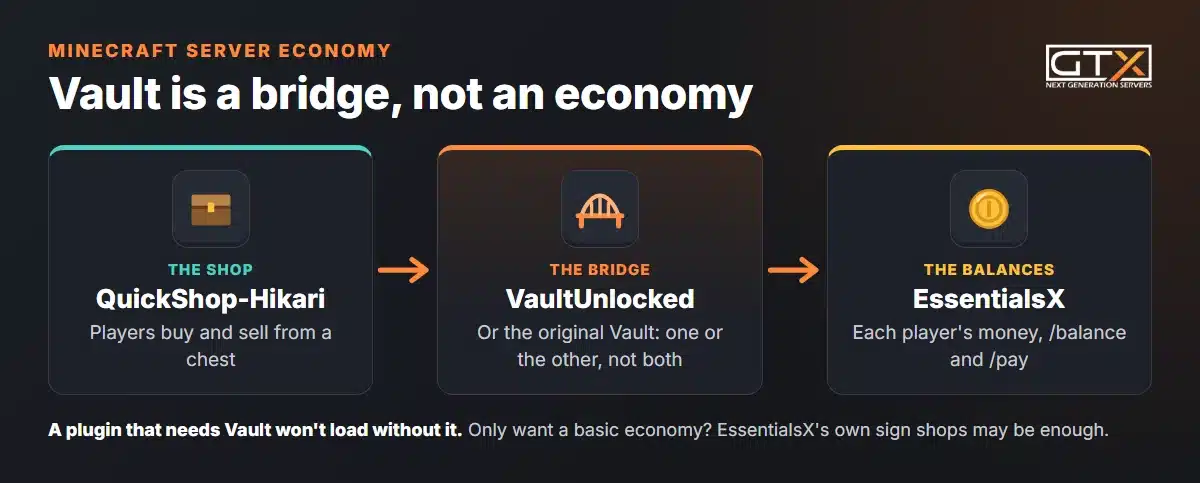
QuickShop-Hikari turns chests into shops: players sell and buy items from a chest without typing commands. Version 6.3.0.3 supports 26.3. If you only want a basic economy, EssentialsX's own sign shops may be enough.
Anti-cheat: Paper's Anti-Xray first, then Grim
Paper has an Anti-Xray built in that hides ores from players using X-ray. It's off by default: set enabled: true under anticheat, anti-xray in config/paper-world-defaults.yml and restart. Paper's Anti-Xray guide has ready-made settings for the Overworld and the Nether.
For movement and combat cheats, Grim is a free, open-source anti-cheat for Paper and Spigot. On 15 October its newest build listed 26.2, not 26.3, so a 26.3 server has to wait. On a small private server with a whitelist, you may not need an anti-cheat at all.
Bedrock players: Geyser and Floodgate
Geyser lets Bedrock players on consoles, phones and Windows join your Java server, and Floodgate lets them in without a Java account. Geyser's own docs say it supports Java 26.3 and Bedrock 26.30 to 26.52. Our Java or Bedrock chapter explains what crossplay can and can't do, and how to play Minecraft with friends covers every other way to get a mixed group together.
Backups: use your server's backups, not a plugin
CoreProtect undoes grief, but it isn't a backup: it can't bring back a corrupted world or a broken update. On a GTX server, open Backups and click Create backup; the server can keep running, and backups are stored offsite. Switch on Locked for a backup scheduled ones should never overwrite. Step by step: back up your entire Minecraft server. On your own PC, copy the whole server folder before every plugin or version update.
How to install a plugin
On a GTX server
- Make a backup (see above).
- Open Versions, click Paper (or Purpur), pick the Minecraft version and click Install. Wipe Server Files deletes every file on the server, your world included, so leave it off to keep your world. Full steps: change the server type and version.
- Paper for 26.x needs Java 25. If the server won't start, set the Java version on the Startup page.
- Download the plugin's
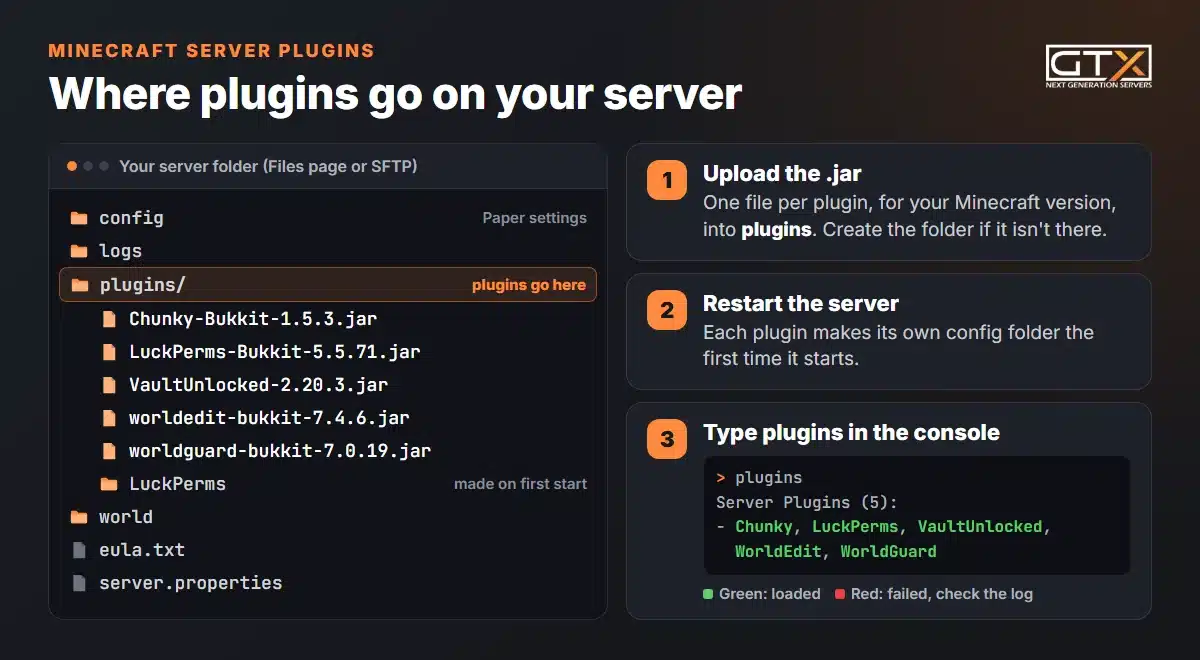
.jarfor your Minecraft version and upload it to thepluginsfolder on the Files page or over SFTP (connect to your server with SFTP). Create the folder if it isn't there yet. - Restart the server, then type
pluginsin the Console. Green means loaded; red means it failed.
A plugin in red usually tells you why in the log. "Unknown/missing dependency plugins: [Vault]" means it needs another plugin first. "Invalid plugin.yml" usually means the file is a Forge or Fabric mod, not a plugin, or the download is broken.
On your own PC
Download Paper for your version from papermc.io, put it in an empty folder and start it with java -Xms4G -Xmx4G -jar paper.jar --nogui (Java 25 for 26.x). Accept the EULA in eula.txt, start it again, then drop plugins into the new plugins folder and restart.
Where to download plugins safely
A plugin gets full access to your server and the machine it runs on, so only download from trusted places: Hangar (Paper's own plugin site), Modrinth, SpigotMC, BukkitDev or the plugin's own GitHub. Never use re-upload sites. Test a new plugin on a copy of your server before it goes on the one your friends play on.
Before you update Minecraft, check your plugins
Plugins hook deep into the server, so a new Minecraft version often needs new plugin versions. Minecraft 26.3 came out on 15 September 2026. Paper's first stable 26.3 build followed on 11 October, and on 15 October CoreProtect and Grim still listed 26.2 as their newest version. Before you update:
- Write down every plugin on your server and check that each one's page lists the new version.
- If a plugin you can't do without isn't ready, stay on the version you have. ViaVersion lets players on a newer game version join an older server, so nobody has to downgrade their game.
- Make a backup, update Paper, then update every plugin, and check the console for red plugins.
Minecraft server plugins FAQ
Do players need to download plugins to join?
No. Plugins run only on the server, and players join with a normal, unmodded Java Edition game. That's the big difference from mods, which usually have to be installed by every player.
Can you add plugins to a Minecraft Realm?
No. Realms doesn't let you install mods or plugins. For plugins you need your own server running Paper, Purpur or Spigot. Our guide to Minecraft Realms and mods explains what Realms can and can't do, and how to move a Realm world to a server.
Do Spigot plugins work on Paper?
Yes. Paper's docs call it a drop-in replacement for Spigot, and it runs Bukkit and Spigot plugins. The reverse isn't always true: plugins written as Paper plugins use Paper's own API and only load on Paper or servers built on it, such as Purpur.
Can I run plugins and mods on the same server?
Only with a hybrid server such as Mohist or Arclight, which load Forge mods and Bukkit plugins together. On a normal server you choose one side: plugins for ranks, protection and minigames, mods for new blocks and content.
How many plugins can a Minecraft server run?
There's no fixed limit; memory and CPU are. We recommend 4 GB (our Iron plan) for vanilla plus light plugins and about 10 to 15 players, and 8 GB (Emerald) for heavier plugin sets and 15 to 25 players. Use spark to find a plugin that's using more than its share.
We've hosted game servers since 2008. If you'd rather not run the server yourself, our Minecraft server hosting switches between 17+ server types, Paper, Purpur and Spigot included, from the panel, with a file manager and SFTP for your plugin files. For everything else about running a server, from the first install to backups and admin, read our Minecraft server guide.
Keep playing: more Minecraft guides
- Mods and modpacksRealms mods: what you can and cannot do7 min read
- Mods and modpacksEducation Edition mods8 min read
- Mods and modpacksMake a modded server (NeoForge, Forge, Fabric)9 min read
- Mods and modpacksSurvival mods for hardcore players8 min read
- Mods and modpacksMagic mods7 min read
- Mods and modpacksFurniture mods8 min read