



 DayZ
 Palworld


 Enshrouded










Insurgency Sandstorm Server Hosting Australia
Rent Your Own Insurgency Sandstorm Dedicated Server
About Insurgency: Sandstorm server hosting
Premium Insurgency Sandstorm server hosting from GTX Gaming's Australian and worldwide datacentres. Rent your own Insurgency: Sandstorm server for 8 to 32 players with instant setup, an always-on Insurgency Sandstorm dedicated server for Push, Firefight, Skirmish and Checkpoint co-op, mod.io mods and maps, mutators and Web RCON in the browser, up to 5GB of RAM and 100GB of NVMe storage included, daily automatic backups, enterprise DDoS protection and 24/7 support. Rent your Insurgency Sandstorm dedicated server from A$7.04/mo.
Insurgency Sandstorm Server Hosting: Plans & Pricing
- Instant setup
- Up to 5GB RAM included
- Up to 100GB NVMe storage
- Daily automatic backups
- 24/7 support
- mod.io mods and maps
- Mutators and Web RCON
- Up to 5GB RAM included
- Daily automatic backups
- Enterprise DDoS protection
- Public and community servers
- mod.io mods and maps
- RAM upgradable to 32GB
- Daily automatic backups
- Enterprise DDoS protection
- 24/7 support
- DDoS protection
- Instant setup
One Insurgency Sandstorm server, priced per slot: pick any number of players from 8 to 32 on the order form. Every plan includes up to 5GB of RAM, up to 100GB of NVMe storage and DDoS protection, and you can change your slots or add memory at any time without losing your server's files.
Insurgency Sandstorm Server Hosting Control Panel
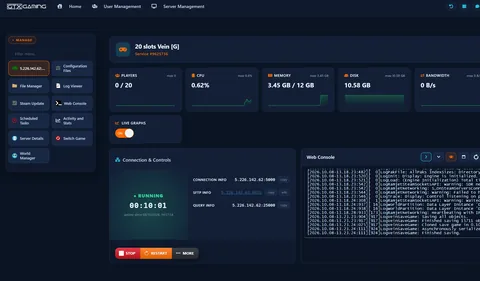
Our custom panel puts your server's maps, modes, mods, admins, RCON, files, restarts and backups in a browser, so you spend your time in the firefight instead of in config files.

- 🎛️One-click controlsStop and restart your server with a single button, and see its status, uptime, connection address, SFTP, query and RCON details at a glance.
- ⚙️Configuration FilesSet your server name, password, starting map, scenario, game mode and mutators in Start.bat with the Config Editor, and tune Game.ini, MapCycle.txt and Admins.txt in the browser.
- 🧩Mod.io AccountLink your mod.io account with one button, subscribe to mods and maps on mod.io, restart, and your server downloads them itself.
- 🖥️Web RCON & Web ConsoleKick, ban, message players and change the scenario from the browser, with your server's live output in the Web Console and the Log Viewer.
- 🔄Steam Update & Scheduled TasksOne button updates your server when New World Interactive patches the game, and Scheduled Tasks restart it on a timer, with daily automatic backups on every server.
- 📊Live graphs & statsWatch CPU, memory and player counts on live graphs, and look back over past days with Activity and Stats.
Insurgency Sandstorm Server Hosting: Modes, Mods & Settings
Your server runs the official Insurgency: Sandstorm dedicated server. Pick the maps, the modes and the mutators, add mod.io mods and maps, and decide who plays and who runs it.
Pick the starting map and scenario in Start.bat, and build your rotation in MapCycle.txt from scenario names such as Scenario_Refinery_Push_Security.
Your RotationPush, Firefight, Skirmish and Team Deathmatch for versus nights, or Checkpoint co-op against bots, set in the Game Mode field of Start.bat.
Your ModeLink your mod.io account in the panel, subscribe to mods and maps on mod.io, add mod maps to your rotation or set one as the starting map.
Your ModsStack mutators such as Competitive, Frenzy and Hardcore in the Mutators field of Start.bat to change the rules of a match.
Your RulesTune Checkpoint with MinimumEnemies, MaximumEnemies and FriendlyBotQuota in Game.ini, with vehicle insertion on or off.
Your DifficultyLock the server with a password in Start.bat, give admin rights by Steam64 ID in Admins.txt, and run RCON commands from the Web RCON tool.
Private or PublicAlready running an Insurgency: Sandstorm server with another host? Copy your Game.ini, MapCycle.txt and Admins.txt over SFTP or the File Manager, link your mod.io account again, and our 24/7 team can help with the move or handle it for you. Still playing the original Insurgency from 2014? We host that too: order a classic Insurgency server, priced per slot the same way.
How Many Slots Does My Insurgency Sandstorm Server Need?
Pick a slot for every human player who will be on the server at the same time; bots do not take a slot. You pay per slot, so you only pay for the team sizes you need, and every plan includes up to 5GB of RAM.
| Slots | Best for | From |
|---|---|---|
| 8 slots | A co-op squad grinding Checkpoint | A$7.04/mo |
| 12 slots | Small groups and 6 v 6 scrims | A$10.56/mo |
| 16 slotsRecommended | Clan scrims and Firefight nights | A$14.08/mo |
| 20 slots | Growing communities | A$17.60/mo |
| 24 slots | Busy Skirmish and Push servers | A$21.12/mo |
| 28 slots | A full 14 v 14 match | A$24.64/mo |
| 32 slots | The biggest server we offer | A$28.16/mo |
The order form lets you pick any slot count from 8 to 32. On memory, our own 16 slot demo server used about 910MB of RAM after starting on Refinery, with nobody online. More players, bigger mod maps and more mods use more. Watch live memory use in the control panel and add memory from 8GB to 32GB at any time from your client area.
Insurgency Sandstorm Server Hosting Locations: Low Ping Australia & Worldwide
Insurgency Sandstorm servers deploy in 19 locations: Sydney in Australia; Tokyo, Singapore and Mumbai in Asia; London, Paris, Frankfurt, Amsterdam, Stockholm and Madrid in Europe; New York, Ashburn, Chicago, Dallas, Miami, Los Angeles, Portland and Quebec in North America; plus Moscow. Run a quick test to see your latency to our network.
What's Included With Your Insurgency Sandstorm Server Hosting?
Every server ships fully loaded. Upgrade any part of it whenever you like.
| Resource | Included | Optional upgrade |
|---|---|---|
| Player slots | 8 to 32 slots, chosen at checkout | Change your slot count any time |
| Memory | Up to 5GB of RAM on every server | Tiers from 8GB to 32GB, changed any time |
| Storage | Up to 100GB NVMe free | Tiers up to 200GB, plus extreme 14,000MB/s NVMe |
| Mods & maps | The game's own maps, modes and mutators | Link mod.io and add mods and maps any time |
| CPU priority | Normal priority on high-frequency cores | High and Realtime tiers |
| CPU clock | Standard high-frequency clocks | +5%, +10% and +20% clock boost tiers |
| Protection | Enterprise DDoS mitigation | Included on every server |
| Backups | Daily automatic backups | Scheduled restarts with Scheduled Tasks |
Slots, RAM, storage, CPU priority and clock boosts are all picked at checkout and can be changed later without losing your server's files. Players need their own copy of Insurgency: Sandstorm on Steam to join.
Insurgency Sandstorm Server Hosting Features: Everything Built In
Every server ships with the full GTX feature set, no hidden add-ons.
Insurgency Sandstorm Server Hosting: the essentials
GTX Gaming Server Hosting Reviews
Verified Trustpilot reviews from GTX Gaming customers.
GTX gaming absolutely excels at customer service
GTX gaming excels at customer service. Every ticket is answered within minutes and issues resolved promptly and professionally. Nothing but wonderful things to say about the service GTX provides. I’ve had the pleasure of interacting with several of their support agents: Tom H, Rui P, Jamie R, John K, Robert P, James K, and man they’re all excellent! Kudos to the entire team and thank you for the service you provide to the gaming community. They’ve enabled our entire crew to spend many hours having a total blast.
TOP!!!
Speed, competence, and understanding. It's the first time I've found such a good support team from a server hosting provider. Top service, top support!
Thank you Mr. Gibbs
Absolutely loved the friendliness and the quick response time. Even though I felt a little dumb for not realizing the problem myself, it felt twice as good to know that the fix was simple and clear.
Insurgency Sandstorm Server Hosting FAQ
How fast is Insurgency Sandstorm server setup?
+What is Insurgency Sandstorm server hosting?
+How do I join my Insurgency Sandstorm server?
+How do I add mod.io mods and maps to my Insurgency Sandstorm server?
+Can I run mutators on my server?
+How do I make myself an admin on my Insurgency: Sandstorm server?
+How many players can join my Insurgency Sandstorm server?
+How much RAM does an Insurgency Sandstorm server need?
+Which game modes can my Insurgency Sandstorm server run?
+Can I run Checkpoint co-op against bots?
+Can I upgrade my Insurgency Sandstorm server later?
+Which locations can I host an Insurgency Sandstorm server in?
+Should I host an Insurgency Sandstorm server on my own PC?
+How much does Insurgency Sandstorm server hosting cost in Australia?
+What is your refund policy?
+Do you offer monthly Insurgency Sandstorm server hosting with no contract?
+The Complete Guide to Insurgency Sandstorm Server Hosting in Australia & Worldwide
Everything you need to know before you rent an Insurgency Sandstorm server in Australia or any of GTX Gaming's worldwide datacentres, from joining and server settings to game modes, mod.io mods, mutators, admins, slots, pricing and locations.
What Is Insurgency Sandstorm Server Hosting?
Insurgency Sandstorm server hosting is a managed service that runs an Insurgency: Sandstorm dedicated server on professional hardware in a datacentre, around the clock, so your clan can scrim, your community can play Push and Firefight nights and your co-op squad can grind Checkpoint whether or not you are at your PC. Every GTX Gaming Insurgency Sandstorm server includes up to 5GB of RAM, up to 100GB of NVMe storage, daily automatic backups, enterprise DDoS protection and a web control panel, so jobs like changing the map rotation, adding a mod.io map or setting a password take a few clicks.
People look for it as an Insurgency Sandstorm dedicated server, an Insurgency Sandstorm private server, an Insurgency Sandstorm game server or simply a Sandstorm server, and they all mean the same thing: your own always-on Insurgency Sandstorm server, with your maps, your mods and your rules.
What Is Insurgency: Sandstorm?
Insurgency: Sandstorm is a hardcore tactical first-person shooter from New World Interactive, published by Focus Entertainment and released on Steam on 12 December 2018. It is built on lethal close-quarters combat: no health bars, no ammo counter on screen, and teamwork as the only path to survival, according to the game's Steam page.
- Versus and co-op: objective-based versus modes such as Push, Firefight and Skirmish, plus Checkpoint co-op where a squad fights through bot-held objectives.
- Security against Insurgents: two factions with their own weapons, gear and voice lines, and every scenario names the side players start on.
- Built for community servers: New World Interactive publishes a dedicated server and a Server Admin Guide, and the game runs mods and custom maps through mod.io.
- Still updated: named operations keep landing, most recently Update 1.21 Operation: Breachpoint in May 2026 with a brand-new map.
Why Rent Your Own Insurgency Sandstorm Server?
Public servers run someone else's rotation and someone else's rules. With your own server you decide the maps, the modes, the mutators and who plays. Most clans and communities rent rather than host at home, for reasons that show up by the first match night:
- Always online: the server runs 24 hours a day, so players in every time zone can jump on whenever they like.
- Nothing to run at home: no SteamCMD installs, no ports to open on your router and no PC left running all night.
- Room for a full match: any slot count from 8 for a co-op squad to 32 for a busy public server, with 28 covering a full 14 against 14 versus match.
- Proper hardware: high-frequency CPUs and NVMe storage in a datacentre, with DDoS protection at the network edge.
- Backups and support: daily automatic backups and a 24/7 support team mean a broken setting or a crashing mod is an inconvenience, not the end of your server.
Getting Started & Joining Your Insurgency Sandstorm Server
Your server is set up the moment you order. From there, getting your players into the first round typically looks like this:
- Order: choose your slots and your location, and your server is set up instantly.
- Name it: open Start.bat in Configuration Files and set your server name and, if you want a private server, a password.
- Pick the map: set the starting map, scenario and game mode in Start.bat, and edit MapCycle.txt for your rotation. Then restart.
- Join: start Insurgency: Sandstorm, open the Community Servers browser, find your server by name and join.
Your control panel shows your server's connection address, SFTP details and the query and RCON ports. Players need their own copy of Insurgency: Sandstorm on Steam. If your server does not appear in the browser, check that it is running, or ask our 24/7 team.
Server Settings: Start.bat, Game.ini & MapCycle.txt
Your server's rules live in a handful of files, all editable through Configuration Files in the control panel, each with a Config Editor for the common settings and a Text Editor for everything else:
- Start.bat: the server name, the password, the starting map and scenario, the game mode, the Mutators field and the mod.io section.
- Game.ini: the general rules under [/Script/Insurgency.INSGameMode] and [/Script/Insurgency.INSMultiplayerMode]: kill feed, team kill limit, dead chat, friendly fire and its modifier, auto-balance, map voting, the idle limit, round and win limits, the game time limit and supply. Each mode has its own section too, such as [/Script/Insurgency.INSPushGameMode] for attacker and defender waves, [/Script/Insurgency.INSCoopMode] for bots and [/Script/Insurgency.INSCheckpointGameMode] for defend and counter-attack timers.
- MapCycle.txt: one scenario per line, in the order you want it played, for example Scenario_Refinery_Checkpoint_Security or Scenario_Refinery_Push_Insurgents. The scenario name carries the map, the mode and the side players start on.
- Admins.txt: one Steam64 ID per line for everyone who gets admin rights.
- Engine.ini: the RCON settings, already set up for the Web RCON tool.
Change a setting, save the file and restart the server for it to take effect. Keep a backup before big changes, so you can always go back.
Game Modes, Maps & Scenarios
Everything your server plays is a scenario, and a scenario name carries the map, the mode and the starting side: Scenario_Refinery_Push_Security is Push on Refinery with players starting as Security, Scenario_Refinery_Checkpoint_Insurgents is Checkpoint co-op on Refinery as the Insurgents. The rotation our panel installs covers Checkpoint, Firefight, Push, Skirmish and Team Deathmatch on Refinery, and New World Interactive's official Server Admin Guide lists every map, scenario and mode in the game. To change what your server plays:
- Starting map and scenario: type the map name and the scenario name into Start.bat under Configuration Files and restart.
- Game mode: type the mode name into the Game Mode field of Start.bat.
- Rotation: list your scenarios one per line in MapCycle.txt, and keep bUseMapCycle=True in Game.ini. Switch bMapVoting on if you want players to vote.
- Mid-match: use scenarios and travelscenario in the Web RCON tool to list and change scenarios without a restart.
mod.io Mods & Custom Maps
Insurgency: Sandstorm takes its mods and custom maps from mod.io, and our panel is built around it. Link your mod.io account with the Mod.io Account button, paste the one-time security code it emails you into the mod.io section of Start.bat, then subscribe to the mods and maps you want on mod.io and start the server: it downloads them by itself into its mod.io folder. From there, a mod map goes into MapCycle.txt for your rotation or into the Mod.io Travel Mod field to start the server on it, and a mod that ships as a mutator goes into the Mutators field. Read each mod's page first: many need settings after installing, and an outdated mod is the most common reason a server will not start.
Mutators & Bots
Mutators change the rules of a match: cheaper or pricier gear, melee-only enemies, slower movement and more. Type the names into the Mutators field of Start.bat, separated by commas with no spaces, for example Competitive,Frenzy,Hardcore, and the game loads them in that order; a misspelled mutator is simply skipped. For co-op, the [/Script/Insurgency.INSCoopMode] section of Game.ini sets MinimumEnemies and MaximumEnemies, the number of friendly bots with FriendlyBotQuota and whether rounds start from a vehicle with bUseVehicleInsertion, while [/Script/Insurgency.INSCheckpointGameMode] holds the defend and counter-attack timers. Bots do not use a player slot.
Admins, Passwords & RCON
Running a community server means keeping order. Insurgency: Sandstorm gives you three tools for it, all reachable from the control panel:
- Password: set a password in Start.bat to keep the server private for your clan or scrim partners.
- Admins.txt: add the Steam64 ID of every admin, one per line, and restart. Admins get the in-game admin menu.
- RCON: your RCON password is under Server Details. Open the Web RCON tool or the Web Console and run commands such as listplayers, kick, ban, permban, unban, say, restartround, maps, scenarios, travelscenario and gamemodeproperty. Changes made with travelscenario and gamemodeproperty last until the next map change.
Keep the admin and RCON passwords to yourself and never share them in public.
Game Updates & Versions
New World Interactive still updates Insurgency: Sandstorm with named operations: Update 1.19 Operation: Shell Shock in October 2025, Update 1.20 Operation: Clear Sight in February 2026 with new sights and mod editor improvements, and Update 1.21 Operation: Breachpoint in May 2026 with a brand-new map, two new pistols and more customisation, followed by a minor patch in July 2026. When a patch lands, the Steam Update button in your control panel brings your server up to date, and the Log Viewer shows you the result. Keep your server on the same version as your players, and check that your mod.io mods have been updated for the new version too.
How Much Does Insurgency Sandstorm Server Hosting Cost in Australia?
Pricing is simple: you pay per slot, with up to 5GB of RAM and up to 100GB of NVMe storage included on every server:
- 8 slots: from A$7.04/mo. A co-op squad grinding Checkpoint.
- 16 slots: from A$14.08/mo. Clan scrims and Firefight nights.
- 24 slots: from A$21.12/mo. Growing communities.
- 28 slots: from A$24.64/mo. A full 14 against 14 Push match.
- 32 slots: from A$28.16/mo. The biggest server we offer.
Any slot count in between can be picked on the order form. All plans include instant setup, DDoS protection, daily automatic backups and 24/7 support, with no setup fee and no contract. Billing is monthly by default, with three-month, six-month and yearly cycles available at a discount, and you can change plan or cancel at any time.
How Many Slots and How Much RAM Does an Insurgency Sandstorm Server Need?
Choose a slot for every human player who will be on the server at the same time; bots in Checkpoint do not take one. 8 slots suits a co-op squad, 16 slots clan scrims and Firefight nights, and 28 to 32 slots a full 14 against 14 Push match or a busy public server. On memory, our own 16 slot demo server used about 910MB of RAM after starting on Refinery, with nobody online. More players, bigger mod maps and more mods use more. The up to 5GB included with every server is the place to start, the control panel shows live memory use, and you can add memory from 8GB to 32GB at any time.
Locations for Insurgency Sandstorm Server Hosting
A firefight is decided in a split second, so host close to your players. GTX Gaming runs Insurgency Sandstorm server hosting from an Australian datacentre in Sydney plus 18 more locations worldwide: Tokyo, Singapore and Mumbai in Asia; London, Paris, Frankfurt, Amsterdam, Stockholm and Madrid in Europe; New York, Ashburn, Chicago, Dallas, Miami, Los Angeles, Portland and Quebec in North America; plus Moscow. Some locations carry a surcharge, shown at checkout. Use the live ping test above to find the lowest-latency location for your players, pick it at checkout, and if you need to move later our support team can migrate your server.
Insurgency Sandstorm Server Hosting Glossary
Quick definitions of the terms you'll meet across Insurgency: Sandstorm, our control panel and your Insurgency Sandstorm dedicated server:
- Dedicated Server
- A server that runs your matches by itself, around the clock, without a player hosting them from their own game.
- Scenario
- A map plus a mode plus a starting side, named like Scenario_Refinery_Push_Security. Rotations and RCON work in scenarios.
- Start.bat
- The launch file our panel edits for you: server name, password, starting map and scenario, game mode, mutators and mod.io.
- Game.ini
- The rules file, with a section per game mode for friendly fire, round limits, bots and timers.
- MapCycle.txt
- The rotation: one scenario per line, played in order.
- Admins.txt
- The admin list: one Steam64 ID per line.
- Push
- A versus mode where attackers capture objectives in sequence while defenders hold them, built around 14 against 14.
- Checkpoint
- The co-op mode: a squad of players fights through objectives held by bots and survives counter-attacks.
- Firefight
- A versus mode with three objectives where capturing one respawns your team.
- Mutator
- A rule change loaded at start, such as Competitive, Frenzy or Hardcore, stacked by name in Start.bat.
- mod.io
- The mod platform Insurgency: Sandstorm uses for mods and custom maps, linked to your server from the panel.
- RCON
- Remote console: the commands an admin runs on a live server, from the panel's Web RCON tool or any RCON client.
- SFTP
- Secure file transfer for moving files between your PC and your server.
Setup Guides & Help for Your Insurgency Sandstorm Server
Once your Insurgency Sandstorm server is live, our help guides cover the common jobs, such as adding mod.io mods and maps to your Insurgency Sandstorm server, using RCON commands, changing the starting map and scenario and adding mutators, and our help centre has more guides for your server. Our 24/7 support team is on live chat and tickets for anything the guides don't cover:
Explore Other Services
Host more of your favourites with the same instant setup and 24/7 support.
Last Updated: October 23, 2026