






 DayZ
DayZ Palworld


 Enshrouded














Arma 3 Server Hosting Australia
Rent Your Arma 3 Dedicated Server
About Arma 3 server hosting
Premium Arma 3 server hosting from GTX Gaming's Australian and worldwide datacentres. Rent an Arma 3 server for your squad, milsim unit or community with instant setup, 10 to 120 player slots, up to 5GB of RAM free with upgrades to 32GB, Steam Workshop and server-side mods, your own missions and Zeus, BattlEye anti-cheat, up to 100GB of NVMe storage, enterprise DDoS protection and 24/7 support. Rent your Arma 3 dedicated server from A$19.54/mo.
Arma 3 Server Hosting: Plans & Pricing
- Instant setup
- Up to 5GB RAM included
- Steam Workshop mods
- BattlEye anti-cheat
- 24/7 support
- 8GB RAM for mod sets
- Workshop + server-side mods
- Zeus and custom missions
- BattlEye anti-cheat
- Enterprise DDoS protection
- 12GB RAM
- Big mod sets and AI counts
- RAM upgradable to 32GB
- BattlEye anti-cheat
- Enterprise DDoS protection
- 24/7 support
- DDoS protection
- Instant setup
Arma 3 dedicated servers, priced by slots, with up to 5GB of RAM included free. Every plan includes up to 100GB of NVMe storage, Steam Workshop and server-side mods and DDoS protection, and you can change your slots or memory at any time without losing your missions or mods.
The Arma 3 Server Hosting Control Panel
Our custom panel puts your Arma 3 server's mods, missions, configs and backups in a browser, with a Steam Workshop tool that installs mods in one click.
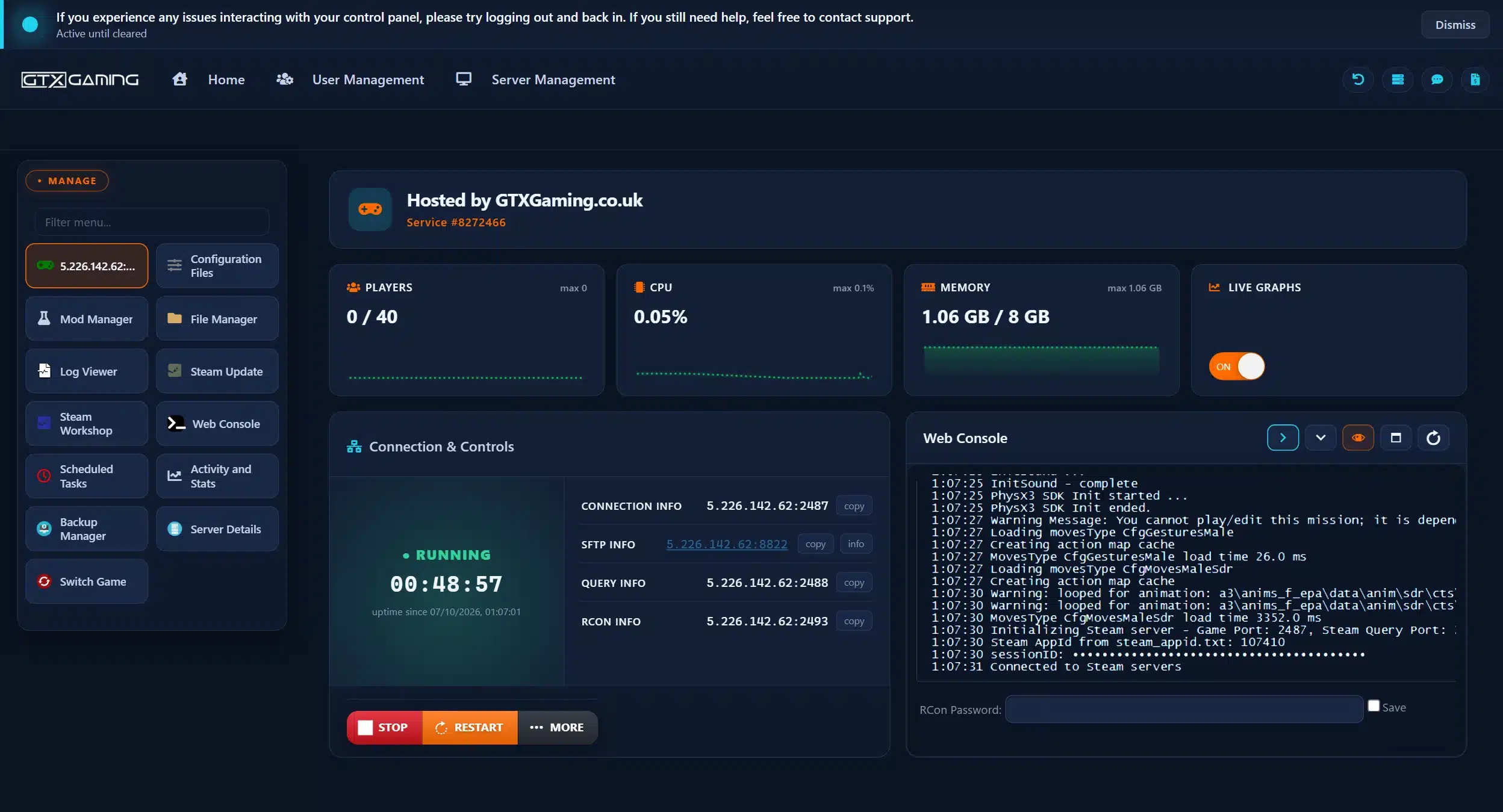
- 🎛️One-click controlsStart, stop and restart your server with one button, and see its status, players, connection, SFTP, query and RCON details at a glance.
- 🧩Steam Workshop in one clickBrowse the Arma 3 Steam Workshop inside the panel and press Install. No mod IDs to copy: Workshop.mods keeps your Workshop and server-only mods in one list.
- 📦Mod ManagerAdd Creator DLC, phpMyAdmin and Server Messages to your server from the Mod Manager in one click.
- 📂Configuration Files & File ManagerEdit server.cfg, basic.cfg, Start.bat (Arma version and server tools), the BattlEye configs and the difficulty profile in the browser, and upload missions with the File Manager or over SFTP.
- 💾Backups & Scheduled TasksThe Backup Manager and the automatic backup system keep copies of your server, so a broken mod is a restore, not a rebuild. Scheduled Tasks handle restarts on a timer.
- 📊Web Console, logs & live graphsFollow the server output in the Web Console and Log Viewer, update with Steam Update, and watch CPU, memory and players on live graphs.
Arma 3 Server Hosting: Workshop Mods, Missions & Zeus
Steam Workshop and server-side mods, your own missions, Zeus game mastering, Creator DLC and BattlEye: everything your unit needs to run its own war.
Install Workshop mods in one click from the panel's Steam Workshop tool and keep server-only add-ons in the same Workshop.mods list. CBA_A3, ACE3, TFAR, ACRE2 and CUP all run on your own server.
Steam WorkshopUpload mission .pbo files to MPMissions, set a mission rotation in server.cfg and keep long campaigns running with persistent = 1, even when the last player logs off.
MPMissionsRun live ops with a Zeus game master placing enemies on the fly, a persistent Antistasi campaign, KP Liberation or a King of the Hill public server. Your server, your war.
Game MasterBattlEye anti-cheat is built into Arma 3. Add verifySignatures and the mod keys in your keys folder, and only players running the mods you allow can join.
Anti-CheatRun S.O.G. Prairie Fire, Spearhead 1944, Reaction Forces and more. Non-owners join with free compatibility data, and Arma 3 Pass subscribers get every DLC.
Creator DLCBig co-op ops with lots of AI? A Headless Client takes the AI calculations off your server for missions built to use one. We sell it as its own Arma 3 Headless Client server.
AI OffloadUpload your server.cfg, missions, mods and keys with the File Manager or over SFTP and carry on where you left off. Our 24/7 team can help with the move or handle it for you.
How Many Slots & How Much RAM Does My Arma 3 Server Need?
Pick a slot for every player who will be online at the same time. Every server includes up to 5GB of RAM free, and you can add slots or memory whenever your unit grows.
| Slots | Best for | From (5GB RAM included) |
|---|---|---|
| 10 slots | A fireteam or a few friends | A$19.54/mo |
| 20 slots | A squad's co-op nights | A$23.45/mo |
| 30 slots | Small milsim units | A$33.22/mo |
| 40 slotsRecommended | Modded unit ops with ACE3 and CBA_A3 | A$43.00/mo |
| 50 slots | Large units and training servers | A$50.82/mo |
| 60 slots | Public co-op and Antistasi servers | A$58.65/mo |
| 70 slots | Busy public servers | A$62.56/mo |
| 80 slots | Big communities and public PvP | A$70.38/mo |
| 90 slots | Large public servers | A$78.20/mo |
| 100 slots | King of the Hill and big public PvP | A$82.11/mo |
| 110 slots | Very large communities | A$95.80/mo |
| 120 slots | The biggest public servers | A$111.45/mo |
| Memory | When to choose it | Adds |
|---|---|---|
| Up to 5GB | Included free with every server: vanilla missions for a squad | Free |
| Up to 8GB | Our pick for a modded 40 player unit with ACE3 and CBA_A3 | A$5.85/mo |
| Up to 12GB | Our pick for 80 players or heavy mod lists | A$13.67/mo |
| Up to 16GB | Big terrains, CUP and large AI counts | A$21.49/mo |
| Up to 24GB | Persistent campaigns with large mod sets | A$35.18/mo |
| Up to 32GB | The biggest modded public servers | A$46.91/mo |
An Arma 3 server uses more memory as you add mods, players and AI. The memory picks above are our own sizing advice, and the 14GB and 20GB tiers are at checkout too; change your RAM at any time from your client area.
Arma 3 Server Hosting Locations: Low Ping Australia & Worldwide
Arma 3 servers deploy in 19 locations: Sydney in Australia; Tokyo, Singapore and Mumbai in Asia; London, Paris, Frankfurt, Amsterdam, Stockholm and Madrid in Europe; New York, Ashburn, Chicago, Dallas, Miami, Los Angeles, Portland and Quebec in North America; plus Moscow. Run a quick test to see your latency to our network.
What's Included With Your Arma 3 Server Hosting?
Every server ships fully loaded. Upgrade any part of it whenever you like.
| Resource | Included | Optional upgrade |
|---|---|---|
| Player slots | 10 to 120 slots, chosen at checkout | Change your slot count any time |
| Memory | Up to 5GB of RAM on every server | Tiers from 8GB to 32GB, changed any time |
| Storage | Up to 100GB of 7,500MB/s NVMe free | Tiers up to 200GB, plus extreme 14,000MB/s NVMe |
| Game server | Arma 3: Vanilla [G3], a clean dedicated server for your mods and missions | Arma 3 Headless Client as a separate order |
| Anti-cheat | BattlEye, built into Arma 3 | Signature checks with your keys folder |
| CPU priority | Normal priority on high-frequency cores | High and Realtime tiers, plus clock boosts |
| Protection | Enterprise DDoS mitigation | Included on every server |
| Support | 24/7 live chat and tickets | VIP ticket priority |
Slots, RAM, storage, CPU priority and clock boosts are all picked at checkout and can be changed later without losing your missions or mods. Players need their own copy of Arma 3 on Steam to join.
Arma 3 Server Hosting Features: Everything Built In
Every server ships with the full GTX feature set, no hidden add-ons.
Arma 3 Server Hosting: the essentials
GTX Gaming Server Hosting Reviews
Verified Trustpilot reviews from GTX Gaming customers.
GTX gaming absolutely excels at customer service
GTX gaming excels at customer service. Every ticket is answered within minutes and issues resolved promptly and professionally. Nothing but wonderful things to say about the service GTX provides. I’ve had the pleasure of interacting with several of their support agents: Tom H, Rui P, Jamie R, John K, Robert P, James K, and man they’re all excellent! Kudos to the entire team and thank you for the service you provide to the gaming community. They’ve enabled our entire crew to spend many hours having a total blast.
TOP!!!
Speed, competence, and understanding. It's the first time I've found such a good support team from a server hosting provider. Top service, top support!
Thank you Mr. Gibbs
Absolutely loved the friendliness and the quick response time. Even though I felt a little dumb for not realizing the problem myself, it felt twice as good to know that the fix was simple and clear.
Arma 3 Server Hosting FAQ
How fast is Arma 3 server setup?
+What is Arma 3 server hosting?
+How do I join my Arma 3 server?
+How do I add Steam Workshop mods to my Arma 3 server?
+How do I upload my own missions to my Arma 3 server?
+Can players without the DLC join my Arma 3 server?
+How many players can join my Arma 3 server?
+How much RAM does an Arma 3 server need?
+What is an Arma 3 Headless Client and do I need one?
+Which ports does an Arma 3 server use?
+Does my Arma 3 server support BattlEye anti-cheat?
+Which locations can I host an Arma 3 server in?
+Can I move my existing Arma 3 server to GTX Gaming?
+How much does Arma 3 server hosting cost in Australia?
+Can I upgrade my Arma 3 server later?
+What is your refund policy?
+The Complete Guide to Arma 3 Server Hosting in Australia & Worldwide
Everything you need to know before you rent an Arma 3 server in Australia or any of GTX Gaming's worldwide datacentres, from joining and Steam Workshop mods to missions and Zeus, Creator DLC, server config, BattlEye, the Headless Client, slots, RAM, pricing and locations.
What Is Arma 3 Server Hosting?
Arma 3 server hosting is a managed service that runs the Arma 3 dedicated server on professional hardware in a datacentre, around the clock, so your unit's operations, persistent campaigns and public missions keep running whether or not anyone is online. Every GTX Gaming Arma 3 server includes up to 5GB of RAM, up to 100GB of NVMe storage, enterprise DDoS protection and a web control panel, and it starts as a clean vanilla server that you build your own setup on: your mods, your missions, your rules.
People look for it as an Arma 3 dedicated server, an Arma 3 game server, an Arma 3 private server or an Arma 3 milsim server, and they all mean the same thing: a home for your own Arma 3 server, where your squad decides the war and nobody else's admin does.
What Is Arma 3?
Arma 3 is the military sandbox from Bohemia Interactive, released on Steam on 12 September 2013. It is built for combined-arms combat on a huge scale: infantry, armour, helicopters, jets and boats share one battlefield, and Bohemia's own store copy counts over 610 km² of open-world terrain. The base game brings Altis and Stratis, the free Malden 2035 DLC adds a third island, and the Apex and Contact expansions add Tanoa and Livonia.
More than a decade on, it is still moving:
- Still updated: Game Update 2.22 arrived on 11 August 2026 with the MH-80 Ghost Hawks, new languages and platform support, followed by a hotfix and a mini-update on 30 September 2026.
- Creator DLC: third-party expansions published by Bohemia, from Global Mobilization and S.O.G. Prairie Fire to Spearhead 1944, Reaction Forces and Expeditionary Forces, which got its 1.2 update in March 2026.
- Arma 3 Pass: since 30 April 2026 a monthly subscription gives players the base game, every DLC and every Creator DLC.
- A giant Workshop: Bohemia counts over 160,000 user-generated items on the Steam Workshop, from new terrains to complete game modes.
Bohemia calls Arma Reforger the successor to Arma 3, and we host Reforger servers too, but Arma 3 keeps its own huge mod library, its milsim units and its long-running campaigns, and Bohemia keeps shipping updates for it.
Why Rent an Arma 3 Server?
You can run the Arma 3 dedicated server on a spare PC at home, but most units rent one instead, for reasons that show up the first time an op starts without the host:
- Always online: your server runs 24 hours a day, so persistent campaigns keep their progress and members on different schedules can jump in whenever they like.
- Nothing to run at home: no five UDP ports to forward on your router and no PC left running, and your own machine stays free for playing.
- Mods your way: Steam Workshop mods, server-side mods and signature checks set up once, on a server the whole unit joins.
- Your rules: your missions, your difficulty, your password and your BattlEye settings, with no public-server rule set.
- Proper hardware: high-frequency CPUs and NVMe storage in a datacentre, with DDoS protection at the network edge, so a 60 player op is not decided by someone's home upload speed.
- Real support: a 24/7 support team for the night a mod update breaks the server before the weekly op.
Getting Started & Joining Your Arma 3 Server
Your server is set up the moment you order. From there, getting your squad on the ground typically looks like this:
- Order: choose your slots, memory and location, and your server is set up instantly.
- Name it: set your server name, a password if you want it private and an admin password (passwordAdmin) in server.cfg.
- Add mods and missions: install the mods your unit uses, copy each mod's .bikey key into the keys folder and upload your mission .pbo files to MPMissions.
- Join: start Arma 3 with the same mods, open Multiplayer and find your server by its name in the server browser, or use Direct Connect with the IP address and port from your control panel.
Once you are in, type #login with your admin password to take admin rights: from there you can pick the mission, manage players and restart without touching a file.
Steam Workshop & Server-Side Mods on Your Arma 3 Server
Mods are where Arma 3 lives, and the Arma 3 Steam Workshop is packed with them, from single weapons to whole armies. On GTX Gaming you browse it inside the control panel and press Install, with no mod IDs to copy. Under the hood, an Arma 3 server loads mods in two ways and checks them with keys:
- -mod: mods that players need as well, such as CBA_A3, ACE3, CUP or a new terrain, loaded as a list of mod folders.
- -serverMod: server-side mods that run on the server only and are not broadcast to players.
- Keys: signed mods ship a .bikey key file in their keys folder; copy it into the server's keys folder. With verifySignatures = 2, the default, the server checks every addon against those keys, so players with unknown or unsigned mods cannot join.
The mods most units build on are all actively maintained in 2026:
- CBA_A3: the community base addons that most other mods need.
- ACE3: advanced medical, ballistics and interaction for proper milsim.
- TFAR and ACRE2: radio mods for realistic comms between squads.
- CUP: the Community Upgrade Project's terrains, weapons, units and vehicles.
- Zeus Enhanced (ZEN): extra tools for Zeus game masters.
One rule never changes: every player needs the same mods as the server to join, so share a Steam Workshop collection with your unit and update the server and the players together after a mod update. Running a mod framework instead of a vanilla setup? Several have their own GTX pages: Arma 3 Exile, Arma 3 Epoch, Altis Life, A3Wasteland and Desolation Redux.
Missions, Zeus & Popular Game Modes
An Arma 3 server runs missions: a mission is a .pbo file that sets the terrain, the factions and the rules. Upload missions to the server's MPMissions folder, then choose one in-game as admin or set up a rotation in the Missions class of server.cfg. Set persistent = 1 and a mission with respawn keeps running when the last player leaves, which suits long campaigns. Popular things to run on your own server:
- Zeus: the free game master mode. A Zeus watches from above and places enemies, objectives and events live, so no two ops play the same.
- Antistasi: a persistent guerrilla campaign to take a whole map back from an occupying army. Antistasi Ultimate and the official community version are both maintained, with Antistasi Ultimate updated in September 2026.
- KP Liberation: a classic co-op campaign to free a map sector by sector, building up your forces as you go.
- King of the Hill: big public PvP where teams fight over one objective; its official site explains how to run your own King of the Hill server.
- Your own missions: build them in the game's built-in editor and upload them like any other mission.
Creator DLC, Arma 3 Pass & Who Can Join
Arma 3's DLC does not split your player base: players without a DLC can still play alongside owners, within limits set by Bohemia:
- Premium content: non-owners cannot pick up premium DLC weapons and gear, or take the driver, gunner or commander seat of premium vehicles; passenger seats are open to everyone.
- DLC terrains: non-owners cannot play on a DLC terrain such as Tanoa (Apex) or Livonia (Contact), so a mission on one needs every player to own it.
- Creator DLC: for Reaction Forces, S.O.G. Prairie Fire, Spearhead 1944, Expeditionary Forces and CSLA Iron Curtain, the developers publish free compatibility data for non-owners on the Steam Workshop, so non-owners can join a server running them; the premium terrains, campaigns and single-player scenarios stay owner-only.
- Arma 3 Pass: since 30 April 2026 Bohemia's monthly subscription includes the base game, every DLC and every Creator DLC, which lifts all of these limits for its subscribers.
Before you build your unit's server around a DLC, check what your members own: a mission on Altis, Stratis or Malden keeps everyone in.
Server Config, BattlEye & Ports
Arma 3 keeps its server settings in two files:
- server.cfg: the server name, passwords and admin password, the message of the day, maxPlayers, BattlEye, signature checks, voting, persistence and the mission rotation.
- basic.cfg: network tuning, such as MinBandwidth, MaxBandwidth and MaxMsgSend.
BattlEye anti-cheat is built into Arma 3. Set BattlEye = 1 and every player needs BattlEye running to join; pair it with verifySignatures = 2 so only the mods you allow get in. The server uses five UDP ports, all counted from the game port, 2302 by default: 2302 for the game and voice, 2303 for Steam queries, 2304 for the Steam master server, 2305 reserved for voice and 2306 for BattlEye. On a GTX server they are set up for you, so there is nothing to forward.
The Arma 3 Headless Client
AI is what makes an Arma 3 server work hard: every enemy squad on the map is calculated by the server. A Headless Client is an extra Arma 3 instance with no player attached that takes AI calculations off the server, so missions with lots of AI stay smooth for everyone. It is built into the game and the dedicated server; the server lists the Headless Client's IP address under headlessClients[] in server.cfg, the mission has to be built to hand its AI over, and the Headless Client takes up a player slot. Most vanilla and small co-op servers do not need one. We sell it as a separate product: see Arma 3 Headless Client server hosting.
How Much Does Arma 3 Server Hosting Cost in Australia?
You pay for the slots and the memory you choose, with up to 5GB of RAM and up to 100GB of NVMe storage included on every server. Our three recommended builds are:
- Squad, 20 slots with 5GB RAM: A$23.45/mo. A squad, a small unit or friends' co-op nights.
- Platoon, 40 slots with 8GB RAM: A$48.85/mo. Our recommended size for modded unit ops with ACE3 and CBA_A3.
- Company, 80 slots with 12GB RAM: A$84.05/mo. Public servers, Antistasi and King of the Hill.
- 8GB memory upgrade: adds A$5.85/mo to any server.
Every slot count from 10 to 120 is available, see the full list under our plans. All plans include instant setup, DDoS protection and 24/7 support, with no setup fee and no contract. Billing is monthly by default, with three-month, six-month and yearly cycles at discounts of 5%, 10% and 15%, and you can change plan or cancel at any time.
How Many Slots & How Much RAM Does an Arma 3 Server Need?
Choose a slot for every player who will be online at the same time, plus one for each Headless Client. A squad or small unit is well served by 10 to 20 slots, a modded milsim unit by 30 to 50, and public servers, King of the Hill and big communities by 60 to 120. The mission sets its own playable slots, and the maxPlayers setting in server.cfg caps the rest, so the real limit is the lowest of the three. Memory is the other half: as a guide, the 5GB included with every server suits vanilla missions for a squad, while big mod sets such as ACE3, CUP or RHS, large terrains, persistent campaigns and lots of AI need more. We recommend 8GB for a modded 40 player unit and 12GB for 80 players or heavy mod lists, with tiers up to 32GB when your server needs them.
Locations for Arma 3 Server Hosting
In a firefight every millisecond counts, so host close to your players. GTX Gaming runs Arma 3 server hosting from an Australian datacentre in Sydney plus 18 more locations worldwide: Tokyo, Singapore and Mumbai in Asia; London, Paris, Frankfurt, Amsterdam, Stockholm and Madrid in Europe; New York, Ashburn, Chicago, Dallas, Miami, Los Angeles, Portland and Quebec in North America; plus Moscow. Some locations carry a surcharge, shown at checkout. Use the live ping test above to find the lowest-latency location for your unit, pick it at checkout, and if you need to move later our support team can migrate your server.
Arma 3 Server Hosting Glossary
Quick definitions of the terms you'll meet across Arma 3, our control panel and your server settings:
- Dedicated Server
- A server that runs your missions by itself, around the clock, without a player hosting it from their own game.
- server.cfg
- The main server settings file: name, passwords, maxPlayers, BattlEye, signature checks and the mission rotation.
- basic.cfg
- The network tuning file, with bandwidth and message settings such as MaxMsgSend.
- MPMissions
- The server folder that holds multiplayer mission files. Upload a mission here to play it.
- PBO
- Arma's packed file format. Missions and addons both come as .pbo files.
- -mod / -serverMod
- Startup parameters that load mods: -mod for mods players also need, -serverMod for server-only mods.
- Keys folder
- Holds the .bikey key files of the mods you allow. Signature checks compare every addon against them.
- verifySignatures
- The server.cfg setting that checks addons against your keys; at 2, players with unknown or unsigned mods cannot join.
- BattlEye
- The anti-cheat built into Arma 3, switched on with BattlEye = 1 in server.cfg.
- Zeus
- The free game master mode: a player places units, objectives and events live during a mission.
- Headless Client
- An extra Arma 3 instance with no player that takes AI calculations off the server. Sold separately.
- Creator DLC
- Third-party Arma 3 expansions published by Bohemia, such as S.O.G. Prairie Fire and Spearhead 1944.
- Arma 3 Pass
- Bohemia's monthly subscription with the base game, every DLC and every Creator DLC.
- CBA_A3
- Community Base Addons, the framework most big Arma 3 mods need loaded first.
- Milsim
- Military simulation: units that play Arma 3 with real ranks, roles, radio discipline and planned ops.
- Persistent
- The server.cfg setting that keeps a mission running after the last player leaves.
Setup Guides & Help for Your Arma 3 Server
Start with the complete Arma 3 server guide: from your first start to mods and keys, missions, admins, the Headless Client and backups.
Our 24/7 support team is on live chat and tickets for anything from your first server.cfg to a mod that will not load:
Explore Other Services
Host more of your favourites with the same instant setup and 24/7 support.
Last Updated: 23 October 2026