

Valheim Server Hosting Australia
Rent Your Dedicated Valheim Server
Premium Valheim server hosting from GTX Gaming's Australian and worldwide datacentres. Instant setup, crossplay across every platform, Valheim Plus and BepInEx mod support, world migration, daily automatic backups, enterprise DDoS protection and 24/7 support, all updated for Valheim 1.0 and the Deep North, out now. Rent your dedicated Valheim server from A$22.92/mo.
★★★★★ 4.7/5 on Trustpilot · 1,400+ reviewsValheim Server Hosting: Plans & Pricing
Every plan bundles player slots with the right RAM allocation. Vanilla Valheim allows 10 players; the bigger plans come ready for the Valheim Plus mod, which unlocks 24 to 64 slots. Change plan at any time without losing your world.
- Instant setup
- Crossplay ready
- World upload & migration
- Daily automatic backups
- Priority 24/7 support
- 24-player cap via Valheim Plus
- 16GB RAM for mods
- Daily automatic backups
- Enterprise DDoS protection
- 32-player cap via Valheim Plus
- 24GB RAM for mod packs
- Daily automatic backups
- Enterprise DDoS protection
- 64-player cap via Valheim Plus
- 32GB RAM, upgradable to 64GB
- Daily automatic backups
- Enterprise DDoS protection
The Valheim Server Hosting Control Panel
Our custom panel makes running a Valheim server effortless, no command line required.
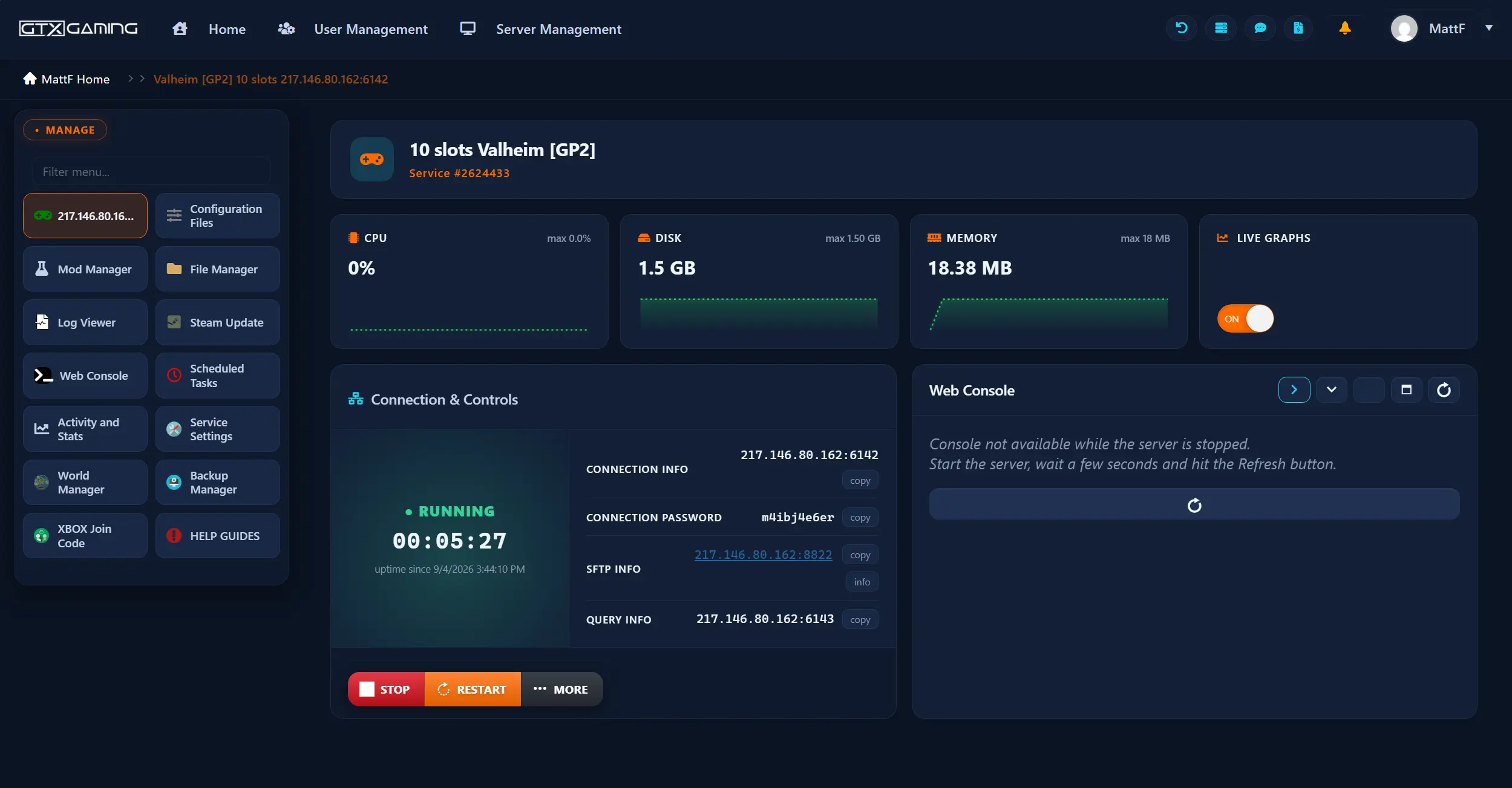
- 🎛️One-click controlsStart, stop, restart and update your server with a single button.
- 🧩Easy mod installsSet up Valheim Plus or BepInEx and drop mod files in with the built-in file manager or SFTP, restart, done.
- ⚙️Config editor & web consoleEdit your server name, password and world settings, toggle crossplay, grab your connection details and watch the live console.
- 🗺️World managerUpload an existing world's .db and .fwl files from your PC or another host, pick the active world and keep building in minutes.
- 💾Daily backups & restoreAutomatic daily backups of your world you can restore in a couple of clicks.
- 📊Live statsReal-time player, CPU, disk and memory monitoring with live graphs.
Valheim 1.0 & the Deep North: Your Server Is Ready
Valheim 1.0 is out: on 9 September 2026 the game left Early Access after five and a half years. The Deep North, the final biome, is live, alongside the first-ever PlayStation 5 and Nintendo Switch 2 releases and full crossplay across every platform. Every GTX server is updated.
The frozen final biome is live, along with much-requested build pieces like drawbridges. Existing worlds carry forward into 1.0, so the base you built in Early Access is the base you'll defend in the far north.
Final Biome1.0 has brought Valheim to PlayStation 5 and Nintendo Switch 2 for the first time, with full crossplay between all platforms. With crossplay enabled on your GTX server, every Viking in your clan joins the same world, whatever they play on.
Full CrossplayThe whole fleet is running the 1.0 update, and our 24/7 team is staffed for the launch rush. Start your server now and you are in the Deep North era from the first login.
Day-One SupportLaunch week fills servers fast. Start your world on an updated 1.0 server today and sail for the Deep North tonight, with crossplay for every platform.
Valheim Server Hosting: Mods, Crossplay & Auto-Updates
The official dedicated server build, kept in sync with every Iron Gate release, with first-class support for Valheim Plus and the BepInEx mod scene.
The official Valheim dedicated server build, deployed instantly and kept up to date with every Iron Gate release, including the live 1.0 Deep North update. Crossplay is a single setting away.
Always CurrentThe most popular Valheim overhaul: quality-of-life tweaks, building and crafting controls, and the mod that unlocks higher player caps. Our 24 to 64-slot plans come ready for it, and the panel makes installing it painless.
Unlocks 24-64 SlotsBepInEx is the loader behind most of Valheim's mod ecosystem, from EpicLoot to the Therzie packs. Install the loader, upload your plugins through the file manager or SFTP, restart, and your modded world is live.
Thousands of ModsAlready deep into a world on your own PC or with another host? Upload the .db and .fwl files through the panel, keep your bases, portals and progress, and your world is back online in minutes. Our 24/7 team can handle the migration for you.
How Much RAM Does My Valheim Server Need?
Every plan includes 10GB RAM free. Long-running worlds, mods and higher player counts benefit from more, and prices below show the full slots + RAM bundle.
| Players | Slots + RAM | Best for | From |
|---|---|---|---|
| Up to 10 | 10 slots · 10GBMost Popular | Vanilla worlds, most friend groups | A$22.92/mo |
| Up to 10 | 10 slots · 12GB | Long-running worlds with sprawling bases | A$36.59/mo |
| Up to 10 | 10 slots · 16GB | Modded groups (Valheim Plus QoL, BepInEx packs) | A$44.41/mo |
| Up to 24 | 24 slots · 16GB | Bigger clans on a Valheim Plus server | A$67.95/mo |
| Up to 32 | 32 slots · 24GB | Communities and heavier mod packs | A$97.13/mo |
| Up to 48 | 48 slots · 24GB | Events and large communities | A$128.11/mo |
| Up to 64 | 64 slots · 32GB | Mega communities at full stretch | A$170.81/mo |
| Up to 64 | 64 slots · 64GB | Heavy overhauls at maximum scale | A$209.92/mo |
Slots above 10 require the free Valheim Plus mod (vanilla's player cap is 10). Slots, RAM, disk and CPU options can all be changed at any time from your client area without losing your world.
Valheim Server Hosting Locations: Low Ping Australia & Worldwide
Valheim servers deploy in 16 locations: Sydney for Australia and Singapore for Asia; London, Paris, Frankfurt, Amsterdam and Helsinki in Europe; and New York, Ashburn, Charlotte, Chicago, Dallas, Miami, Los Angeles, Portland and Quebec in North America. Run a quick test to see your latency to our network.
What's Included With Your Valheim Server Hosting?
Every server ships fully loaded. Upgrade any part of it whenever you like.
| Resource | Included | Optional upgrade |
|---|---|---|
| Slots & RAM | 10-slot vanilla to 64-slot Valheim Plus bundles, 10GB RAM free on every plan | RAM tiers up to 64GB, changed any time |
| Storage | Up to 100GB NVMe free | Tiers up to 200GB, plus extreme 14,000MB/s NVMe |
| Mods & worlds | Valheim Plus, BepInEx, world uploads and migration | Included on every server |
| Crossplay | Supported and toggled from the panel | Included on every server |
| CPU priority | Normal priority on high-frequency cores | High and Realtime tiers |
| CPU clock | Standard high-frequency clocks | +5%, +10% and +20% clock boost tiers |
| Protection | Enterprise DDoS mitigation | Included on every server |
| Backups | Daily automatic backups | Included on every server |
Slots, RAM, storage, CPU priority and clock boosts are all picked at checkout and can be changed later without losing any server data.
Valheim Server Hosting Features: Everything Built In
Every server ships with the full GTX feature set, no hidden add-ons.
Valheim Server Hosting: the essentials
GTX Gaming Server Hosting Reviews
Real Trustpilot reviews from GTX Gaming Valheim customers.
Quick to respond, easy to work with, functional servers
I struggled with a large Valheim worldfile and connection issues across many different server hosts, until I stumbled upon GTXGaming, so I've stuck with them for a few years now with consistent performance and great customer service the few times I've needed it. As a most recent example, Taylor Gibbs helped me upload my Windrose world file within minutes when I struggled to on my own.
Very Professional Support Staff, Super Simple Server Setup
Visited GTXGaming looking for a Valheim server, knowing very little about the process. My chat helper John Kramer was very professional, knowledgeable, informative, and patient guiding me through the process. Server was up and playable like lightning-speed, no lag whatsoever with players from 3 different countries (2 different continents) playing. GTXGaming server set up very easy to use while offering a lot of customizability.
Outstanding company / Valheim server rent
Outstanding company, these guys are on top form and the server runs great. Had a technical issue i.e i broke the server im renting. Opened a ticket and with 5 to 10 minutes they had already wrote back and we began to fix it. Jamie who fixed my issue was amazing and help get everything sorted, think there were others helping so kudos to them also. If you think of renting a server from GTX do it!
Valheim Server Hosting FAQ
How fast is Valheim server setup?
+What is Valheim 1.0 and the Deep North update?
+Does my Valheim server support crossplay?
+Can I install mods like Valheim Plus and BepInEx?
+Can I upload my existing Valheim world?
+Can my Valheim server have more than 10 players?
+How much RAM does a Valheim server need?
+Can I upgrade my Valheim server later?
+Which locations can I host a Valheim server in?
+Should I host a Valheim server from my own PC?
+How much does Valheim server hosting cost in Australia?
+What is your refund policy?
+Do you offer monthly Valheim server hosting with no contract?
+The Complete Guide to Valheim Server Hosting in Australia & Worldwide
Everything you need to know before you rent a Valheim server in Australia or any of GTX Gaming's worldwide datacentres, from the 1.0 Deep North launch and crossplay to Valheim Plus, BepInEx mods, RAM sizing, slots, pricing and locations.
What Is Valheim Server Hosting?
Valheim server hosting is a managed online service that runs the official Valheim dedicated server on professional hardware in a datacentre, around the clock, so your world stays online whether anyone is logged in or not. Every GTX Gaming Valheim server comes with 10GB of RAM included, slot bundles from vanilla's 10 players up to 64 with Valheim Plus, daily automatic backups, enterprise DDoS protection and a web control panel that turns admin jobs like uploading a world, installing mods, toggling crossplay or restoring a backup into a few clicks.
Unlike a server running on a spare PC at home, a dedicated Valheim server hosted by GTX runs on high-frequency CPUs with NVMe storage, and the world persists: crops grow, smelters finish their ore and your clan can log in from any timezone, on any platform.
What Is Valheim?
Valheim is a brutal survival and exploration game set in a procedurally generated purgatory inspired by Norse mythology, developed by Iron Gate and published by Coffee Stain. As a fallen Viking, you gather, build, sail and fight your way through distinct biomes, each with its own creatures, materials and boss, proving yourself to Odin one summoning altar at a time. It became one of gaming's great Early Access success stories, selling millions of copies within weeks of its February 2021 debut.
- Co-op at its best: up to 10 players in vanilla share one world, building longhouses, sailing for iron and dying to trolls together.
- Building that matters: structural integrity, smoke ventilation and the comfort system make bases genuinely engineering projects.
- A world with weight: punishing bosses, storms at sea, and biomes that escalate from meadow strolls to Ashlands warfare.
- A thriving mod scene: Valheim Plus and thousands of BepInEx mods reshape everything from building rules to loot.
Valheim 1.0 & the Deep North Update
On 9 September 2026, Valheim left Early Access at last. Version 1.0 shipped the Deep North, the frozen final biome players waited five and a half years to enter, alongside much-requested build pieces such as drawbridges. Just as big for multiplayer groups: 1.0 brought Valheim to PlayStation 5 and Nintendo Switch 2 for the first time, with full crossplay between every platform.
For server owners the launch is straightforward good news. Existing worlds carry forward into 1.0, and the GTX fleet is already running the update. With two new console platforms joining, a Valheim server list has never looked busier, and a fresh dedicated server is the cleanest way into the Deep North era for a new clan, with crossplay from the first login.
Why Rent a Valheim Server?
Iron Gate publish free dedicated server software, so you could self-host from a spare machine. Most groups rent instead, for reasons that show up the first time someone's crops wither because the host's PC was off:
- The world never sleeps: your server runs 24/7, so clanmates in any timezone play when they like, without waiting for a host.
- No port forwarding or DDoS exposure: home connections struggle with the upload bandwidth and attention a public server attracts; enterprise mitigation at the datacentre edge keeps yours online.
- Automatic updates and backups: the server keeps itself in sync with Iron Gate's releases, including the 1.0 launch, and your world is backed up daily.
- Crossplay without the hassle: a proper dedicated server with crossplay enabled is the cleanest way to get PC and console Vikings into one world.
Valheim Mods: Valheim Plus & BepInEx
Valheim's mod scene rests on two pillars, and our servers support both:
- Valheim Plus: the celebrated overhaul mod that adds fine-grained control over building, crafting, stamina and world settings, and raises the player cap beyond vanilla's 10. Our 24 to 64-slot plans exist because of it. Everyone joining a Valheim Plus server needs the mod installed with matching settings.
- BepInEx: the loader behind most of the wider mod ecosystem on Thunderstore, from EpicLoot and Plant Everything to the Therzie combat and monster packs. Install the loader, drop plugins into the server's plugins folder, restart, done.
- Matching lists: as with most moddable survival games, the server and every player need compatible mod lists. Keep yours somewhere shared, and let the panel's file manager or SFTP do the uploads.
- Stuck? Our 24/7 team untangles loader versions and mod conflicts every day, and can do the whole install for you.
Crossplay & Platforms on a Valheim Server
Valheim dedicated servers support crossplay, and on a GTX server it is a single setting toggled from the control panel. With it enabled, players on PC, Mac, Linux and Xbox share one world, and since the 9 September 2026 launch PlayStation 5 and Nintendo Switch 2 players join them. One caveat worth knowing: heavily modded servers are effectively PC-only territory, since console players cannot install client-side mods, so big communities often run a vanilla crossplay world alongside a modded PC world. Slots and RAM can be resized any time, which makes running either setup on the same plan family easy.
How Much Does Valheim Server Hosting Cost in Australia?
Valheim pricing is slot-led, and every plan includes 10GB of RAM free. Our bundles pair the slot tier with the RAM that suits it:
- 10 slots / 10GB RAM: from A$22.92/mo. Vanilla's full player cap, covers most groups.
- 24 slots / 16GB RAM: from A$67.95/mo. Bigger clans on a Valheim Plus server.
- 32 slots / 24GB RAM: from A$97.13/mo. Communities and heavier mod packs.
- 48 slots / 24GB RAM: from A$128.11/mo. Events and large communities.
- 64 slots / 32GB RAM: from A$170.81/mo. The biggest Valheim Plus communities.
All plans include instant setup, DDoS protection, daily automatic backups, full mod support, up to 100GB of NVMe storage free and 24/7 support, with no setup fees and no contracts. Billing is monthly and you can change plan or cancel at any time.
How Much RAM Does a Valheim Server Need?
A fresh vanilla world for up to 10 players runs comfortably in the 10GB every plan includes. RAM demand grows with the things Vikings are proudest of: sprawling bases with thousands of build pieces, worlds explored edge to edge, higher player counts and mod packs all push memory use up. A modded group does well on 16GB, larger communities sit happily on 24GB to 32GB, and 64GB exists for heavy overhauls at maximum scale. The RAM allocation is changed in a couple of clicks from your client area, without losing your world, so start where you are and grow with the base.
Locations for Valheim Server Hosting
Combat in Valheim is timing-heavy, parries especially, and a low ping keeps it honest. GTX Gaming runs Valheim server hosting from an Australian datacentre in Sydney, with Singapore covering Asia, London, Paris, Frankfurt, Amsterdam and Helsinki in Europe, and New York, Ashburn, Charlotte, Chicago, Dallas, Miami, Los Angeles, Portland and Quebec in North America. Use the live ping test above to find the lowest-latency location for your group, pick it at checkout, and if you get it wrong our support team can migrate your server.
Valheim Server Hosting Glossary
Quick definitions of the terms you'll meet across the game, our control panel and the knowledge base:
- Dedicated Server
- The official standalone Valheim server that runs without the game client. What GTX Gaming hosts for you.
- World Files (.db / .fwl)
- The two files that hold a Valheim world: the .db is the world data, the .fwl its metadata. Upload both to migrate a world.
- Seed
- The code that generates a world's terrain. The same seed always produces the same map, so groups share good ones.
- Valheim Plus
- The popular overhaul mod for server-side control of building, crafting and stamina rules, and the mod that raises the player cap past 10.
- BepInEx
- The mod loader behind most of Valheim's mod ecosystem. Installed on the server, with plugins dropped into its folder.
- Crossplay
- The server setting that lets PC, Xbox and, from 1.0, PS5 and Switch 2 players share one world.
- The Deep North
- Valheim's frozen final biome, live since the 1.0 update on 9 September 2026.
- Biome
- A distinct region type with its own creatures, resources and boss, from Meadows to the Ashlands and beyond.
- Portal
- The in-game structure pair that teleports players across the map. Most metals famously refuse to travel through one.
- Comfort
- The base-building stat that extends the Rested buff. One more reason Viking halls keep growing, along with the RAM they need.
Setup Guides & Help for Your Valheim Server
Once your Valheim server is live, our knowledge base and support team cover the common tasks: first boot, setting the server name and password, enabling crossplay, uploading a world, installing Valheim Plus or BepInEx and getting your clan connected. Our 24/7 support team is on live chat and tickets for anything the guides don't cover:
Explore Other Services
Host more of your favourites with the same instant setup and 24/7 support.
Last Updated: 9 September 2026