



 DayZ
 Palworld


 Enshrouded












Arma 2 DayZ Epoch Server Hosting Australia
Rent Your Arma 2 DayZ Epoch Dedicated Server
About DayZ Epoch server hosting
Premium Arma 2 DayZ Epoch server hosting from GTX Gaming's Australian and worldwide datacentres. Rent your own DayZ Epoch server for 10 to 120 players with instant setup, an always-on Arma 2: Operation Arrowhead dedicated server running Epoch 1.0.7.1 with its MySQL database and BattlEye, hostName, password and maxPlayers in the server config, the clock in HiveExt.ini, plot poles, coins, the virtual garage and weather in configVariables.sqf, 17 maps, up to 5GB of RAM and 100GB of NVMe storage included, daily automatic backups, enterprise DDoS protection and 24/7 support. Rent your Arma 2 DayZ Epoch dedicated server from A$19.54/mo.
Arma 2 DayZ Epoch Server Hosting: Plans & Pricing
- Instant setup
- Up to 5GB RAM included
- Up to 100GB NVMe storage
- Daily automatic backups
- 24/7 support
- MySQL database included
- BattlEye with RCon access
- Up to 5GB RAM included
- Daily automatic backups
- Enterprise DDoS protection
- 17 maps from Chernarus to Napf
- Scheduled restarts and backups
- RAM upgradable to 32GB
- Daily automatic backups
- Enterprise DDoS protection
- 24/7 support
- DDoS protection
- Instant setup
One Arma 2 DayZ Epoch server, priced by slots, from 10 players for your own group of survivors up to 120 for a busy public server. Every plan includes up to 5GB of RAM, up to 100GB of NVMe storage and DDoS protection, and you can change your slots or add memory at any time without losing your bases or your database.
Arma 2 DayZ Epoch Server Hosting Control Panel
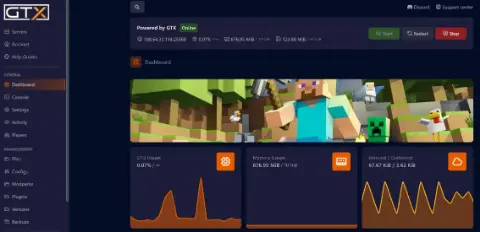
Our custom panel puts your server's config files, mission, database, restarts and backups in a browser, so you spend your time running the server instead of hunting through folders over FTP.

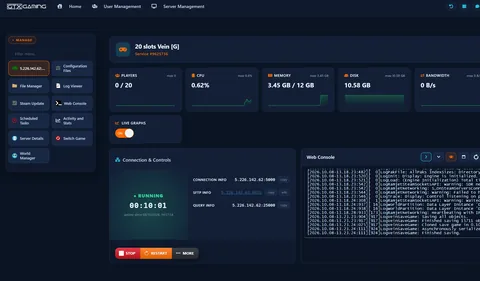
- 🎛️One-click controlsStart, stop and restart your server with a single button, and see its status, uptime and connection, query and SFTP details at a glance.
- ⚙️Config files in the browserYour server config (hostName, password, passwordAdmin, maxPlayers, the motd lines and the mission template) opens as config.cfg under Configuration Files with a Config Editor for the usual settings and a Text Editor for everything else, next to HiveExt.ini for the database and the clock, bans.txt for BattlEye bans, your Arma 2 profile and the Start.bat server start line. Stop, change, save, start.
- 🗺️Mission & scriptsThe File Manager opens the MPMissions folder, the @DayZ_Epoch and @DayZ_Epoch_Server mod folders, BattlEye and Keys, so you can edit init.sqf and configVariables.sqf in the browser, upload a repacked mission or a script over SFTP, and the Mod Manager installs the Lingor, Namalsk and Taviana map files in one click, with the server stopped.
- 🗄️Database & persistenceYour MySQL database runs on the server with your Epoch files, HiveExt.ini already points at it, and the Mod Manager installs phpMyAdmin so you can browse characters, vehicles and base objects from the browser; the Server Details button shows the database login, Wipe Database starts a fresh world, and Switch Game moves the server to another game from your client area.
- 💾Backup Manager & Scheduled TasksDaily automatic backups plus your own from the Backup Manager, with Backup Server and Restore Server buttons for a full copy and a roll-back, and Scheduled Tasks run restarts, backups and the Steam Update on a timer with a warning to players first; the Server Messages tool from the Mod Manager posts timed messages in game.
- 📊Logs & live graphsFollow the server’s output in the Web Console, with an RCon password field for BattlEye commands, read the Arma 2 RPT and server logs in the Log Viewer, and watch players, CPU, memory and bandwidth on live graphs under Activity and Stats.
Arma 2 DayZ Epoch Server Hosting: Config, Maps & Admin
DayZ Epoch keeps its rules in a handful of files: the server .cfg for name, password and player count, HiveExt.ini for the database and the clock, and the mission's init.sqf and configVariables.sqf for plot poles, coins, the virtual garage, weather, storms and admins, all editable from the browser.
The .cfg file for your map under Configuration Files sets hostName for the server browser, password for a private server, passwordAdmin for #login, maxPlayers matched to your slots, the motd lines players see on joining, verifySignatures and BattlEye, and the template line that picks the mission and map.
Your ServerChernarus, Chernarus Winter, Takistan, Lingor, Isla Duala, Taviana, Namalsk, Panthera, Podagorsk, Caribou, Sahrani, Ovaron, Napf, Sauerland, Sauerland Winter and Ruegen each have their own mission folder; init.sqf sets dayZ_instance, spawnArea, spawnShoremode for shore or inland spawns and the DZE_SafeZonePosArray trader safe zones.
Your WorldconfigVariables.sqf holds the Epoch rules: DZE_PlotPole for plot radius and spacing, DZE_GodModeBase for indestructible bases, DZE_doorManagement, Z_SingleCurrency to trade in coins instead of gold bars, DZE_Virtual_Garage to store vehicles, DZE_VehicleKey_Changer and DZE_HeliLift.
Your RulesDZE_Weather picks static or dynamic summer or winter weather, DZE_EVR turns on the EVR storms from Namalsk, DZE_Bloodsuckers adds the bloodsuckers, dayz_spawnselection gives Chernarus players a spawn choice, and the [Time] section of HiveExt.ini sets the clock: Static for the same hour at every restart, Local for real time or Custom for an offset.
Your Atmosphere#login with your passwordAdmin unlocks the Arma 2 server commands in chat; your PlayerUID in DZE_PlotManagementAdmins and DZE_doorManagementAdmins lets you manage every plot pole and door; the RCon password in BEServer.cfg powers remote admin tools, and the BattlEye filter files decide which scripts are allowed to run.
Your PowersCharacters, bases, vehicles, traders and locked doors live in the MySQL database that HiveExt.ini points at, so nothing is lost at a restart; CleanupPlacedAfterDays decides when abandoned objects are removed, and the dayz_epoch database can be backed up and restored like any other file.
PersistentAlready running a DayZ Epoch server at home or with another host? Upload your mission folder, your edited configVariables.sqf and a dump of your dayz_epoch database with the File Manager or SFTP, point HiveExt.ini at the new database and start the server, and our 24/7 team can help with the move or handle it for you.
How Many Slots Does My Arma 2 DayZ Epoch Server Need?
Pick a slot for every player who will be online at the same time. Zombies, AI and vehicles do not use slots, only real players do, and every plan includes up to 5GB of RAM.
| Slots | Best for | From |
|---|---|---|
| 10 slots | A group of friends on one map | A$19.54/mo |
| 20 slots | Two squads sharing a server | A$23.45/mo |
| 30 slotsRecommended | A community with a few squads and a trader economy | A$33.22/mo |
| 40 slots | Discord communities and event nights | A$43.00/mo |
| 60 slots | Public servers | A$58.65/mo |
| 80 slots | Busy public servers with several squads | A$70.38/mo |
| 100 slots | The stock mission's maxPlayers limit | A$82.11/mo |
| 120 slots | The biggest Arma 2 DayZ Epoch server we offer (raise maxPlayers in description.ext) | A$111.45/mo |
Every tier from 10 to 120 slots, in steps of ten, is in the full plan list above. On memory, our own 20 slot Arma 2 DayZ Epoch demo server used about 155MB of RAM ten minutes after starting a fresh Chernarus world with nobody online, so the up to 5GB included on every server leaves plenty of room for a full server. Arma 2's server is single-threaded, so a high CPU clock matters more than extra cores, and a busy map with many base objects and vehicles in the database loads more at every restart. Watch live memory use in the control panel and add memory from 8GB to 32GB at any time from your client area.
Arma 2 DayZ Epoch Server Hosting Locations: Low Ping Australia & Worldwide
Arma 2 DayZ Epoch servers deploy in 19 locations: Sydney in Australia; Tokyo, Singapore and Mumbai in Asia; London, Paris, Frankfurt, Amsterdam, Stockholm and Madrid in Europe; New York, Ashburn, Chicago, Dallas, Miami, Los Angeles, Portland and Quebec in North America; plus Moscow. Run a quick test to see your latency to our network.
What's Included With Your Arma 2 DayZ Epoch Server Hosting?
Every server ships fully loaded. Upgrade any part of it whenever you like.
| Resource | Included | Optional upgrade |
|---|---|---|
| Player slots | 10 to 120 slots, chosen at checkout | Change your slot count any time |
| Memory | Up to 5GB of RAM on every server | Tiers from 8GB to 32GB, changed any time |
| Storage | Up to 100GB NVMe free | Tiers up to 200GB, plus extreme 14,000MB/s NVMe |
| Game version | DayZ Epoch 1.0.7.1 on the Arma 2: Operation Arrowhead server | Kept current by our team |
| CPU priority | Normal priority on high-frequency cores | High and Realtime tiers |
| CPU clock | Standard high-frequency clocks | +5%, +10% and +20% clock boost tiers |
| Protection | Enterprise DDoS mitigation | Included on every server |
| Backups | Daily automatic backups | Scheduled Tasks for your own |
Slots, RAM, storage, CPU priority and clock boosts are all picked at checkout and can be changed later without losing your bases or your database. Players need their own copy of Arma 2: Operation Arrowhead with the Arma 2 content and the @DayZ_Epoch client files to join; the server itself is included and installed for you.
Arma 2 DayZ Epoch Server Hosting Features: Everything Built In
Every server ships with the full GTX feature set, no hidden add-ons.
Arma 2 DayZ Epoch Server Hosting: the essentials
GTX Gaming Server Hosting Reviews
Verified Trustpilot reviews from GTX Gaming customers.
GTX gaming absolutely excels at customer service
GTX gaming excels at customer service. Every ticket is answered within minutes and issues resolved promptly and professionally. Nothing but wonderful things to say about the service GTX provides. I’ve had the pleasure of interacting with several of their support agents: Tom H, Rui P, Jamie R, John K, Robert P, James K, and man they’re all excellent! Kudos to the entire team and thank you for the service you provide to the gaming community. They’ve enabled our entire crew to spend many hours having a total blast.
TOP!!!
Speed, competence, and understanding. It's the first time I've found such a good support team from a server hosting provider. Top service, top support!
Thank you Mr. Gibbs
Absolutely loved the friendliness and the quick response time. Even though I felt a little dumb for not realizing the problem myself, it felt twice as good to know that the fix was simple and clear.
Arma 2 DayZ Epoch Server Hosting FAQ
How fast is Arma 2 DayZ Epoch server setup?
+What is Arma 2 DayZ Epoch server hosting?
+How do I join my Arma 2 DayZ Epoch server?
+Can I play DayZ Epoch on Xbox or PlayStation?
+How many players can join my Arma 2 DayZ Epoch server?
+How much RAM does an Arma 2 DayZ Epoch server need?
+How much does Arma 2 DayZ Epoch server hosting cost in Australia?
+Which locations can I host an Arma 2 DayZ Epoch server in?
+Can I change the settings on my Arma 2 DayZ Epoch server?
+Which maps can my Arma 2 DayZ Epoch server run?
+How do I become an admin on my Arma 2 DayZ Epoch server?
+Can I add scripts and addons to my Arma 2 DayZ Epoch server?
+Is DayZ Epoch still updated?
+Can I move my existing Arma 2 DayZ Epoch server to GTX Gaming?
+Can I upgrade my Arma 2 DayZ Epoch server later?
+The Complete Guide to Arma 2 DayZ Epoch Server Hosting in Australia & Worldwide
Everything you need to know before you rent an Arma 2 DayZ Epoch server in Australia or any of GTX Gaming's worldwide datacentres, from joining your server and setting up the server config to maps, the Epoch rules in configVariables.sqf, admins and BattlEye, the database, scripts, slots, RAM, pricing and locations.
What Is Arma 2 DayZ Epoch Server Hosting?
Arma 2 DayZ Epoch server hosting is a managed service that runs a DayZ Epoch dedicated server, the Arma 2: Operation Arrowhead server with the @DayZ_Epoch and @DayZ_Epoch_Server mod files, its MySQL database and BattlEye, on professional hardware in a datacentre, around the clock, so your bases, vehicles and trader economy are always there whether or not anyone is at their PC. Every GTX Gaming Arma 2 DayZ Epoch server includes up to 5GB of RAM, up to 100GB of NVMe storage, daily automatic backups, enterprise DDoS protection and a web control panel, so jobs like naming your server, changing the map or scheduling a restart take a few clicks.
People look for it as an Arma 2 DayZ Epoch dedicated server, a DayZ Epoch private server, an Arma 2 Epoch game server or DayZ Epoch server rental. They all mean the same thing: your own always-on Arma 2 DayZ Epoch server, with your map, your rules and your survivors.
What Is DayZ Epoch?
DayZ Epoch is an open-source survival mod for Arma 2: Operation Arrowhead, Bohemia Interactive's 2010 military sandbox, built by the Epoch Mod team on the community edition of the DayZ mod. Where the original DayZ mod was pure survival, Epoch adds an economy and a reason to build: traders in safe zones, gold bars or coins as currency, plot poles and modular base building, lockable doors and vehicles with keys, a virtual garage, helicopter lifting and towing, missions, and extra weapons, vehicles and buildings from the Arma 2 community.
- Build and defend: plot poles claim a radius, walls, floors and doors are crafted from salvaged materials, and DZE_GodModeBase can make bases indestructible if you prefer building to raiding.
- Trade: trader cities such as Stary Sobor, Bash and Klen on Chernarus buy and sell weapons, vehicles and building supplies, in gold bars by default or coins with Z_SingleCurrency.
- Seventeen maps: Chernarus and Takistan from Arma 2, plus community islands from Namalsk and Taviana to Napf and Lingor, each with its own mission file.
- Open source: the whole mod lives on GitHub; the Epoch Mod team published its last release, 1.0.7.1, on 25 May 2023, following 1.0.7 in April 2021 and 1.0.6.2 in December 2017.
Why Rent Your Own Arma 2 DayZ Epoch Server?
A DayZ Epoch server is more than a game process: it is an Arma 2 OA server, a MySQL database, BattlEye and a mission folder that all have to be in step. Most groups rent rather than host at home, for reasons that show up within the first week:
- Always online: the server runs 24 hours a day, so a base is only safe if the server is up, and friends in other time zones can log in when they like.
- Nothing to run at home: no ports 2302 to 2305 to open on your router, no MySQL server to install and keep secure, and no PC left running all night.
- Room for everyone: from 10 slots for one group of friends to 120 for a public server with several squads and a busy trader economy.
- Proper hardware: high-frequency CPUs for Arma 2's single-threaded server and NVMe storage in a datacentre, with DDoS protection at the network edge.
- Backups and support: daily automatic backups and a 24/7 support team mean a bad script or a broken database table is an inconvenience, not the end of your server.
Getting Started & Joining Your Arma 2 DayZ Epoch Server
Your server is installed the moment you order. From there, getting your group into the world typically looks like this:
- Order: choose your slots and your location, and your server is set up instantly.
- Name it: stop the server, open the .cfg file for your map under Configuration Files, set hostName and, for a private server, password, save and press START.
- Install the client files: every player needs Arma 2: Operation Arrowhead with the Arma 2 content (Combined Operations) and the @DayZ_Epoch client folder from the Epoch releases, launched with the @DayZ_Epoch mod enabled.
- Join: in Arma 2: Operation Arrowhead open Multiplayer, use Remote to enter the address and port shown under Connection Info in your panel, or find your hostName in the server browser, and enter the password if you set one.
The GTX panel also shows your SFTP and query details on the home page, so you always know where your server lives. If your server does not appear in the browser, check that it is running and that the @DayZ_Epoch version on the client matches the server, or ask our 24/7 team.
Server Config: hostName, Password, Slots & Time
Arma 2 reads the server settings from the .cfg file named in the startup line, and DayZ Epoch ships one per map in DZE_Server_Config. Our panel exposes it under Configuration Files, so you never touch a command line. The lines most groups change first:
- hostName and motd[]: the name in the server browser and the lines of the message of the day players see as they join, with motdInterval for how often they repeat.
- password and passwordAdmin: a join password for a private server, and the admin password you type after #login in the in-game chat.
- maxPlayers: the player count, set to match the slots you ordered; the stock missions declare maxPlayers = 100 in their description.ext, so raise that too for a 110 or 120 slot server.
- template and difficulty: the mission the server loads, such as DayZ_Epoch_11.Chernarus, and the difficulty it runs it on, veteran by default.
- verifySignatures, BattlEye and persistent: signature checks that keep unsigned addons off your server, BattlEye anti-cheat on, and a mission that keeps running with nobody on it.
Stop the server before you edit the config, save it, then start the server again: the server reads the file at startup. The game port (2302 by default), the Steam ports 2303 and 2304 and the startup line with its -mod=@DayZ_Epoch;@DayZ_Epoch_Server and -config, -cfg and -profiles switches are set for you. The in-game clock lives in HiveExt.ini: Type Static with an Hour value for the same time of day at every restart, Local for the real time of the datacentre, or Custom with an Offset.
Maps & Missions: Chernarus, Namalsk, Taviana, Napf & More
DayZ Epoch 1.0.7.1 ships 17 mission folders in MPMissions, one per map, and the template line in your server config decides which one loads. Switching map is a config edit and a restart, with two things to know:
- Arma 2 maps: Chernarus (with a winter version and a second Chernarus layout) and Takistan come with Arma 2: Operation Arrowhead and the Arma 2 content, so every player already has them.
- Community islands: Lingor, Isla Duala, Taviana, Namalsk, Panthera, Podagorsk, Caribou, Sahrani, Ovaron, Napf, Sauerland, Sauerland Winter and Ruegen are addons: the server needs the island in its -mod line and every player installs the same addon on their PC.
- Per-map settings: each mission's init.sqf carries dayZ_instance, the spawnArea and spawnShoremode spawn rules and the DZE_SafeZonePosArray trader safe zones, so a map keeps its own trader cities and spawn points.
A map change starts a fresh world unless the database already holds objects for that instance, so take a backup first if you are experimenting.
Epoch Rules: Plot Poles, Coins, Garage, Weather & Storms
Epoch's own rules live in configVariables.sqf inside the mission folder, with a comment on every line. Edit it in the File Manager, restart, and the rules apply to everyone. The ones most server owners tune:
- DZE_PlotPole sets the plot radius and the minimum distance between plots; DZE_GodModeBase makes player-built objects indestructible, and DZE_doorManagement lets owners manage who can open their doors.
- Z_SingleCurrency switches the traders from gold bars to coins; DZE_Virtual_Garage lets players store vehicles safely, and DZE_VehicleKey_Changer lets them make or change a vehicle key.
- DZE_Weather chooses static or dynamic summer or winter weather, DZE_EVR turns on the EVR storms, DZE_Bloodsuckers adds bloodsuckers, and DZE_HeliLift allows helicopters to lift vehicles.
- dayz_spawnselection gives Chernarus players a spawn choice, dayz_groupSystem adds the group system, and DZE_DeathMsgChat decides whether death messages appear in chat.
Keep a copy of the original file: an update to Epoch brings a new configVariables.sqf, and you will want to carry your changes over rather than lose them.
Admins & BattlEye: #login, Plot Admins & RCon
Running a public DayZ Epoch server means keeping order, and you have three layers for it. Setting them up takes a minute:
- #login: type #login followed by the passwordAdmin from your server config in the in-game chat, and the Arma 2 server commands are yours: #kick, #restart, #shutdown, #lock, #unlock and #mission.
- Plot and door admins: put your PlayerUID, and those of your co-admins, into the DZE_PlotManagementAdmins and DZE_doorManagementAdmins arrays in configVariables.sqf and you can manage every plot pole and open every door on the server.
- BattlEye and RCon: the RCon password in BEServer.cfg gives you remote console tools from outside the game, with kick and ban commands and a live view of who is online, and BattlEye's filter files decide which scripts may run on your server.
Keep the admin list short and every password to yourself: anyone with passwordAdmin or the RCon password can shut your server down. Our 24/7 support team can help if an admin locks themselves out.
Database, Scripts & Addons
Epoch's persistence is a MySQL database: characters, bases, vehicles, traders and locked doors are written to the dayz_epoch tables that HiveExt.ini points at, and CleanupPlacedAfterDays decides when abandoned objects are removed. Scripts and addons are a file job:
- Mission scripts: custom traders, loot tables, safe zones, map additions and most community scripts go into the mission folder with a line in init.sqf, uploaded with the File Manager or SFTP.
- BattlEye filters: every new script needs matching exceptions in scripts.txt, publicvariable.txt and the other filter files in the BattlEye folder, or BattlEye kicks your players for it.
- Addons: an extra island or weapon pack goes into the server's -mod line and onto every player's PC; there is no Steam Workshop for DayZ Epoch, so players install addons by hand.
Scripts run inside the server, so a broken one can slow it down or crash it: add them one at a time and keep a backup from before each one, and our 24/7 team can roll a server back if a script breaks the mission.
How Much Does Arma 2 DayZ Epoch Server Hosting Cost in Australia?
Pricing is simple: you pay for the number of slots, with up to 5GB of RAM and up to 100GB of NVMe storage included on every server:
- 10 slots: from A$19.54/mo. A group of friends on one map.
- 20 slots: from A$23.45/mo. Two squads sharing a server.
- 30 slots: from A$33.22/mo. A community with a few squads and a trader economy.
- 60 slots: from A$58.65/mo. Public servers.
- 120 slots: from A$111.45/mo. The biggest Arma 2 DayZ Epoch server we offer.
Every tier in between, in steps of ten slots, is in the full plan list at the top of this page. All plans include instant setup, DDoS protection, daily automatic backups and 24/7 support, with no setup fee and no contract. Billing is monthly by default, with three-month, six-month and yearly cycles available at a discount, and you can change plan or cancel at any time.
How Many Slots and How Much RAM Does an Arma 2 DayZ Epoch Server Need?
Choose a slot for every player who will be online at the same time; zombies, AI and vehicles do not use slots. 10 slots suits one group of friends, 30 slots a community with a few squads, and 60 slots or more a public server. On memory, our own 20 slot Arma 2 DayZ Epoch demo server used about 155MB of RAM ten minutes after starting a fresh Chernarus world with nobody online, so the up to 5GB included on every server leaves plenty of room for a full server. Arma 2's server is single-threaded, so a high CPU clock matters more than extra cores, and a busy map with many base objects and vehicles in the database loads more at every restart. The up to 5GB included with every server is the place to start, the control panel shows live memory use, and you can add memory from 8GB to 32GB at any time.
Locations for Arma 2 DayZ Epoch Server Hosting
A firefight at a trader city and a helicopter landing both feel better without lag, so host close to your players. GTX Gaming runs Arma 2 DayZ Epoch server hosting from an Australian datacentre in Sydney plus 18 more locations worldwide: Tokyo, Singapore and Mumbai in Asia; London, Paris, Frankfurt, Amsterdam, Stockholm and Madrid in Europe; New York, Ashburn, Chicago, Dallas, Miami, Los Angeles, Portland and Quebec in North America; plus Moscow. Use the live ping test above to find the lowest-latency location for your group, pick it at checkout, and if you need to move later our support team can migrate your server.
Arma 2 DayZ Epoch Server Hosting Glossary
Quick definitions of the terms you'll meet across DayZ Epoch, our control panel and your Arma 2 DayZ Epoch dedicated server:
- Dedicated Server
- A server that runs your world by itself, around the clock, without a player hosting it from their own game.
- @DayZ_Epoch
- The Epoch client mod folder; players load it in Arma 2: Operation Arrowhead, and the server loads it with @DayZ_Epoch_Server.
- Server config (.cfg)
- The per-map Arma 2 server file with hostName, password, passwordAdmin, maxPlayers, motd and the mission template; our panel opens it under Configuration Files.
- HiveExt.ini
- The file that connects the server to its MySQL database and sets the in-game time (Static, Local or Custom).
- Mission (MPMissions)
- The map folder the server runs, such as DayZ_Epoch_11.Chernarus, holding init.sqf, configVariables.sqf and description.ext.
- configVariables.sqf
- The mission file that holds Epoch's rules: plot poles, coins, virtual garage, weather, storms, admins and more.
- Plot pole
- The object that claims a building radius for its owner; DZE_PlotPole sets the radius and the distance between plots.
- Trader city
- A safe zone with traders who buy and sell gear, vehicles and building supplies for gold bars or coins.
- Virtual garage
- The Epoch feature that stores a player's vehicles out of the world until they are needed.
- #login
- The in-game chat command that unlocks the Arma 2 server admin commands with your passwordAdmin.
- BattlEye
- Arma 2's anti-cheat; its filter files decide which scripts may run, and BEServer.cfg holds the RCon password.
- RCon
- Remote console access to the server through BattlEye, for kicks, bans and a live player list from outside the game.
- Query port
- The Steam query port (2303 by default) that lists your server in the browser; the game port is 2302.
- SFTP
- Secure file transfer for moving files, such as a mission folder or a database dump, between your PC and your server.
Setup Guides & Help for Your Arma 2 DayZ Epoch Server
Once your Arma 2 DayZ Epoch server is live, our help guides cover the common panel jobs, such as connecting over SFTP, finding your server files, scheduling automatic restarts and reading your server logs, and our Arma 2 DayZ Epoch help guides cover the Epoch-specific jobs, such as opening your MySQL database in phpMyAdmin and editing your mission file with PBO Manager. For the mod itself, the Epoch Mod team's GitHub repository carries the server readme, the changelogs and the client and server files, and Bohemia's Steam page covers Arma 2: Operation Arrowhead. Anything else, our 24/7 team is a ticket or a live chat away.
Explore Other Services
Host more of your favourites with the same instant setup and 24/7 support.
Last Updated: October 23, 2026