


Dedicated Game Servers
Subnautica & Subnautica 2 Server Hosting
Rent Your Dedicated Server
Subnautica 2 server hosting from GTX Gaming — share an alien ocean with up to three friends in 4-player co-op, or run a persistent original Subnautica world that stays alive 24/7. High-performance UK & worldwide locations with DDoS protection, instant deployment, and 24/7 expert support.
Subnautica & Subnautica 2 Dedicated Server Plans
Pick the game you want to host. Both plans deploy instantly on the same enterprise-grade GTX hardware, with DDoS protection, offsite backups, and our full control panel included.
- Persistent World, Always Online
- DDoS Protection Included
- Instant Server Setup
- Automatic Offsite Backups
- 24/7 Expert Support
- Full Server Control Panel
- 4 Player Slots (Co-Op Cap)
- DDoS Protection Included
- Instant Server Setup
- Automatic Offsite Backups
- 24/7 Expert Support
- Full Server Control Panel
Manage Your Subnautica 2 Server From Any Browser
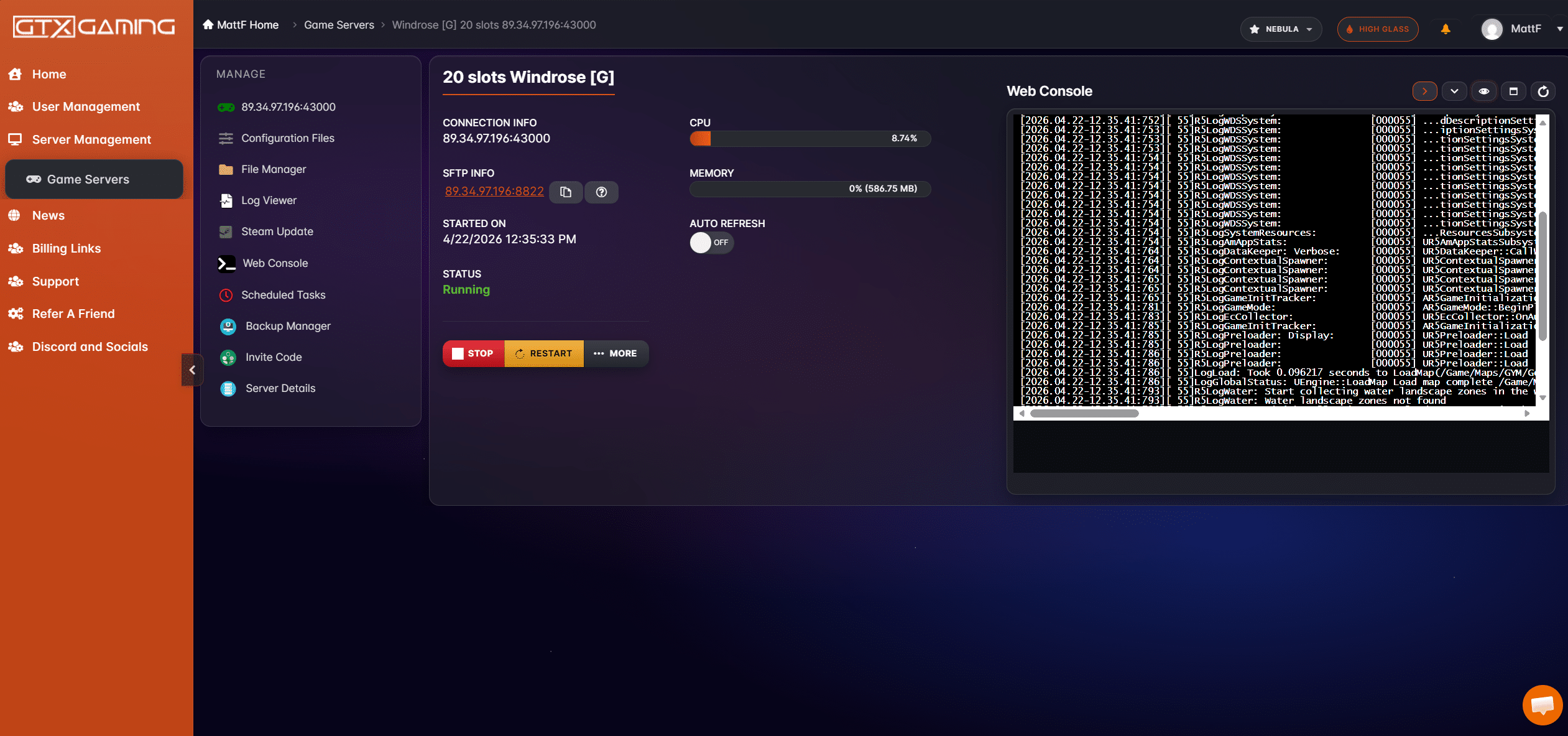
Every GTX Subnautica or Subnautica 2 dedicated server includes our custom web-based control panel — accessible from any browser, anywhere in the UK or further afield. No SSH, no command line, no faff. Just a clean, modern interface built for divers who'd rather be exploring the deep than troubleshooting.
-
One-Click Server Controls
Start, stop, and restart your Subnautica 2 server instantly from the dashboard. No support tickets, no waiting around — the controls are always one click away.
-
Live Web Console
Watch real-time server output, issue admin commands, and spot issues the moment they happen — all from within your browser.
-
File Manager & Scheduled Tasks
Edit server config files, schedule nightly restarts, and manage backups without ever leaving the panel or opening an FTP client.
-
Live Resource Monitoring
Keep an eye on CPU and memory usage in real time so you always know your dive team is exploring on hardware with plenty of headroom to spare.
Subnautica 2 Server Locations
Find your closest Subnautica 2 dedicated server location for the best gaming experience. Click below to test your ping to all our global datacentres.
What Is Subnautica 2?
Subnautica 2 is the next chapter in the underwater survival adventure series from Unknown Worlds, launching into Steam Early Access on 14 May 2026. Driven from your home by ongoing conflict, the colony ship CICADA shepherds you and your fellow Pioneers to a new alien ocean world — until the ship's AI insists the mission must continue and strands you in the depths. Explore vibrant biomes in your Tadpole submersible, design and customise bases, scan a rich biodiversity of creatures, and uncover the mysteries of a planet that might not want you there. Learn more on the official Subnautica 2 website.
With a dedicated Subnautica 2 game server from GTX Gaming, you and up to three friends get a persistent alien ocean to explore in 4-player online co-op. The world keeps running 24/7 even when nobody's logged in, so progress, bases, and discoveries are always waiting for the next dive. Prefer the original Subnautica? GTX hosts a persistent dedicated single-player save for that too — pick the right plan for your group above.
- 4-Player Online Co-Op
- All-New Alien Ocean World
- Custom Base Building
- Tadpole Submersible & Vehicle Upgrades
- Towering Leviathans & Deep-Sea Threats
- Scan-and-Study Biodiversity
- Cross-Platform Multiplayer
- Steam Early Access
Premium Subnautica 2 Dedicated Server Features
Every Subnautica and Subnautica 2 game server comes loaded with the tools and protection your dive team needs to survive the depths.
Enterprise DDoS Protection
Our UK and worldwide datacentres feature enterprise-grade DDoS mitigation, keeping your server online and your dive team exploring without interruption from malicious attacks.
Instant Deployment
Order now and your dedicated server is provisioned and ready to play within seconds. No waiting, no delays — your world is live the moment payment clears.
24/7 Expert Support
Our dedicated support team is available around the clock to help with your server. Whether it's configuration, troubleshooting, or general queries, we're here for you.
Automatic Offsite Backups
Your underwater world is automatically backed up to offsite storage. Lost a base or a precious save to a server issue? Roll back to a previous snapshot with a single click from your control panel.
Full Server Control Panel
Manage every aspect of your dedicated server through our intuitive web-based control panel. Adjust settings, manage players, install mods, and restart your server with ease.
UK & Worldwide Server Locations
Low-latency Subnautica and Subnautica 2 game servers hosted from UK datacentres and locations across Europe, North America, and Asia-Pacific. Enjoy minimal ping and smooth gameplay wherever your dive team is based.
Enterprise-Grade Hardware
Subnautica 2 is a demanding open-world multiplayer game with vast streamed underwater biomes, persistent base building, and creature AI running across a full alien ecosystem. That's why we host on genuinely top-tier hardware rather than oversold shared boxes — every spec below is what you actually get on our Subnautica and Subnautica 2 fleet.
AMD Ryzen 9 9950X
16 cores, 32 threads, latest-gen Zen 5 architecture. High single-thread clock speeds — which is what game servers actually need — combined with enough parallel capacity to handle creature AI, base physics, and streamed biome chunks without stutter.
DDR5 Memory
Significantly higher bandwidth and lower latency than DDR4. Matters for large multiplayer ocean worlds where entity counts, base physics, biome streaming, and save-state operations push memory throughput hard.
Enterprise NVMe SSDs
Ultra-fast read/write speeds for near-instant world loads, rapid autosaves, and fast offsite backups. No spinning disks, no SATA SSDs — NVMe only across our entire Subnautica and Subnautica 2 fleet.
Why Rent A Subnautica 2 Server From GTX?
Subnautica 2 is about to launch, and the depths are waiting. Here's what makes hosting with GTX different from the cheap, oversold alternatives — for both Subnautica 2 and the original Subnautica.
Instant Deployment
Order in under a minute and your server is live and joinable within seconds. No queues, no manual provisioning — just pay, grab your join details, and dive straight in.
Dedicated Resources
Real CPU cores, real RAM, real NVMe storage — all reserved for your dive team alone. No noisy neighbours, no shared boxes, no contention slowing down your world.
Full Control
Edit any future Subnautica 2 server config files, manage whitelists, set passwords, schedule restarts, restore backups — every setting is yours from the GTX control panel as Unknown Worlds expand the dedicated tooling during Early Access.
Honest Pricing
Pricing for both Subnautica and Subnautica 2 will be confirmed shortly. No surprise fees, no hidden upgrades, and no compromises on hardware. Pay for what you actually get — top-tier dedicated hosting.
How To Get Your Subnautica 2 Server
Setting up your dedicated server with GTX Gaming is simple. Follow these steps and you'll be diving in minutes.
Pick Your Game
Choose between the original Subnautica or Subnautica 2 (4-player co-op).
Order Today
Complete your order and your dedicated server is provisioned automatically.
Instant Setup
Your server boots within seconds and your join details are displayed in the panel.
Dive In
Invite up to three friends, configure your world, and start your alien-ocean adventure.
How to Set Up Your Subnautica 2 Server
Everything you need to get your dedicated server up and running. Click each step to expand the details.
- Use the order panel in the hero or pricing section above to choose between the original Subnautica or Subnautica 2 (4-slot co-op).
- Complete your order and your dedicated server is provisioned automatically — no manual setup or queue.
- Your server appears in your GTX Gaming control panel dashboard within seconds.
- Log in to your GTX Gaming client area.
- Navigate to your active services and click on your Subnautica or Subnautica 2 server.
- The control panel gives you full access to start, stop, restart, and configure your server — including file management, console access, scheduled restarts, and offsite backups.
- Click the Start button in the control panel to boot your server.
- Once running, your server IP address and port are displayed in the dashboard.
- If you've set a server password, share it with your dive team alongside the IP and port.
- You can verify the server is online and accepting connections from the live web console.
- Launch Subnautica 2 on Steam.
- From the main menu choose Multiplayer → Join Server by IP.
- Paste the server IP and port from your GTX Gaming control panel and enter the password if prompted.
- You're in. Up to three friends can join using the same details — Subnautica 2 supports 4-player co-op.
- For the original Subnautica, follow the same flow from the Subnautica main menu.
All server settings can be edited from the GTX Gaming control panel — no SSH or external tools required. Use the panel to change your server name, set or remove a password, manage whitelisted players, schedule automatic restarts, restore from offsite backups, and view live server logs.
Subnautica 2 launches into Early Access on 14 May 2026, and Unknown Worlds will continue to expand the dedicated server tooling and config options throughout the Early Access period. As new server config files become available, you'll be able to edit them directly through the GTX file manager.
For the latest official guidance on Subnautica 2 multiplayer and server setup, see the Subnautica 2 Steam page and the official Subnautica website.
The Best Place to Rent a Subnautica 2 Server in the UK & Worldwide
Looking to rent a Subnautica 2 server? GTX Gaming is the UK's leading provider of dedicated game server hosting, and we're rolling out hosting for both Subnautica 2 and the original Subnautica from the same enterprise-grade fleet. With over a decade of experience running game servers for communities across the United Kingdom and worldwide, we know what it takes to deliver a seamless multiplayer experience — even on day one of an Early Access launch.
Our Subnautica 2 dedicated server plans are built for 4-player online co-op on an alien ocean world that simply doesn't sleep. Every server comes with enterprise-grade DDoS protection, automatic offsite backups, and our custom-built control panel that puts you in command of every setting. Whether you're exploring vibrant biomes in your Tadpole submersible, scanning towering Leviathans, or building a custom base in the depths, your dedicated server delivers the performance your dive team needs.
When you host your Subnautica 2 server with GTX Gaming, you're choosing hardware in premium UK datacentres and server locations worldwide, with redundant power, cooling, and network infrastructure. This means ultra-low latency for players across the UK, Europe, and beyond — so every dive, scan, and base placement happens in real time with no lag, no rubberbanding, and no stutter.
Subnautica & Subnautica 2 Dedicated Server Features at a Glance
Every Subnautica 2 game server from GTX Gaming includes one-click restarts, automated backups, scheduled tasks, and the ability to swap between hosting the original Subnautica or Subnautica 2 as your group's tastes change. Subnautica 2 is capped at 4-player co-op, so our 4-slot plan covers a full dive team with no wasted resources. Flexible billing and instant provisioning mean you're never locked into more than you need.
Why Choose GTX Gaming?
GTX Gaming has been the trusted choice for game server hosting since 2007. We host servers for hundreds of games and thousands of players worldwide. When you rent your dedicated Subnautica server from us, you're backed by a team that lives and breathes game servers. Our 24/7 support team are gamers themselves — they understand your needs and can resolve issues quickly. Order today and experience the difference that dedicated, expert hosting makes.
Subnautica 2 Server Hosting FAQ
Everything you need to know about renting your own dedicated Subnautica or Subnautica 2 server with GTX Gaming.
Ready to Command the Depths?
Order your dedicated server today and your dive team can be exploring within minutes. Enterprise-grade hardware, full control, instant deployment — everything you need to run a great Subnautica or Subnautica 2 world.
Subnautica 2 Launches 14 May 2026 • UK & Worldwide Servers • Instant Deployment