






 DayZ
DayZ Palworld


 Enshrouded










I want to start a server
Realms or your own server, Java or Bedrock, free on your PC or hosted.
Start with the basics
Popular game servers
Your panels
Minecraft knowledge hub
Everything you need to start a Minecraft server and keep it running well, for Java and Bedrock. Written by the team that hosts them.
No guides match your search. Try a shorter word, or browse a topic above.
Not sure where to begin? Choose the one that sounds like you.
Realms or your own server, Java or Bedrock, free on your PC or hosted.
Start with the basicsPick a server type, install a modpack, set up admins and the whitelist.
Mods and admin guidesBackups, scheduled tasks, how much RAM you need and what to check first.
Performance guidesRanked by visits from Google Search, July to October 2026.
Prefer to read it in order? 12 short chapters, about 14 minutes in all, from picking an edition to keeping a big server fast.
Start readingGame panel, versions, server types, Java version, SFTP
11 guides
Good to knowThe wrong Java version is the most common reason a server will not start after a version change.
One-click modpacks, mod picks, resource and data packs
13 guides
Good to knowPlugins run only on the server. Mods usually need the same pack on every player’s game.
OP, whitelist, kick and ban, sub-users
9 guides
Good to knowScanners find public Java servers without a whitelist within hours. Turn it on before you share the address.
Game rules, command blocks, summon, teleporting
6 guides
Good to knowFrom Java 1.21.11, game rules use snake_case names such as keep_inventory.
Backups, restores, scheduled tasks, RAM and lag
5 guides
Good to knowTake a backup before every version change or modpack install. The server can keep running.
Building, redstone, farming, mobs, combat
57 guides
Good to knowIdeas your players will actually use, from castle blueprints to the best horse.
The complete guide
Realms is Mojang's own subscription server. It is the easiest way to play with a few friends: no setup, and it lives inside the game. The trade-off is control. Realms Plus and Java Realms allow up to 10 players online at once, and you cannot add your own mods or plugins, upload a custom server jar or change most server settings.
Your own server (on your PC or hosted) has no player cap beyond what your hardware handles, runs any modpack or plugin you like, and gives you every setting in server.properties. It is the right choice once your group outgrows 10 players or wants mods.
The question we hear most often is whether you can mod a Realm. The short answer is no; our guide Minecraft Realms mods: what you can and cannot do explains the workarounds and when a server is the better route.
The server edition has to match the game your players own. Java and Bedrock cannot join each other's servers without help.
| Java Edition | Bedrock Edition | |
|---|---|---|
| Plays on | Windows, Mac, Linux | Windows, Xbox, PlayStation, Switch, phones and tablets |
| Mods and plugins | Thousands: Forge, NeoForge, Fabric mods; Paper and Spigot plugins | Add-ons and behaviour packs only |
| Joining a server | Multiplayer, Add Server, enter the address | Servers tab on PC and mobile; consoles only list featured servers |
| Default port | 25565 (TCP) | 19132 (UDP) |
| Best for | Modded and plugin servers, technical play | Mixed groups, younger players, console friends |
Crossplay: if your friends are split between editions, run a Java server with the Geyser plugin (on Paper or Spigot) or mod (on Fabric). Geyser translates between the two, so Bedrock players can join the Java server; its companion Floodgate lets them join without owning a Java account. Mods that add new blocks will not show for Bedrock players, so crossplay works best on plugin servers.
Console players on Bedrock: Xbox, PlayStation and Switch cannot type in a server address; they only see Mojang's featured servers. Players use community workarounds such as BedrockConnect to reach other servers. Phones, tablets and Windows can add a server by address directly.
Hosting for each edition: Java Minecraft server hosting and Bedrock Edition server hosting. Want ready-made worlds for console? Try our Minecraft PS4 seeds.
You can make a Minecraft server for free. Mojang gives away the Java server (server.jar) and the Bedrock Dedicated Server for Windows and Ubuntu Linux. Running one at home is a good way to learn, and for two or three friends on the same Wi-Fi you may not need a server at all: Open to LAN in the pause menu does the job.
eula=true in eula.txt to accept Mojang's EULA, and start it again.-Xmx4G for 4 GB) and leave enough for your own game if you play on the same PC.Free, and full control. But the world is offline whenever the PC sleeps or restarts, your home IP is exposed to everyone you give it to, there is no DDoS protection, and the server competes with your own game for CPU and RAM. Home upload speed is usually the first limit as players join.
Online 24/7 without your PC, a server address you can share safely, DDoS protection, server-grade CPUs, one-click modpacks and backups, and support when something breaks. It costs a monthly fee, so it pays off once your group plays most days or wants mods.
Our view after hosting game servers since 2008: start at home if you are learning or playing with one or two friends. Move to hosting when the server needs to be up while you are offline or when more than a handful of people play. If that is you, see our Minecraft server plans.
On GTX, Minecraft servers run on our own game panel at gamepanel2.gtxgaming.co.uk (separate from the panel our other games use). After you order, the server is online within about two minutes. This is the order we tell new customers to work in:
203.0.113.10:25565.server.properties holds the server name (motd), difficulty, game mode, max-players, white-list and view distance. Your plan has no player slot limit, but Minecraft's own max-players starts at 20, so raise it if you expect more.Larger uploads such as an existing world are easier over SFTP: connect to your Minecraft server with SFTP (FileZilla works well, with the same password as the panel). Need to start over? Reinstall your Java server, or on Bedrock reinstall your Bedrock server.
The server type decides what you can add later, so choose it first. You cannot mix plugins and mods on a normal server.
| Server type | Runs | Choose it when |
|---|---|---|
| Vanilla | Nothing extra | You want pure Minecraft, exactly as Mojang ships it |
| Paper (and Purpur, Pufferfish) | Bukkit and Spigot plugins | Survival or community servers that need plugins, protection and better performance than vanilla. Our default advice |
| Spigot | Bukkit and Spigot plugins | A plugin needs Spigot specifically (most run better on Paper) |
| Fabric (and Quilt) | Fabric mods | Lightweight mods, performance mods and fast updates to new versions |
| Forge / NeoForge | Forge or NeoForge mods | Big modpacks; NeoForge for current versions, Forge for older packs |
| Mohist, Arclight | Mods and plugins together | You really need both; expect more compatibility issues |
| Velocity, BungeeCord | A proxy in front of servers | You link several servers into one network |
Open Versions, pick a launcher (Vanilla, Paper, Fabric, NeoForge and the rest), then pick the Minecraft version. A confirmation box offers Wipe Server Files: turn it on only when you want a clean start, and take a backup first either way. Full steps: change the Minecraft version on a Java server.
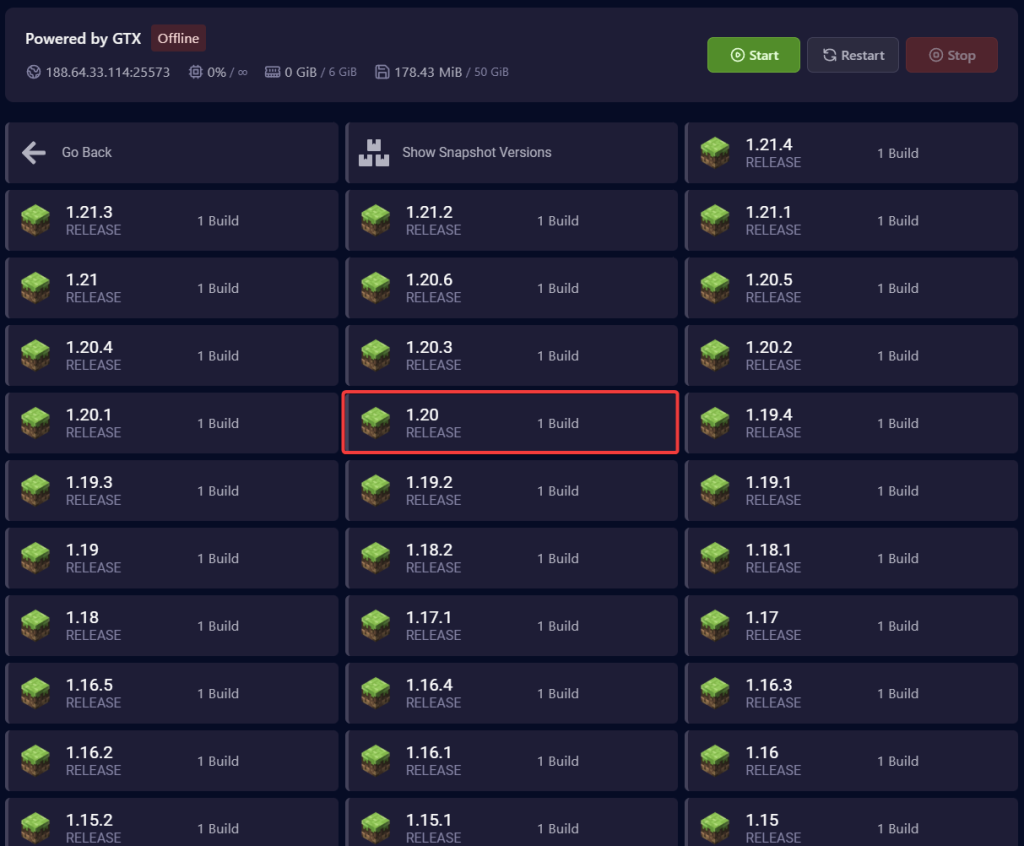
Plugins (Paper, Spigot) run only on the server: players join with a normal, unmodded game. Mods (Fabric, Forge, NeoForge) usually need the same mods on every player's game too, so with modpacks everyone installs the same pack and version through a launcher such as CurseForge, Modrinth or Prism.
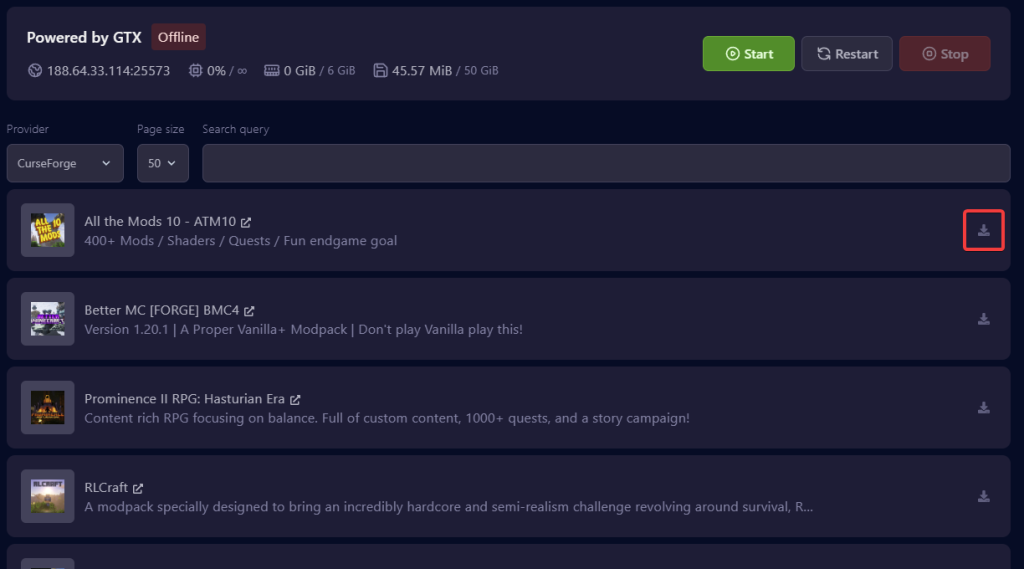
Step by step with screenshots: install a modpack on your Minecraft Java server. Packs that are not in the list can still be uploaded by hand: install any modpack from its server files. Heavy packs need more memory, so check the RAM guide before you install.
Looking for mods to try? Our picks: survival mods for hardcore players, magic mods, furniture mods, building mods and animal mods. No mods at all? Data packs change the game on a vanilla server.
Do these before you share the address. Server scanners find public Java servers without a whitelist quickly, sometimes within hours.
op YourName in the panel console. Guides: OP a player on Java and OP a player on Bedrock (Bedrock players must be online, or you add their XUID to permissions.json).whitelist on, then whitelist add Name for each friend. Only listed players can join: admin and whitelist on Minecraft, or for Bedrock, whitelist on your Bedrock server.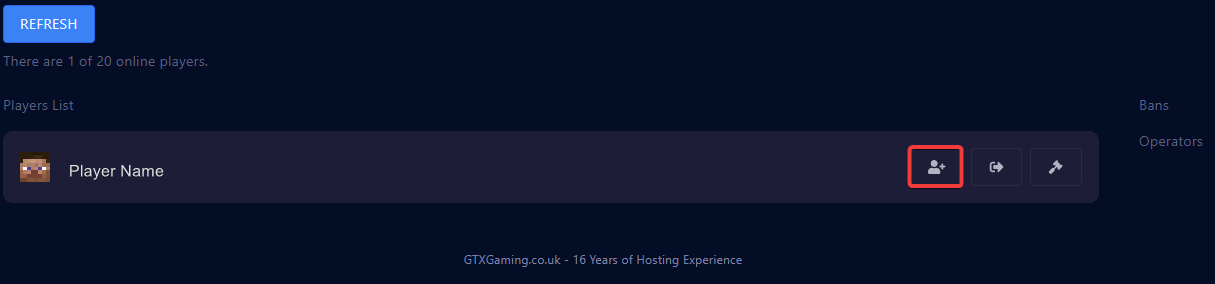
Running a bigger community? Ideas for what to host: the best Minecraft minigames and tips for PvP on Minecraft servers.
Type commands in game with a /, or in the panel's Console without it. You need to be OP to use them in game.
| Command | What it does |
|---|---|
/gamerule keep_inventory true | Players keep items and XP when they die. Java 1.21.11 and newer use these snake_case names; older Java versions use keepInventory, Bedrock uses keepinventory |
/gamerule players_sleeping_percentage 1 | One sleeping player skips the night (older Java: playersSleepingPercentage) |
/gamerule mob_griefing false | Creepers and endermen stop breaking blocks (older Java: mobGriefing) |
/difficulty hard | Changes difficulty for everyone |
/gamemode creative Name | Switches one player's game mode |
/tp Name1 Name2 | Teleports a player to another player |
/time set day, /weather clear | Sets time and weather |
/setworldspawn | Makes your current spot the spawn point for new players |
Not sure of a game rule's name on your version? Type /gamerule and a space, and the game lists every rule it knows.
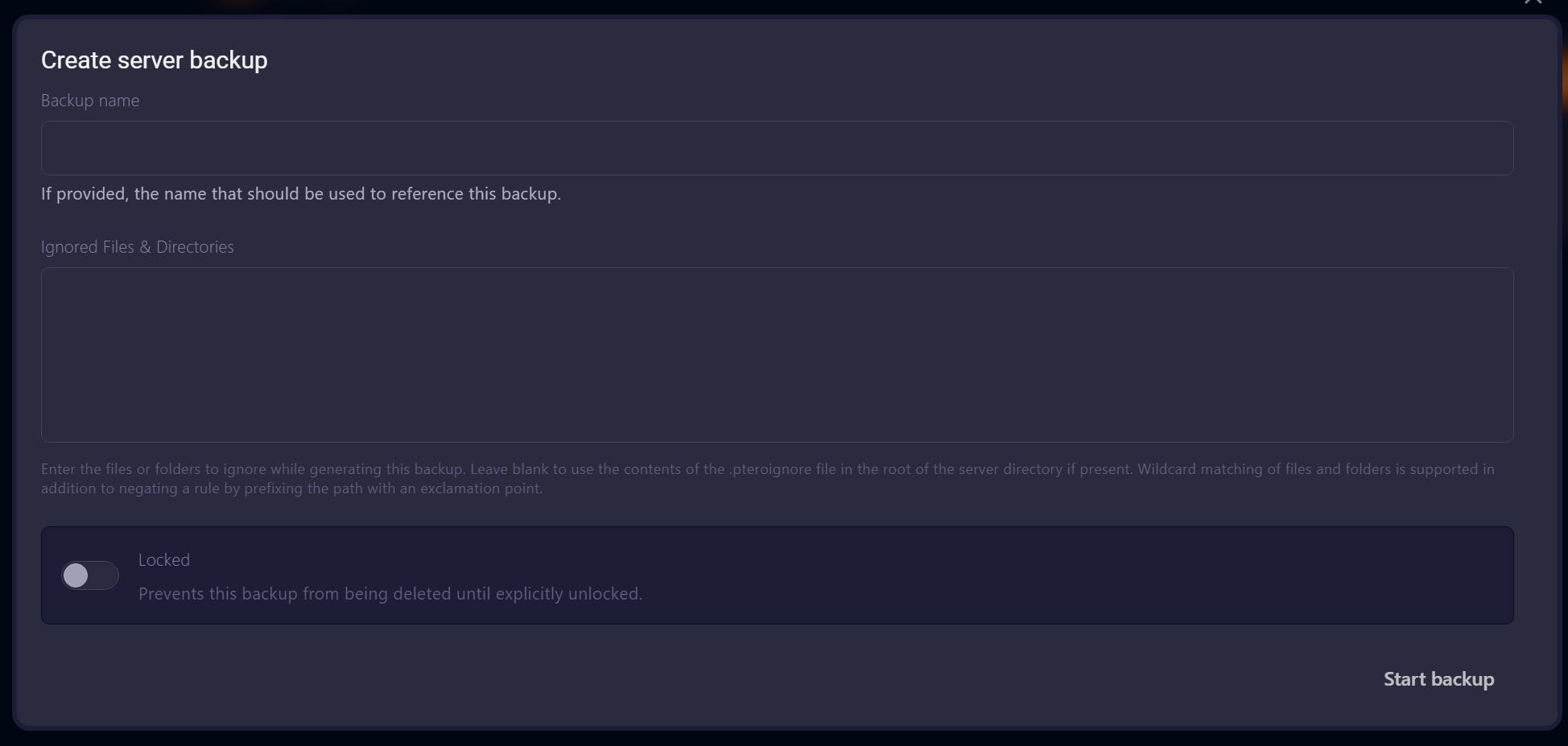
A version change or modpack install without a backup is the easiest way to lose a world. On GTX, open Backups and click Create backup; the server can keep running. Name it, and switch on Locked for a backup you never want overwritten by scheduled ones. Backups are stored offsite.
On GTX every plan has unlimited player slots; memory is the real limit. These are the ranges we recommend from the servers we host:
| Players | RAM | Plan | Good for |
|---|---|---|---|
| 2 to 5 | 1 GB | Dirt | Testing, small vanilla groups |
| 5 to 10 | 2 GB | Sand | Vanilla survival, casual play |
| 10 to 15 | 4 GB | Iron | Vanilla plus light plugins (Paper, Spigot) |
| 10 to 15 | 6 GB | Redstone | Modded starter, small modpacks |
| 15 to 25 | 8 GB | Emerald | Heavier plugins, mid-size modpacks (our most popular) |
| 25 to 35 | 12 GB | Zeus | Large modpacks such as RLCraft, All The Mods, Better MC |
| 30 to 50+ | 16 GB | Titan | Heavy modpacks, large communities |
| 50+ | 20 GB | Netherite | Public servers (Java only) |
Plans in between (3 GB to 15 GB) and prices are on the Minecraft server hosting page; you can upgrade or downgrade your RAM at any time.
view-distance and simulation-distance in server.properties default to 10; 6 to 8 is often enough and saves a lot of CPU and RAM.Once the server runs, these guides from our blog help your players get the most out of it: building and redstone, farming and resources, mobs and villagers, combat, enchanting and exploring. They are all in one list: browse the 57 play guides.
Yes. The Java server and the Bedrock Dedicated Server are free from Mojang, and you can run them on your own PC. You pay with your PC's uptime, your home connection and some setup work (Java, the EULA, port forwarding). A hosted server costs a monthly fee but stays online without your PC.
Minecraft itself has no hard limit; the max-players setting starts at 20 and you can raise it. The real limit is RAM and CPU: around 10 to 15 players on 4 GB for vanilla with light plugins, 15 to 25 on 8 GB for heavier setups, and more memory for big modpacks (see the RAM table).
Yes, with the Geyser plugin or mod on a Java server, plus Floodgate so Bedrock players do not need a Java account. Content added by mods will not appear for Bedrock players.
Yes. Upload the world folder from your saves folder over SFTP or the panel's Files page, and make sure level-name in server.properties matches the folder name. Use the same or a newer Minecraft version than the world was last played on.
Usually the Java version. Minecraft 26.x needs Java 25, 1.20.5 to 1.21.11 need Java 21, and older modpacks often need Java 17 or 8. Set it on the panel's Startup page, then start again. The console shows the exact error if it is something else.
For a few friends who want vanilla with no setup, Realms is simple. If you want mods, plugins, more than 10 players online at once, or full control of the settings, run your own server.