

Minecraft Server Hosting Australia
Rent Your Dedicated Minecraft Server
Premium Minecraft server hosting from GTX Gaming's Australian and worldwide datacentres. Instant setup, Java and Bedrock editions, 17+ server types from Paper to Forge, one-click installs for 5,000+ modpacks, unlimited player slots, enterprise DDoS protection and 24/7 support. Rent your dedicated Minecraft server from A$3.72/mo.
★★★★★ 4.7/5 on Trustpilot · 1,400+ reviewsMinecraft Server Hosting: Plans & Pricing
Every plan includes unlimited player slots. RAM is the only thing you choose, and you can upgrade or downgrade at any time.
- Unlimited player slots
- Instant setup
- Enterprise DDoS protection
- Scheduled offsite backups
- Unlimited player slots
- One-click modpack installs
- Forge, Fabric & NeoForge ready
- Scheduled offsite backups
- Unlimited player slots
- Instant setup
- One-click modpack installs
- Enterprise DDoS protection
- Priority 24/7 support
- Unlimited player slots
- Built for RLCraft & All The Mods
- High-frequency dedicated cores
- Scheduled offsite backups
The Minecraft Server Hosting Control Panel
Our custom panel makes running a Minecraft server effortless, no command line required.
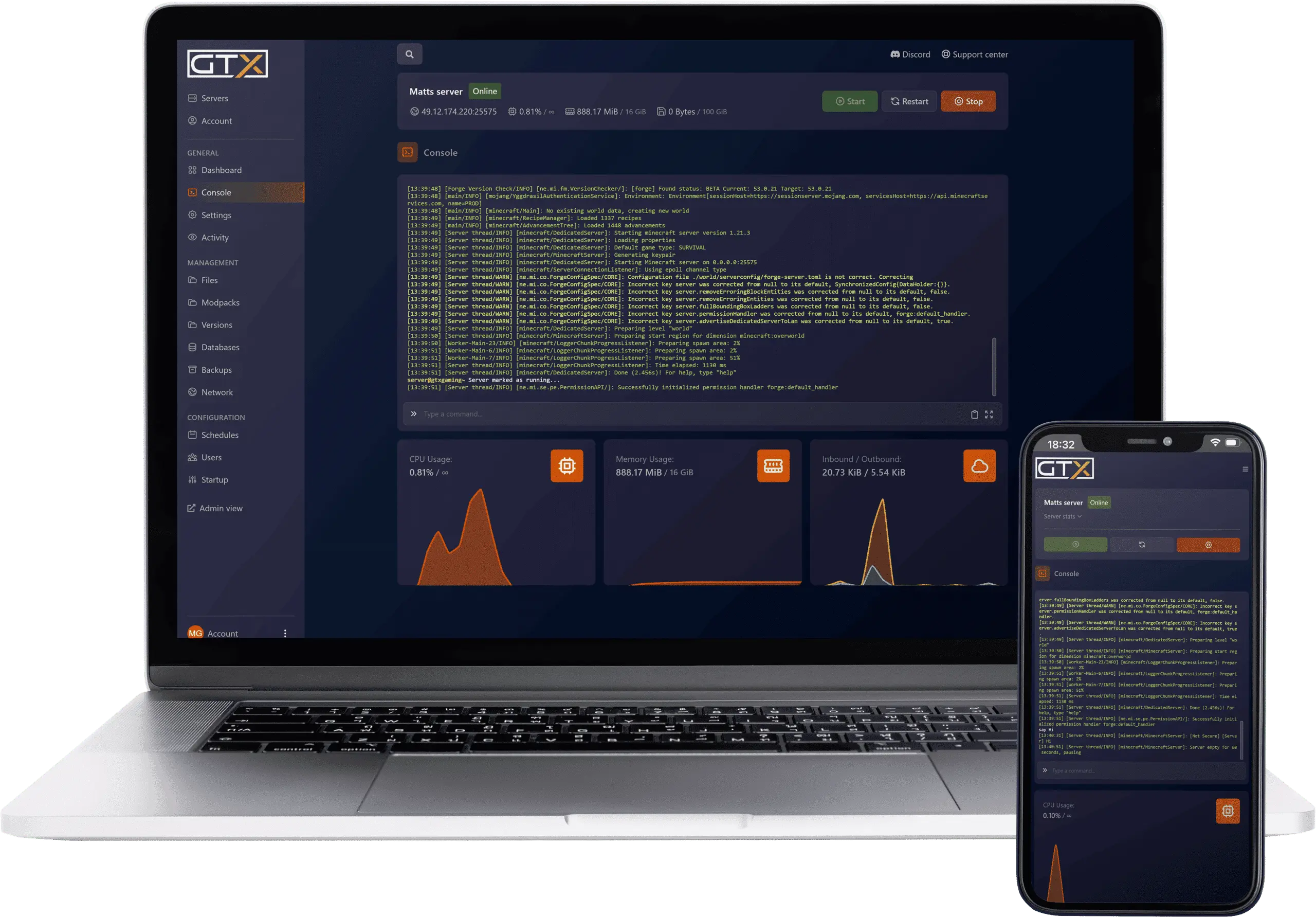
- 🎛️One-click controlsStart, stop, restart and update your server with a single button.
- 📦One-click modpack installerInstall any of 5,000+ modpacks from CurseForge, Modrinth, FTB, Technic and ATLauncher straight from the panel, no JAR juggling.
- 🔁Server type & version switcherSwap between Paper, Spigot, Forge, Fabric and 17+ other server types, and switch Minecraft versions from 1.7 to 1.21+ in one click.
- 📂Full file accessBuilt-in file manager, log viewer and SFTP for configs, worlds and plugin files.
- 💾Backups & restoreScheduled offsite backups you can restore in a couple of clicks with the Backup Manager.
- 📊Live stats & consoleReal-time player, CPU, disk and memory monitoring plus a live web console.
Minecraft Server Hosting: 17+ Server Types & 5,000+ Modpacks
From vanilla performance forks to heavy modpacks and proxy networks, every major Minecraft server type runs on GTX with one-click install and instant switching at any time.


The most popular high-performance server. Faster than vanilla with full plugin support.
Most Popular
Maximum performance fork built for the busiest servers.
Performance
Highly customisable Paper fork with hundreds of extra gameplay toggles.
Customisable
Multi-threaded regionised server for very high player counts.
Multi-Threaded
Paper fork focused on vanilla parity with extra features.
Vanilla Parity
Performance-focused fork squeezing extra ticks out of big worlds.
Performance
The classic plugin platform behind thousands of community servers.
ClassicOptimised Spigot fork, compatible with the whole Bukkit plugin ecosystem.
RecommendedEvery Paper plugin plus deep gameplay customisation on top.
CustomisableMaximum performance with full plugin support for large networks.
Performance
The industry standard modding platform behind most classic modpacks.
Industry Standard
The modern Forge continuation powering current-version modpacks.
Modern
Lightweight, fast-updating mod loader loved for performance mods.
LightweightCommunity-driven Fabric fork with wide mod compatibility.
Community
Run Forge mods and Bukkit plugins together on one server.
Mods + Plugins
Forge and Bukkit hybrid with strong current-version support.
Hybrid
Flexible plugin API that plays nicely with Forge mods.
Flexible API
The classic proxy for linking multiple servers into one network.
Classic
The next-generation proxy: faster, more secure, actively developed.
Next-Gen
BungeeCord fork by the PaperMC team with quality-of-life fixes.
PaperMCAll 17+ Supported Server Software
High-performance
Maximum performance
Classic plugins
Multi-threaded
Customisable
Vanilla parity
Performance fork
Industry standard
Modern Forge
Lightweight mods
Fabric fork
Forge + Bukkit
Hybrid server
Flexible API
Network proxy
Next-gen proxy
PaperMC proxy
Install any modpack from the major launchers, from RLCraft, All The Mods and Better MC to SkyFactory, Vault Hunters, GregTech: New Horizons and FTB OceanBlock, directly from your server's control panel. No JAR juggling, no SFTP uploads.
How Much RAM Does My Minecraft Server Need?
Every plan includes unlimited player slots. RAM is the only limit, so size it to your community and gameplay style.
| Players | RAM | Plan | Best for | From |
|---|---|---|---|---|
| 2 to 5 | 1GB | Dirt | Vanilla testing, small friend groups | A$3.72/mo |
| 5 to 10 | 2GB | Sand | Vanilla survival, casual play | A$7.63/mo |
| 10 to 15 | 4GB | Iron | Vanilla plus light plugins (Paper, Spigot) | A$15.25/mo |
| 10 to 15 | 6GB | Redstone | Modded starter, small modpacks | A$22.88/mo |
| 15 to 25 | 8GB | EmeraldMost Popular | Heavier plugins, mid-size modpacks | A$30.51/mo |
| 25 to 35 | 12GB | Zeus | Large modpacks (RLCraft, All The Mods, Better MC) | A$45.76/mo |
| 30 to 50+ | 16GB | Titan | Heavy modpacks, large communities | A$61.21/mo |
| 50+ | 20GB | Netherite | Maximum power, public servers (Java only) | A$86.28/mo |
Not sure? Use the plan picker below for a personalised recommendation, or ask our 24/7 support team.
Minecraft Server Hosting Locations: Low Ping Australia & Worldwide
Java servers deploy in 9 locations: Sydney, Singapore, London, Germany, Finland, Dallas, New York, Los Angeles and Miami. Bedrock offers the same list except Singapore. Run a quick test to see your latency to our network.
Recommendations vary with your mod and plugin load. You can upgrade at any time.
Order Recommended PlanWhat's Included With Your Minecraft Server Hosting?
Every server ships fully loaded. Upgrade any part of it whenever you like.
| Resource | Included | Optional upgrade |
|---|---|---|
| Player slots | Unlimited on every plan | Nothing to upgrade, slots are never capped |
| Memory | Your choice of 1GB to 20GB DDR5 (Java) or 1GB to 16GB (Bedrock) | Change your RAM tier any time from the client area |
| Storage | 50GB NVMe free | 100GB and 200GB tiers |
| Server software | 17+ server types with one-click install and switch | Included on every server |
| CPU priority | Normal priority on high-frequency cores | High and Realtime tiers |
| CPU clock | Standard high-frequency clocks | +5%, +10% and +20% clock boost tiers |
| Protection | Enterprise DDoS mitigation | Included on every server |
| Backups | Scheduled offsite backups | Included on every server |
RAM, storage, CPU priority and clock boosts are all picked at checkout and can be changed later without losing any server data.
Minecraft Server Hosting Features: Everything Built In
Every server ships with the full GTX feature set, no hidden add-ons.
Minecraft Server Hosting: the essentials
GTX Gaming Server Hosting Reviews
Real Trustpilot reviews from GTX Gaming Minecraft customers.
Best Hosting I've Used
I've tried other Hosting Services but I've found GTX to be the absolute best. I've run into some issues loading certain Minecraft servers as well as general questions for Valheim. The Support Staff at GTX has helped with or down right fixed (installed and running) anything I've wanted. Always fast, I've never waited more than 10-20 minutes for a CSM to be on the job and getting things going, even though I'm in the US and they're in the UK. Game swapping? No problem. Game version not matching what my daily fancy is? No problem. Local to me location for the fastest ping I can get? No problem. I have no need for a different Host. Less Expensive ≠ Less Service Thanks to all the Wizards of GTX.
GTXGaming Review
I've used this service multiple times, for several different games (Eco, 7 days to Die, Minecraft). I've had excellent service every time, swift response time and any issue or question answered within 5-10 minutes. I honestly cannot complain about the service - the staff has been helpful, friendly and swift every time. The servers had no lag, downtime or problems, easy to configure and access.
Absolutely Recommend
I've had multiple game servers through GTXGaming: Arma 3, DayZ, Minecraft, and several other servers. I rarely had issues, and when I did, the support team was always quick to help and very helpful. I highly recommend GTXGaming and would do it again!
Minecraft Server Hosting FAQ
How fast is Minecraft server setup?
+Can I install modpacks and plugins on my Minecraft server?
+Can I host modded Minecraft with Forge, Fabric or NeoForge?
+What is the difference between Java and Bedrock server hosting?
+Do you support the latest Minecraft version (1.21+)?
+How much RAM do I need for a Minecraft server?
+Can I upgrade or downgrade my Minecraft server later?
+Which locations can I host a Minecraft server in?
+Should I host a Minecraft server from my own PC?
+How much does Minecraft server hosting cost in Australia?
+What is your refund policy?
+What payment methods are accepted?
+What support options are available?
+The Complete Guide to Minecraft Server Hosting in Australia & Worldwide
Everything you need to know before you rent a Minecraft server in the UK or any of GTX Gaming's worldwide datacentres, from choosing between Java and Bedrock and sizing your RAM to picking server software, installing modpacks, pricing and locations.
What Is Minecraft Server Hosting?
Minecraft server hosting is a managed online service that runs the Minecraft server software on professional hardware in a datacentre, around the clock, so you and your friends can join a shared world from anywhere whether your own PC is on or off. Every GTX Gaming Minecraft server comes with unlimited player slots, enterprise DDoS protection, scheduled offsite backups and a web control panel that turns admin jobs like installing a modpack, switching versions, restoring a backup or banning a player into one-click operations.
Unlike a server running on a spare PC at home, a dedicated Minecraft server hosted by GTX runs on high-frequency AMD Ryzen 9 7950X cores with DDR5 memory and NVMe storage, tuned for the load patterns of a Minecraft world: chunk loading, mob ticking, redstone calculations and player physics. The result is higher TPS (ticks per second), lower latency and a smoother experience for everyone connected.
What Is Minecraft?
Minecraft is the best-selling video game of all time, developed and published by Mojang Studios. Players mine resources, craft tools and build anything they can imagine in procedurally generated block worlds, alone or together, in survival or creative mode. More than a decade of updates has grown it into two editions and an enormous ecosystem of mods, plugins, minigames and community servers.
- Survival and creative: fight through the night and beat the Ender Dragon, or build without limits in creative mode.
- Two editions: Java Edition on PC with its huge mod scene, and Bedrock Edition on Windows, consoles and mobile.
- Endless multiplayer: SMP survival worlds, minigame networks, modded adventures and creative build servers.
- Constant updates: Mojang ships major content updates every year, and our panel supports each one within about 24 hours.
Why Rent a Minecraft Server?
Mojang publish free server software, so you could self-host from a spare PC. Most communities rent instead, for reasons that show up the first night someone can't log in:
- 24/7 uptime: your world stays online through PC restarts, sleep mode and power cuts, so friends in any timezone can play.
- Performance: at home the server competes with your game client for CPU and RAM, and both suffer. Dedicated high-frequency cores keep TPS at 20 where a home PC stutters.
- Network and safety: residential broadband has weak upload speeds and no DDoS protection, and port forwarding opens a hole in your home network.
- Backups: one corrupted save on a home server means your community's progress is gone. Scheduled offsite backups make that a two-click restore.
Java vs Bedrock: Which Edition Do You Need?
Minecraft has two distinct editions and they need different server software, which is why the pricing plans above carry a Java/Bedrock toggle:
- Java Edition runs on PC (Windows, macOS, Linux) and supports the entire ecosystem of mods (Forge, Fabric, NeoForge, Quilt), plugin platforms (Spigot, Paper, Purpur, Pufferfish) and more than 5,000 modpacks. If you want modded gameplay, plugin-based games like SkyBlock or BedWars, or a custom server type, choose Java.
- Bedrock Edition runs on Windows 10 and 11, mobile (iOS, Android), Xbox, PlayStation and Nintendo Switch, and uses its own server protocol with a more limited add-on system. Choose Bedrock when console and mobile players need to join.
GTX Gaming offers both at the same per-GB prices, from 1GB to 20GB on Java and 1GB to 16GB on Bedrock. If you want Bedrock players on a Java world, crossplay is possible with the community Geyser proxy, and our support team can help you set it up.
Modded vs Vanilla Minecraft Server Hosting
Vanilla servers run unmodified Minecraft. They are cheap to host (4GB is plenty for 10 to 15 players), update the moment Mojang releases a new version, and suit small SMPs, creative build servers and survival worlds for friends.
Modded servers running Forge, Fabric, NeoForge or hybrid platforms like Mohist and Arclight are RAM-hungry. Small packs of 50 to 100 mods are happy with 6GB; medium packs like Better MC, SkyFactory or Vault Hunters want 8GB to 12GB; and giant packs like RLCraft, All The Mods or GregTech: New Horizons benefit from 16GB or more. The RAM guide table above covers the full sizing chart, and the huge mod library on CurseForge is a good place to browse what's possible.
How to Install a Modpack on Your Minecraft Server
Modpack installation is the job our control panel automates hardest. There is no JAR juggling and no SFTP uploading involved:
- 1. Order your server: pick a RAM tier sized for the pack (6GB for small packs, 12GB or more for heavy ones) and your server is live within two minutes.
- 2. Open the modpack installer: log into the control panel and open the one-click installer, which lists 5,000+ packs from CurseForge, Modrinth, FTB, Technic and ATLauncher.
- 3. Pick your pack and version: search for the pack, choose the version that matches your players' launchers, and confirm.
- 4. Restart and play: the panel installs the server files, assigns the right Minecraft version and restarts your server ready to join.
- 5. Switch any time: the same installer swaps your server to a different pack, server type or version in one click, and a backup first makes it risk-free.
How Much Does Minecraft Server Hosting Cost in Australia?
Pricing scales with the one resource that actually matters for Minecraft: RAM. Every plan already includes unlimited player slots, so you never pay per player. Representative tiers:
- Dirt: 1GB from A$3.72/mo. Testing and 2 to 5 vanilla players.
- Sand: 2GB from A$7.63/mo. Small vanilla SMPs.
- Iron: 4GB from A$15.25/mo. 10 to 15 players with light plugins.
- Redstone: 6GB from A$22.88/mo. Modded starter packs.
- Emerald: 8GB from A$30.51/mo. The most popular plan, heavier plugins and mid-size modpacks.
- Zeus: 12GB from A$45.76/mo. Large modpacks like RLCraft and All The Mods.
- Titan: 16GB from A$61.21/mo. Heavy modpacks and big communities.
Java tiers continue to 20GB for the biggest public servers. All plans include instant setup, DDoS protection, scheduled offsite backups, the one-click modpack installer, full config access and 24/7 support, with no setup fees and no contracts. Billing is monthly and you can change RAM or cancel at any time.
What Hardware Does Minecraft Server Hosting Need?
Minecraft's main game loop is single-threaded: almost all the heavy work runs on one CPU core, so raw clock speed matters far more than core count. Budget hosts run worlds on oversubscribed shared cores, and it shows as TPS dropping exactly when your world gets busy. GTX Gaming Minecraft servers run on:
- High-frequency AMD Ryzen 9 7950X CPUs: up to 5.7GHz boost clocks keep TPS at 20 while chunks load and mobs tick.
- DDR5 memory: your full RAM allocation is dedicated to your server, never shared.
- NVMe storage: 50GB free with tiers to 200GB, so chunk loads happen in milliseconds.
- CPU priority and clock boosts: optional High and Realtime priority plus +5% to +20% clock boost tiers squeeze out extra headroom for the busiest worlds.
As a rule of thumb: a vanilla world for friends is comfortable on 1GB to 4GB; a modded server should start at 6GB; and a large public server running a heavy pack benefits from 12GB or more plus a CPU priority upgrade.
Locations for Minecraft Server Hosting
Latency is the silent killer of multiplayer Minecraft: even 100ms of ping makes PvP feel sluggish. GTX Gaming runs Minecraft server hosting from an Australian datacentre in Sydney for low ping across Australia and New Zealand, plus Singapore for Asia, London, Germany and Finland in Europe, and New York, Dallas, Los Angeles and Miami in North America (Java Edition). Use the live ping test above to find the lowest-latency region for your group, pick your location at checkout, and if you get it wrong our support team can migrate your server.
Minecraft Server Hosting Glossary
Quick definitions of the terms you'll meet across the game, our control panel and the knowledge base:
- Java Edition
- The original PC version of Minecraft with the full mod, plugin and modpack ecosystem. What most custom servers run.
- Bedrock Edition
- The cross-platform version for Windows, consoles and mobile. Uses its own server software and add-on system.
- TPS
- Ticks per second. A healthy server runs at 20; lower numbers mean the whole world is slowing down. The key health metric for any Minecraft server.
- Chunk
- A 16x16 block column of the world. Loaded chunks drive CPU and RAM load, which is why exploring and big farms push servers hard.
- Modpack
- A curated bundle of mods installed together, like RLCraft or All The Mods. Our panel installs 5,000+ of them in one click.
- Plugin
- A server-side extension for platforms like Paper and Spigot that adds commands, protections and minigames without players installing anything.
- Server type
- The server software your world runs on: vanilla, a performance fork like Paper, a mod loader like Forge, or a proxy like Velocity.
- Geyser
- A community proxy that lets Bedrock players join Java servers, enabling crossplay between the two editions.
- SMP
- Survival multiplayer. The classic shared-survival-world server that most communities start with.
- Whitelist
- A list of approved player names. With the whitelist on, only invited players can join your server.
Setup Guides & Help for Your Minecraft Server
Once your Minecraft server is live, our knowledge base and support team cover the common tasks: first boot, changing your server type and version, installing modpacks and plugins, uploading an existing world, scheduling backups and getting your community connected. Our 24/7 support team is on live chat and tickets for anything the guides don't cover:
Explore Other Services
Host more of your favourites with the same instant setup and 24/7 support.