






 DayZ
DayZ Palworld


 Enshrouded














I want my own Rust server
Rented or on your own PC, what it needs, and the first settings to change.
Start with the basics
Popular game servers
Your panels
Rust knowledge hub
Everything you need to run a Rust server that survives wipe day: Facepunch's dedicated server at home or rented, server.cfg, force wipes and blueprints, Oxide and Carbon plugins, admin and RCON, Rust+, backups and RAM. Written by the team that hosts them.
No guides match your search. Try a shorter word, or browse a topic above.
Not sure where to begin? Choose the one that sounds like you.
Rented or on your own PC, what it needs, and the first settings to change.
Start with the basicsSettings, wipe day, Oxide and Carbon plugins, admin and RCON.
Settings and plugin guidesRAM and CPU, restarts, backups and what to check first.
Performance guidesRanked by visits from Google Search, July to October 2026.
Prefer to read it in order? 15 short chapters, about 22 minutes in all, from your first wipe to keeping a busy server fast.
Start readingServer details, files, SFTP, logs, FAQ
5 guides
Good to knowAlways copy the full address from CONNECTION INFO in the panel: your server's port may not be Rust's default 28015.
Force wipe day, updates, wipe timer, reinstall
4 guides
Good to knowFacepunch updates Rust on the first Thursday of every month and that update wipes the map; blueprints stay unless you wipe them too.
Custom maps, decay, gather rates
3 guides
Good to knowserver.cfg is read every time the server starts and wins over the start line; a setting you only change in the console is not saved to it.
Owners, RCON, sub-users, Rust+
4 guides
Good to knowPlayers have to reconnect after you add them with ownerid or moderatorid before their admin rights work.
Install, permissions, databases
4 guides
Good to knowOxide has to be updated after every Rust update; on wipe day, Monthly Update and Wipe updates Oxide or Carbon for you.
Backups, restores, scheduled restarts
6 guides
Good to knowOff-site backups are taken daily and kept for six months, on top of the backups you schedule in the panel.
RAM, CPU, hardware, slots, stats
6 guides
Good to knowFacepunch asks for 12 GB of free RAM, more for a 6k map; our ready-made Rust plans start at 12 GB.
Tags, banner, GameTracker, donations
4 guides
Good to knowThe server browser shows up to four tags: use one wipe schedule, one difficulty and one region tag at most.
Teams, clans and FPS
2 guides
Good to knowThese guides are about the game itself: check the in-game numbers after each monthly update.
The complete guide
server.cfg; ports and RCON go in the start line (the settings that matter).ownerid or in users.cfg, then reconnect (admin and RCON).connect IP:port, or find the server in the browser once its query port is reachable (ports and requirements).The Rust dedicated server is a separate program from Facepunch, installed with SteamCMD as app 258550. You do not need a Steam account to install or run it, but every player needs a Steam account that owns Rust. These are the figures from Facepunch's guide to creating a server:
| Requirement | Facepunch's figure | What it means in practice |
|---|---|---|
| System | Windows, Linux or macOS | On Linux the server console is not interactive, so you send commands over RCON |
| Memory | 12 GB of free RAM, more on a 6k map | Free on top of whatever else the machine runs; Facepunch says the figure depends on how the server is used and how many play |
| Disk | 15 GB free, SSD or NVMe highly preferred | Bigger maps need more disk as well as more memory |
| CPU | No fixed figure | The more players, the faster the CPU has to be |
A Rust server uses four ports. You only need the game port to connect and play, so get that working first and add the others after:
| Port | Default | Protocol | Used for |
|---|---|---|---|
server.port | 28015 | UDP | Joining the game |
server.queryport | Game or RCON port plus 1, whichever is higher | UDP | Showing up in the server browser. It cannot be the same as the game port |
rcon.port | Set your own (Facepunch's example uses 28016) | TCP | RCON tools and web consoles |
app.port | Game or RCON port plus 67, whichever is higher (28082 if you changed nothing) | TCP | The Rust+ companion app |
server.encryption level 2 for that, which is the default, so most owners never touch it.Running your own Rust server is free and a good way to learn how it works. Facepunch's guide boils down to these steps:
steamcmd +force_install_dir C:\Rust\MyServer +login anonymous +app_update 258550 validate +quit. Without +login anonymous you get a "No subscription" error..bat on Windows; on Linux SteamCMD installs a basic runds.sh). It runs RustDedicated.exe -batchmode with your settings, for example +server.port 28015 +server.level "Procedural Map" +server.seed 1234 +server.worldsize 4000 +server.maxplayers 10 +server.hostname "My Server" +server.identity "server1" +rcon.port 28016 +rcon.password your-own-password +rcon.web 1 -logfile rustserverlog.txt.Server startup complete.connect localhost:28015.Facepunch still links an old quick-install zip, but its own wiki warns that the zip dates from 2015, that the -autoupdate it relies on no longer exists, and that you do not need it.
| Question | Your own PC or home server | A rented server |
|---|---|---|
| Online when you are not | Only while the machine is on | 24/7, so upkeep, decay and raids keep running all wipe |
| Memory | 12 GB free on top of Windows, the game and anything else you run | Ready-made plans from 12 GB, up to 32 GB at checkout |
| Wipe day | SteamCMD update, delete the old save, reinstall Oxide, restart | Monthly Update and Wipe in one click or as a scheduled task |
| Plugins | Download Oxide or Carbon and copy the files in yourself | Installed from the Mod Manager, plugins from a built-in installer |
| Backups | By hand | Scheduled backups plus daily off-site backups kept for six months |
| Your home address | Shared with everyone who joins | A datacentre address with DDoS protection |
If your group wants a map that is up every day of the wipe, our Rust server hosting runs the same Facepunch server for you, with the control panel described below.
A GTX Rust server is set up as soon as you order it. This is the order we suggest for the first evening:
server.cfg holds the name, description, tags and header image (Text Editor) and the custom map setting (Config Editor). start.bat holds the RCON password and a Custom Commands box for start-line settings such as decay and the wipe timer. Users.cfg holds your owners.connect followed by that address and press Enter. Always use the full address from the panel: your port may not be 28015.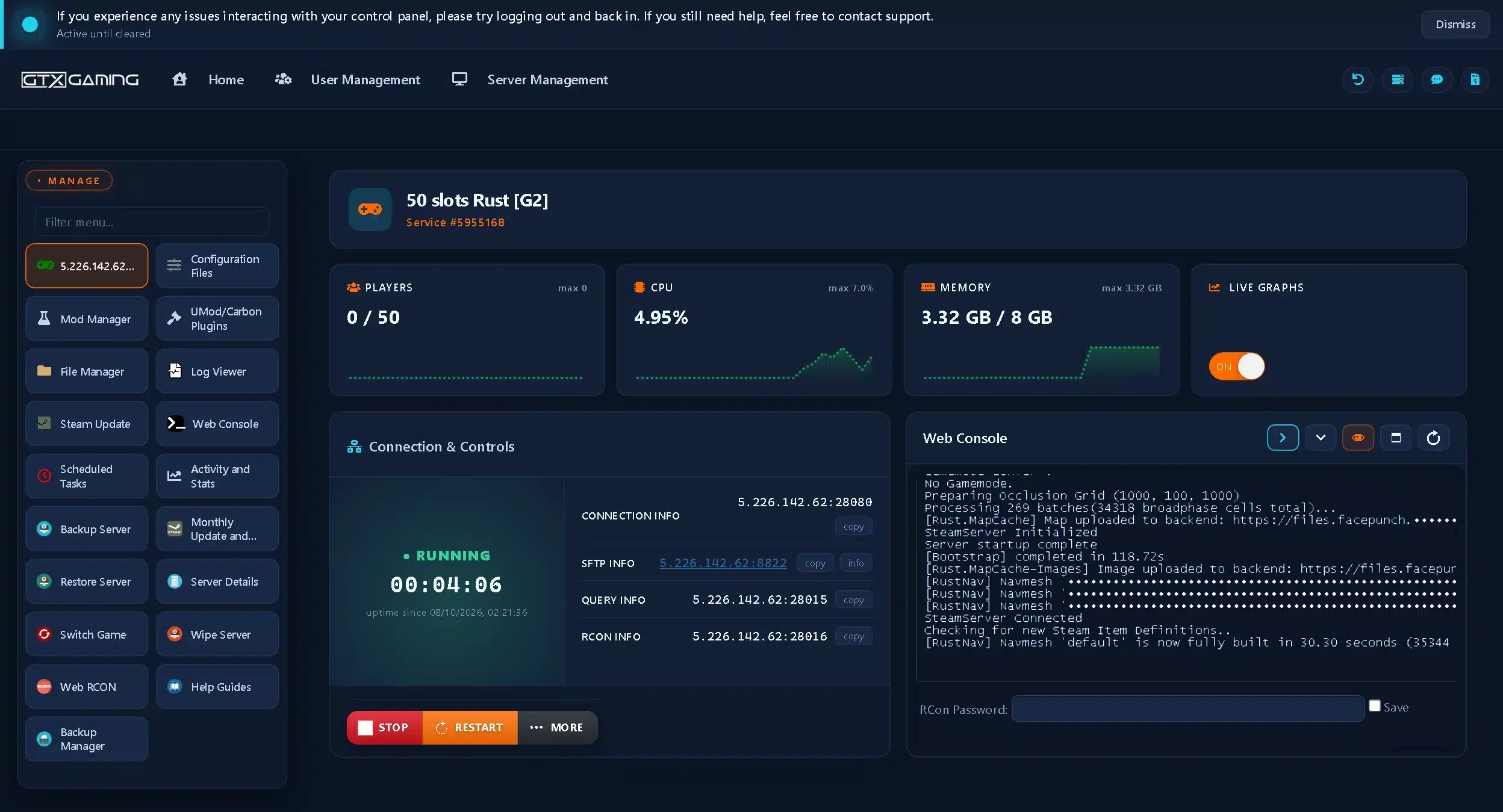
server.cfg when it starts and does not change the file by itself. A setting you change in the console is not written to it, so put anything you want to keep in server.cfg, or run server.writecfg as an admin.Facepunch's advice is to put only the essentials, such as ports and RCON, on the start line and everything else in server.cfg, which lives in server/<identity>/cfg/. The server reads it at startup and it wins over the start line. In the file you leave out the + in front of each setting. A few settings, such as the weather chance values, only work once the server is running, so set those from the console or RCON.
| Setting | What it does |
|---|---|
server.hostname | The name in the server browser |
server.description | The text players see in the connect window |
server.url | Your website |
server.headerimage | The banner: a direct link to a 1024 x 512 .jpg or .png |
server.logoimage | The server icon in the browser and in Rust+: 256 x 256, shown in a circle, so keep the logo centred |
server.tags | Browser tags, comma separated, for example monthly,vanilla (tags) |
server.seed, server.worldsize | The procedural map (maps) |
server.pve | A PvE server; it adds the PvE tag by itself |
server.gamemode | Softcore, hardcore, primitive and other modes; leave it empty for normal Rust |
decay.* | Decay and upkeep (every decay variable and its default) |
Don't remember a setting's name? Type find and part of the name into the console, for example find decay. Since April 2026 the console also has a command list, and admins get auto-completion for server settings.
server.gamemode mid-wipe: it resets every player and their inventory, with no way back. Change it on wipe day. Facepunch also says not to set the mode to vanilla; leave it empty instead.Decay changed in September 2026: tool cupboards now add an upkeep tax for bigger groups (the first four players free, then 2% and later 4% per player, up to 300%). Facepunch put the settings in the decay group, so a server owner can change the tax or switch it off.
Facepunch promises "monthly updates on the first Thursday of every month", and recent ones kept to it: Power Trip on 6 August, Breach and Clear on 3 September and Livestock on 1 October 2026. That update brings a new save version, so every server starts a fresh map: the force wipe. Facepunch's wiki explains that the number in the save file's name goes up at a forced wipe, which makes the server create a new map instead of loading the old one, and that a forced wipe only wipes the map.
| Wipe | What resets | How |
|---|---|---|
| Map wipe | The map, bases and everything in them | Forced by the monthly update, or any time with a new seed or a deleted save |
| Blueprint wipe | Every player's learned blueprints | Delete player.blueprints at the same time as the map |
| Full wipe | Both | A map wipe and a blueprint wipe together |
The release hour can change from month to month, so check Facepunch's announcement and schedule your wipe for a little after it. It also ships the odd extra mandatory update: the Halloween update is due on 22 October 2026 at 18:00 BST, and Facepunch asked server owners to remember the date.
On GTX, the Monthly Update and Wipe button does wipe day in one go: it updates the server, keeps blueprints if you tick Save blueprints, changes the world seed if you want, and updates Oxide or Carbon if either is installed. You can also run it as a one-time Scheduled Task on the Thursday, as our guide to updating and wiping on force wipe day shows. Between wipes, Steam Update is enough.
The wipe timer is the countdown on the warhead at the bottom of the Nuclear Missile Silo. It counts to your next wipe and starts the endgame events (F-15 flyovers and Bradleys on the roads) on the last day of a wipe. By default it follows the force wipe: the first Thursday of the month at 19:00 London time, or every Thursday with the weekly tag and the first and third Thursday with biweekly. Change it with +wipeDayofWeek (0 Sunday to 6 Saturday), +wipeHourofDay, wipeTimezone, or an exact wipeUnixTimestampOverride, and check it with PrintWipe (setting the silo timer on GTX).
monthly, biweekly or weekly in server.tags, and set the wipe timer to match, so the silo countdown and the endgame events line up with the wipe you really run.Most servers run a procedural map, made from two numbers: server.seed (any number from 0 to 2147483647) and server.worldsize (1000 to 6000). The server saves the result as proceduralmap.SIZE.SEED.map, so the same seed and size give you the same map again. Facepunch's guide notes that a larger map needs more disk space and memory, and a 6k map uses more than the 12 GB baseline. On GTX, Monthly Update and Wipe can change the seed for you at the wipe.
A custom map is a .map file made in a map editor. Facepunch's wiki on hosting a custom map covers the rules:
+server.levelurl to a direct download link and remove the seed and world size settings. Players download the map from that link, not from your server, so the host must be online 24/7. A Dropbox link only works with dl=1 at the end.baseboat.generate_paths false and cargoship.event_enabled false.On GTX, upload the map to Dropbox, install uMod (Oxide) and Rust Edit from the Mod Manager, then tick Custom Map Settings in the server.cfg Config Editor and paste the link (our custom map guide). A new map is a new world, so most owners switch maps on wipe day.
Rust has two admin levels: owner (ownerid, the highest) and moderator (moderatorid). From the server console, run users to see each player's SteamID64, then ownerid 76561198123456789 "Name". The player has to reconnect to get the rights; Facepunch notes the change is saved automatically. With the server stopped you can also add a line such as ownerid 76561198123456789 "Name" "" to users.cfg.
On GTX, stop the server, open Users.cfg in Configuration Files with the Config Editor, press new owner and paste your SteamID64, the 17-digit number that starts with 7656119 (making yourself admin, step by step). To give a friend the panel without your password, create a sub-user with only the permissions they need.
RCON runs console commands without being in the game. Facepunch's start line sets +rcon.port, +rcon.password and +rcon.web 1, the WebRCON method it suggests. On GTX the Web Console logs in with your RCON password, tools such as RustAdmin connect with the details under Server Details, and you change the password in the start.bat Config Editor (RCON and WebRCON on GTX). Use a long password of your own, never Facepunch's example.
| Command | What it does |
|---|---|
status / players | Who is online, with SteamID64 and ping |
kick <player> "reason" | Removes a player, who can rejoin straight away |
banid <SteamID64> "name" "reason" <duration> | Bans a player who does not have to be online; a duration such as 1M7d makes it temporary |
unban <SteamID64> / banlistex | Lifts a ban / lists bans with reasons |
mute <player> | Mutes a player for the whole server when an admin uses it |
say "message" | A chat message from the server (sv say from the F1 console) |
Running more than one server? Facepunch's centralized banning lets several servers share one ban list: set server.bansServerEndpoint to a web API you host.
server.useServerWideRequiredSystemConfig . Facepunch says this helps its anti-cheat and earns a Secure tag in the browser, but under 60% of players had Secure Boot on at the time, so it shrinks your audience.Server plugins run on a modding framework that you install on the server. There are two:
Oxide (uMod)
The long-running Rust modding framework, distributed through uMod. Plugins go in oxide/plugins, settings in oxide/config and oxide/data. Facepunch's guide warns that Oxide must be updated after every Rust server update.
Carbon
Its own docs call it a drop-in replacement for Oxide: it keeps the same folder and plugin structure and aims to run Oxide plugins unchanged, updates itself, keeps permissions in SQL and has an in-game interface to install and configure plugins.
Carbon replaces Oxide, so a server runs one or the other. On GTX both come from the Mod Manager: install it, start the server once so it creates its folders, stop it, then add plugins from the UMod Plugins Installer (installing Oxide plugins on GTX). Plugins that store data in MySQL can use a database from the Mod Manager, which you can open with phpMyAdmin.
Most plugins add permissions, such as pluginname.use, and players can only use that part of a plugin once you grant it. The commands work in the F1 console as an admin or over RCON:
oxide.grant user <name> <permission> and oxide.revoke user ... for one player.oxide.group add vip, oxide.grant group vip <permission> and oxide.usergroup add <name> vip to manage a whole group at once.oxide.show perms lists every permission on the server; oxide.show user <name> shows one player's.Our guide to configuring plugin permissions lists the rest. The best-known plugin job is a 2x, 5x or 10x server: the Gather Manager plugin plus gather.rate and dispenser.scale at the same multiplier, as in setting custom gather rates.
Server tags are how players filter the browser. Set server.tags to a comma-separated list, for example server.tags monthly,vanilla,EU. The browser shows up to four. Use only one tag per group: one wipe schedule (monthly, biweekly, weekly), one difficulty (vanilla, hardcore, softcore) and one region (NA, SA, EU, WA, EA, OC, AF). Facepunch warns that two tags from one group break search and can hide your server. Other tags include pve, roleplay, creative, minigame, training, battlefield, broyale and builds; the full list is on Facepunch's server browser tags page. On GTX you add the line to the bottom of server.cfg with the Text Editor (adding Rust server tags).
A banner and an icon make your listing stand out: server.headerimage at 1024 x 512 and server.logoimage at 256 x 256, both as direct links. The banner does not show when you join directly, only in the in-game browser.
Rust+ is Facepunch's companion app for iOS and Android. Once paired, players see the map, their team chat and their smart devices on their phone. Players pair from the in-game ESC screen with Rust+ and Pair with Server. For that to work the companion port must be reachable over TCP (by default the game or RCON port plus 67, whichever is higher). Facepunch also says to keep the companion.id file in your save folder with your backups and never copy it to another server.
Two more ways to grow: list the server on GameTracker from the panel's GameTracker Banners button, and let players chip in with a Clan Pay donation link from the Client Area. Facepunch's community server guidelines allow donations and paid perks, as long as the server never calls itself official and every player can use the Facepunch DLC they have bought.
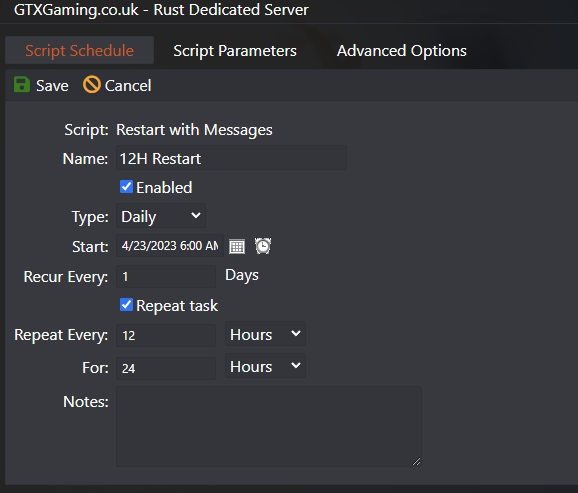
The Rust server saves the map regularly and keeps backups of the save each time. Facepunch also notes that most Rust servers restart once a day for stability and performance, and since September 2026 big events (oil rigs, Cargo Ship, the patrol helicopter, Bradley and satellite crash sites) survive a restart instead of vanishing. On GTX:
Facepunch asks for 12 GB of free RAM, more for a 6k map, and says the real figure depends on how the server is used and how many players it has. A map also grows during a wipe: Facepunch's notes describe the number of colliders in the world as "constantly growing during a wipe cycle". On our own 50-slot demo server, a fresh default map used about 3.3 GB right after startup with nobody online; players, bases and plugins add to that as the wipe goes on. Facepunch has been trimming the server too: in April 2026 it removed unused meshes from the server build, saving around 600 MB of memory.
| Plan | Slots | RAM | Good for |
|---|---|---|---|
| Included memory | 50 | 10 GB | A small, low-population vanilla server on a smaller map |
| Survivor | 50 | 12 GB | A clan server or a small community |
| Raider | 100 | 16 GB | Active communities and plugin packs |
| Warlord | 160 | 20 GB + High CPU Priority | Busy public servers and wipe-day peaks |
| Your own mix | Up to 1000 | Up to 32 GB | Built at checkout |
Low FPS for one player is a different problem from server lag: it is the player's PC, and our Rust FPS guide covers the settings that help.
connect IP:port in the meantime.dl=1), and a changed map needs a new file name.ownerid; server commands in the F1 console need admin rights.Once the server is up, these guides help your group play on it: setting up teams and clans, and getting a smoother frame rate in fights. We check them against Facepunch's update notes, but the game itself always has the last word. They are in one list: browse the play guides.
Install the Rust dedicated server with SteamCMD (app 258550, anonymous login), start RustDedicated with -batchmode and your settings such as +server.port 28015, +server.seed and +server.worldsize, wait for Server startup complete and forward the game port (UDP) on your router. Or rent one: on GTX it is set up when you order, and you change the same settings in the game panel.
On the first Thursday of every month, when Facepunch releases its monthly update. The hour can change, so check Facepunch's announcement. A server's wipe timer counts down to the first Thursday at 19:00 London time by default.
No. Facepunch's wiki says a forced wipe only wipes the map. For a blueprint wipe, delete the player.blueprints file at the same time. On GTX, leave Save blueprints unticked in Monthly Update and Wipe for a full wipe.
Facepunch asks for 12 GB of free RAM, more for a 6k map, and says the real figure depends on how the server is used and how many play. Our ready-made plans have 12 GB (50 slots), 16 GB (100 slots) and 20 GB (160 slots), and you can build up to 32 GB at checkout.
Run ownerid with your SteamID64 in the server console, or add an ownerid line to users.cfg while the server is stopped, then reconnect. On GTX, open Users.cfg with the Config Editor and press new owner.
Four: the game port (UDP, 28015 by default), the query port for the server browser (UDP), the RCON port (TCP) and the Rust+ companion port (TCP, by default the game or RCON port plus 67). Only the game port is needed to join.
Either. Oxide (uMod) is the long-running plugin framework; Carbon calls itself a drop-in replacement for Oxide that keeps the same plugin structure, updates itself and has an in-game plugin menu. A server runs one of them. Oxide has to be updated after every Rust update.
Check that the server has finished starting, that its query port is reachable over UDP and differs from the game port, and that it counts as secure (encryption level 2, the default). Players can always join with F1 and connect IP:port.