






 DayZ
DayZ Palworld


 Enshrouded














Vintage Story Server Hosting UK
Rent Your Vintage Story Dedicated Server
About Vintage Story server hosting
Premium Vintage Story server hosting from GTX Gaming's UK and worldwide datacentres. Rent a Vintage Story server for your friends or your whole community with instant setup, 10 to 100 slots at just £0.45 per slot, 5GB of RAM and 100GB of NVMe storage included, one-click World Playstyles, mods from the official Mod DB, one-click updates, daily automatic backups, enterprise DDoS protection and 24/7 support. Rent your Vintage Story dedicated server from £4.50/mo.
Vintage Story Server Hosting: Plans & Pricing
- Instant setup
- 5GB RAM included
- One-click World Playstyles
- Daily automatic backups
- 24/7 support
- 8GB RAM
- Room for Mod DB mods
- One-click World Playstyles
- Daily automatic backups
- Enterprise DDoS protection
- 16GB RAM
- Big mod lists
- RAM upgradable to 32GB
- Daily automatic backups
- Enterprise DDoS protection
- 24/7 support
- DDoS protection
- Instant setup
Vintage Story servers are priced per player slot, with 5GB of RAM included free. Every plan includes up to 100GB of NVMe storage, one-click World Playstyles and DDoS protection, and you can change your slots or memory at any time without losing your world.
The Vintage Story Server Hosting Control Panel
Our custom panel puts your Vintage Story server's playstyle, mods, files, players and backups in a browser, with a Web Console for every server command and a one-click update button.
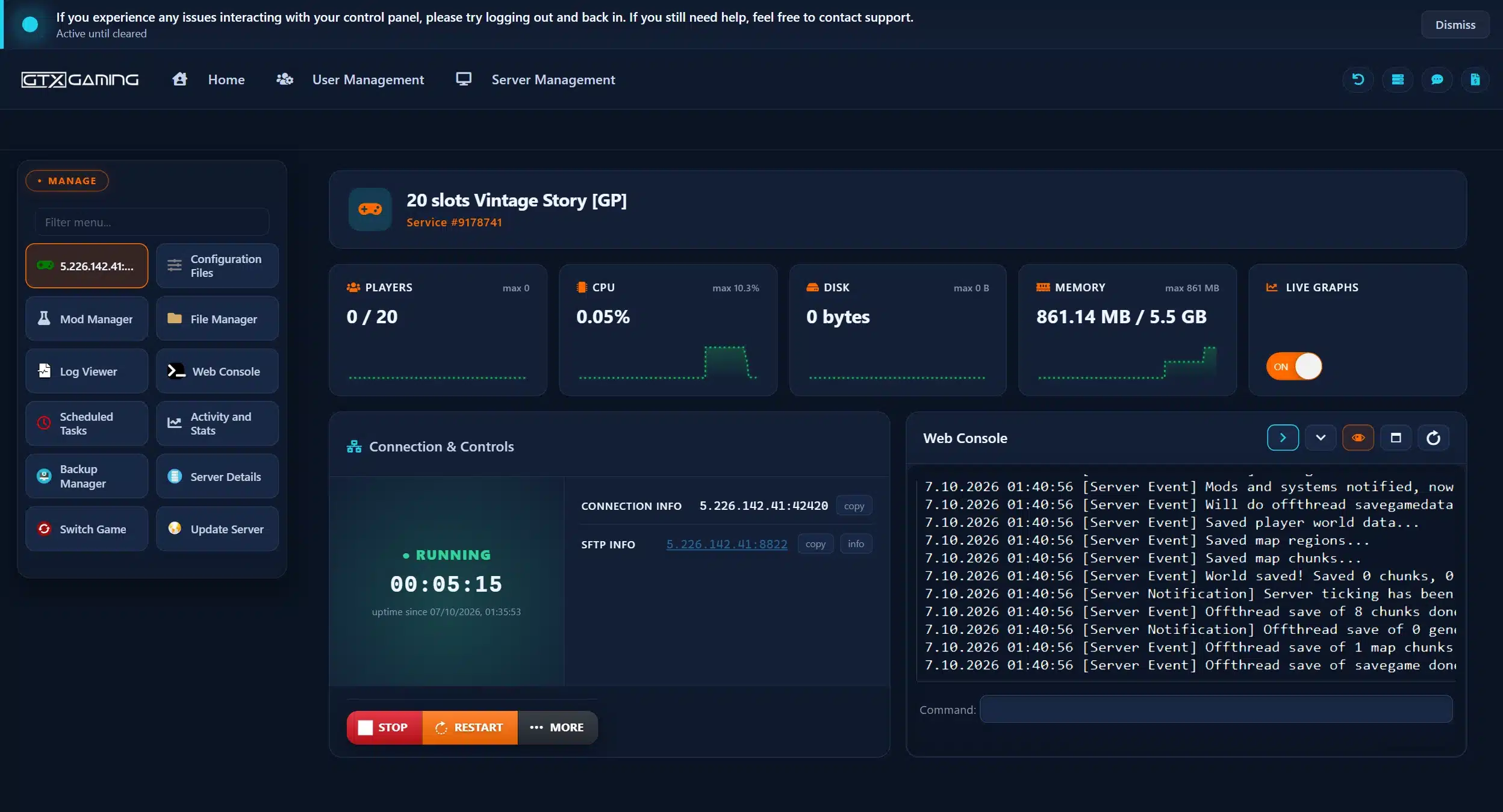
- 🎛️One-click controlsStart, stop and restart your server with a single button, and see its status, connection details and SFTP details at a glance.
- 🌳World Playstyles in the Mod ManagerSwitch between Standard, Exploration, Wilderness Survival, Homo sapiens and Creative Building with one click before you generate your world.
- 🧩Web Console & Mod DBType /moddb install and a mod's ID in the Web Console to add it from the official Mod DB, and run admin commands such as /op from your browser.
- 📂Configuration Files & File ManagerEdit serverconfig.json in the browser, drop mod files into the Mods folder or upload a world, with SFTP access for big uploads.
- 💾Backups & Scheduled TasksDaily automatic backups plus the Backup Manager, so a temporal storm gone wrong or a broken mod is a restore, not a lost world. Scheduled Tasks handle restarts on a timer.
- 🔄Update Server, logs & live graphsBring your server up to date with the Update Server button, follow the Log Viewer and watch CPU, memory and players on live graphs.
Vintage Story Server Hosting: Mods, Playstyles & Settings
Pick your playstyle, add mods from the official Mod DB and set every rule of your world yourself: temporal storms, the whitelist, player roles and more.
The Mod Manager in your panel sets your server's playstyle in one click: Standard is installed by default, and Exploration, Wilderness Survival, Homo sapiens and Creative Building are one button away.
Mod ManagerInstall any mod from the official Vintage Story Mod DB with /moddb install in the Web Console, or upload the mod's zip file to the Mods folder. Players are offered the server's mods automatically when they join.
Official Mod DBDecide how often temporal storms hit, how harsh survival is and how big the world gets. Set it all in the world configuration or in serverconfig.json through Configuration Files.
Your RulesDedicated servers whitelist players by default, so only the people you add can join. Make yourself admin with /op and give other players roles from visitor up to moderator.
Private by DefaultWhen Anego Studios releases a new Vintage Story version, press Update Server in your control panel. Your players need the same game version as the server to join.
Update ServerStarted a world in single player? Upload its .vcdbs save file through the File Manager or SFTP and carry on where you left off with your friends.
World UploadA Vintage Story world is a single .vcdbs file. Upload it to the Saves folder through the File Manager or SFTP, point your server at it and restart. Our 24/7 team can help with the move or handle it for you.
How Many Slots & How Much RAM Does My Vintage Story Server Need?
Pick a slot for every player who will be online at the same time. Every server includes 5GB of RAM free, and you can add slots or memory whenever your group grows.
| Slots | Best for | From (5GB RAM included) |
|---|---|---|
| 10 slots | You and a group of friends | £4.50/mo |
| 20 slotsRecommended | Active groups and modded worlds | £9.00/mo |
| 30 slots | Small communities and roleplay servers | £13.50/mo |
| 40 slots | Public servers and large communities | £18.00/mo |
| 50 slots | Busy public survival servers | £22.50/mo |
| 60 slots | Big public servers | £27.00/mo |
| 80 slots | Large public communities | £36.00/mo |
| 100 slots | The biggest slot count we offer | £45.00/mo |
| Memory | When to choose it | Adds |
|---|---|---|
| Up to 5GB | Included free with every server: up to 10 players in a normal survival world | Free |
| Up to 8GB | Our pick for 20 players or a modded world | £2.99/mo |
| Up to 12GB | Around 30 players, or a big mod list | £6.99/mo |
| Up to 16GB | Our pick for 40 players and well-explored worlds | £10.99/mo |
| Up to 24GB | Public servers with 60 or more players | £17.99/mo |
| Up to 32GB | Full 100 slot servers and the biggest modded worlds | £23.99/mo |
Anego Studios' own server guide estimates 1GB of RAM plus 300MB for every player online in a normal survival world; mods and a well-explored world add to that. The memory picks above are our sizing advice based on it. Watch live memory use in the control panel and change your RAM at any time from your client area.
Vintage Story Server Hosting Locations: Low Ping UK & Worldwide
Vintage Story servers deploy in 19 locations: London, Paris, Frankfurt, Amsterdam, Stockholm and Madrid in Europe; New York, Ashburn, Chicago, Dallas, Miami, Los Angeles, Portland and Quebec in North America; Sydney, Tokyo, Singapore and Mumbai in Asia-Pacific; plus Moscow. Run a quick test to see your latency to our network.
What's Included With Your Vintage Story Server Hosting?
Every server ships fully loaded. Upgrade any part of it whenever you like.
| Resource | Included | Optional upgrade |
|---|---|---|
| Player slots | 10 to 100 slots, £0.45/mo per slot | Change your slot count any time |
| Memory | Up to 5GB of RAM on every server | Tiers from 8GB to 32GB, changed any time |
| Storage | Up to 100GB NVMe free | Tiers up to 200GB, plus extreme 14,000MB/s NVMe |
| Playstyles | Standard, Exploration, Wilderness Survival, Homo sapiens and Creative Building | One click in the Mod Manager |
| Mods | Any mod from the official Mod DB | Free, installed from the Web Console |
| CPU priority | Normal priority on high-frequency cores | High and Realtime tiers |
| Protection | Enterprise DDoS mitigation | Included on every server |
| Backups | Daily automatic backups and restore | Included on every server |
Slots, RAM, storage, CPU priority and clock boosts are all picked at checkout and can be changed later without losing your world. Players need their own Vintage Story game account to join.
Vintage Story Server Hosting Features: Everything Built In
Every server ships with the full GTX feature set, no hidden add-ons.
Vintage Story Server Hosting: the essentials
Vintage Story Server Hosting FAQ
How fast is Vintage Story server setup?
+What is Vintage Story server hosting?
+How do I join my Vintage Story server?
+How do I add mods to my Vintage Story server?
+Which playstyles can my Vintage Story server run?
+What port does a Vintage Story server use?
+Which admin commands can I use on my Vintage Story server?
+How many players can join my Vintage Story server?
+How much RAM does a Vintage Story server need?
+Can I upload my existing Vintage Story world?
+How do I update my Vintage Story server?
+Which locations can I host a Vintage Story server in?
+Do my players need their own copy of Vintage Story?
+How much does Vintage Story server hosting cost in the UK?
+Can I upgrade my Vintage Story server later?
+Can I host a Vintage Story server for free?
+What should I look for in Vintage Story server hosting?
+What is your refund policy?
+Do you offer monthly Vintage Story server hosting with no contract?
+The Complete Guide to Vintage Story Server Hosting in the UK & Worldwide
Everything you need to know before you rent a Vintage Story server in the UK or any of GTX Gaming's worldwide datacentres, from joining and adding mods to playstyles, temporal storms, the whitelist, uploading a world, updates, slots, RAM, pricing and locations.
What Is Vintage Story Server Hosting?
Vintage Story server hosting is a managed service that runs the Vintage Story dedicated server on professional hardware in a datacentre, around the clock, so your world keeps turning through the seasons whether or not anyone is online. Every GTX Gaming Vintage Story server includes up to 5GB of RAM, up to 100GB of NVMe storage, daily automatic backups, enterprise DDoS protection and a web control panel with a Mod Manager for the five World Playstyles and a Web Console for every server command.
People look for it as a Vintage Story dedicated server, a Vintage Story game server, a Vintage Story private server or simply a Vintage Story server to rent, and they all mean the same thing: a home for your own Vintage Story server, with your mods, your rules and only the players you invite.
What Is Vintage Story?
Vintage Story is an uncompromising wilderness survival sandbox game from Anego Studios, set in a ruined world reclaimed by nature. You start empty-handed in the stone age and work your way up through the ages, and almost every craft is a skill of its own:
- Knapping, clayforming and smithing: shape flint into tools, form clay into pots and moulds, then smelt ore and hammer metal on the anvil.
- Four seasons and a real climate: crops need the right season, winters can be brutal, and the world's climate changes from region to region.
- Temporal storms: by default, roughly every 10 to 20 days the world turns hostile as a temporal storm rolls in, drifters appear around you and your temporal stability drops.
- A huge world: the default world is over a million blocks wide in each direction, procedurally generated with realistic landscapes.
- Built for modding: the game was designed from the ground up with modding in mind, and the official Mod DB hosts over 10,000 mods.
The first public version came out on 27 September 2016, and Anego Studios still treats the game as early access because its full vision is not finished yet. It keeps growing: version 1.22 arrived on 21 April 2026 with fishing, a reworked forge, quenching and tempering, large windmills and waterwheels, and the first dynamic dungeons. Vintage Story runs on Windows, macOS and Linux, and is sold on its official website rather than on Steam.
Why Rent a Vintage Story Server?
You can run the Vintage Story dedicated server from a spare machine at home, but most groups rent one instead, for reasons that show up the first time a temporal storm hits while the host is asleep:
- Always online: your world runs 24 hours a day, so friends on different schedules can tend their farms and work their forges whenever they like.
- Nothing to run at home: no ports to open on your router and no PC left running, and your own PC stays free for playing.
- Mods without the hassle: install mods from the official Mod DB with one command, and your players are offered the same mods automatically when they join.
- Your rules: choose your playstyle, set how often temporal storms come, decide who gets whitelisted and who gets admin.
- Proper hardware: high-frequency CPUs and NVMe storage in a datacentre, with DDoS protection at the network edge, so a big build or a busy evening does not depend on someone's home connection.
- Backups and support: daily automatic backups, the Backup Manager and a 24/7 support team mean a griefer, a broken mod or a bad night is an inconvenience, not the end of your world.
Getting Started & Joining Your Vintage Story Server
Your server is set up the moment you order. From there, getting your group into the world typically looks like this:
- Order: choose your slots, memory and location, and your server is set up instantly.
- Pick a playstyle: keep Standard or switch to another World Playstyle in the Mod Manager before your world is generated.
- Name it: set your server name and, if you like, a password in serverconfig.json through Configuration Files.
- Make yourself admin: type /op [yourname] in the Web Console.
- Whitelist your friends: dedicated servers whitelist players by default, so add each player with /player [name] whitelist on, or switch the whitelist off for an open server.
- Join: in Vintage Story, open Multiplayer and add your server with the IP address and port from your control panel.
The default port is 42420, and your exact address is shown at the top of your control panel, ready to copy.
How to Add Mods to Your Vintage Story Server
Mods are a big part of Vintage Story, and the official Vintage Story Mod DB hosts over 10,000 of them, from small quality-of-life tweaks to new landforms, new crafts and whole new creatures. There are two ways to add one to your server:
- From the Web Console: find the mod's ID on the Mod DB, or search for it with /moddb search [keyword], then type /moddb install [modid] and restart the server. To install a specific version, add the version number after the ID.
- By upload: download the mod's zip file and upload it to your server's Mods folder with the File Manager or SFTP, then restart.
When players join, the game offers them the server's mods to download automatically, as long as the mod is marked as server-side or universal; client-side mods, such as some interface mods, each player installs for themselves. Install a few mods at a time and test them before adding more, check each mod supports your server's game version, and take a backup before a big change.
Playstyles, World Settings & Temporal Storms
Vintage Story has five preset playstyles, and the Mod Manager in your control panel switches between them in one click:
- Standard: the default survival experience, balancing exploration, building and survival. Installed on your server by default.
- Exploration: more focus on exploring and building, less on survival, with no temporal storms.
- Wilderness Survival: more focus on survival; players who die respawn at a random spot up to 5,000 blocks away.
- Homo sapiens: removes all lore content and every trace of past civilisations, for a pure survival world.
- Creative Building: flat, empty terrain with unlimited blocks, flying and world editing tools.
A playstyle shapes how a world is generated, so choose it before you create your world, or start a fresh world to change it. On top of the preset you can tune the world itself, such as how often temporal storms come, how harsh the climate is and how big the map is, and the server settings in serverconfig.json, such as the server name, password, player limit and default player role, through Configuration Files. Settings in serverconfig.json take effect after a restart.
Whitelist, Admins & Player Roles
Vintage Story servers are private by default: since version 1.20 a dedicated server only lets in players on its whitelist. That keeps strangers out of your world, and it means one step before your friends can join:
- Admin: /op [name] makes a player admin, with access to every server command.
- Whitelist: /player [name] whitelist on lets a player in. Switch the whitelist off with /serverconfig WhitelistMode off if you want a public server.
- Roles: every player has a role, from visitor and limited player up to player, moderator and admin, in survival and creative versions. Set one with /player [name] role [rolecode], and choose the role new players get with DefaultRoleCode in serverconfig.json.
The game also has anti-griefing built in: land claims protect a player's builds from others, and moderators can step in when needed. Run every command from the Web Console in your control panel, or in game once you are admin.
Vintage Story Server Commands: Quick Reference
Once you are admin (type /op [yourname] in the Web Console), these are the server commands you will use most. They come from the official Vintage Story wiki, and they work from the Web Console in your control panel or from the chat in game:
- /kick [name] [reason] and /ban [name] [reason]: remove a player, or block them from coming back; /unban [name] lifts a ban.
- /announce [message]: send a message to every player on the server, for example before a restart.
- /time set day or /time set night: change the time of day. Other names such as morning, sunset and midnight work too, or give an hour.
- /tp [name] or /tp [coordinates]: teleport to a player or to a spot on the map.
- /gamemode [mode]: switch between survival, creative, spectator and guest, for yourself or for another player.
- /serverconfig maxclients [number] sets the player limit, and /serverconfig setspawnhere moves the world spawn to where you stand.
- /land claim manages land claims, the game's own protection against griefing.
- /autosavenow saves the world straight away, and /stop shuts the server down cleanly.
The official Vintage Story wiki lists every command with all its options, and the official dedicated server guide covers the rest of the setup. Roles decide who can run which command, so give moderators a moderator role rather than full admin.
Uploading a World & Keeping Your Server Updated
Already playing in single player or with another host? A Vintage Story world is one .vcdbs save file. Stop the server, upload the file to the Saves folder through the File Manager or SFTP, then either name it default.vcdbs or set SaveFileLocation in serverconfig.json to its name, and start the server. Your builds, your chests and your farms carry on. Our support team can handle the whole move for you, from copying your files to checking your mods load.
Updates are one click: when Anego Studios releases a new version, press Update Server in your control panel. Players must run the same game version as the server to join, so update when your group updates. After a big update, check your mods: some need a new release from their authors first, so keep a backup from before the update. At the time of writing the current version is 1.22.7, released on 16 August 2026, and Anego Studios has said the next big update, 1.23, focuses on combat.
How Much Does Vintage Story Server Hosting Cost in the UK?
You pay per player slot, from 10 to 100 slots at £0.45/mo each, plus any extra memory, with up to 5GB of RAM and up to 100GB of NVMe storage included on every server. Our three recommended builds are:
- Homestead, 10 slots with 5GB RAM: £4.50/mo. You and a group of friends.
- Village, 20 slots with 8GB RAM: £11.99/mo. Our recommended size for active groups and modded worlds.
- Town, 40 slots with 16GB RAM: £28.99/mo. Public servers and large communities.
Every slot count from 10 to 100 is available, see the full list under our plans or set your own on the order form. All plans include instant setup, one-click World Playstyles, DDoS protection, daily automatic backups and 24/7 support, with no setup fee and no contract. Billing is monthly by default, with three-month, six-month and yearly cycles available at a discount, and you can change plan or cancel at any time.
How Many Slots & How Much RAM Does a Vintage Story Server Need?
Choose a slot for every player who will be online at the same time. A group of friends is well served by 10 slots, an active group or a small community by 20 to 30, and public servers by 40 or more, up to 100. Memory is the other half. Anego Studios' dedicated server guide estimates 1GB of RAM plus 300MB for every player online in a normal survival world, so the 5GB included with every server covers about 10 players. Mods and a big explored map add to it: as a guide we recommend 8GB for 20 players, 16GB for 40 and 32GB for a full 100 slot server. The control panel shows live memory and player graphs, so you can see exactly when your world needs more and upgrade, up to 32GB, without losing anything.
Locations for Vintage Story Server Hosting
A low ping makes every swing of the pickaxe and every fight with a drifter feel responsive, so host close to your players. GTX Gaming runs Vintage Story server hosting from a UK datacentre in London plus 18 more locations worldwide: Paris, Frankfurt, Amsterdam, Stockholm and Madrid in Europe; New York, Ashburn, Chicago, Dallas, Miami, Los Angeles, Portland and Quebec in North America; Sydney, Tokyo, Singapore and Mumbai in Asia-Pacific; plus Moscow. Some locations carry a surcharge, shown at checkout. Use the live ping test above to find the lowest-latency location for your group, pick it at checkout, and if you need to move later our support team can migrate your server.
Best Vintage Story Server Hosting: What to Compare Before You Rent
Most offers to rent a Vintage Story server look alike at first glance. These are the things that decide how your world actually plays once your group moves in:
- Memory, not just slots: Anego Studios' server guide estimates 1GB of RAM plus 300MB for every player online, and mods and a big explored map add to it. Check how much RAM a plan really includes. Every GTX Gaming Vintage Story server includes up to 5GB, and you can upgrade to 32GB at any time.
- CPU: the same guide recommends 4 CPU threads, with more clock speed as the player count grows. Our servers run on high-frequency CPUs, with CPU priority and clock boost available as upgrades.
- Location: ping decides how a fight with drifters feels. Pick a host with a datacentre close to your group: we run Vintage Story servers in 19 locations across Europe, North America and Asia-Pacific (see Locations).
- Mods and playstyles: a good host lets you install Mod DB mods without manual file work. Ours installs them with one /moddb install command in the Web Console, and the Mod Manager switches World Playstyles in one click.
- Control and backups: full access to serverconfig.json, a File Manager and SFTP for your saves, one-click updates, and backups you can restore yourself. Every GTX Gaming server has daily automatic backups and the Backup Manager.
- Billing and refunds: monthly billing with no contract, no setup fee and a 24-hour money-back guarantee, so you can try a Vintage Story dedicated server without risk.
Not sure which size fits your group? Compare our builds under pricing, or ask our 24/7 support team to size your server with you.
Vintage Story Server Hosting Glossary
Quick definitions of the terms you'll meet across Vintage Story, our control panel and your server settings:
- Dedicated Server
- A server that runs your world by itself, around the clock, without a player hosting it from their own game.
- Mod DB
- The official Vintage Story mod library at mods.vintagestory.at. Install its mods with /moddb install.
- Playstyle
- One of five world presets: Standard, Exploration, Wilderness Survival, Homo sapiens and Creative Building.
- Temporal Storm
- A recurring event, by default roughly every 10 to 20 days, when drifters appear and temporal stability drops.
- Temporal Stability
- A player's grip on reality. It drops in unstable places and during storms, and low stability brings danger.
- Drifters
- Hostile creatures that roam caves and appear around players during temporal storms.
- Knapping
- Shaping flint or stone into tool heads by hand, the first craft of every new world.
- serverconfig.json
- The file that holds your server's settings: name, password, player limit, whitelist mode, roles and world settings.
- .vcdbs
- The save file that holds a whole Vintage Story world. Upload it to the Saves folder to move a world.
- Whitelist
- The list of players allowed to join. Dedicated servers use it by default since version 1.20.
- Roles
- Permission levels for players, from visitor up to moderator and admin.
- Web Console
- The server console in your control panel, where you type commands such as /op and /moddb install.
- Land Claims
- Protected areas that stop other players from changing a player's builds.
- Mod Manager
- The control panel tool that switches your server's World Playstyle in one click.
Setup Guides & Help for Your Vintage Story Server
Once your Vintage Story server is live, the Help Guides in your control panel cover the common tasks: naming your server, setting a password, making yourself admin, whitelisting players, installing mods, switching playstyles, uploading a world, updating and restoring a backup. Our 24/7 support team is on live chat and tickets for anything the guides don't cover:
Or start with the complete Vintage Story server guide: from your first world to mods, roles, updates and backups.
Explore Other Services
Host more of your favourites with the same instant setup and 24/7 support.
Last Updated: October 13, 2026