






 DayZ
DayZ Palworld


 Enshrouded














I want my own Arma Reforger server
Your own PC or ours, the first settings to change, and how console players get in.
Start with the basics
Popular game servers
Your panels
Arma Reforger knowledge hub
Everything you need to run an Arma Reforger server that stays up: your own PC or a rented server, the server config, scenarios, Workshop mods, crossplay for PC, Xbox and PS5 players, admins, restarts, backups and server performance. Written by the team that hosts them.
No guides match your search. Try a shorter word, or browse a topic above.
Not sure where to begin? Choose the one that sounds like you.
Your own PC or ours, the first settings to change, and how console players get in.
Start with the basicsScenarios, Workshop mods, crossplay and admins.
Mods and scenariosServer FPS, AI, view distances, RAM and slots, and what to check first.
Performance guidesRanked by visits from Google Search, July to October 2026.
Prefer to read it in order? 13 short chapters, about 22 minutes in all, from your first start to a busy modded crossplay server.
Start readingServer details, files, SFTP, logs, FAQ
7 guides
Good to knowChange files only while the server is stopped, and check the Log Viewer if it stops straight after START: a typo in Server.json is the usual cause.
Reforger Workshop, dependencies, versions
2 guides
Good to knowMods without a version update themselves on every restart. Pin a version only while a mod is broken, and clear it again once its author has fixed it.
Scenario IDs, Server.json, versions
2 guides
Good to knowSome Workshop scenarios only download while the server runs an official scenario: start once on an official one, then switch.
IdentityId, admin slots, donations
3 guides
Good to knowAdd admins by IdentityId, not Steam ID: only IdentityIds get the admin priority queue when the server is full.
Scheduled restarts, backups, restores
5 guides
Good to knowAutomatic backups run alongside restarts, so a daily scheduled restart also keeps your backups fresh.
Bandwidth, RAM, slots, CPU, switching game
6 guides
Good to knowAI and view distances drive most of the load: lower networkViewDistance and aiLimit before you buy more hardware.
The complete guide
Arma Reforger is played on three kinds of server. Official servers are run by Bohemia Interactive, and nobody outside Bohemia can change their scenario, mods or rules. Community servers run the same server software, but their owner decides the scenario, the Workshop mods, the player limit, the rules and who gets in. An Arma Reforger private server is simply a community server with a password.
There are two ways to run a community server, according to Bohemia's server hosting documentation:
Arma Reforger reached version 1.0 on 16 November 2023 and arrived on PlayStation 5 on 12 December 2024, so one community server can bring PC, Xbox and PS5 players together. Its islands are Everon, Arland and, since Update 1.6 in October 2025, Kolguyev.
Running your own dedicated server is free if you have a spare PC, and it is a good way to learn how Arma Reforger servers work. Bohemia's documentation covers the steps:
anonymous and run app_update 1874900 validate. Bohemia documents a Linux setup with SteamCMD as well.config.json with your server name, passwords, scenario and mods (the settings that matter).ArmaReforgerServer.exe with -config pointing at that file and -maxFPS 60. Bohemia heavily recommends a -maxFPS between 60 and 120, otherwise the server can try to use all the resources of the machine. -profile sets the folder for logs and downloaded mods.| Question | Your own PC or home server | A rented server |
|---|---|---|
| Online when you are not | Only while the machine is on | 24/7 |
| Setup | SteamCMD, a JSON config, launch parameters, router and firewall | Set up when you order; name it and start it in the game panel |
| Mods and scenarios | Copy the mod list from the game's Mod Manager (JSON tab) into the config | Paste Workshop links; the panel writes the config and adds dependencies |
| Updates, restarts and backups | By hand or with your own scripts | Steam Update button, scheduled restarts, offsite backups |
| Your home address | Shared with everyone who joins | A datacentre address with DDoS protection |
| Cost | Free software, plus power and your connection | A monthly fee, no setup fee |
Our view after hosting game servers since 2008: a squad with a spare PC and a good upload can start at home. Rent one when the server must stay up while you are offline, when you run a modded or public community, or when a full Conflict server would swamp your home connection. Every GTX Arma Reforger server includes up to 10 GB of RAM; see our Arma Reforger server hosting plans for current prices and locations.
A GTX Arma Reforger server is installed when you order it. Open it in the game panel and you see its addresses at the top: CONNECTION INFO (the address players join), QUERY INFO, RCON INFO and SFTP INFO. Then:
Server.json with the Config Editor: a form for the main settings, such as the server name, password, scenario, crossplay and the admin slots. The Text Editor opens the same file as raw JSON for anything the form does not show.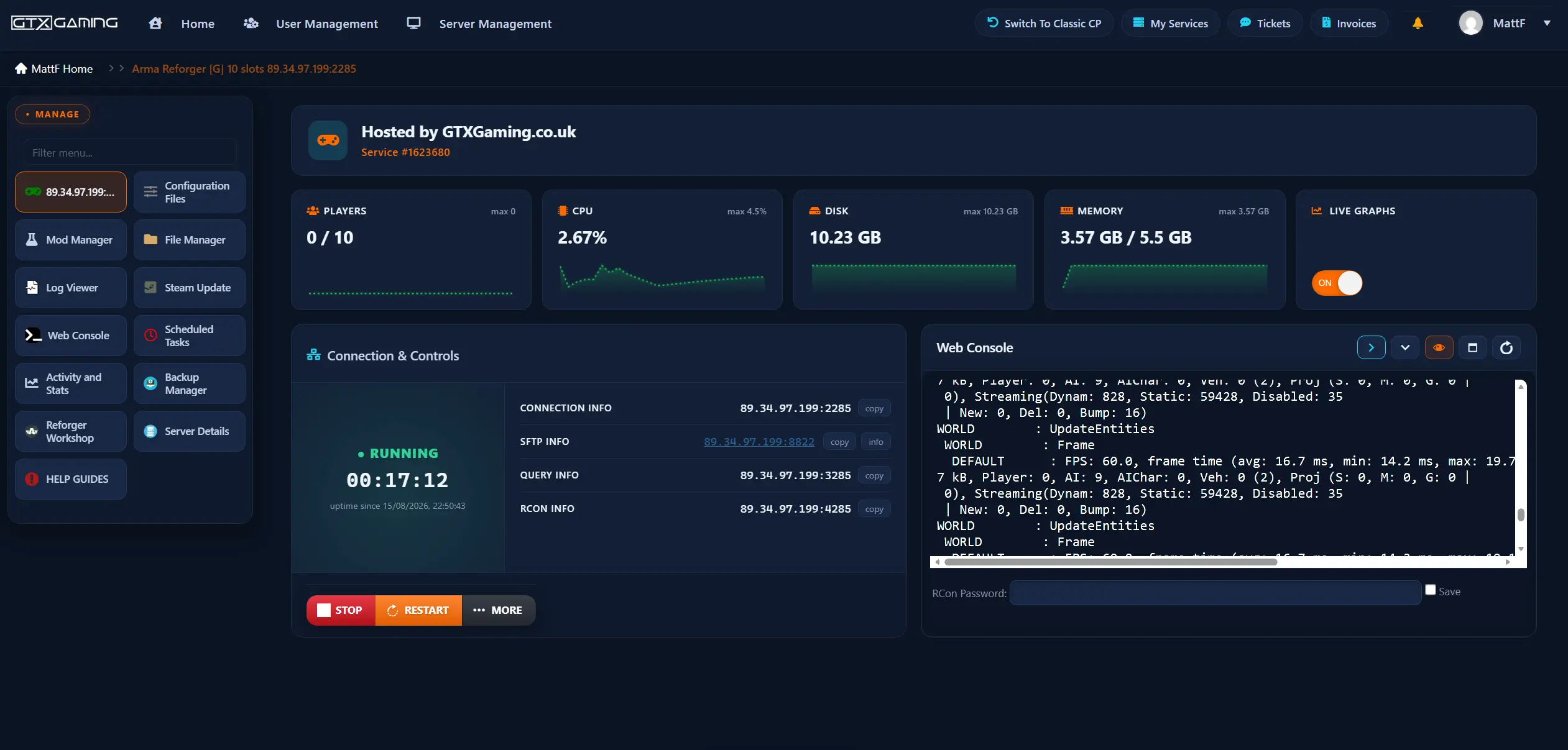
The other buttons you will use: Server Details (your passwords and ports, including the BIS RCON password), Steam Update, Scheduled Tasks, Backup Manager, Activity and Stats (live CPU, memory and player graphs) and File Manager, with SFTP for big uploads. The MORE menu next to START and STOP holds the Workshop helpers: Delete Mods Cache, Delete Scenarios Cache, Generate Mods Code and Plant Scenario Names. Start.bat in Configuration Files holds start-up options such as the log level.
Server.json as strict JSON, and Bohemia notes that its keys are case-sensitive. One missing comma or quote and the server cannot read the file, so use the Config Editor where you can and check the Log Viewer if the server stops straight after START.Every Arma Reforger dedicated server reads one JSON file, usually called config.json (on GTX it is Server.json in Configuration Files). The keys below come from Bohemia's server config reference and its later changelogs; keys are case-sensitive.
name: the name in the server browser, up to 100 characters.password: players need it to join. Leave it empty for a public server.passwordAdmin: the admin password for #login. No spaces.admins: IdentityIds or Steam IDs of your admins (admins and RCON).scenarioId: the scenario the server runs (scenarios).maxPlayers: 1 to 128; Bohemia's default is 64. On GTX the player limit follows the slots of your plan.visible: true to show the server in the server browser.crossPlatform and supportedPlatforms: who can join from which platform (crossplay).mods: the Workshop mods every player downloads on join (mods).serverMaxViewDistance: 500 to 10,000 metres, default 1,600.networkViewDistance: how far the server streams players, vehicles and objects to each player, 500 to 5,000 metres, default 1,500. A big lever for bandwidth and server load.serverMinGrassDistance: forces a minimum grass distance on players (0, or 50 to 150 metres).disableThirdPerson: true forces first person.battlEye: anti-cheat, true by default.fastValidation: leave it true. Bohemia says every public server should.VONDisableUI, VONDisableDirectSpeechUI and VONCanTransmitCrossFaction: voice chat rules.joinQueue with maxSize: how many players can wait in the join queue when the server is full, 0 to 50 (0 switches the queue off).aiLimit: a ceiling on AI characters; the default -1 means no limit. disableAI switches AI off completely.playerSaveTime: how often players are saved, 120 seconds by default.slotReservationTimeout: how long a slot is held for a player who drops out with a replication (network) kick, so they can reconnect, 5 to 300 seconds, default 60.disableNavmeshStreaming: loads AI navigation fully into memory for slightly better AI reactions, at a cost of up to hundreds of MB of RAM.bindPort, publicPort, a2s and rcon) are set for you on a GTX server: leave them as they are, and change your player slots in the Client Area. Change only the settings above, then restart the server to apply them.An Arma Reforger server runs one scenario at a time, set in scenarioId. The official ones include Conflict, the large-scale battle for an island (since Update 1.6 in the Conflict HQC form with a player Commander, and since Update 1.7 with the FIA as a playable third faction), Combat Ops for co-op squads against AI, and Game Master, where one player builds and runs the mission live for everyone else.
The value is the path of the scenario's .conf file, for example {ECC61978EDCC2B5A} for Conflict on Everon in Bohemia's list for update 1.2.1. Scenarios are added with updates and mods, so do not copy old lists: start the server with -listScenarios and it writes the current paths to its log.
Server.json in the Config Editor, set Type of scenario to Workshop Scenarios and pick the scenario in Workshop Scenario.Some Workshop scenarios must first be downloaded while the server runs an official scenario: start once on an official scenario, let the download finish, then select the Workshop scenario before the next start. Many scenarios come in several variants, and the scenario ID is on the Scenarios tab of its Workshop page. Full steps: install Workshop scenarios on your Arma Reforger server.
-autoreload start-up parameter reloads the scenario after the delay you give it, in seconds, without shutting the server down.Arma Reforger mods come from the official Arma Reforger Workshop, on PC, Xbox and PS5. A server lists its mods in the mods block of its config, and every player who joins downloads the same set automatically. Bohemia is clear that players cannot pick and choose: everyone uses the mods the server requires, in the versions it requires.
modId: the mod's ID, shown on its Workshop page.name: only a label for you; the server ignores it.version: optional. Leave it out and the server always loads the latest version; set it to hold a mod on one version.required: true by default. Set it to false and the server drops that mod with a warning in the log, instead of refusing to start, when it cannot download it.On a GTX server you do not have to write any of that by hand. Press STOP, press Reforger Workshop, paste the mod links from the Workshop website, one per line, press Execute and START. The installer adds every dependency a mod needs and leaves the version empty, so your mods update themselves every time the server restarts. Full steps: install Workshop mods on your Arma Reforger server.
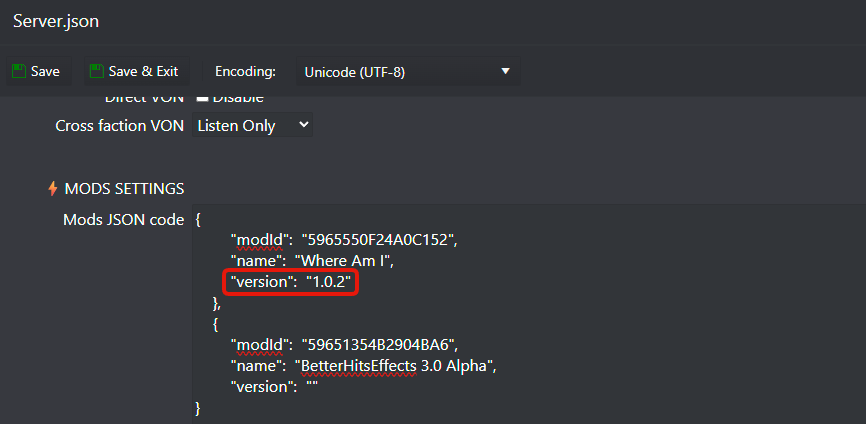
Arma Reforger updates can break mods, and the more mods you run, the bigger the risk. Open the Log Viewer: it usually names the mod that failed. To hold a mod on a version that works, type that version into its version field in Server.json (each mod lists its versions on the Changelog tab of its Workshop page), press MORE and Delete Mods Cache, then START. Clear the version again once the mod author has released a fix.
Arma Reforger runs on PC, Xbox Series X|S and PlayStation 5, and each community server decides which of them it lets in. Bohemia's server config reference describes two settings:
supportedPlatforms: the platforms the server accepts, PLATFORM_PC, PLATFORM_XBL (Xbox) and PLATFORM_PSN (PlayStation). Without it, a server accepts PC players only.crossPlatform: set it to true and the server adds the missing platforms to that list for you. It is false by default.The same reference says a vanilla server is either PC only or PC with both consoles: PC with only one console, or a console-only server, is not a valid combination.
When Bohemia's reference was last archived (February 2025), a modded server could take PC and Xbox players but not PlayStation players. Update 1.4 on 22 May 2025 then opened the Workshop on PS5, and Bohemia said players on all platforms can now enjoy modded content and fight together. Two console limits from Bohemia still shape a crossplay mod list:
On a GTX server, crossplay is a setting in Server.json: switch it on in the Config Editor, or set crossPlatform to true in the Text Editor, and restart the server.
Arma Reforger has two kinds of admin access, both described in Bohemia's server documentation. The first is the admin password: a player types #login and the passwordAdmin from the config in chat (press C in the lobby or Enter in game). The second is the admins list in the config, with IdentityIds and Steam IDs: listed players can #login without the password. Two details from Bohemia's documentation and changelogs:
On a GTX server, find a player's IdentityId with the players command in the Web Console (log in with the BIS RCON password from Server Details while the player is online), then paste it into an Admin UID slot in the Config Editor and restart. Players who are offline can be found in old console.log files in the Log Viewer, as long as the log level in Start.bat is set to Normal. Full steps: add admins to your Arma Reforger server.
#players: lists the players and their player IDs.#kick <playerId>: removes a player, who can rejoin.#ban create <playerId or identityId> <seconds> <reason>: bans a player (0 seconds means for ever); #ban list and #ban remove <identityId> manage the list. Bans work on dedicated servers only.#restart: restarts the scenario and keeps players connected; #shutdown stops the server.#roles: shows which admin roles you have.RCON lets tools such as the GTX Web Console send these commands from outside the game. In the config's rcon block the password is required, must have at least three characters and cannot contain spaces; permission is admin (every command) or monitor (only commands that change nothing), and up to 16 clients can connect at once. Since update 1.4.0.38 a vote kick carries on even if the player leaves, and a successful one gives a temporary ban. To let a co-admin into the panel without sharing your login, create a sub-user.
Bohemia updates Arma Reforger often, and your server needs every update. Recent ones: Update 1.6 (30 October 2025) brought Kolguyev and Conflict HQC, Update 1.7 (28 May 2026) made the FIA a playable faction, Update 1.8 followed on 13 August 2026 and its follow-up 1.8.0.13 on 3 September 2026. Update 1.9 is on the Experimental branch (September 2026). Patch notes are on the official Arma Reforger news on Steam.
A regular restart clears out the memory a server builds up over a long session, and it fetches mod updates. In Scheduled Tasks, create a Scheduled Restart task: every 6 hours suits most servers, every 4 hours busy or heavily modded ones, and once a day is the minimum we recommend. Tasks run on the server's clock, which may be in a different time zone from yours. Full steps: set up automatic restarts.
Automatic backups run alongside your server's restarts and are stored offsite, and we normally keep backups for up to six months. The Backup Manager lists them, restores one and lets you download a backup to your PC; its password is not your panel password. A restore puts the server back to the moment of that backup, so anything that happened later is replaced.
A busy Arma Reforger server simulates every player, AI character, vehicle and projectile, and streams them to each player. Four things decide how hard it works: the number of players, the number of AI, the view distances and the mods.
-maxFPS between 60 and 120. GTX servers run at 60 FPS by default, with a 120 FPS boost as an add-on.aiLimit caps it; disableAI removes it for pure PvP.networkViewDistance means less to stream per player, which saves CPU and bandwidth. Our guide to reducing bandwidth on an Arma Reforger server goes through every setting.To see what your server is doing, Bohemia's -logStats parameter writes a line with the server FPS, frame times, memory, players and AI to the log; it is the line you can see in the Web Console of the panel screenshot above. Activity and Stats shows memory and CPU over the day: if memory sits near the top when the server is busy, more RAM will help.
Up to 10 GB RAM included. Squad co-op, Combat Ops and private sessions with friends.
Up to 12 GB RAM. Modded community servers, the plan most buyers choose.
Up to 16 GB RAM. Large Conflict battles and heavy mod lists.
RAM tiers up to 64 GB, more NVMe storage (up to 100 GB included), and High or Realtime CPU priority.
As a rule of thumb from our own servers: a 10 to 30 slot co-op or Combat Ops server is comfortable on the included RAM, a modded Conflict server with 60 or more slots should take a RAM upgrade, and a full 100 to 128 slot community server benefits from 16 GB or more and a CPU priority upgrade. You can change your RAM, slots or CPU priority later without losing server data. Pick the location closest to most of your players: we host Arma Reforger in 19 locations, and the plans page has a ping test.
Open the Log Viewer: it usually names the mod that failed. Remove the last mods you added, press MORE and Delete Mods Cache, and start again. After a game update, pin the mod to a version that works or wait for its author's fix.
Often a typo in Server.json: a missing comma, quote or bracket, or a key in the wrong case. Fix it in the Config Editor, or check the line the Log Viewer names.
Start the server once on an official scenario so the Workshop scenario can download, then select it before the next start. Still stuck? MORE and Delete Scenarios Cache.
Give a modded server a few minutes to download its mods first. Check that visible is true, and that players are not filtering for vanilla servers: modded servers carry a puzzle piece icon.
Crossplay must be on, and on a modded server every console player has to fit your whole mod list into their console's mod storage (crossplay).
The admin password cannot contain spaces. Type #login and the password in chat; players in the admins list can type #login alone.
A mod with a version set in Server.json never updates. Clear the version, press MORE and Delete Mods Cache, and restart.
Watch Activity and Stats while the server is busy, then lower AI and view distances or add RAM (performance). Still stuck? Our support team is there 24/7.
Install the Arma Reforger dedicated server with Steam or SteamCMD (app 1874900), write a config.json with your server name, passwords and scenarioId, start ArmaReforgerServer.exe with -config and -maxFPS 60, and open UDP 2001 and 17777 on your router. Or rent one: on GTX it is set up when you order, and you set the same things in Server.json with the Config Editor.
No. Bohemia lists player-hosted servers as PC only, and the dedicated server runs on a PC or in a datacentre. Console players join a community server instead: rent a dedicated server, switch crossplay on, and your Xbox and PS5 friends join it from the server browser.
Xbox players can. PS5 players got the Workshop with Update 1.4 on 22 May 2025, and Bohemia said players on all platforms can now play modded content together. Keep the mod list lean: Bohemia gives PS5 25 GB and Xbox 50 GB for mods, and every player downloads the server's full mod set. Test with a console player before you announce the server.
Up to 128: maxPlayers takes 1 to 128 and Bohemia's default is 64. GTX Arma Reforger plans run from 10 to 128 slots; choose one slot for every player who will be online at the same time.
List each mod's modId from its Workshop page in the mods block of the server config; players download them automatically when they join. On GTX, press STOP, paste the Workshop links into Reforger Workshop, press Execute and START: dependencies are added for you and mods update on every restart.
Set passwordAdmin in the config and type #login with that password in chat. To skip the password, add your IdentityId to the admins list (up to 30 IDs); only IdentityIds get the admin priority queue. On GTX, find your IdentityId with the players command in the Web Console and paste it into an Admin UID slot in the Config Editor.
By default UDP 2001 for the game, 17777 for the server browser query (A2S) and 19999 for RCON. On a GTX server the ports are set for you: they are under CONNECTION INFO, QUERY INFO and RCON INFO in the game panel.
Set scenarioId in the config to the scenario's .conf path; start the server with -listScenarios to log the current list. On GTX, pick the scenario in the Config Editor of Server.json; for a Workshop scenario, install it with Reforger Workshop first and choose Workshop Scenarios as the type.