






 DayZ
DayZ Palworld


 Enshrouded














I want my own Conan Exiles server
Enhanced or Legacy, your PC or rented, and the first five steps to a world that stays up.
Start with the basics
Popular game servers
Your panels
Conan Exiles knowledge hub
Everything you need to run a Conan Exiles server that stays up, for Conan Exiles Enhanced (UE5) and Legacy (UE4): your own PC or rented, ports, PvP or PvE settings, the Isle of Siptah, mods, admin, backups and RAM. From a team that has hosted game servers since 2008.
No guides match your search. Try a shorter word, or browse a topic above.
Not sure where to begin? Choose the one that sounds like you.
Enhanced or Legacy, your PC or rented, and the first five steps to a world that stays up.
Start with the basicsPvP or PvE, rates and the purge, maps, mods and admin.
Settings and mod guidesRAM per player count, tickrate, restarts, backups and what to check first.
Performance guidesRanked by visits from Google Search, July to October 2026.
Prefer to read it in order? 16 short chapters, about 22 minutes in all, from picking Enhanced or Legacy to keeping a busy clan server fast.
Start readingUE5 or UE4, your own save, region
3 guides
Good to knowSince 5 May 2026 Steam installs Conan Exiles Enhanced (UE5); UE4 lives on as the Legacy branch without updates, and players must run the same version as the server.
Details, files, SFTP, server lists
7 guides
Good to knowPlayers can always join with Direct Connect, using the IP and port from the panel's Connection & Controls box, even while the server list does not show the server.
ServerSettings.ini, Siptah, custom maps, travel
4 guides
Good to knowStop the server before you edit ServerSettings.ini or Engine.ini: a running server writes its own values back over your changes.
Admin panel, RCON, bans, co-admins
6 guides
Good to knowChange the default admin password before you invite anyone: whoever knows it can make themselves admin on your server.
Steam Workshop, load order, updates
4 guides
Good to knowAn Enhanced server ignores UE4 mods: check that a mod's Workshop page says Version: Enhanced before you install it.
Backups, restores, restarts, reinstalls
6 guides
Good to knowBack up before every update, mod change or wipe: a world converted to Enhanced cannot go back to UE4.
RAM, CPU, slots, stats, logs
7 guides
Good to knowEvery GTX Conan Exiles plan includes up to 10 GB of RAM; we suggest 12 GB for 30 players and 16 GB for 60, more for big worlds and long mod lists.
Boot loops, crashes, disconnects, server list
4 guides
Good to knowA Conan Exiles server can take 3 to 10 minutes to boot with a big database: watch the Web Console before you press RESTART, because every restart starts the boot again.
Thralls and the Wheel of Pain
1 guides
Good to knowThrall wake-up time is a server setting, so a server owner can make capturing thralls easier or harder.
The complete guide
Conan Exiles left Early Access on Steam on 8 May 2018. On 5 May 2026 Funcom turned the Steam version into Conan Exiles Enhanced, a free upgrade to Unreal Engine 5 built with Inflexion Games. The Unreal Engine 4 game did not disappear: it is now Conan Exiles Legacy, a branch Steam players pick under Properties, Game Versions & Betas. A server runs one or the other, and Funcom is clear that a player's game version must match the server's. What changes for a server owner, from Funcom's announcements and its Enhanced FAQ:
Enhanced (UE5)
The version Steam installs. New content and fixes, official PC servers, the Exiled Lands and the Isle of Siptah on one server, mods built for Enhanced, and it reads UE4 Exiled Lands saves.
Legacy (UE4)
The Conan Exiles Legacy branch. No further updates or official servers on PC, one map per server, UE4 Workshop mods, and it cannot load a world once that world has been converted to Enhanced.
In short: pick Enhanced for almost every PC group. It is the version Steam installs, it gets the new content, and an Exiled Lands world can move to it. Pick Legacy only when your community depends on UE4 mods that have not been rebuilt for Enhanced, or to keep an old Isle of Siptah world running as it is: Siptah bases cannot move to Enhanced (moving a world).
Xbox and PlayStation are a separate story. Funcom kept the consoles on the UE4 game with their own servers, and console players cannot join a PC server. In September Funcom said more about Enhanced on consoles would be revealed in October.

Conan Exiles had its busiest year since launch, and most of it changed how servers work. The points that matter if you run or plan a server, from Funcom's Steam announcements and patch notes:
modlist.txt until you change the active mods, then they are removed.Every patch means the same routine for a server: check your mods, update the server, then let players back in (updates).
The Conan Exiles dedicated server is free, and you do not need a second copy of the game. Funcom's own route is its Dedicated Server Launcher, a small Windows program that downloads the server with Valve's SteamCMD, installs Workshop mods, edits the main settings, tests your ports and restarts the server on a timer. Since version 1.9.0 (5 May 2026) it installs Enhanced by default and fetches UE4 from the Conan-Exiles-Legacy branch. The steps, from Funcom's guide:
C:\ExilesServer, not on the desktop or in Downloads.Your own PC
Free software, plus power and bandwidth. Online only while the PC is on, sharing its memory with the game and Windows, and every player sees your home address. You handle the launcher, router ports and firewall.
A rented server
A monthly fee. Online 24/7 with its own memory that you can upgrade, on a datacentre address with DDoS protection. You order it and press START.
Our view after hosting game servers since 2008: if a few friends play while you are online and your PC has memory to spare, start at home with Funcom's launcher. Enhanced is not light: our own 30 slot demo server used about 8.5 GB of memory with nobody online. Rent when the world must stay up while you are offline, when the clan grows, or when you want backups and restarts handled for you. Our Conan Exiles Server Hosting plans are set up as soon as you order, run Enhanced or Legacy, and start at 10 slots with up to 10 GB of RAM included.
A GTX server is installed and ready when your order completes. The first setup takes a few minutes in the game panel, with the same tools for Enhanced and Legacy:
AdminPassword in ServerSettings.ini, add a ServerPassword if the server is private, save and press START.serverRegion in ServerSettings.ini starts at 0 (Europe); 1 is North America, 2 Asia, 3 Australia, 4 South America and 5 Japan. It changes how the server list filters your server, not where the server runs.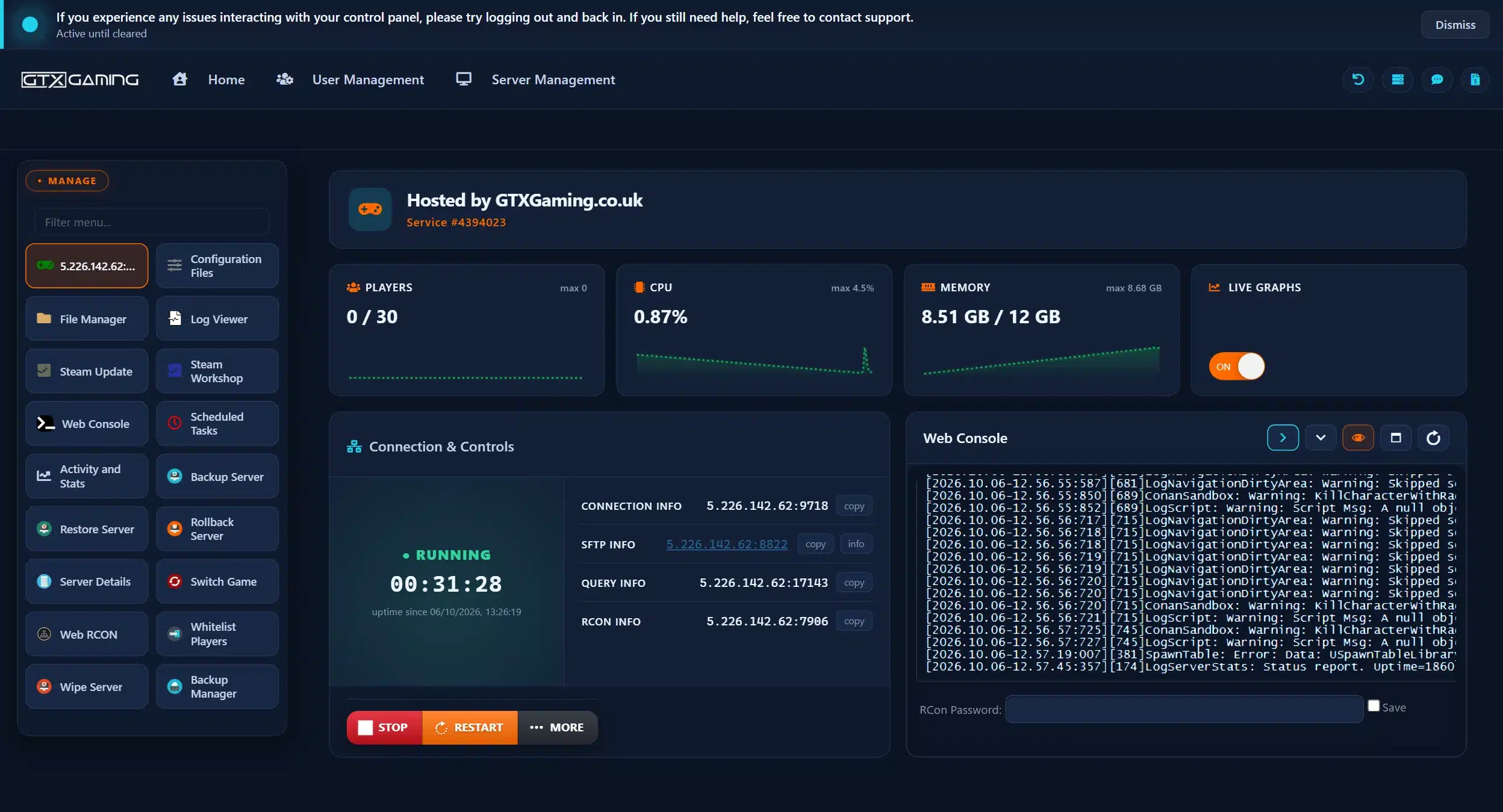
Players join from Conan Exiles on Steam, on the same version as the server: Play Online, then search the server browser for the server's name, or choose Direct Connect and paste the IP and port from the panel's Connection & Controls box, with the server password if you set one. Direct Connect works even while the server list does not show your server, so share the address with your clan on day one.
Server missing from the list? Work through these in order:
serverRegion, and in the browser set Combat Mode to ALL, Community to ALL and the filter to Internet or Community.The server is for the PC game: Xbox and PlayStation players cannot join it, and there is no crossplay between PC and console.
Conan Exiles has no single PvP or PvE switch. Funcom's launcher guide explains that the official server types are a mix of many settings, set in the in-game admin interface. You change them in two places, on Enhanced and Legacy alike: in game, logged in as admin, from the server settings menu, or in ServerSettings.ini under Configuration Files with the server stopped. Multipliers use 1.0 as normal: 2.0 doubles a value, 0.5 halves it. The core of the three classic server types:
PvP
Players fight and raid each other's bases. PVPEnabled on and CanDamagePlayerOwnedStructures on.
PvE
Players cannot hurt each other or each other's buildings: building, exploring and fighting the NPCs. PVPEnabled off.
PvE-Conflict
Players can fight each other, but cannot damage each other's buildings. PVPEnabled on, building damage off.
On top of that, the settings owners change most (names as they appear in ServerSettings.ini):
PlayerXPRateMultiplier for all XP, with separate time, kill, harvest and craft multipliers.HarvestAmountMultiplier, ResourceRespawnSpeedMultiplier, CraftingCostMultiplier and ItemConvertionMultiplier (crafting speed, spelt that way in the file).DayCycleSpeedScale for the whole day, with DayTimeSpeedScale and NightTimeSpeedScale for each part.PlayerActiveThirstMultiplier, PlayerActiveHungerMultiplier, DropEquipmentOnDeath and EverybodyCanLootCorpse.NoOwnership lets everyone loot every chest and use every machine; clanMaxSize caps clan size.AvatarsDisabled turns the gods' avatars off, AvatarLifetime sets how long one lasts.ServerCommunity (0 None, 1 Purist, 2 Relaxed, 3 Hard Core, 4 Role Playing, 5 Experimental) and serverRegion decide how players find you.Raid hours, the purge (the NPC armies that attack player bases) and thrall settings sit in the same in-game server settings menu: switch the purge on or off, make it harder or easier, and set building damage to set hours so bases are not raided around the clock. Region control can also block players by country, so make sure your own players' countries stay allowed.
The Exiled Lands and the Isle of Siptah are one world on Enhanced. Every server hosts both, players who own the Isle of Siptah DLC travel to the island without a restart, and everyone else stays in the Exiled Lands. There is no separate Siptah server and no map to switch: the whole world is saved in game.db.
A UE4 server runs either the Exiled Lands or the Isle of Siptah, and each has its own database: game.db for the Exiled Lands, dlc_siptah.db for Siptah. To switch a GTX Legacy server to Siptah, back up, press STOP, open Engine.ini in Configuration Files, set the map to Siptah and start again. If it will not start, update your mods, delete the steamapps folder in the File Manager and run Steam Update to validate the files.
Custom maps are Workshop mods: install the map with the Steam Workshop button, then put the map's exact name in the map field of Engine.ini, with the same capitals and underscores (for example Savage_Wilds). You find the name in the File Manager, in the conanexiles\mods folder named after the map's mod ID. Players need the map mod too. Our custom map guide was written on Legacy: on Enhanced, use a map whose Workshop page says Version: Enhanced.
Several servers can be linked so players travel between them: the community-made Amunets Server Transfer mod runs on every server, a small web space holds the travel file (cluster.ini, with each server's address, RCON port and RCON password), and each server learns its alias name with the admin command DataCmd TransferConfig. Our cluster guide was written for Legacy servers, so check the mod's Workshop page for Enhanced support before you plan an Enhanced cluster.
Admin rights come from the admin password, on Enhanced and Legacy alike. Funcom's launcher guide calls it the password you use with MakeMeAdmin to reach the admin control panel. In game:
CTRL+SHIFT+C for the admin panel: spawn items, set the time of day, cloak and more.~ for the admin console, for commands such as SummonPlayer (bring a stuck player to you), Fly, God and ToggleDebugHUD (server performance and player count on screen).Away from the game, the panel's Web RCON button runs commands on a running server: list the players first to get a player ID, then pick the command. Any RCON tool works too, with the RCON details from Server Details; RCON uses TCP, so a home server needs that port forwarded for TCP.
blacklist.txt in Configuration Files and restart. The ID is logged next to their name in ConanSandbox.log, in the Log Viewer.Conan Exiles mods come from the Steam Workshop, and players need the same mods, in the same versions, as the server. The version matters most: an Enhanced server only loads mods built for Enhanced. Since hotfix 1.0.1 it ignores Legacy (UE4) mods, and after update 2.2.0 every Enhanced mod had to be recooked, so after a big engine update some mods show as out of date until their authors rebuild them. A Legacy server keeps using UE4 Workshop mods.
modlist.txt for you. Install mods in the order you want them to load: if you reorder modlist.txt by hand, the next mod update resets it to the install order.A long list goes in faster with Plant Workshop Mods under MORE: enter the IDs in load order as @ModID1;@ModID2;@ModID3;, then in Steam Workshop switch to installed content and press Reinstall All. The ID is the number after ?id= in the mod's Workshop address. To keep mods current, add an Update Workshop Mods scheduled task, for example every 12 hours at a quiet time: the server restarts to apply the updates. Hosting yourself? Funcom's launcher takes Workshop IDs or paths to .pak files and writes modlist.txt in ConanSandbox\Mods for you.
A Conan Exiles world lives in one database file, game.db, in the ConanSandbox\Saved folder of the game on your PC or of the server. To play a world from your PC online on a GTX server:
game.db is your save.game.db, in case you want that world back.game.db to ConanSandbox/Saved, replacing the server's file.Funcom's Enhanced FAQ adds rules for older worlds:
game.db, characters and buildings included. Keep a copy of the UE4 file: once a world is converted it cannot go back to UE4.A Conan Exiles world can be years of building, so treat backups as part of running the server. In the GTX panel:
Hosting yourself? Funcom's launcher can copy game.db, the last log and the three ini files each time the server shuts down, and keep a set number of days.
A Conan Exiles server holds up to 70 players. Its memory use grows with the world: players online, building pieces and placeables, thralls and mods all add to it. Our own sizing advice, from the plans we run:
10 slots, 10 GB
Included free with every server: a fresh world for a small clan.
30 slots, 12 GB
Our pick for an active clan with a few Workshop mods.
60 slots, 16 GB
Our pick for public PvP, big bases and thrall armies.
24 to 64 GB
Long-running worlds, large mod lists and full 70 slot servers.
For scale, our 30 slot Enhanced demo server used 8.5 GB of its 12 GB with nobody online. Funcom's update 2.2.0 helps busy servers most: before Iris, Funcom says a full server took eight times longer than a quiet one to do the same work, and with Iris it keeps its speed as it fills up.
-SendUnattendedBugReports to the launch line, so its team receives the crash reports.Once the server is up, the game begins: capturing thralls and breaking them on the Wheel of Pain is a big part of Conan Exiles, and our Conan Exiles thrall guide covers capturing, breaking and managing them. Server owners can shape that part of the game too: thrall wake-up time and the purge are server settings (settings). More play guides are listed in the play guides topic.
On a Windows PC, the easiest route is Funcom's free Dedicated Server Launcher: it downloads the server with SteamCMD (app 443030), lets you pick Enhanced or Legacy, sets the name, passwords and region, and tests your ports. Forward 7777, 7778 and 27015 for UDP and TCP, start it and find it in the server browser. Want it online 24/7 without your PC? See Conan Exiles Server Hosting.
No. Funcom says a player's game version must match the server's, so Enhanced players join Enhanced servers and players on the Conan Exiles Legacy branch join UE4 servers. Xbox and PlayStation stay on the UE4 game with their own servers and cannot join a PC server.
On Enhanced, yes: the two maps are one world, every server hosts both, and players need the Isle of Siptah DLC to travel to the island. On Legacy (UE4) a server runs one map at a time, set in Engine.ini, with its own database.
Funcom's defaults are 7777 (game), 7778 and 27015 (Steam query), plus your RCON port if you use RCON, which runs over TCP. Funcom's guide says to forward them for both UDP and TCP. A second server on the same machine needs its own folder and its own set of ports.
It grows with the world: players, buildings, placeables, thralls and mods all add to it. Our own 30 slot Enhanced demo server used about 8.5 GB with nobody online. As a guide we suggest 12 GB for 30 players and 16 GB for 60, and more for long-running worlds with big mod lists.
Set AdminPassword in ServerSettings.ini, join the server, press ESC, open Settings, Server Settings and click Make me Admin, then type the password. Press CTRL+SHIFT+C for the admin panel, or Insert or ~ for the admin console.
Use Steam Workshop mods built for Enhanced (their Workshop page says Version: Enhanced): an Enhanced server ignores UE4 mods. On GTX, stop the server, open Steam Workshop in the panel, press Install and start it again. Every player needs the same mods in the same versions.
An Exiled Lands world, yes: Enhanced reads the UE4 game.db, characters and buildings included, but a converted world cannot go back to UE4, so keep a copy. Isle of Siptah bases cannot move, because the island moved when it joined the Exiled Lands; Funcom's route is to transfer the characters to an Exiled Lands world first.