






 DayZ
DayZ Palworld


 Enshrouded














I want my own Enshrouded server
Your own PC or ours, the one config file, and the first settings to change.
Start with the basics
Popular game servers
Your panels
Enshrouded knowledge hub
Everything you need to run an Enshrouded dedicated server for your group: your own PC or a rented server, enshrouded_server.json, difficulty presets and custom settings, roles and passwords, world saves, backups, RAM and what 1.0 changes. Written by the team that hosts them.
No guides match your search. Try a shorter word, or browse a topic above.
Not sure where to begin? Choose the one that sounds like you.
Your own PC or ours, the one config file, and the first settings to change.
Start with the basicsDifficulty presets, custom settings, roles and passwords.
Settings and rolesRAM and slots, backups, updates and what to check first when it lags.
Performance guideRanked by visits from Google Search, July to October 2026.
Prefer to read it in order? 14 short chapters, about 24 minutes in all, from your first start to a busy 16-player world.
Start readingConnecting, server details, files, logs, FAQ
7 guides
Good to knowServer not in the list? Add the QUERY INFO address from the panel to your Steam favourites: the server then sits at the top of the Join list with a star.
userGroups, passwords, panel co-admins
2 guides
Good to knowThe password a player types decides their role, so every group needs its own password: keep the Admin one to yourself.
Scheduled restarts, backups, reinstall
4 guides
Good to knowA server backup holds the world, not the characters: each player's character is saved on their own PC.
RAM, slots, CPU, hardware, switching game
6 guides
Good to knowKeen Games puts the server at about 4.4 GB of RAM when idle plus up to 100 MB per player, so watch the memory graph as your group grows.
Skill trees and building
2 guides
Good to knowThese guides are about the game itself: check how skills and building behave in game after each Enshrouded update, starting with 1.0.
The complete guide
enshrouded_server.json, the one file that holds every setting (the settings that matter and roles and passwords).Yes. There are three ways to play Enshrouded with friends. One player can host from the game: their PC runs the world, and the world goes offline when they leave. Or you run the Enshrouded dedicated server, a separate program that runs the world on its own, with no game client open, so friends can play whenever they like. A rented server is that same dedicated server, run for you in a datacentre with a control panel on top.
Keen Games bundles the dedicated server with the game: owning Enshrouded on Steam unlocks it in the Tools section of your Steam library. Keen's installation guide says that only Windows is supported for now and that Linux support is planned for later. A server holds up to 16 players, set with slotCount.
Keen's dedicated server FAQ explains the split that shapes everything else in this guide: the world (terrain, bases, chests, unlocked survivors) is stored on the server, and each character is stored only on the player's own PC. A character keeps its equipment, inventory, levels and skills on any server. According to Keen's FAQ it also keeps its map memory, personal crafting recipes, collected Shroud Roots, lore texts and the towers that player found; it does not take along most crafting recipes, which depend on the survivors and crafting stations unlocked in each world, or the survivors themselves.
Two more things that come up early. Enshrouded is a co-op game: Keen says there is no PvP mode and none is planned. And Keen has not promised mod support, although it says it would love to add it one day. What you can change today is a lot: the difficulty preset, dozens of individual game settings, the roles and permissions of your players, and voice and text chat.
Keen Games set 15 October 2026 as the day Enshrouded leaves Early Access on Steam and reaches 1.0, after the game had been in Early Access since 24 January 2024. These are the points from Keen's announcements on the official Enshrouded news on Steam that matter for a server:
On a server, the order is the same as for every big update:
enshrouded_server.json with its passwords and settings (how).enshrouded_server.json files are sometimes updated incorrectly. If the server will not start or your settings look wrong after an update, compare the file with Keen's current default and put your saved passwords and settings back.Running your own Enshrouded server costs nothing extra if you have a spare Windows PC, and it is a good way to learn how the server works. Keen's installation guide and dedicated server FAQ cover the steps:
enshrouded_server.json next to the program. Stop the server and edit the file in any text editor (what to change).15637 by default, and the ports Steam itself needs on your router and firewall, so players outside your home can find the server.[Session] 'HostOnline' (up)! means it has fully started.savegame folder somewhere safe now and then.Hardware is the other half. For 4 to 6 players Keen recommends a 6-core (12-thread) CPU at about 3.2 GHz, 16 GB of RAM and an SSD with 30 GB free; for 16 players an 8-core (16-thread) CPU at about 3.7 GHz. Keen also asks for about 2 Mbit/s of upload per player. Running the game on the same PC as the server means both share that machine.
Free software from Steam, full control and a good way to learn. But the world is only online while that Windows PC is on, you update, restart and back up by hand, you open ports on your router, and your home address is shared with everyone who joins.
Online 24/7 without your PC, set up when you order, with a control panel for the config file, updates, scheduled restarts and backups, a datacentre address with DDoS protection and support when something breaks. It costs a monthly fee, with no setup fee and no contract.
Our view after hosting game servers since 2008: if two or three friends play at the same time as the host, hosting from the game is fine. Run a dedicated server when the world should stay online while the host is away, when more of you play at different times, or when you want roles and passwords that do not depend on one player's PC. Every GTX Enshrouded server includes up to 5 GB of RAM; see our Enshrouded server hosting plans for current prices and locations.
Enshrouded servers on GTX run in our game panel. They are set up as soon as you order and start on the Default difficulty preset, so you can join straight away and change things later. This is the order we suggest for the first evening:
enshrouded_server.json. Set the server name, a different password for each role in userGroups and, if you like, a gameSettingsPreset (roles, presets). Save the file.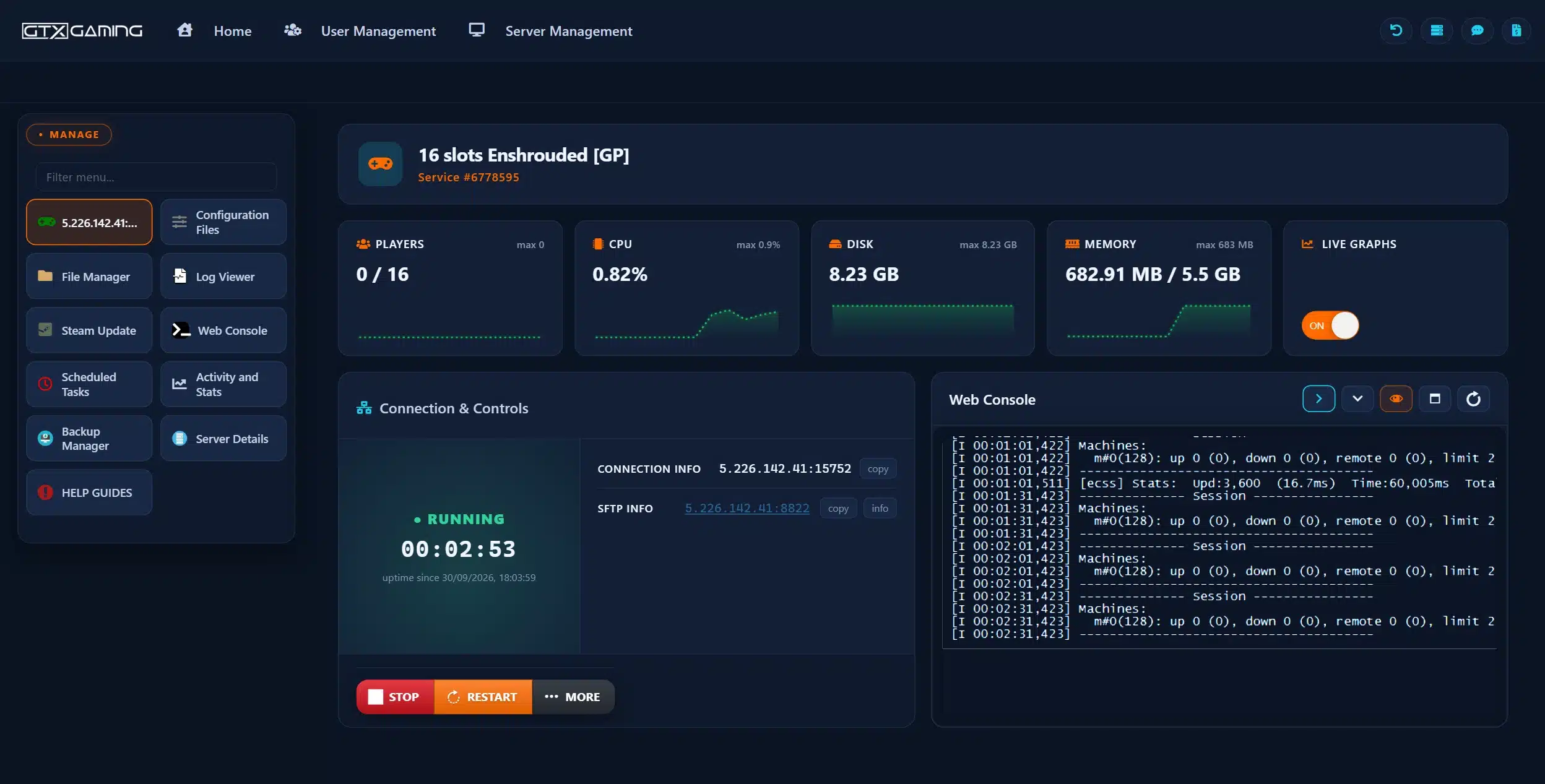
enshrouded_server.json on your own PC. If an update or a typo ever breaks the file, you can paste your passwords and settings straight back in.Everything about an Enshrouded server is in one JSON file, enshrouded_server.json, which the server creates the first time it starts. Keen documents it in its dedicated server configuration guide. These are the entries and what they do:
"name": the server name in the in-game server list. Everyone can see it, so Keen asks for a name that is not offensive."slotCount": how many players can be on at once, from 1 to 16. Each slot adds load on the server."queryPort": 15637 by default. On your own PC, open it in your firewall; on GTX it is set for you and shown as QUERY INFO."ip": 0.0.0.0, and only changed for special internal network setups."saveDirectory" and "logDirectory": where the world is saved (./savegame) and where logs go (./logs, with older logs moved to logs/backup)."enableVoiceChat", "voiceChatMode" and "enableTextChat": voice and text chat are off by default on a dedicated server. Set them to true, and choose Proximity or Global voice."tags": labels that help players filter the server list. Keen named LookingForPlayers, BaseBuilding, Exploration, Roleplay and language tags, and points to the enshrouded_server_readme.txt that comes with the server for the details."gameSettingsPreset" and "gameSettings": the difficulty (next chapter)."userGroups" and "bans": roles, passwords and banned players (roles chapter).Two rules from Keen's settings guide save a lot of head-scratching. Numbers above or below a setting's range are not an error: the server uses the maximum or minimum instead. Invalid text is an error: the server does not start, and the console window shows the value it could not read. A missing comma, quote or bracket has the same effect, so change one thing at a time.
"password" line near the top. Keen replaced it with roles: the line no longer sets the server password, and if it is filled in, the server turns it into a user group called default with the rights of a Friend."gameSettingsPreset" sets the difficulty of the whole world. Keen describes the five options like this:
"gameSettings" section, where you tune the world one value at a time. The settings below only work with Custom.Most settings are factors, where 1 is the normal game: 2 doubles a value and 0.5 halves it. The ranges below are from Keen's server gameplay settings guide.
playerHealthFactor, playerManaFactor, playerStaminaFactor: 0.25 to 4.shroudTimeFactor: how long players can stay in the Shroud, 0.5 to 2. playerBodyHeatFactor (cold) and playerDivingTimeFactor (oxygen) work the same way.enableStarvingDebuff: hunger and starvation, off by default. fromHungerToStarving sets how long players stay hungry before starving, 5 to 20 minutes.tombstoneMode: what players drop when they die. AddBackpackMaterials (the default: materials only), Everything or NoTombstone (keep everything).enableDurability: set it to false and weapons no longer break. curseModifier: Easy turns the Shroud curse off, Hard doubles the chance of getting it.miningDamageFactor: more terraforming and more resources per hit, 0.5 to 2.resourceDropStackAmountFactor: materials per loot stack, 0.25 to 2. plantGrowthSpeedFactor and factoryProductionSpeedFactor (workstations): 0.25 to 2.perkCostFactor: runes needed to upgrade weapons, 0.25 to 2. perkUpgradeRecyclingFactor: runes back from salvaging upgraded weapons, 0 to 1.weatherFrequency (Disabled, Rare, Normal, Often), enableGliderTurbulences, fishingDifficulty and tamingStartleRepercussion round off the world settings.randomSpawnerAmount (how many enemies) and aggroPoolAmount (how many attack at once): Few, Normal, Many or Extreme.enemyDamageFactor 0.25 to 5, enemyHealthFactor 0.25 to 4, plus enemyStaminaFactor, enemyPerceptionRangeFactor and threatBonus (how often enemies attack). None of these change bosses.bossDamageFactor and bossHealthFactor: 0.2 to 5. pacifyAllEnemies: enemies, but not bosses, only fight back when attacked.experienceCombatFactor and experienceExplorationQuestsFactor: 0.25 to 2. experienceMiningFactor: 0 to 2.dayTimeDuration (30 minutes by default) and nightTimeDuration (12 minutes by default): each 2 to 60 minutes. Both are written in nanoseconds, so one minute is 60000000000 and the default day is 1800000000000.miningDamageFactor and resourceDropStackAmountFactor to 2. Change a few values at a time, restart, and ask your group how it feels before you change more. Keen updates this list with new settings, so check its guide after big updates such as 1.0.An Enshrouded server has no single password. Instead, each user group in "userGroups" has its own password and its own permissions, and the password a player types when joining decides which group they are in. A freshly created file, Keen says, comes with four groups and random passwords, so nobody can walk in before you set your own:
Each group is a short block of permissions you can switch on or off:
canKickBan: may remove players from the server.canAccessInventories: may use chests and other containers.canEditWorld: may terraform and interact with the open world outside bases.canEditBase: may add and remove blocks and props and terraform inside bases.canExtendBase: may place, upgrade and remove Flame Altars.reservedSlots: slots kept free for that group. Give Admin 1, and the server shows as full to other groups before the last slot is taken, so you can always get in.You are not limited to the four presets. Keen's server roles guide suggests, for example, a group that may use chests and workstations but not change your bases: copy a block, give it a new name and password and set its permissions. Every group needs its own password, because the password is how the server tells the groups apart. Keep the Admin password to yourself and hand out the Friend or Guest one.
Players with canKickBan can remove someone in game. A kick is quick, and the player can come back later. A ban puts the player on the server's persistent ban list, so they are turned away every time they try to rejoin, until an admin removes them from the list again in game. Keen added bans, the Visitor role and the open-world permission in the Wake of the Water update (November 2025), and the default config file now ends with a "bans" list.
The world is saved in the server's savegame folder. Keen's dedicated server FAQ says the server saves every five minutes, and a save is between 1 MB for a new world and about 100 MB for a world full of big bases. Keen's save game guide adds how the files work:
3ad85aea, the second 3bd85c7d, and so on.-index file says which copy is loaded, under "latest" (0 to 9), and the _info files hold details such as the world name.That gives you a built-in undo. To roll a world back by a few saves, stop the server, copy all the save files somewhere safe, set "latest" in the index file to an earlier copy, and start the server again.
%USERPROFILE%\Saved Games\ in the enshrouded folder; with Steam Cloud on, Steam keeps its own copy.-index file and its _info files) into savegame with the File Manager, or with SFTP for big worlds. Check which file names the server's savegame folder already uses and match them; if you are unsure, our support team can do the move for you.Every GTX Enshrouded server takes daily automatic backups that you can restore from the Backup Manager and download to your own computer. The Backup Manager has its own password, shown on its button or under Server Details. Take an extra backup before an update, a big settings change or a world move, and keep the files you download. A reinstall wipes every server file but keeps your backups.
Keen updates the game and the dedicated server through Steam. Players' games update themselves; a server has to be updated by its owner. When the two run different versions, Enshrouded's server list shows the server with a version mismatch, and a server that is behind may not show up at all. Keen's hotfix notes say when only the game changed and dedicated servers do not need an update.
Regular restarts keep a long-running server fresh, and on GTX the automatic backups run alongside them. Restart after you change enshrouded_server.json too: the server only reads the file when it starts.
Keen gives clear numbers for the server in its dedicated server FAQ and recommended server specifications (we checked them on 13 October 2026):
slotCount.Every GTX Enshrouded server includes up to 5 GB of RAM, which suits smaller groups. For a busy server near 16 players, the 8 GB upgrade gives comfortable headroom. Choose one slot for every player who is online at the same time, not for everyone you have ever invited.
The live graphs on your server page and Activity and Stats show CPU and memory in use now and over past days. Start on the included memory, watch the graph on a busy evening, and add RAM, slots or CPU priority in the Client Area under Upgrade/Downgrade Options if you are running close to the limit. Keen made performance one of its 1.0 goals, so it is worth looking at the graph again after the 1.0 update.
enshrouded_server.json stops the server and names the value. Check commas, quotes and brackets, or paste back your saved copy of the file.gameSettings values only apply when gameSettingsPreset is Custom, and only after a restart. If the server was running while you edited, it may have overwritten your change: stop it first.canAccessInventories, canEditBase and canExtendBase.[Session] 'HostOnline' (up)! in the console and log.Still stuck? Our 24/7 support team reads the logs with you on live chat or a ticket.
Once the server runs, the questions turn to the game itself: how the skill trees and the classes players talk about really work, and how the voxel building lets you reshape the land around your base. Our play guides are listed under Play guides above. The skill tree changes with 1.0, so check the layout in game when you first load in after the update.
Yes. Keen Games bundles the Enshrouded dedicated server with the game: owning Enshrouded on Steam unlocks it in the Tools section of your Steam library. It runs on Windows (Keen says Linux support is planned for later) and holds up to 16 players. You can run it on your own PC or rent one that stays online around the clock.
Install the dedicated server from the Tools section of your Steam library, start it once so it creates enshrouded_server.json, stop it, set the server name, slot count and a password for each role, open the query port (15637 by default) and start it again. On GTX the server is set up when you order: you edit the same file in Configuration Files and press START.
Enshrouded uses roles instead of one password. In the userGroups section of enshrouded_server.json, give each group (such as Admin, Friend, Guest and Visitor) its own password; the password a player types when joining decides their role and what they may do. Stop the server before you edit the file, and keep the Admin password to yourself.
Up to 16. You set the limit with slotCount, from 1 to 16. Every slot adds load on the server, so choose one slot for each player who is online at the same time. GTX Enshrouded plans run from 4 to 16 slots and can be changed at any time.
Keen Games says the server uses about 4.4 GB of RAM when idle, plus up to 100 MB per player, and no more than about 6 GB in total. Every GTX Enshrouded server includes up to 5 GB, which suits smaller groups; the 8 GB upgrade gives a busy server near 16 players comfortable headroom.
Switch on the option to show dedicated servers in the server filter of the Join menu, then search for the name. If it is still missing, the server may be on another version than your game: update it. You can also add the IP and query port as a favourite in Steam under View, Game Servers; favourites sit at the top of the Join list.
Yes. Stop the server, back it up, and upload the world files (the world file with its -index and _info files) into the server's savegame folder with the File Manager or SFTP, matching the file names the server uses. Characters are saved on each player's PC, so everyone keeps their own character. Our support team can do the move for you.
Keen Games set 15 October 2026 for the 1.0 release. Keen says 1.0 resets every skill tree and raises the level cap to 50. Back up the world and your enshrouded_server.json, update the server when the 1.0 server build is out, check the config file afterwards, and read Keen's release notes before you update a long-running world.