




 DayZ
DayZ Palworld


 Enshrouded
















Quick answer
Java and Bedrock players can't join each other's worlds or Realms, but they can play together on a Java server that runs Geyser, a free plugin or mod that translates Bedrock's connection for Java. Install Geyser and Floodgate on a Paper, Spigot, Fabric or NeoForge server on the latest version (26.3), give Geyser a UDP port, and Bedrock players add the server by its address and that port. Consoles can't add servers by address, so they need a workaround.
On this pageHow Java and Bedrock crossplay works
- How Java and Bedrock crossplay works
- What you need for a crossplay server
- Step 1: Run Paper on the latest version
- Step 2: Install Geyser and Floodgate
- Step 3: Open a UDP port for Bedrock players
- Step 4: Join from phones, tablets and Windows
- Can console players join a Geyser server?
- Running a server with Java and Bedrock players
- What Bedrock players can't do on a Java server
- Crossplay not working? Check these
- Java and Bedrock crossplay FAQ
Below: how Geyser and Floodgate work, the setup on a GTX server and on your own PC, connecting from phones, Windows and consoles, running a server with players from both editions, and what to check when Bedrock players can't get in.
Checked against Minecraft Java Edition 26.3, Bedrock Edition 26.52, Geyser 2.12.0 and Floodgate 2.2.5, October 2026.
How Java and Bedrock crossplay works
Java Edition and Bedrock Edition are separate versions of Minecraft with different network protocols. LAN games and Realms stay within one edition, so the only way to put both in the same world is a server that understands both.
That's what Geyser does. It runs on a Java server and translates for every Bedrock player who connects, so the server sees them as a normal Java player. Two pieces work together:
- Geyser is the translator. It's free and open source, and runs as a plugin on Paper and Spigot, as a mod on Fabric and NeoForge, or on a Velocity or BungeeCord proxy. It listens for Bedrock players on its own UDP port, 19132 by default.
- Floodgate handles the login. Without it, every Bedrock player has to sign in with a Java account. With it, they join with just their Bedrock account. It goes on the same server as Geyser.
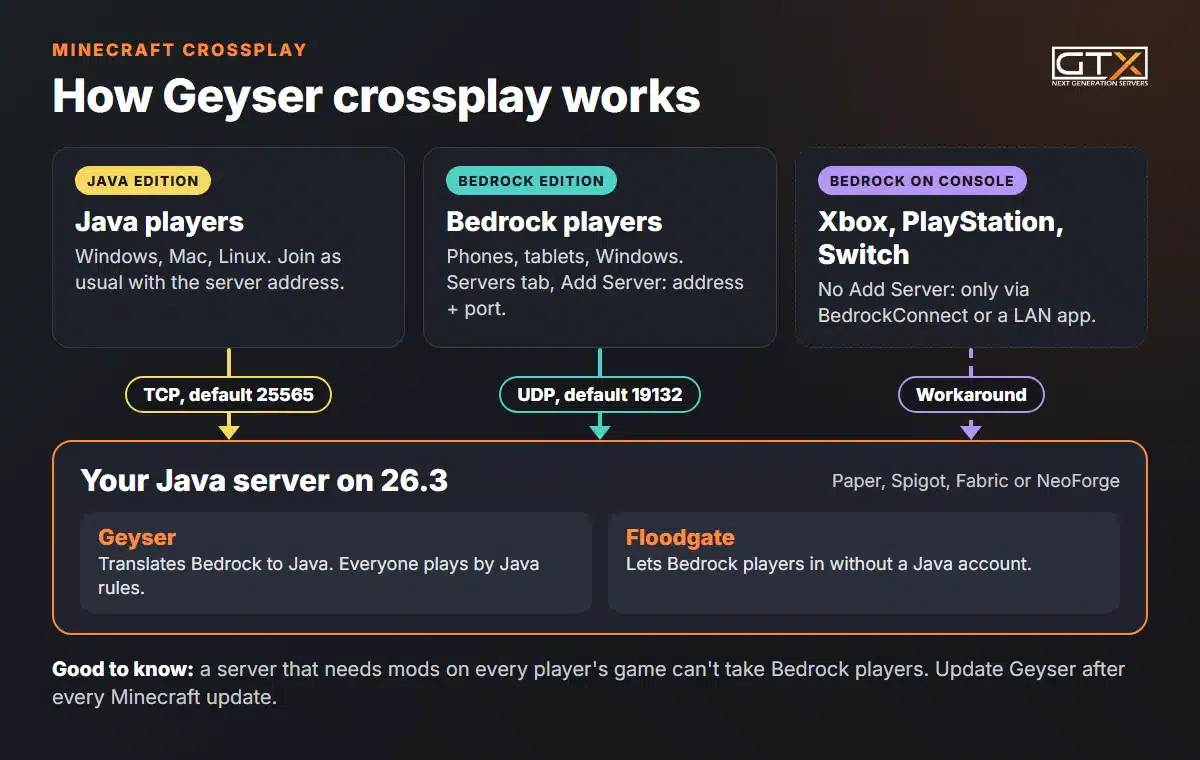
Because it's a Java server, everyone plays by Java rules: according to GeyserMC, redstone, farms and commands work exactly as they do on Java Edition. If everyone in your group plays Bedrock, you don't need Geyser at all, and our guide to choosing a Java or Bedrock server helps you pick. (Looking for the geysers that potent sulfur blocks make in the game itself? This guide is about the GeyserMC software.)
What you need for a crossplay server
Geyser needs a server that can load plugins or mods, and that server has to accept the newest Java version, because Geyser presents every Bedrock player as a 26.3 player. Find the row that matches your server:
| Your server | Geyser and Floodgate go | Good to know |
|---|---|---|
| Paper or Spigot | As plugins in the plugins folder |
GeyserMC's recommended choice. 26.3 works as it is; 1.20.5 to 26.2 also needs the ViaVersion plugin |
| Fabric | As mods in the mods folder, with Fabric API |
Only on the latest Minecraft version, 26.3, and only with server-side mods |
| NeoForge | As mods in the mods folder |
Only on 26.3, and only if players can join without installing mods themselves |
| Velocity or BungeeCord network | Geyser on the proxy only; Floodgate on the proxy, and on the servers behind it for better skin support | Every server behind the proxy must accept 26.3 players (ViaVersion) |
| Vanilla | Nowhere: vanilla can't load plugins or mods | Switch to Paper first (Step 1) |
Also have ready:
- Java 21 or newer for Geyser. Minecraft 26.x servers need Java 25 anyway, so a 26.3 server already meets it.
- A UDP port. Java players connect over TCP (port 25565 by default); Bedrock players connect to Geyser over UDP. Step 3 covers hosted servers and home PCs.
- A backup of your world before you change the server software.
Step 1: Run Paper on the latest version
Already on Paper, Spigot, Fabric or NeoForge 26.3? Skip to Step 2. Otherwise, Paper is the simplest base for crossplay: it loads plugins, Java players join with an unmodded game, and GeyserMC recommends it.
On a GTX server
- Back up first: back up your entire server, or at least the world folder.
- Open Versions in the game panel, choose Paper and the newest version, and install it. Our guide to changing the Minecraft version shows each screen. It switches on Wipe Server Files, which clears the server, so upload your world folder again afterwards with the Files page or over SFTP.
- Start the server and watch the Console until it says
Done. If it won't start, the Java version is the usual cause: set the Java version to Java 25 for 26.x.
Your vanilla world works on Paper: Paper's migration guide says it converts how the world is stored on the first start. Going back to vanilla takes manual steps, so keep that backup.
On your own PC
Stop the server and make a full backup. Download Paper for 26.3 from papermc.io, replace your vanilla server jar with it (use the file name your start command expects, or change the command) and start the server. Minecraft 26.x needs Java 25 installed on the PC.
Step 2: Install Geyser and Floodgate
- Stop the server.
- Download Geyser and Floodgate for your platform from the GeyserMC download page. Paper uses the Spigot builds. Fabric and NeoForge use the mod builds, and Fabric also needs the Fabric API mod.
- Upload both
.jarfiles to thepluginsfolder on Paper or Spigot, or themodsfolder on Fabric or NeoForge. On GTX, use the Files page or SFTP. - Start the server once so Geyser creates its config:
plugins/Geyser-Spigot/config.ymlon Paper and Spigot,config/Geyser-Fabric/config.ymlorconfig/Geyser-NeoForge/config.ymlon the mod loaders. - Stop the server, open Geyser's
config.ymland setauth-typetofloodgate. Current Geyser builds also do this by themselves when Floodgate is on the same server, but GeyserMC's steps still include it.
Older guides tell you to copy Floodgate's key.pem into Geyser's folder; on a single server, GeyserMC calls that unnecessary now. Leave online-mode=true in server.properties, too. Turning it off would let Bedrock players in without Floodgate, but GeyserMC warns that offline mode lets anyone join your server and is against Mojang's EULA.
Step 3: Open a UDP port for Bedrock players
Bedrock connects over UDP, while Java uses TCP. The port in the bedrock section of Geyser's config is the port Bedrock players type in:
bedrock:
  port: 19132
  clone-remote-port: false
On a GTX server
GeyserMC's advice for hosts that aren't on its provider list, like us, is to set clone-remote-port to true and restart. Geyser then listens on the same port number as your Java server, so Bedrock players connect with exactly the address and port shown at the top of the game panel. If Bedrock players still can't connect, open a support ticket and ask for a UDP port, then set it as Geyser's port with clone-remote-port back on false. Our support team can help you set Geyser up.
On your own PC
- Same PC: connect to
localhost. On Windows, playing Bedrock on the PC that runs the server needs GeyserMC's loopback fix. - Same network: use the PC's local address, which starts with
192.168.or10. - From outside your home: forward UDP 19132 on your router to your PC, allow it in the firewall, and give friends your public IP address. If you can't port forward, GeyserMC suggests playit.gg, which handles UDP; Ngrok won't work because it's TCP only.
Two more things. Other plugins or mods that use UDP, such as voice chat or query, can't share Geyser's port. And you can test the port from the server itself: type geyser connectiontest <ip> <port> in the console.
Step 4: Join from phones, tablets and Windows
- In Bedrock Edition, select Play, open the Servers tab, scroll down and select Add Server.
- Enter any name, the server's address and Geyser's port. The port has its own box: typing
address:portinto the address box can give an "Invalid IP address!" error. - Save it, then select the server to join.
If a domain name doesn't work, use the server's IP address instead: Bedrock can't follow the SRV records some domains use. Java players change nothing; they join with the usual address under Multiplayer.
With Floodgate, Bedrock players appear with a dot in front of their name, for example .Steve, and spaces in a gamertag become underscores. That avoids clashes with Java names, and it matters for commands.
Can console players join a Geyser server?
Not directly. Minecraft on Xbox, PlayStation and Switch can't add a server by address, so apart from friends' worlds and LAN games it only reaches the featured servers and Realms. GeyserMC's documentation says every console can still reach a Geyser server through a workaround:
- BedrockConnect. You change the console's DNS settings to a BedrockConnect server. Joining a featured server in the Servers tab then opens BedrockConnect's own server list, where you enter the server you want. GeyserMC's console guide has the steps for Xbox One, Nintendo Switch and PS4, and BedrockConnect's page adds PS5. It's a separate project, not part of GeyserMC, and its main address is often blocked on consoles, so its GitHub page lists alternatives.
- A LAN app. An app on a phone or PC on the same network makes the server show up as a LAN game in the console's Friends tab. GeyserMC lists MCCompanion, BedrockTogether (Android and iOS 14 or later) and Phantom for PC, which doesn't work with Switch.
Neither is part of the game, and console players still need their console's online subscription for multiplayer. If most of your group is on console and nobody needs Java, a Bedrock world or a Realm is simpler: our guide on how to play Minecraft with friends covers those routes.
Running a server with Java and Bedrock players
Whitelist and OP Bedrock players
Turn the whitelist on before you share the address. For Bedrock players, Floodgate has its own command, /fwhitelist add <gamertag>, which works once that player has joined any Geyser server. If they haven't yet, switch the whitelist off, let them join once, add them with /whitelist add .Name and switch it back on.
Other commands need the dot too: /op .Steve, /kick .Steve. If a command rejects the name, put it in double quotes: /op ".Steve". Every admin command is in our guide to Minecraft server commands for OP, whitelist, kick and ban, and the panel way is in admin and whitelist on Minecraft.
Link a Java and a Bedrock account
Players who own both editions can link them with Floodgate's Global Linking, which is on by default: join link.geysermc.org from both accounts, type /linkaccount on one and enter the code it gives on the other. After that, both accounts play as the Java account, with its inventory and position, on every server that uses Global Linking. Move anything you want to keep off the Bedrock account first: its data stays out of reach while the accounts are linked.
Skins and resource packs
Floodgate shows Bedrock players' skins to Java players. Resource packs don't cross over on their own: Bedrock players need Bedrock versions of your packs, which go in the packs folder next to Geyser's config.
Keep Geyser up to date
Bedrock updates itself on every platform, and Geyser only supports current versions: in October 2026 that was Bedrock 26.30 to 26.52 with Java 26.3. After every Minecraft update, swap in the new Geyser and Floodgate jars, and only move the server to a new Java version once GeyserMC's supported versions page lists it.
What Bedrock players can't do on a Java server
Geyser translates between two different games, and GeyserMC lists things it can't fix. The ones you'll most likely notice:
- Mods that players must install. If the server only lets in players who have its mods, as most modpacks do, Bedrock players can't join at all. Server-side mods are fine. A modpack server, like the one in our guide on how to make a modded Minecraft server, is a Java-only server.
- Some chat and command features. Links in chat can't be clicked, and plugin commands that don't use Minecraft's own command system may not suggest their options while you type.
- Some visuals. The glowing effect, banner layers past the sixth, and anything below -512 or above 512 in the Overworld.
- Custom content. Custom enchantments, custom anvil and smithing recipes, and plugin menus that need left and right clicks told apart.
Crossplay not working? Check these
- "Outdated client". Geyser is older than the Bedrock game or the server. Update Geyser.
- "Outdated server". The Java server is older than the version Geyser imitates. Update the server, or add ViaVersion on Paper and Spigot.
- "Unable to connect to world". Bedrock can't reach Geyser's port. Check the port number in Geyser's config and that it's open for UDP; on a hosted server, try
clone-remote-portor ask your host for a UDP port. - "Invalid IP address!". The address box contains the port too, or a domain that uses an SRV record. Enter the IP address and put the port in its own box.
- Geyser won't start. "Address already in use" means another program, often a voice chat mod or a second copy of Geyser, holds the port. "Compiled by a more recent version of the Java Runtime" means it needs Java 21 or newer; on GTX, change it on the Startup page.
- "Cannot reply to EncryptionRequestPacket" with Floodgate. Floodgate is misconfigured or another login plugin gets in the way. On a single server, delete any copy of
key.pemyou put in Geyser's folder and restart.
On GTX, our 24/7 support can go through the console error with you if it isn't clear.
Java and Bedrock crossplay FAQ
Can Java and Bedrock players play together without a server?
No. LAN games, Bedrock invites and Realms all work within one edition. Crossplay between Java and Bedrock needs a Java server running Geyser, on your own PC or hosted.
Is Geyser free?
Yes. Geyser and Floodgate are free and open source under the MIT licence. They cost nothing beyond the server they run on.
Do Bedrock players need to own Java Edition?
Not with Floodgate: they join with their Bedrock account. Without Floodgate, Geyser asks each Bedrock player to sign in with a Java account, so every one of them would need one.
Can Java players join a Bedrock server with Geyser?
No. Geyser only works one way, letting Bedrock players join Java servers. To have both editions on one server, run a Java server with Geyser.
How do I whitelist Geyser players?
With Floodgate, use /fwhitelist add <gamertag> once the player has joined any Geyser server. If they haven't, use the whitelist-off method above.
We've hosted game servers since 2008. Our Minecraft server hosting installs Paper, Fabric and NeoForge from the Versions page, every plan has unlimited player slots, and our support team can help you set Geyser up. For everything else about running a server, from the first install to backups and admin commands, read our Minecraft server guide.