






 DayZ
DayZ Palworld


 Enshrouded










Getting started
Getting started with your GTX game server
From order to playing with your friends in six steps: where to log in, how to set your server up, how to join it, and where to get help when you need it.
Looking for invoices or your services? Use the Billing Area. The two logins are separate accounts.
Your server in 6 steps
Follow them in order the first time. Bookmark this page for later.
-
1Step 1
Order your server
Pick your game from our full list of game servers, choose the location closest to most of your players and the plan you need, then pay. Your server is created automatically the moment your payment goes through.
Moving from another host? Migrations are free: open a ticket with the old host's FTP details or a zipped save and we move it for you.
 Minecraft
 Palworld
 DayZ
DayZ
 Enshrouded
Popular right now. Every game has its own page with locations and plans. -
2Step 2
Log in to the game panel
Your game panel username and password are in the welcome email we send when the server is ready. Lost the email? In the Billing Area open Services › My Services, click your server and copy the Default Password field.
- Game Panel runs your server: start, stop, settings, files, mods and backups. Minecraft servers use the Minecraft Panel.
- Billing Area handles invoices, upgrades, game switches and cancellations.

Your server in the game panel, right after you log in. -
3Step 3
Set it up your way
Open your server in the game panel. Configuration Files holds the server name, password and game settings, File Manager your files, Scheduled Tasks automatic restarts and Backup Manager your backups. For bigger uploads, SFTP uses the same username and password as the panel.

The game panel menu: settings, files, mods and tasks in one place. -
4Step 4
Connect and play
Look at Connection & Controls on your server's page. CONNECTION INFO shows the IP address and port: press copy and paste it into the game's direct connect or server address box.
Not in the server list yet? New or renamed servers can take a while to appear in a game's public list. Join with direct connect while you wait.

Copy CONNECTION INFO and paste it into your game. -
5Step 5
Add mods and bring your friends
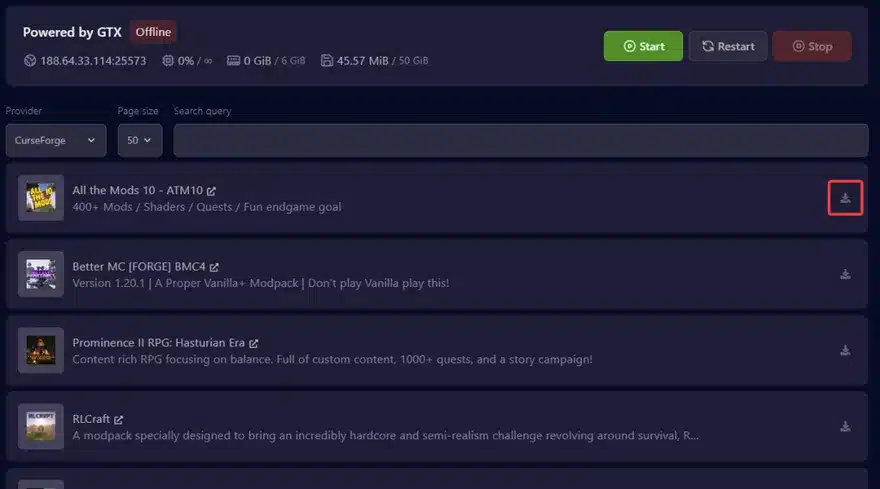
Install mods with Mod Manager or Steam Workshop in the panel (Minecraft has one-click modpacks). Want a friend to help run the server? Give them their own sub-user login instead of sharing yours.

One-click modpacks in the Minecraft Panel. -
6Step 6
Get help when you need it
Open a support ticket from your Billing Area: our team answers tickets 24/7, weekends included. You get a fix faster when you include your server's IP and port, what you changed last and any error message.


Ordered a dedicated server or VPS?
Same Billing Area, slightly different first steps.
1. Order
Pick a machine on our dedicated servers page. Setup times depend on the model, location, day and time of day.
2. Get your login
When it's ready, open My Services and click the active server for its IP, username and password. With the TCAdmin addon active there is no remote desktop access.
3. Get help
Open a ticket for anything you need, or ask on Discord.
Quick answers
Where do I log in to manage my server?
There are two places, each with its own login. The Game Panel runs your server (Minecraft servers use the Minecraft Panel). The Billing Area handles invoices, upgrades, game switches and cancellations.
I forgot my password. What now?
Use game panel password recovery or the Billing Area password reset. The two accounts are separate, and so is two-factor authentication on each.
Can I switch my server to a different game?
Yes, any time: open your server in the Billing Area and press Switch Game Server. Your current server is backed up first. See how to switch game.
Can I change my server's location?
Yes. In the Billing Area open your server, choose Upgrade/Downgrade Options and pick the new location. Our team then moves your server and confirms the details with you in a ticket.
Can I get a refund?
Every new service has a 24-hour cooling-off period: open a ticket within 24 hours of ordering and we refund you. Dedicated servers can only be refunded for hardware problems.