






 DayZ
DayZ Palworld


 Enshrouded














I want my own DayZ server
Private, community or rented, your own PC or ours, and the first settings to change.
Start with the basics
Popular game servers
Your panels
DayZ knowledge hub
Everything you need to run a DayZ server that stays up: your own private server or a rented one, serverDZ.cfg, Chernarus, Sakhal and community maps, Workshop mods, loot in types.xml, admin tools, restarts, backups and server FPS. Written by the team that hosts them.
No guides match your search. Try a shorter word, or browse a topic above.
Not sure where to begin? Choose the one that sounds like you.
Private, community or rented, your own PC or ours, and the first settings to change.
Start with the basicsMaps, Workshop mods, loot in types.xml and admin tools.
Map and mod guidesServer FPS, RAM and slots, restarts and backups, and what to check first.
Performance guidesRanked by visits from Google Search, July to October 2026.
Prefer to read it in order? 15 short chapters, about 22 minutes in all, from your first start to keeping a busy modded server fast.
Start readingServer details, files, SFTP, logs, FAQ
8 guides
Good to knowServer not in the list? Add the QUERY INFO address from the panel to your Steam server favourites: it tells you straight away whether the server is online.
Sakhal and one-click community maps
12 guides
Good to knowInstall a community map on a clean, vanilla server and take a backup first: many Workshop mods do not work on every map.
Workshop IDs, load order, Expansion, Trader
5 guides
Good to knowList dependencies such as CF before the mods that need them, and add a few mods at a time so a broken one is easy to find.
types.xml, lifetime, login timer
4 guides
Good to knowAn item with nominal or min set to 0 never spawns, and one broken tag can stop the whole economy: run the XML Validator before you press START.
RCON, admin mods, whitelist
5 guides
Good to knowAdd yourself and your admins to whitelist.txt before you switch the whitelist on, or you lock yourselves out.
Patch day, scheduled tasks, Discord, restores
10 guides
Good to knowThe Backup and Restart with Messages task kicks players just before the restart, which helps prevent item duplication.
Server FPS, RAM, CPU, slots, switching game
7 guides
Good to knowLowering ZombieMaxCount in globals.xml (1000 in the vanilla file) is one of the quickest server FPS wins on a busy server.
Survival skills
1 guides
Good to knowThese guides are about the game itself: check how things behave in game after each DayZ update.
The complete guide
serverDZ.cfg (the settings that matter).types.xml so they actually spawn (mods and loot).DayZ is played on three kinds of server. Official servers are run by Bohemia Interactive, and nobody outside Bohemia can change their settings, loot or mods. Community servers run the same DayZ server software, but their owner decides the map, the mods, the loot, the rules and who gets in. A DayZ private server is simply a community server with a password or a whitelist, for your group and nobody else.
The software is the DayZ dedicated server that Bohemia publishes on Steam (app 223350, with a separate experimental branch, app 1042420). It runs the world without a game client, so nobody has to keep DayZ open, and the world, the bases and the stashes are there whenever someone logs in. A rented server is that same dedicated server, run for you in a datacentre with a control panel on top.
Bohemia Interactive set 15 October 2026 as the release date of DayZ Badlands, a paid expansion, and of Update 1.30, the game update that comes with it. These are the points that matter for a server, taken from Bohemia's announcements in the official DayZ news on Steam and the DayZ Badlands store page:
forceSameBuild = 1, as in Bohemia's reference config, a server only lets in players on the same build, so update the server on the day a new version reaches the stable branch.On a GTX server, take a backup, run Steam Update and update your Workshop mods. To test a version before it reaches the stable branch, install the Experimental Update tool from the Mod Manager: it switches your server to the DayZ experimental branch. Our support team can help you move a server to Nasdara.
Running your own DayZ server is free if you have a spare PC, and it is a good way to learn how DayZ servers work. Bohemia's server configuration reference covers the basics:
serverDZ.cfg: the server name (hostname), password, the admin password (passwordAdmin), maxPlayers and the mission to load (template).DayZServer_x64.exe with launch parameters such as -config=serverDZ.cfg, -port=2302, -profiles= (where logs are written) and -mod= for Workshop mods.steamQueryPort) on your router and firewall, so players outside your home network can find and join the server.BEServer_x64.cfg.| Question | Your own PC or home server | A rented server |
|---|---|---|
| Online when you are not | Only while the machine is on | 24/7 |
| Setup | Steam install, config file, launch parameters, router and firewall | Set up when you order; name it and start it in the game panel |
| Mods and maps | Download from the Workshop, copy mod folders and keys by hand | Steam Workshop and one-click Mod Manager installs |
| Updates, restarts and backups | By hand or with your own scripts | Scheduled tasks with player warnings, automatic backups |
| Your home address | Shared with everyone who joins | A server address in a datacentre, with DDoS protection |
| Cost | Free software, plus power and your connection | A monthly fee, no setup fee |
Our view after hosting game servers since 2008: a small group with a spare PC can start at home. Rent one when the server must stay up while you are offline, when you run a modded or public community, or when you do not want your home connection to carry it. Every GTX DayZ server includes up to 10 GB of RAM; see our DayZ server hosting plans for current prices and locations.
DayZ servers on GTX run in our game panel and are set up as soon as you order. This is the order we suggest for the first evening:
Config.cfg with the Config Editor: the server name, a password for a private server, the message of the day and the Mission Template, which sets the map. Press Save & Exit.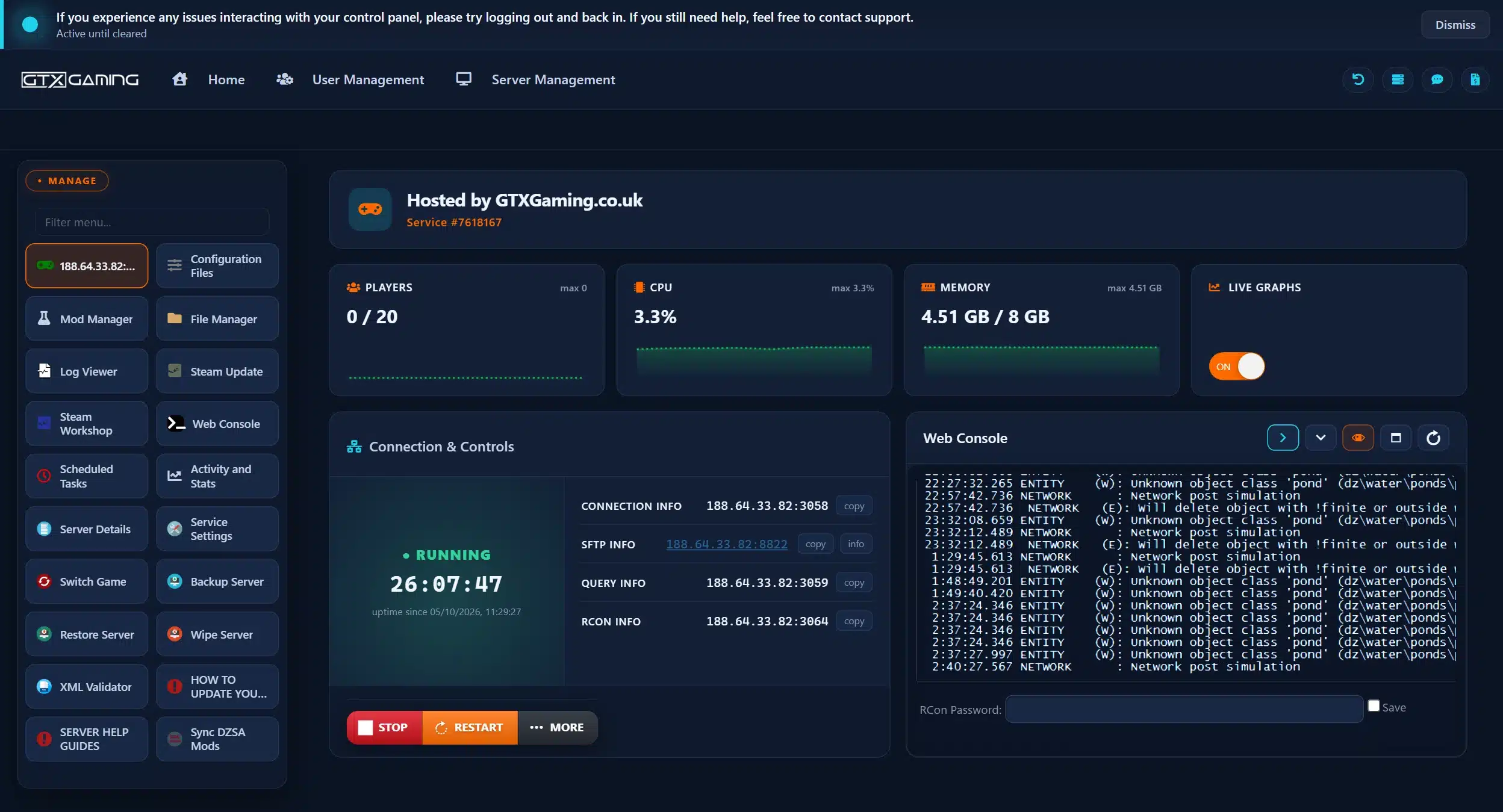
Every DayZ server reads its main settings from one config file. Bohemia calls it serverDZ.cfg, although the real name is whatever the -config launch parameter points to. In the GTX panel it is the Config.cfg entry under Configuration Files, with a form (Config Editor) and a Text Editor. These are the settings owners change most:
| Setting | What it does, with the example value from Bohemia's reference |
|---|---|
hostname | The server name in the server browser. Example: "EXAMPLE NAME" |
password | Password to join. Empty, as in the example, means anyone can join |
passwordAdmin | Password to become server admin |
maxPlayers | Maximum players at once. Example: 60 |
enableWhitelist | Only players in whitelist.txt can join (0 or 1). Example: 0 |
disable3rdPerson, disableCrosshair | First-person only, and no crosshair (0 or 1). Example: 0 |
serverTimeAcceleration | How fast in-game time runs (0.1 to 64); 24 makes a day pass in one hour. Example: 1 |
serverNightTimeAcceleration | Extra speed for the night, multiplied by the value above. Example: 1 |
serverTimePersistent | Keep the in-game time across restarts (0 or 1). Example: 0 |
respawnTime | Seconds before a dead player can start a new character. Example: 5 |
motd[], motdInterval | Messages of the day in chat, and the seconds between them |
lightingConfig | 0 brighter nights, 1 darker nights, 2 Sakhal lighting. Example: 0 |
template (class Missions) | The mission, and so the map, the server loads. Example: dayzOffline.chernarusplus |
The same reference lists the logging and network settings that affect server FPS (logAverageFps, the networkRange values, multithreadedReplication) and the ping limits that warn and kick players (pingWarning, pingCritical, MaxPing); see performance. Gameplay values such as stamina and base damage are in cfggameplay.json in the mission folder, and Bohemia publishes the default mission files for its maps in its DayZ Central Economy repository.
A DayZ map is two things: the terrain, which every player loads, and a mission folder in mpmissions on the server, which holds the loot economy, the spawn points and the saved world. The template line in the server config names the mission to load.
| Map | Mission folder, and who can play it |
|---|---|
| Chernarus | dayzOffline.chernarusplus. Everyone with DayZ |
| Livonia | dayzOffline.enoch. Everyone: part of the base game since Update 1.25 (May 2024) |
| Sakhal | dayzOffline.sakhal. Players who own DayZ Frostline (released with Update 1.26, October 2024) |
| Community maps | The map's own mission, for example empty.deerisle. Everyone, as a free Workshop mod |
Official maps on GTX: stop the server, open Config.cfg in Configuration Files, pick the mission in the Mission Template field, press Save & Exit and start the server. The mission files are already on the server, so no upload is needed; see how to run Sakhal for the full steps.
Community maps on GTX install from the Community Maps section of the Mod Manager in one click: Deer Isle, Namalsk, Banov, BanovFrost, Chiemsee, Bitterroot, Siberia, TakistanPlus, NewYork and more. The panel adds the map mod, its mission files and the mods it depends on, such as CF. What we tell every customer:
_UPDATED folder so your own XML edits are not overwritten).DayZ mods come from the Steam Workshop. A server loads them from the -mod launch parameter, in the order they are listed, and with Bohemia's default verifySignatures = 2 it checks each mod against its key, which is why every mod's .bikey file belongs in the server's keys folder. Mods that only the server needs go in -serverMod and are not sent to players. Players need the same client mods as the server: the DZSA Launcher downloads a server's mods for them, and the official launcher offers to subscribe to any Workshop mods they are missing.
?id= on the mod's Workshop page. Community Framework (CF), which many mods need, is 1559212036.@ModID1;@ModID2;, then press Execute.types.xml entries, admin IDs), then press START and check the Web Console.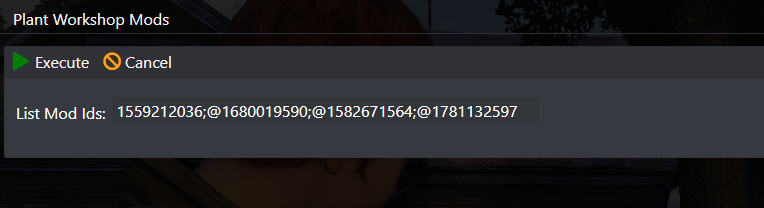
The Mod Manager adds the most requested packs in one click, including the DayZ Expansion Bundle (with ready-made mission files for the maps it supports), VPPAdminTools and Server Messages. To keep mods current, a Workshop Update scheduled task checks for new versions, warns players and restarts the server for you. Add a few mods at a time: when the server will not start, the Log Viewer usually names the mod that failed, and a short list makes the culprit easy to find. Full steps: install several mods at once.
workshop.mods in the Config Editor, run Reinstall All on the installed Workshop content and start again. If it comes back, check the mods' required items and load order.DayZ spawns loot, infected, animals and vehicles through the Central Economy, which reads XML files in the mission folder. Bohemia publishes the default files for its maps in its Central Economy repository. The files you will edit most:
| File | What it controls |
|---|---|
db/types.xml | Every item that can spawn: how many, how long it lies around and how fast it comes back |
db/globals.xml | Global limits and timers: ZombieMaxCount (1000 in Bohemia's Chernarus file), AnimalMaxCount (200), TimeLogin and TimeLogout (15 seconds each), cleanup times |
db/economy.xml | On and off switches for loot (dynamic) and zombies |
db/events.xml | Infected, animals, vehicles and other events |
cfgeconomycore.xml | Extra types files, such as the ones mods bring |
Each item in types.xml is one <type> entry. The AKM in Bohemia's Chernarus file, for example, has nominal 3 (the number the economy aims for on the map), min 2 (below this it spawns more), lifetime 7200 (seconds an untouched item stays before cleanup) and restock 3600 (seconds before it restocks). Raise nominal and min for more of an item, lower them for less, and raise lifetime when loot vanishes too fast.
cfgeconomycore.xml, or add them to types.xml, using the class names exactly as the mod author gives them.No loot or no zombies at all usually means a broken XML file, an item set to 0 or a switch turned off in economy.xml: how to fix no loot or zombies spawning walks through every check. Remember that infected and animals spawn around players, so an empty town with nobody nearby can be normal.
passwordAdmin in the server config is the password to become server admin.BEServer_x64.cfg. On GTX, press Server Details for the RCON details, enter the password in the Web Console and type commands to list every command. RCON only works while the server is online.enableWhitelist = 1 and add each allowed player's ID to whitelist.txt, one per line. A player who is not on the list is kicked, and their ID then shows in the RPT log and the Web Console. Add yourself and your admins first.priority.txt in the server's root folder go to the front of the login queue. Bohemia's format is Steam IDs separated by semicolons.ban.txt keeps players out (Bohemia's disableBanlist switches it off).Y opens its menu. Zomberry Admin Tools reads your Steam64 ID from admins.cfg.A vanilla server needs three clicks: STOP, Steam Update, START. A modded server needs more care, because big DayZ updates often break mods and change the mission XML files:
Not showing up afterwards? Read how to update your DayZ server: it covers failed Steam updates, broken mods, out-of-date map files and XML files that changed with the update.
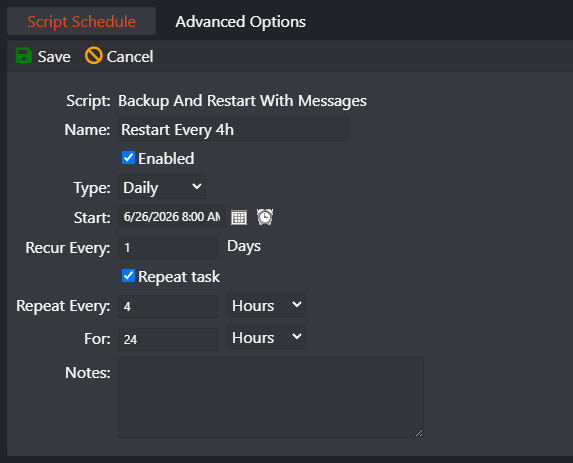
A DayZ server slows down the longer it runs, and Bohemia recommends shutting it down gracefully so characters and storage are saved properly. On GTX the Backup and Restart with Messages task does both: it warns players in game (and on Discord if you connect a webhook) from 30 minutes before, locks the server, kicks the players still online just before the restart to help prevent item duplication, makes a backup and restarts. Every 4 hours suits most modded servers; a quiet vanilla server can go 6 hours. Add a Steam Update task with Update only if new version is available and a Workshop Update task, and the server keeps itself current. For a one-off, MORE has Maintenance Shutdown and Maintenance Restart with warnings.
Press Backup Server before every big change: new mods, a map switch, a wipe or an update. Restore Server brings any backup back, and the Backup Manager downloads one to your PC. Every restart also saves a backup to our offsite backup machine, and we normally keep backups for up to six months. The saved world itself lives in the storage_ folder inside the mission folder (the number after it is the server's instanceId). Many communities wipe after a big update or at the start of a season: the Wipe Server button resets the world in one click, so take a backup first.
Server FPS is how many times per second the server updates the world. When it drops, everyone feels it as desync, rubber-banding, slow doors and infected that teleport, even players with fast PCs. Measure it first: Bohemia's logAverageFps setting writes the average server FPS to the log at the interval you set, with the -doLogs launch parameter on. Then work through the changes that help most, in this order:
nominal on the item types nobody needs and ZombieMaxCount in globals.xml. No wipe is needed: the map thins out over a few restarts.networkRangeFar = 1000 and networkRangeDistantEffect = 4000 metres; lowering them cuts the work per player. Keep multithreadedReplication = 1.| Your server | What we suggest |
|---|---|
| Friends, vanilla | 10 or 20 slots with the included RAM (our own test server used about 4.5 GB with no players and no mods) |
| Growing or modded community | 30 to 60 slots, and 12 GB of RAM for a big mod pack or a community map |
| Big public or roleplay server | 60 slots and up (our plans go to 127), 16 GB of RAM and a higher CPU priority |
These are our own sizing notes for the plans we sell, not an official figure from Bohemia. The panel's Activity and Stats graphs show live memory use, so you can see what your server really needs. RAM, CPU, slots and the hardware package can all be changed later in the Client Area, under Upgrade/Downgrade Options.
server_console and script_log files in the Log Viewer. A broken mod, an out-of-date community map or a mission XML file that changed with the update is the usual cause.workshop.mods and reinstall all installed Workshop mods (fix).economy.xml (loot).lifetime in types.xml.Once the server is running, these guides help your group survive on it, from reading the sounds around you to picking a community map. We keep only the guides readers use and check them against Bohemia's update notes, but the game itself always has the last word after a patch. They are in one list: browse the play guides, and the map guides are under Maps.
Install the DayZ Server tool through Steam (or SteamCMD, app 223350), set a server name and a password in serverDZ.cfg, start DayZServer_x64.exe with -config=serverDZ.cfg, open the game and query ports on your router and give your friends the IP. Or rent one: on GTX it is set up when you order, and you set the same name and password in Configuration Files.
No. The console versions of DayZ are separate from PC, so console players cannot join a PC server and a PC server does not appear in the console server browser. GTX hosts DayZ servers for the PC version on Steam.
You set the limit with maxPlayers in the server config (Bohemia's example config uses 60). GTX DayZ plans run from 10 to 127 slots; choose one slot for every player who will be online at the same time.
Add each mod's Steam Workshop ID to the server's mod list in load order, dependencies such as CF first, and copy each mod's key into the server's keys folder. On GTX, enter the IDs in Plant Workshop Mods, run Reinstall All in Steam Workshop and start the server. Players need the same mods; the DZSA Launcher downloads them for them.
Change the mission in the template line of the server config: dayzOffline.chernarusplus for Chernarus, dayzOffline.enoch for Livonia, dayzOffline.sakhal for Sakhal. On GTX, pick it in the Mission Template field of Config.cfg. Community maps need their Workshop mod and mission too; the Mod Manager installs both in one click.
Usually an error in types.xml or another mission XML file, an item with nominal or min set to 0, or loot switched off in economy.xml. Run the XML Validator, check the Log Viewer for errors that name a mission file, and remember that infected and animals only spawn near players.
Set passwordAdmin in the server config for the server admin password, and use RCON from the Web Console with the password under Server Details. For an in-game admin menu, install an admin mod: VPPAdminTools from the Mod Manager, or Community Online Tools from the Steam Workshop.
Bohemia set 15 October 2026 as the release date of DayZ Badlands and Update 1.30. Update the server when 1.30 reaches the stable branch, because players on a new build cannot join a server on the old one, and check your mods: Bohemia warned that animation-related mods may break. Badlands is a paid expansion; check Bohemia's release notes for who can join a server running Nasdara.