






 DayZ
DayZ Palworld


 Enshrouded














Hytale Server Hosting UK
Rent Your Hytale Dedicated Server
About Hytale server hosting
Premium Hytale server hosting from GTX Gaming's UK and worldwide datacentres. Rent your own Hytale server with instant setup, an always-on Hytale dedicated server for your friends or community, your server name, player limit, game mode and view distance in config.json, a whitelist for friends and CurseForge mods installed from the panel, 4GB to 96GB RAM plans with 100GB of NVMe storage included, daily automatic backups, enterprise DDoS protection and 24/7 support. Rent your Hytale dedicated server from £9.12/mo.
Hytale Server Hosting: Plans & Pricing
- Instant setup
- Java 25 installed for you
- 100GB NVMe storage
- Daily automatic backups
- 24/7 support
- Room for players exploring apart
- CurseForge mods from the panel
- 100GB NVMe storage
- Daily automatic backups
- Enterprise DDoS protection
- Headroom for heavy mod packs
- Whitelist, permissions and bans
- RAM upgradable to 96GB
- Daily automatic backups
- Enterprise DDoS protection
- 24/7 support
- DDoS protection
- Instant setup
One Hytale server, priced by RAM, from 4GB for a group of friends up to 96GB for a busy public world. Every plan includes 100GB of NVMe storage and DDoS protection, you set your own player limit in config.json, and you can change your RAM at any time without losing your world.
Hytale Server Hosting Control Panel
Our custom panel puts your server's config files, mods, console, restarts, updates and backups in a browser, so you spend your time building and exploring instead of tending a Java process.
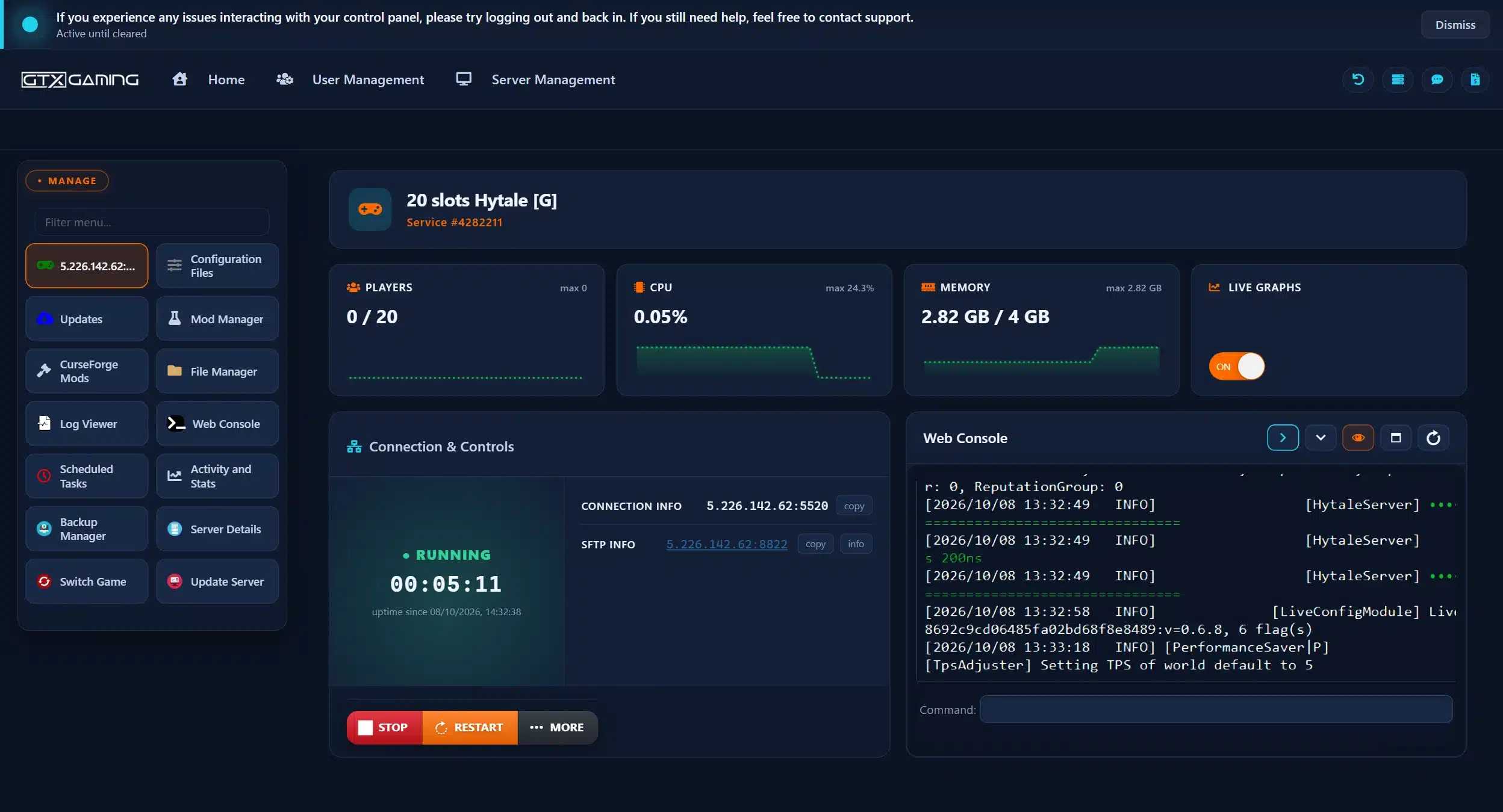
- 🎛️One-click controlsStart, stop and restart your server with a single button, and see its status, player count, connection address and SFTP details at a glance.
- ⚙️Configuration FilesThe SERVER config.json (name, MOTD, password, MaxPlayers, MaxViewRadius, game mode), the WORLD config.json (PvP, fall damage, NPCs), whitelist.json, permissions.json and bans.json, each edited in the browser with the Config Editor or Text Editor.
- 🧩CurseForge Mods & Mod ManagerBrowse the Hytale mods on CurseForge inside the panel, press Install and restart; the Mod Manager shows what is installed, and the mods folder takes any .jar or .zip you upload.
- 🔄Update Server & Scheduled TasksUpdate to the latest Hytale version with one button, or put updates and restarts on a timer with a warning to players, so patch day never catches your server on the wrong version.
- 💾Backup ManagerDaily automatic backups plus your own from the Backup Manager, and the server's own backup runs before every update it applies.
- 📊Web Console, logs & live graphsType server commands and follow the output in the Web Console, read every session's log in the Log Viewer, move files with the File Manager or SFTP, and watch players, CPU and memory on live graphs.
Hytale Server Hosting: Config, Mods & Admin
Hytale keeps everything in plain JSON files: the server's identity and defaults in config.json, each world's rules in its own config.json, and your whitelist, permissions and bans in files of their own. Our panel opens every one of them in the browser.
The SERVER config.json under Configuration Files holds your ServerName and MOTD, an optional join Password, MaxPlayers, MaxViewRadius and the default game mode and hardcore mode for new players.
Your ServerEvery world has its own config.json: switch PvP and fall damage on or off, decide whether NPCs spawn, pause game time or freeze all NPCs, and pick the gameplay config the world uses.
Your Ruleswhitelist.json plus RequireJoinPermission keeps your server private, permissions.json gives you and your moderators their rights, and bans.json holds the players you have shown the door.
Your PlayersMods are server-side in Hytale, so players need nothing installed. Browse CurseForge in the panel and press Install, or drop a .jar or .zip into the mods folder, then restart.
Your ContentHytale's built-in updater checks for new versions and backs up before applying one; the Update Server button and Scheduled Tasks let you decide when, with a warning to players first.
Your ScheduleMaxViewRadius is the biggest lever on RAM: our config ships at 12 chunks, the limit Hypixel Studios recommends, and the Performance Saver config trims the view distance further when the server is under load.
Your PerformanceAlready running a Hytale server at home or with another host? Upload your universe folder with the File Manager or SFTP, copy your config and whitelist across, start the server, and our 24/7 team can help with the move or handle it for you.
How Much RAM Does My Hytale Server Need?
Hypixel Studios' own guidance: RAM follows the loaded world area (view distance and players exploring in different directions), CPU follows player and NPC counts. Our servers all run on high-frequency cores, so RAM is the choice you make.
| RAM | Best for | From |
|---|---|---|
| 4GB | A few friends at the default view distance; the minimum Hytale asks for | £9.12/mo |
| 6GB | Friends who wander off in different directions | £13.68/mo |
| 8GBRecommended | A community with a few mods installed | £17.36/mo |
| 12GB | Busy worlds and bigger view distances | £25.44/mo |
| 16GB | Public servers and heavy mod packs | £33.44/mo |
| 24GB | Large public worlds with many players exploring at once | £45.84/mo |
| 32GB | Big communities and event servers | £62.72/mo |
| 48GB and up | Networks and the largest modded worlds, up to 96GB | £96.48/mo |
Every tier from 4GB to 96GB is in the full plan list above. On memory, on our own demo server a freshly generated world with nobody online used about 2.8GB of a 4GB plan, so 4GB covers a small group of friends at the default view distance. More players spread across the map, a bigger view distance and mods use more, so busy servers need more. Watch live memory use in the control panel and change your RAM tier at any time from your client area.
Hytale Server Hosting Locations: Low Ping UK & Worldwide
Hytale servers deploy in 18 locations: London, Paris, Frankfurt, Amsterdam, Stockholm and Madrid in Europe; New York, Ashburn, Chicago, Dallas, Miami, Los Angeles, Portland and Quebec in North America; Sydney, Singapore and Mumbai in Asia-Pacific; plus Moscow. Run a quick test to see your latency to our network.
What's Included With Your Hytale Server Hosting?
Every server ships fully loaded. Upgrade any part of it whenever you like.
| Resource | Included | Optional upgrade |
|---|---|---|
| Memory | 4GB to 96GB of RAM, chosen at checkout | Change your RAM tier any time |
| Player limit | Set by you with MaxPlayers in config.json | No per-slot pricing |
| Storage | Up to 100GB NVMe free | Tiers up to 200GB, plus extreme 14,000MB/s NVMe |
| Game version | The current Hytale release with Java 25 | Hytale's built-in updater and Update Server |
| CPU priority | Normal priority on high-frequency cores | High and Realtime tiers |
| CPU clock | Standard high-frequency clocks | +5%, +10% and +20% clock boost tiers |
| Protection | Enterprise DDoS mitigation | Included on every server |
| Backups | Daily automatic backups | Backup Manager for your own |
RAM, storage, CPU priority and clock boosts are all picked at checkout and can be changed later without losing your world. Players need their own copy of Hytale from hytale.com to join; the server software is included and installed for you.
Hytale Server Hosting Features: Everything Built In
Every server ships with the full GTX feature set, no hidden add-ons.
Hytale Server Hosting: the essentials
Hytale Server Hosting FAQ
How fast is Hytale server setup?
+What is Hytale server hosting?
+Is GTX Gaming a licensed Hytale host?
+How do I join my Hytale server?
+Can I play Hytale on Xbox or PlayStation?
+What are the Hytale server requirements?
+How much RAM does a Hytale server need?
+How many players can join my Hytale server?
+How much does Hytale server hosting cost in the UK?
+Which locations can I host a Hytale server in?
+Can I change the game mode, PvP and difficulty on my Hytale server?
+How do I whitelist friends and give admin rights on my Hytale server?
+Can I install mods on my Hytale server?
+Does my Hytale server update automatically?
+Can I move my existing Hytale world to GTX Gaming?
+Can I upgrade my Hytale server later?
+The Complete Guide to Hytale Server Hosting in the UK & Worldwide
Everything you need to know before you rent a Hytale server in the UK or any of GTX Gaming's worldwide datacentres, from what Hypixel Studios says a server needs and how your friends join, to config.json, world rules, the whitelist, CurseForge mods, updates, backups, RAM, pricing and locations.
What Is Hytale Server Hosting?
Hytale server hosting is a managed service that runs the official Hytale dedicated server software on professional hardware in a datacentre, around the clock, so your world is online whether or not anyone is at their PC. Every GTX Gaming Hytale server includes the RAM plan you choose, 100GB of NVMe storage, daily automatic backups, enterprise DDoS protection and a web control panel, so jobs like naming your server, whitelisting a friend or installing a mod take a few clicks instead of a terminal session.
People look for it as a Hytale dedicated server, a Hytale private server, a Hytale game server or Hytale server rental, and many simply search for the best Hytale server hosting. They all mean the same thing: your own always-on Hytale server, with your world, your players and your rules.
What Is Hytale?
Hytale is a block-based adventure and creation game from Hypixel Studios, the team that grew out of the Hypixel Minecraft server. In the studio's own words it blends the freedom of a sandbox with the momentum of an RPG: you explore a procedurally generated world, fight its creatures, gather and craft, and build whatever you like. It entered Early Access on Windows PC on 13 January 2026, sold through hytale.com rather than Steam, after the studio's founders bought it back from Riot Games in November 2025.
- Two ways to play: Exploration mode is the adventure, with resources to gather, enemies to fight and places to find; Creative mode gives you unlimited blocks, flight and world-editing tools. A story-driven Adventure mode is still in development.
- Built for servers: community servers are a core part of the game, with an in-game server list, server-side mods that players receive automatically when they connect, and Hypixel Studios' own server manual for anyone running one.
- Updated every week: pre-release patches land weekly and are bundled into numbered updates every few weeks. Update 6 in August 2026 added Spectator mode, Hardcore and an in-game Mod Browser.
- Mods and monetisation on official terms: Hytale's server operator policies let servers earn from cosmetics and ranks within clear rules, with no revenue share taken until 13 January 2028.
Why Rent Your Own Hytale Server?
Hytale can open your single-player world to friends with a share code, but Hypixel Studios' own help pages are frank about the limits: it relies on UPnP and direct connections, it does not work on every network, and for persistent worlds or more than a few friends they point you at a dedicated server. Renting one solves the rest of the list too:
- Always online: the server runs 24 hours a day, so your world is there when your friends are, in any time zone, with nobody's PC left on overnight.
- No networking homework: no UPnP, no port forwarding, no carrier-grade NAT problems. Players add your address and connect.
- Proper hardware: high-frequency CPUs for the entity and player load, NVMe storage for chunk saves, and DDoS protection at the network edge.
- Authenticated for you: every Hytale server must authenticate with Hypixel Studios' services before it can accept players. Ours boot already authenticated, so there is no device code to type.
- Backups and support: daily automatic backups, a backup before every game update and a 24/7 support team mean a bad patch is a restore, not a lost world.
Hytale Server Requirements
Hypixel Studios' Hytale Server Manual sets the bar: the server runs on any machine with at least 4GB of memory and Java 25, on x64 or arm64, and it talks to players over the QUIC protocol on UDP port 5520 rather than TCP. The manual also explains what drives the load: CPU use rises with player and entity counts, while RAM use rises with the loaded world area, so a high view distance and players exploring in different directions cost memory. Our servers come with Java 25 installed, the port opened and the server files, assets and launcher in place; the one requirement left to you is the RAM plan, from 4GB to 96GB.
Getting Started & Joining Your Hytale Server
Your server is installed the moment you order. From there, getting your friends into the world typically looks like this:
- Order: choose your RAM and your location, and your server is set up instantly.
- Name it: open Configuration Files in the control panel, set ServerName, the MOTD and, if you want a private world, a Password in the SERVER config.json, then save.
- Start: press START and watch the Web Console; the server is ready once it reports that it is listening.
- Share the address: copy the address and port from Connection Info on the panel's home page (port 5520 unless we told you otherwise) and send it to your friends.
- Join: in Hytale, open Servers from the main menu, add your server with that address and port, and connect.
The home page of the panel also shows your SFTP details, so you always know where your server lives and how to reach its files. If you would rather players could not simply walk in, turn on RequireJoinPermission and use the whitelist described below.
config.json: Server Name, Player Limit, View Distance & Game Mode
Hytale keeps its server identity and defaults in a single config.json, and our panel exposes it as the SERVER entry under Configuration Files with both a Config Editor and a Text Editor:
- ServerName and MOTD: what players see in their server list.
- Password: set one for a private world; leave it empty for a public server.
- MaxPlayers: the player limit. Hytale servers at GTX Gaming are priced by RAM, so this number is yours to set.
- MaxViewRadius: the view distance in chunks. Our config ships at 12, the limit Hypixel Studios recommends for both performance and gameplay, and it is the single biggest lever on RAM use.
- Defaults: the world new players spawn into, the default GameMode (Adventure or Creative) and the HardcoreMode setting.
- RequireJoinPermission: switch it on and only players on your whitelist can connect.
Stop the server before you edit config.json, save it, then start the server again: the manual notes that configuration files are read at startup and written back when in-game actions change them, so edits made while the server is running are likely to be overwritten.
World Rules & Game Modes
Each world in your universe folder carries its own config.json, which our panel lists as the WORLD entry under Configuration Files. This is where the rules that make a server feel like yours live:
- IsPvpEnabled: on for a competitive server, off for a peaceful build world.
- IsFallDamageEnabled: handy to switch off on a creative or parkour server.
- IsSpawningNPC and IsAllNPCFrozen: whether creatures spawn at all, and a freeze switch for building sessions.
- IsGameTimePaused and GameplayConfig: stop the clock, or point the world at a different gameplay config.
- Seed and WorldGen: the seed and generator the world was made with, if you want a fresh map with the same settings.
Combined with the default GameMode in the server config, that covers the usual server types: an Exploration survival world with PvP, a Creative plot world with fall damage and NPCs off, or a Hardcore server for the brave. Update 6 added Spectator mode as well, which admins can use to watch without being seen.
Whitelist, Permissions, Bans & Commands
Three small files next to config.json decide who gets in and what they may do, and all three are under Configuration Files in the panel:
- whitelist.json: the players allowed to join when RequireJoinPermission is on. The quickest way to run a friends-only server.
- permissions.json: the rights of each player and group, from your own admin powers to a moderator who can kick but not ban.
- bans.json: the players you have shown the door; the server keeps it up to date when you ban someone in the game.
Server commands can be typed into the Web Console in the panel without joining the game, and Scheduled Tasks can run them on a timer, so routine admin jobs such as a nightly restart warning do not need you online. Edit the JSON files with the server stopped, since Hytale rewrites them when permissions change in the game.
Mods on Your Hytale Server
Hytale's modding is server-side: mods are installed on the server as .jar or .zip files in the mods folder, and players receive what they need automatically when they connect, with nothing to install at their end. Our panel gives you two routes. CurseForge Mods opens the Hytale catalogue on CurseForge inside the panel, with the popular mods at the top; press Install on the one you want, restart the server and it is live, and the Mod Manager shows what is installed. Anything you found elsewhere goes into the mods folder with the File Manager or SFTP. Read a mod's page first, keep an eye on the version it was built for, and take a backup before you add one: with weekly game updates, a mod can stop working until its maker catches up.
Updates & Backups
Hytale checks client and server versions against each other exactly, so an out-of-date server turns players away. Three things keep yours current and safe:
- The built-in updater: the Hytale server checks for new versions itself, downloads them to a staging area and, per its config, backs up before applying one.
- Update Server and Scheduled Tasks: update with one button in the panel, or put updates and restarts on a timer with a warning to players first, so patch day never catches your server on the wrong version.
- Backups: daily automatic backups plus your own from the Backup Manager, restored in a couple of clicks, and the Log Viewer keeps every session's log if something needs a closer look.
How Much Does Hytale Server Hosting Cost in the UK?
Pricing is simple: you pay for RAM, with 100GB of NVMe storage included on every server and no per-slot charge:
- 4GB: from £9.12/mo. A few friends at the default view distance; the minimum Hytale asks for.
- 8GB: from £17.36/mo. A community with a few mods installed.
- 16GB: from £33.44/mo. Public servers and heavy mod packs.
- 32GB: from £62.72/mo. Big communities and event servers.
- 96GB: from £190.08/mo. The biggest Hytale server we offer.
Every tier in between is in the full plan list at the top of this page. All plans include instant setup, DDoS protection, daily automatic backups and 24/7 support, with no setup fee and no contract. Billing is monthly by default, with three-month, six-month and yearly cycles available at a discount, and you can change plan or cancel at any time.
How Much RAM Does a Hytale Server Need?
Hypixel Studios' guidance is that RAM follows the loaded world area: a high view distance and players exploring in different directions load more chunks, while player and NPC counts mostly cost CPU. Their recommendation is to cap the view distance at 12 chunks (384 blocks), which is where our config starts. On memory, on our own demo server a freshly generated world with nobody online used about 2.8GB of a 4GB plan, so 4GB covers a small group of friends at the default view distance. More players spread across the map, a bigger view distance and mods use more, so busy servers need more. The control panel shows live memory use, the Performance Saver config trims the view distance when the server is under load, and you can change your RAM tier at any time from your client area.
Locations for Hytale Server Hosting
Hytale's combat rewards timing, and nobody enjoys losing a fight to lag, so host close to your players. GTX Gaming runs Hytale server hosting from a UK datacentre in London plus 17 more locations worldwide: Paris, Frankfurt, Amsterdam, Stockholm and Madrid in Europe; New York, Ashburn, Chicago, Dallas, Miami, Los Angeles, Portland and Quebec in North America; Sydney, Singapore and Mumbai in Asia-Pacific; plus Moscow. Some locations carry a surcharge, shown at checkout. Use the live ping test above to find the lowest-latency location for your group, pick it at checkout, and if you need to move later our support team can migrate your server.
Hytale Server Hosting Glossary
Quick definitions of the terms you'll meet across Hytale, our control panel and your Hytale dedicated server:
- Dedicated Server
- A server that runs your world by itself, around the clock, without a player hosting it from their own game.
- Share Code
- Hytale's way of opening a single-player world to friends over UPnP; the alternative to a dedicated server for a quick session.
- config.json
- The server's main settings file: name, MOTD, password, MaxPlayers, MaxViewRadius and the default game mode.
- MaxViewRadius
- The view distance in chunks; the biggest lever on RAM use, recommended at 12 or less.
- universe
- The folder that holds your worlds and player data; each world has its own config.json with its rules.
- whitelist.json
- The players allowed in when RequireJoinPermission is on.
- permissions.json
- Who may do what on your server, from admins to moderators.
- mods folder
- Where server-side mods live as .jar or .zip files; players receive them automatically.
- CurseForge
- The mod site whose Hytale catalogue the panel browses and installs from.
- QUIC
- The protocol Hytale uses between client and server, over UDP port 5520 by default.
- Java 25
- The Java version the Hytale server runs on; installed on every GTX Gaming server.
- Exploration Mode
- Hytale's adventure mode: gathering, crafting, combat and building in a generated world.
- Creative Mode
- Unlimited resources, flight and world-editing tools for building.
- Performance Saver
- The config that lowers the view distance automatically when the server is under load.
- SFTP
- Secure file transfer for moving files, such as a world or a mod, between your PC and your server.
Setup Guides & Help for Your Hytale Server
Once your Hytale server is live, our help guides cover the common jobs, such as connecting to your server over SFTP and finding your server's files and folders, and the help guides in your client area list the rest. Our 24/7 support team is on live chat and tickets for anything the guides don't cover:
Explore Other Services
Host more of your favourites with the same instant setup and 24/7 support.
Last Updated: October 17, 2026