






 DayZ
 Palworld


 Enshrouded














On this pagePalworld Base Building
Hey friend, are you ready to start building the base of your dreams in the whimsical world of Palworld? Well strap in, because we're about to dive into the basics!
Palworld Base Building
Setting up your base on your Palworld server hosting involves crafting a Palbox, requiring one Paldium Fragment, eight Wood, and three Stone. Additionally, it's advisable to install a light source, such as a campfire, to counter the nighttime chill.
Playing with friends? See how to set up a Palworld dedicated server step by step.
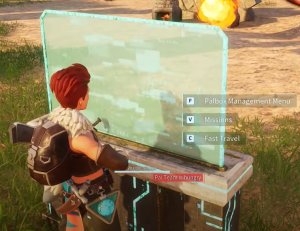
Once your base is established, a blue ring outlines its radius. Improvement opportunities arise through missions accessible from the Palbox, gradually enhancing your home. While some missions are straightforward, advanced levels demand more effort.
Pressing the 'B' button allows players to craft various objects around the area. Initially, you can construct a basic house using wooden components found in the Foundations tab. As you accumulate Technology Points, expect access to a variety of crafting recipes.

Palworld's base building incorporates the vital role of Pals. Enlist them to aid your journey, streamlining crafting tasks. However, maintaining their well-being, ensuring they are well-fed and provided with a bed, remains the player's responsibility.
Guarding against raids and other threats is crucial to maintaining peace. Players must remain vigilant and defend their base when necessary. Since 1.0 raids come in successive waves with rewards for beating all of them, and a Negotiator will cancel an upcoming raid if you pay gold coins.
Assigning a Pal to Your Palworld Base
To incorporate a Pal into your base in Palworld, after you catch some Pals, simply interact with the Palbox. Once open, drag a creature to the 'Pals at the base' section.
Building Tips and Tricks for Your Palworld Base
You crafted your first Palbox and now have an official Palworld base. But a basic box is just the beginning. Use these tips to make your base the ultimate hangout spot for you and your Pals.
Upgrade
Upgrade your base ASAP. Keep an eye on the missions at your Palbox: completing them levels up your base and keeps unlocking more options, so collect Paldium Fragments and other materials as you go.
Make friends
Pals like Lifmunk will keep you stocked with wood, while Fuddler can collect stone and ore. Set them to automated gathering mode.
Multi-task
Set your Pals to farm materials or cook food while you focus on construction. That way you progress on multiple fronts at once.

Customize
Arrange crafting stations, chests, farms, and other items how you want. Build multiple floors or a sprawling single level - you do you!
Defenses
Build walls, turrets, traps, and other security measures to keep baddies away from your hard work.
Relocate
Once you unlock portals, don't be afraid to move your base to new biomes. Just dismantle and take everything with you!
The possibilities are endless when it comes to making your Palworld base uniquely YOU. Let your creativity run wild and enjoy designing and decorating your very own dream world!
More Palworld guides: Palworld Workbench Guide: Craft Your Way to Success!, Palworld Base Defenses: Protect Your Pals! and Palworld Stairs 101: A Beginner's Guide to Building Stairs.
Keep playing: more Palworld guides
- PlayPalworld Pals Guide: The Full List52 min read
- PlayPalworld Coal Guide: All Coal Farming Locations Revealed!3 min read
- PlayPalworld Stairs 101: A Beginner's Guide to Building Stairs3 min read
- PlayPalworld Ore Locations Revealed! Farm Rare Materials Easily3 min read
- PlayList of All Pal Breeding Combinations in Palworld19 min read
- PlayPalworld Pal Catching Guide: How to Be the Very Best5 min read